ONEPLUS
How to turn on colour correction or greyscale on a OnePlus (OxygenOS 16)

In short
Go to Settings, Accessibility & convenience, Accessibility, open the Vision tab and tap Colour correction. Switch it on and pick Deuteranomaly, Protanomaly, Tritanomaly or Greyscale.
4 of 4 steps show a real screenshot from our Nord 5. Each step was checked against the maker's own instructions, linked at the end.
Steps
- 1
Open Accessibility
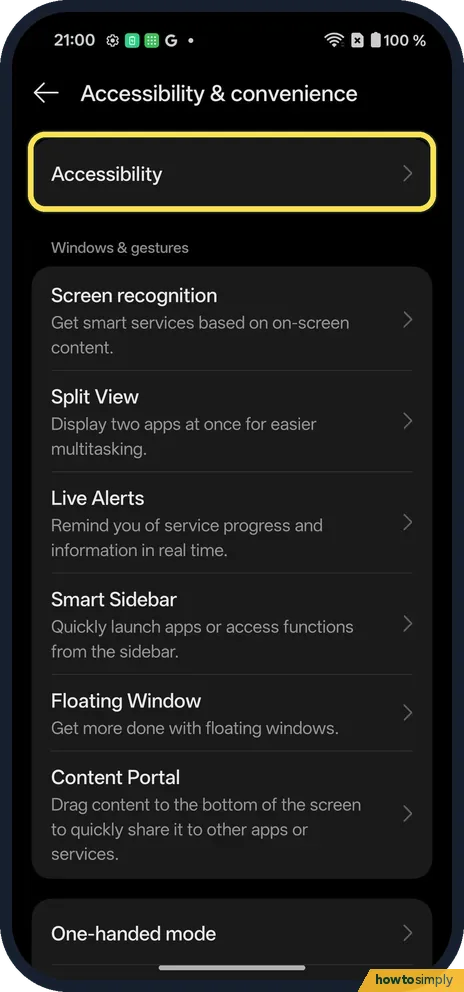
Open Settings, Accessibility & convenience and tap Accessibility at the top.
- 2
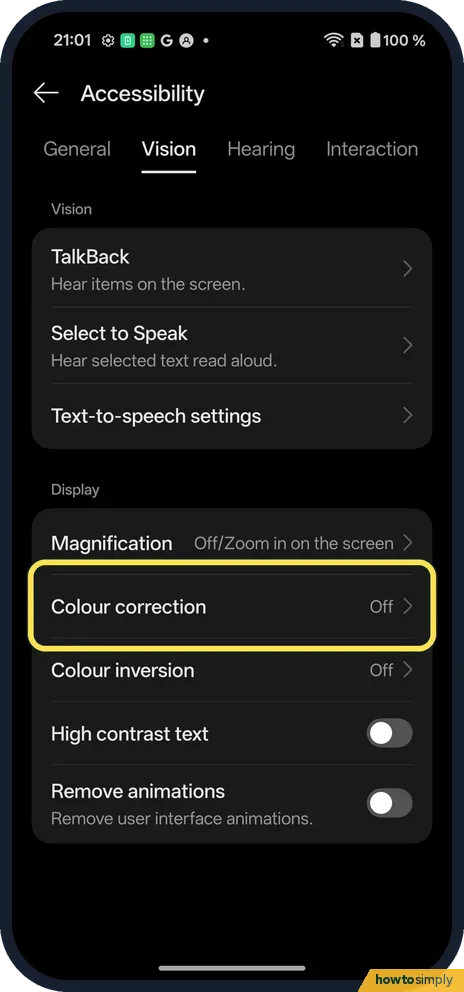
Open the Vision tab
Tap Vision, then Colour correction (Off on ours).
- 3
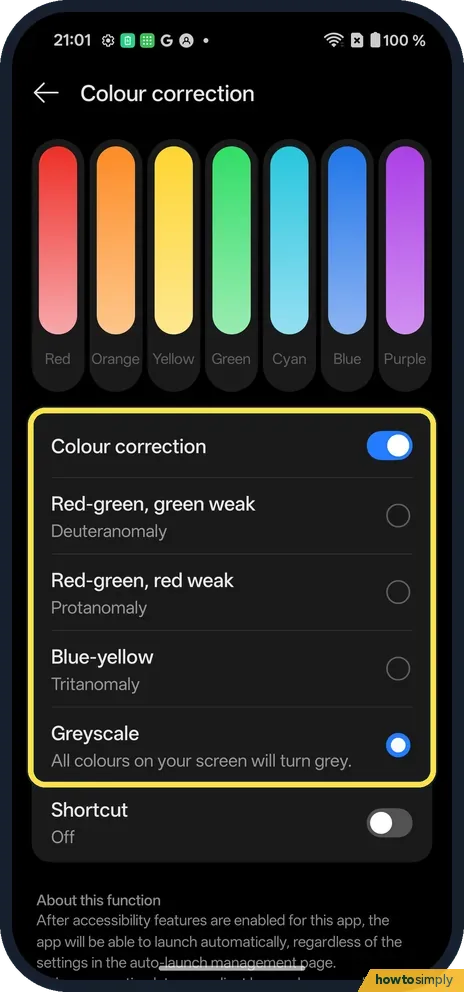
Switch it on and pick a mode
Turn on Colour correction and pick one: Red-green, green weak (Deuteranomaly), Red-green, red weak (Protanomaly), Blue-yellow (Tritanomaly) or Greyscale.
- 4
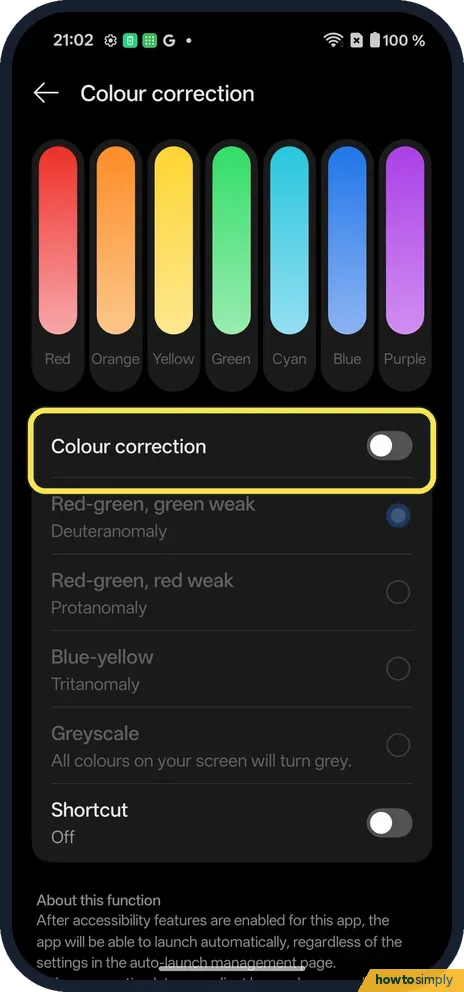
Switch it off
Turn Colour correction off. The choices go grey.
If you do not see this option
- Want a quick switch? Shortcut, at the bottom of the page, adds an on-off shortcut. Source: Use accessibility shortcuts
- Older OxygenOS? OnePlus's OxygenOS 14 manual puts Accessibility under Additional settings. Source: OxygenOS 14.0 User Manual
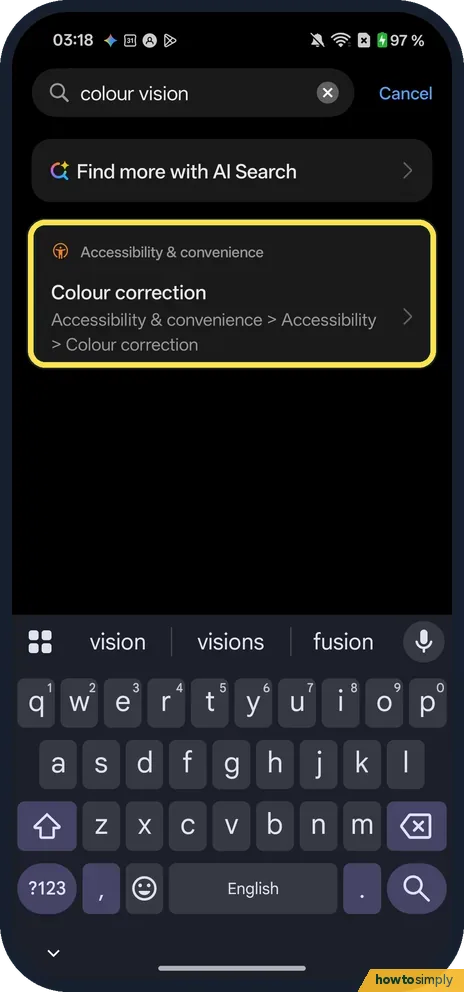
- Looking for Colour vision enhancement? OnePlus's OxygenOS 14 manual describes a separate Colour vision enhancement feature with Grayscale, Red, Green and Blue filters, an intensity setting and a colour vision test. It notes the feature may vary across models and versions, so it may not appear on yours. A Settings search for colour vision on our Nord 5 found only Colour correction. Source: OxygenOS 14.0 User Manual
If this does not work
- Screenshots still in colour? That is normal: on ours the grey effect did not show in screenshots.
- Colours look odd after? Check Colour correction and Colour inversion are both Off on the Vision tab.
- Not sure which mode you need? The names describe the colours that are hard to tell apart: red-green with green weak, red-green with red weak, or blue-yellow. Try each one on a photo or chart you know well and keep the one where the colours separate best. If you are unsure of your type, an optician can test it.
- No intensity slider? Google's Android page mentions an optional intensity slider but says it is not available on all devices. Our Nord 5's Colour correction page has none: just the switch, the four modes and Shortcut.
- Photos look wrong to others? The effect only changes how your screen shows colours. Photos you take and share, and screenshots, keep their real colours, which is why our screenshots stayed in colour.
Good to know
Turn on Eye Comfort on a OnePlus.
With a mode on, every app and screen uses the adjusted colours. Nothing is saved into your files and no app is changed. Turning Colour correction off restores normal colours at once. Some people use Greyscale on purpose to make the phone less tempting to pick up; if that is your aim, adding the on-off shortcut makes it quick to switch back when you need colour, for example to read a map: use the accessibility button and shortcuts.
About this guide
- Device
- Android
- Shown on
- OnePlus Nord 5 (CPH2709), OxygenOS 16.0.5.1201, Android 16
- App
- Settings
- Path
- Settings › Accessibility & convenience › Accessibility › Vision › Colour correction
- Real screenshots
- 4 of 4 steps
- Checked
- October 2026
- Sources
- 3 official, linked below
Sources
Links checked October 2026. Menus and features can change with updates.Spotted a mistake? Menus change with updates, and we want every step to match your screen. Email us about this page or use the contact form. We read every report, and fixes are listed on What changed.
Liked this guide?
Follow us for new guides and short how-to videos.
Did this guide work for you?
Sorry about that. What happened?