
howtosimply.com/guides/how-to-check-battery-health-on-a-samsung-galaxy-phone/ · Checked October 2026 · Samsung Galaxy A57 5G (SM-A576B), One UI 8.5, Android 16
In this guide
On One UI 8, open Settings, Battery and tap Battery information. Battery health shows a percentage, next to the capacity and the number of charge cycles. On older phones, open Samsung Members, Support and Battery status instead.
4 of 6 steps with real screenshots · 2 official sources below
- Device
- Android
- Shown on
- Samsung Galaxy A57 5G (SM-A576B), One UI 8.5, Android 16
- App
- Settings
- Path
- Settings › Battery › Battery information: Battery health %
- Real screenshots
- 4 of 6 steps
- Our phone
- Shown on Galaxy A57, One UI 8.5
- Checked
- October 2026
- Sources
- 2 official, linked below
Step by step
Open Battery
Open Settings and tap Battery.
Watch these steps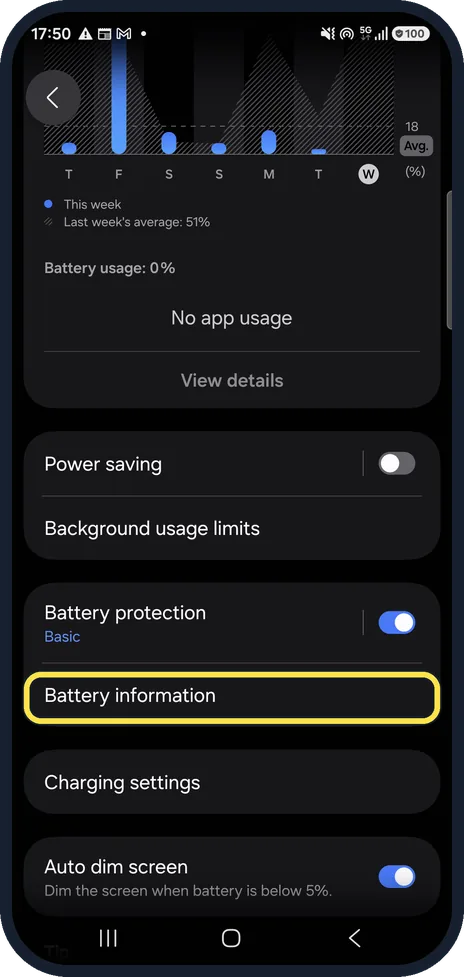
Tap Battery information
Scroll down the Battery page. It is below Battery protection.
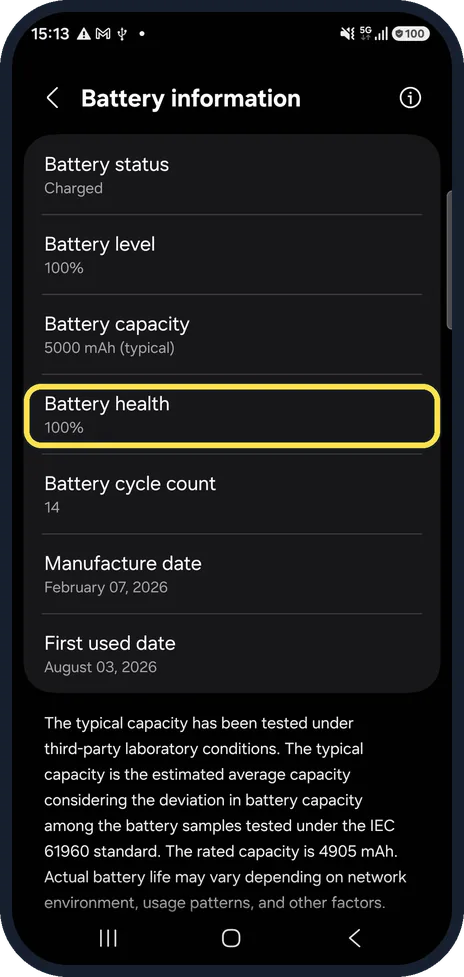
Read Battery health
A percentage of the original capacity. Our phone, a few months old, showed 100%.
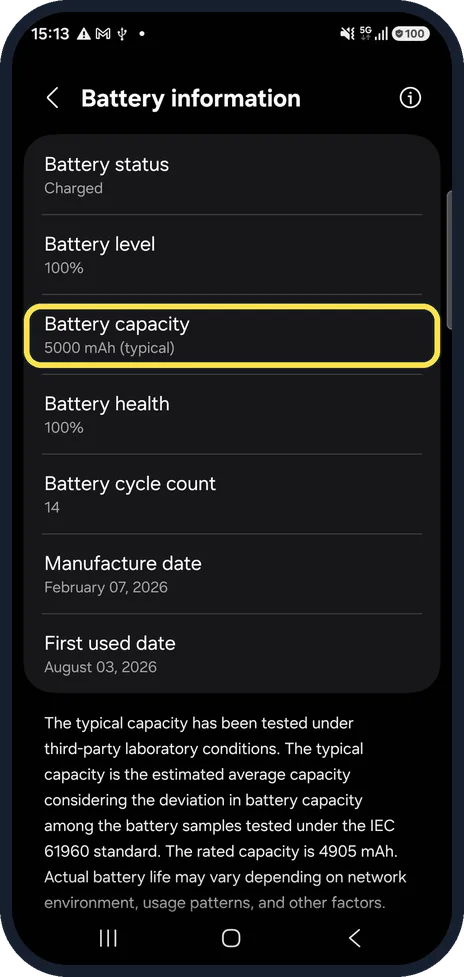
Compare Battery capacity
The typical capacity of a new battery, 5000 mAh on our phone. The note at the bottom explains how Samsung measures it.
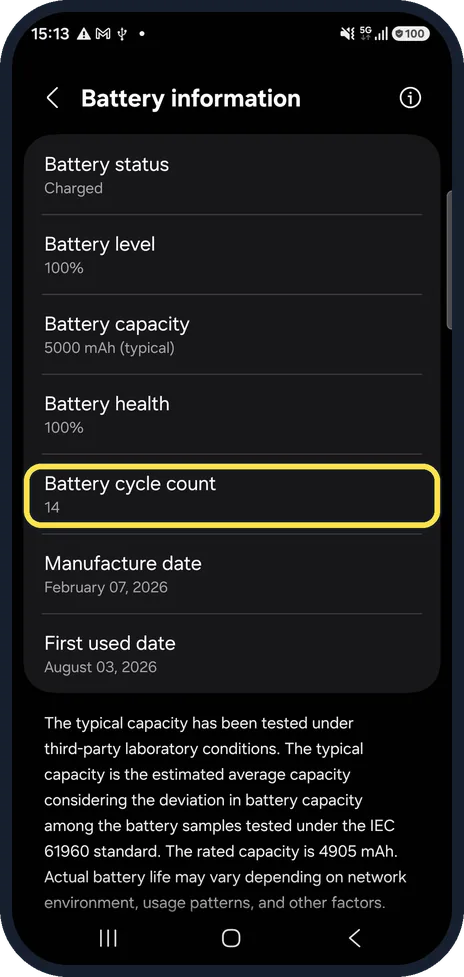
Check the cycle count
One cycle is 100% of charge used, in one go or over several days. Our phone had 14.
No Battery information page? Use Samsung Members
Open Samsung Members, tap Support, then Get Started and Battery status. Settings, Device care, Diagnostics leads to the same tests.
Watch these steps
What our device showed
- Device
- Samsung Galaxy A57 5G (SM-A576B)
- Software
- One UI 8.5, Android 16
- Battery health
- 100%
- Battery cycle count
- 14
- Battery capacity
- 5000 mAh (typical); the note gives the rated capacity as 4905 mAh
- Manufacture date
- February 07, 2026
- First used date
- August 03, 2026
- Date checked
- October 2026
Read from our own screenshots of this device. Your phone will show its own figures. See what each Android brand shows.
If you do not see this option
- Battery status needs the full test first In Samsung Members, Samsung says to start the full diagnostics, stop the test, then choose Battery status. Source: Determine when your Samsung Galaxy phone battery needs replacing
- The diagnostics page does not open Samsung suggests opening it with its own browser, which newer phones call Samsung Browser instead of Samsung Internet. Source: Determine when your Samsung Galaxy phone battery needs replacing
If this does not work
- The phone shows a battery alert Samsung says the phone may show a battery performance degradation alert once performance has dropped a lot. Have the battery checked at a Samsung service centre. Source: Determine when your Samsung Galaxy phone battery needs replacing
- It drains fast or switches off in the cold Samsung lists these as signs of an ageing battery. A replacement may be covered by the warranty, or be paid service. Source: Determine when your Samsung Galaxy phone battery needs replacing
About this guide
A worn battery is the most common reason a phone that once lasted all day no longer does. One UI 8 shows the battery's health directly in Settings.
Good to know
Samsung lists the signs of a battery that needs replacing: it drains quickly after charging, and the phone turns off unexpectedly, especially in the cold.
To slow the wear down, limit charging to 80%: how to limit charging to 80% on a Samsung Galaxy phone.
In short: Settings, Battery, Battery information: Battery health %. Older phones: Samsung Members, Battery status.
- Samsung US: Determine when your Samsung Galaxy phone battery needs replacing
- Samsung US: Check your Samsung Galaxy device status and run diagnostics
Links checked in October 2026. Menus and features can change after software updates. These steps match the version named at the top.
📷 See real photos from the Galaxy A57 in our Camera Lab, next to 10 other phones.
Did this guide work for you?
Sorry about that. What happened?