Battery health on iPhone, Samsung Galaxy and MacBook: what each screen really tells you
All of them show battery health, but not the same thing. An iPhone 14 Pro gives one percentage, an iPhone 17e on the same iOS adds cycle count and dates, a Galaxy A57 shows the most, and a MacBook says "Normal" until you click (i).
By Abu Bakar SaadatPublished 10 October 20265 min readPublisher: Saadat Rafiq
 Illustration
At a glance
- iPhone 14 Pro (iOS 27.0.1)
- Maximum Capacity %, no cycle count in Settings
- iPhone 17e (iOS 27)
- Battery Health page: Normal, Maximum Capacity %, Cycle Count, dates
- Galaxy A57 (One UI 8.5)
- Health %, cycle count, manufacture and first used date
- MacBook Neo (macOS 27.0.1)
- "Normal" on the Battery page, Maximum Capacity % behind the (i)
- Replace when
- The device asks for service, or the battery no longer lasts your day
- Applies to
- iOS 27, iPhone 14 Pro, iPhone 17e, One UI 8.5, macOS 27
- Checked
- October 2026
"Battery health" means something slightly different on each of our three devices. We opened the battery pages on an iPhone 14 Pro on iOS 27.0.1 and an iPhone 17e on iOS 27, a Samsung Galaxy A57 on One UI 8.5 and a MacBook Neo on macOS 27.0.1. Here is what each one shows, what the numbers mean and when they matter.
The short version
| iPhone 14 Pro | iPhone 17e | Galaxy A57 | MacBook Neo | |
|---|---|---|---|---|
| Where | Settings, Battery, Battery Health & Charging | Settings, Battery, Battery Health | Settings, Battery, Battery information | System Settings, Battery, (i) next to Battery Health |
| Main reading | Maximum Capacity as a percentage | Battery Health: Normal, plus Maximum Capacity % | Battery health as a percentage | Normal on the page; Maximum Capacity % in the (i) |
| Cycle count in Settings | No | Yes | Yes | Not on the Battery page |
| Manufacture date | No | Yes (month) | Yes | No |
iPhone: one number, Maximum Capacity
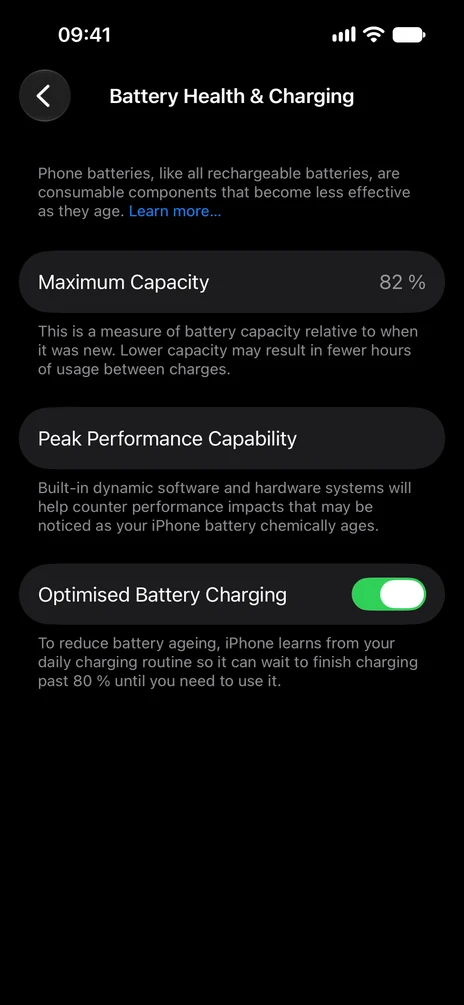
On an iPhone 14 or earlier, open Settings, tap Battery, then Battery Health & Charging. The one number is Maximum Capacity: how much charge the battery holds now compared with when it was new. Our iPhone 14 Pro reads 82%, so a full charge holds about four fifths of what it did on day one.
Under it, Peak Performance Capability says whether the phone is slowing itself down to avoid sudden shutdowns. The sentence on our phone ("Built-in dynamic software and hardware systems will help counter performance impacts…") is the normal message: no slowdown is applied.
What the iPhone 14 Pro does not show in Settings: the number of charge cycles or the battery's manufacture date. Apple's iPhone User Guide says those details appear on iPhone 15 models and later, where the row is called Battery Health.
iPhone 17e: the same iOS, a different page
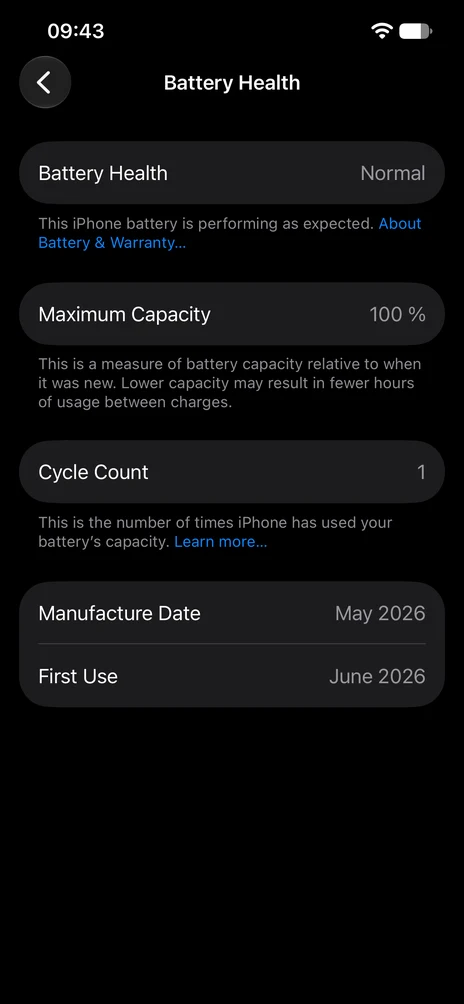
Our iPhone 17e runs the same iOS 27, but its page looks different. The row is called Battery Health, and the page opens with a one-word reading, Normal, and the line "This iPhone battery is performing as expected." Below it come Maximum Capacity (100% on ours), Cycle Count (1), Manufacture Date (May 2026) and First Use (June 2026). So on two iPhones with the same software, only the newer one tells you how many cycles its battery has done.
Optimised Battery Charging is not on this page. On the 17e it has its own Charging page, shown further down.
Samsung Galaxy: the most detail of the three
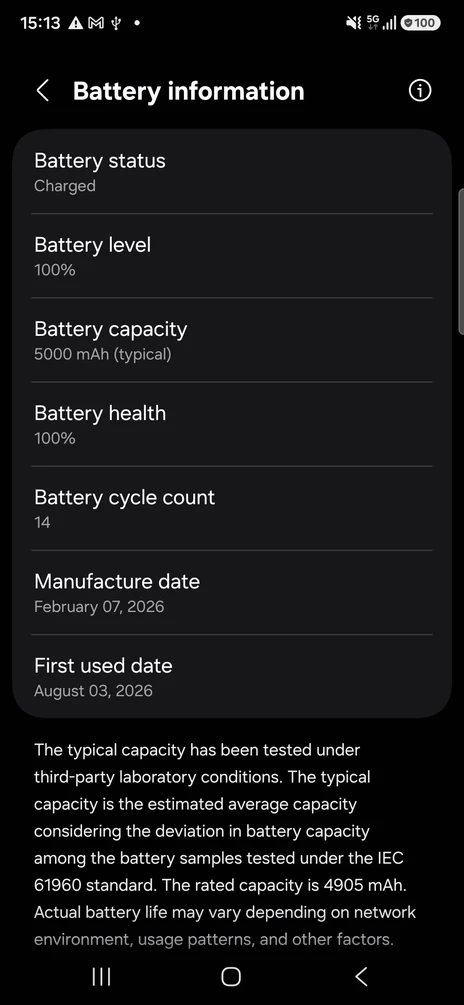
On a Galaxy running One UI 8, open Settings, tap Battery, scroll down and tap Battery information. Our A57 shows battery health at 100%, a cycle count of 14, a manufacture date of 7 February 2026 and a first used date of 3 August 2026. It also gives the capacity: 5000 mAh typical, 4905 mAh rated.
The cycle count is the most useful line. One cycle is 100% of charge used, in any number of top-ups: two days of using half the battery count as one cycle. The manufacture date helps when you buy a "new" or refurbished phone: a battery made long before the phone was sold has been ageing on a shelf.
On older Galaxy phones the page is missing. There, open Samsung Members, tap Support, then Get Started and Battery status.
MacBook: a word first, the number behind (i)
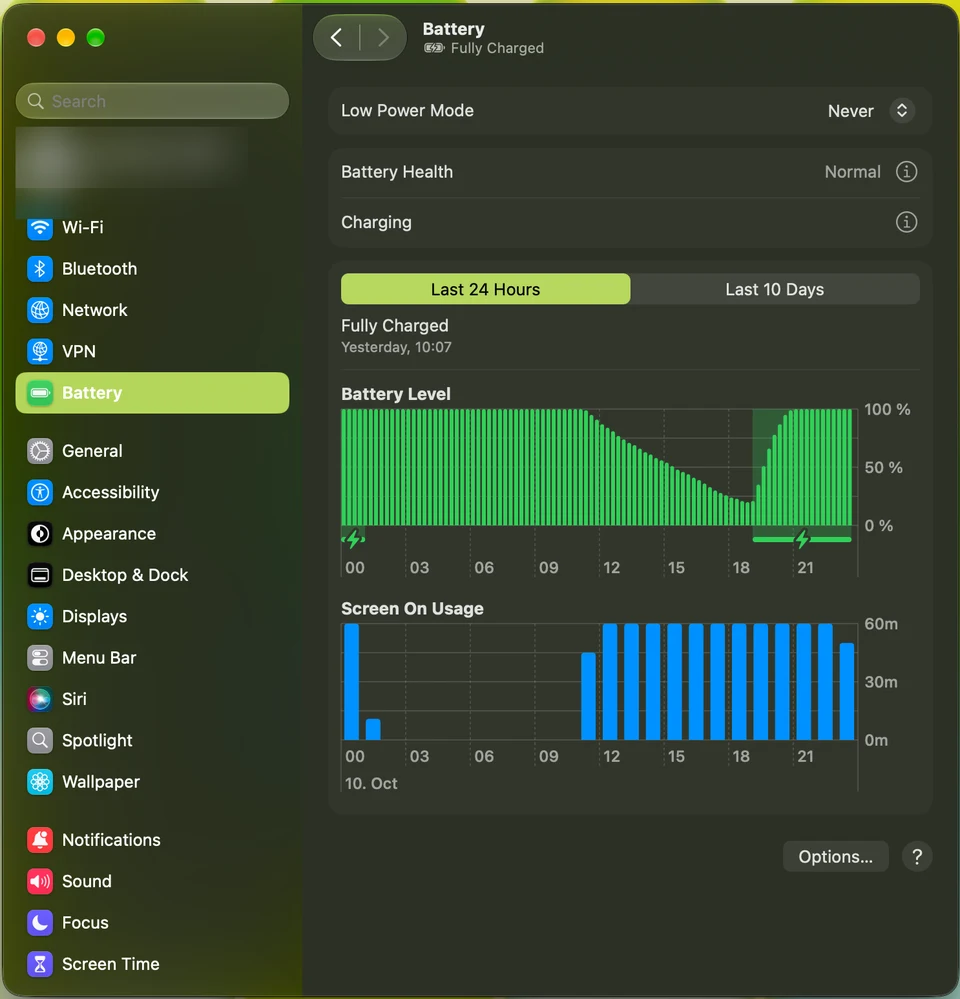
Open System Settings and click Battery. The Battery Health row on our MacBook Neo just says Normal. That is the reading most people need. There is no cycle count on this page.
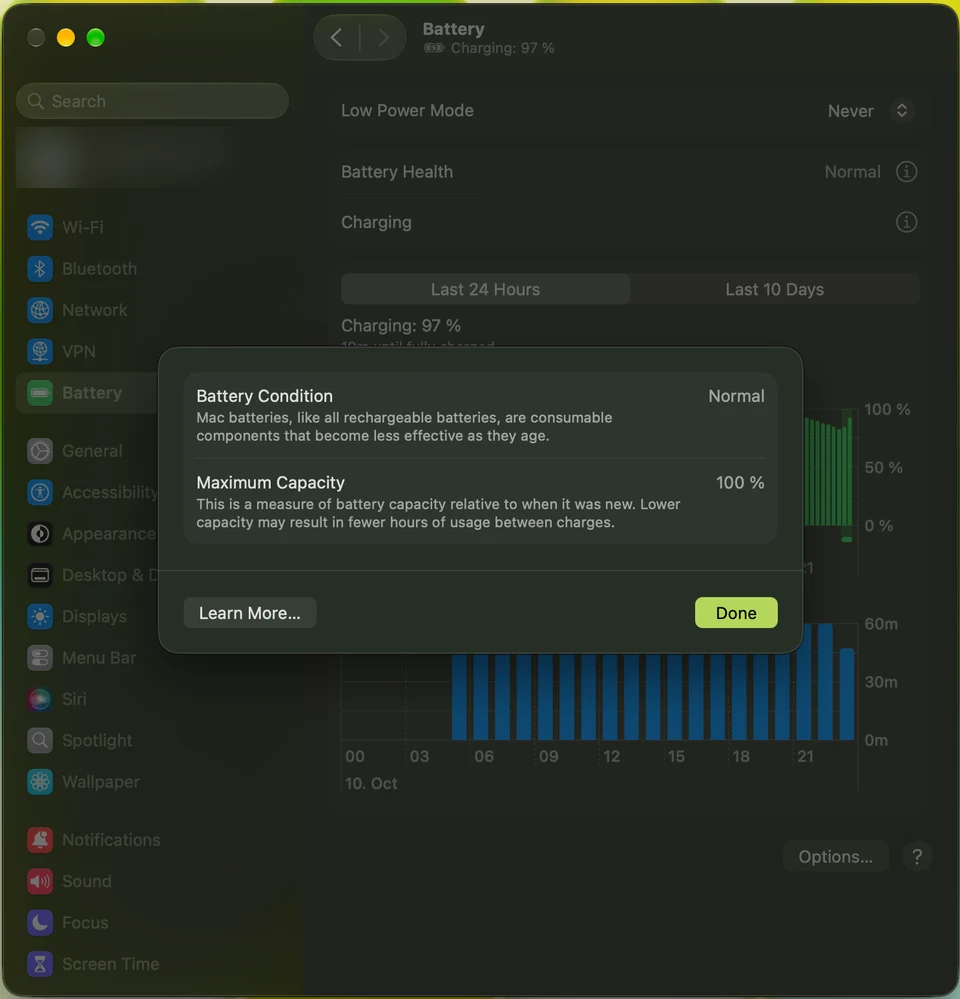
Click the (i) next to Battery Health and a panel opens with two lines: Battery Condition (Normal on ours) and Maximum Capacity, 100% on our MacBook Neo. Maximum Capacity means the same as on the iPhone: how much charge the battery holds compared with when it was new.
When does a battery need replacing?
- When the device says so. A service message on the battery page is the clearest signal.
- When it no longer gets you through your day. 82% capacity on our iPhone 14 Pro is still workable for a light day; for a heavy user it means charging by the afternoon.
- On a Galaxy, Samsung lists the signs: the battery drains quickly after charging, and the phone turns off unexpectedly, especially in the cold.
Slowing the wear down
Each device has a way to stop the battery sitting at 100% for long. On the iPhone 14 Pro it is Optimised Battery Charging, on the Battery Health & Charging page (it is on in our screenshot above); Apple says it pauses charging at 80% and finishes closer to when you usually unplug. On the Galaxy it is Battery protection, under Settings, Battery.
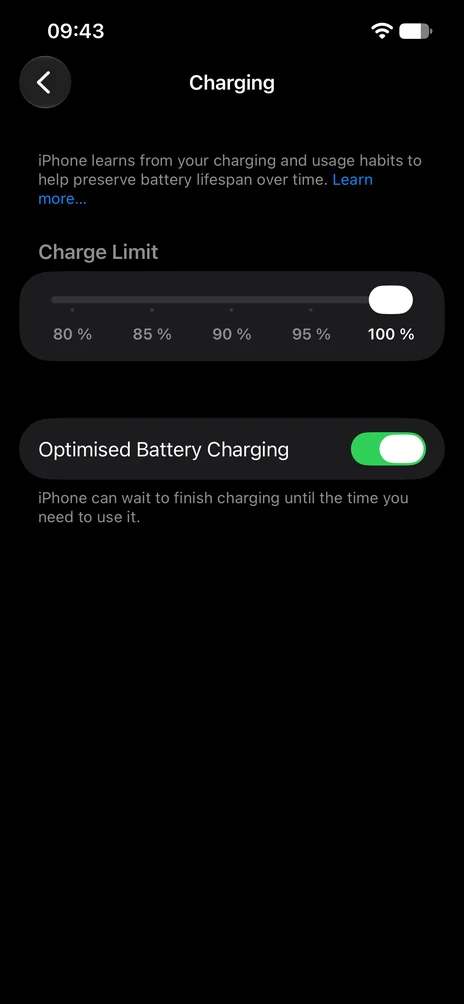
On the iPhone 17e, Settings, Battery, Charging has a Charge Limit slider with steps of 80, 85, 90, 95 and 100% (ours is at 100%) and the Optimised Battery Charging switch. Our iPhone 14 Pro has no Charge Limit slider on its page.
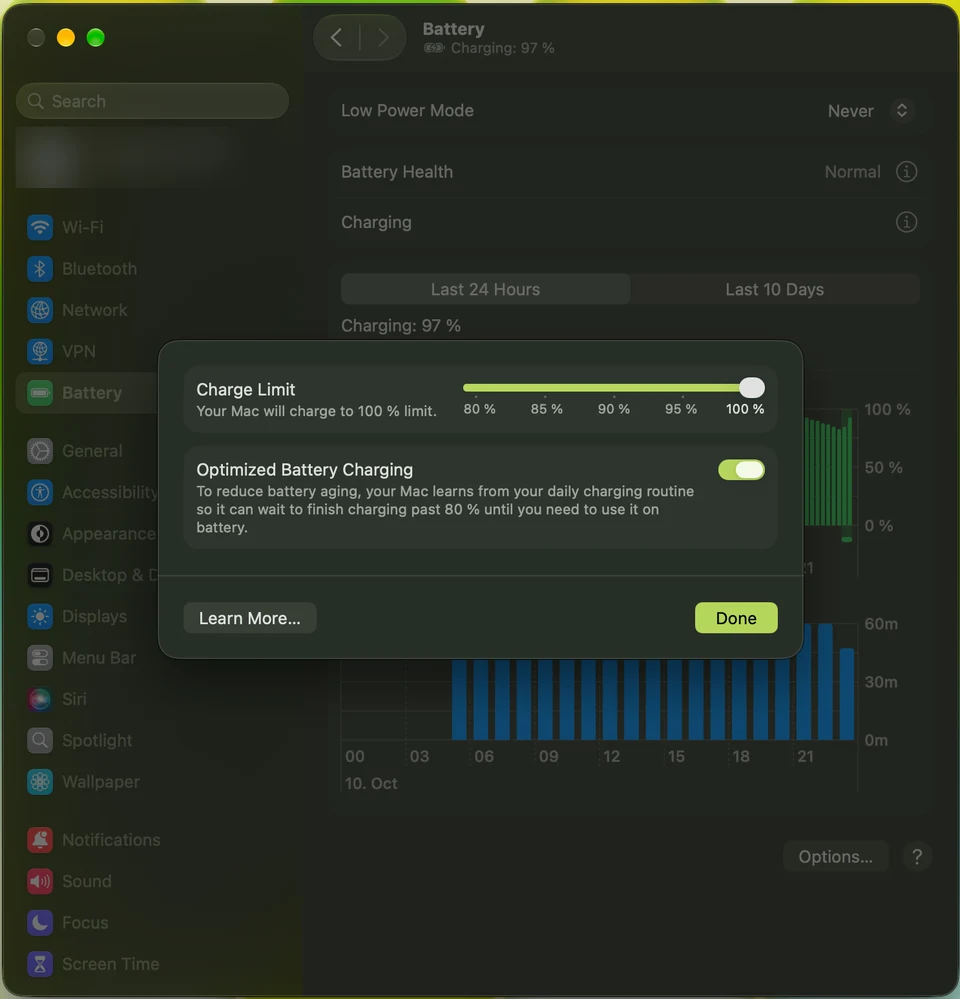
The MacBook Neo has the same pair behind the (i) next to Charging: a Charge Limit slider from 80% to 100% ("Your Mac will charge to 100 % limit" on ours) and Optimized Battery Charging, which the Mac describes as waiting to finish charging past 80% until you need to use it on battery.
Our step-by-step guides:
Questions readers ask
Why does my iPhone not show a cycle count?
On iPhone 14 and earlier, Settings shows Maximum Capacity under Battery Health & Charging. Our iPhone 17e on the same iOS 27 has a page called Battery Health instead, with Cycle Count, Manufacture Date and First Use. Apple says those details are shown on iPhone 15 models and later.
Is 82% battery health bad?
It means the battery holds about 82% of its original charge. The phone works normally; you get fewer hours between charges. Replace it when the phone shows a service message or the battery no longer lasts your day.
Where is battery health on a Samsung Galaxy?
On One UI 8, Settings, Battery, Battery information. On older Galaxy phones without that page, open Samsung Members, Support, Get Started and Battery status.
Why does my MacBook just say Normal?
macOS shows a one-word status next to Battery Health on the Battery page. Normal is what ours showed. Click the (i) next to it to see Battery Condition and Maximum Capacity as a percentage; ours read 100%.
Sources
We base our articles on the makers' official documentation.
- Apple iPhone User Guide (iOS 27): Understand your iPhone battery usage and health
- Apple iPhone User Guide (iOS 27): Optimize iPhone battery charging
- Apple Mac User Guide (macOS 27): Save energy on your Mac
- Samsung US: Determine when your Samsung Galaxy phone battery needs replacing
- Samsung US: Check your Samsung Galaxy device status and run diagnostics