
howtosimply.com/guides/samsung-galaxy-won-t-charge-to-100-battery-protection-explained/ · Checked October 2026 · Samsung Galaxy A57 5G (One UI 8.5, Android 16) and Samsung Galaxy A57 (One UI 9, Android 17 (build A576BXXU6BZIE))
In this guide
A Galaxy that stops at 80%, 85% or 95% is usually doing it on purpose. Open Settings, Battery, Battery protection. Basic lets the level drop to 95% before charging again, Maximum stops at the level you set, and Sleep time protection holds at 80% overnight.
4 of 6 steps with real screenshots · 3 official sources below
- Device
- Android
- Shown on
- Samsung Galaxy A57 5G (SM-A576B), One UI 8.5, Android 16, Samsung Galaxy A57 (SM-A576B), One UI 9, Android 17 (build A576BXXU6BZIE)
- App
- Settings
- Path
- Settings › Battery
- Real screenshots
- 4 of 6 steps
- Our phone
- Shown on Galaxy A57, One UI 8.5
- Checked
- October 2026
- Sources
- 3 official, linked below
Step by step
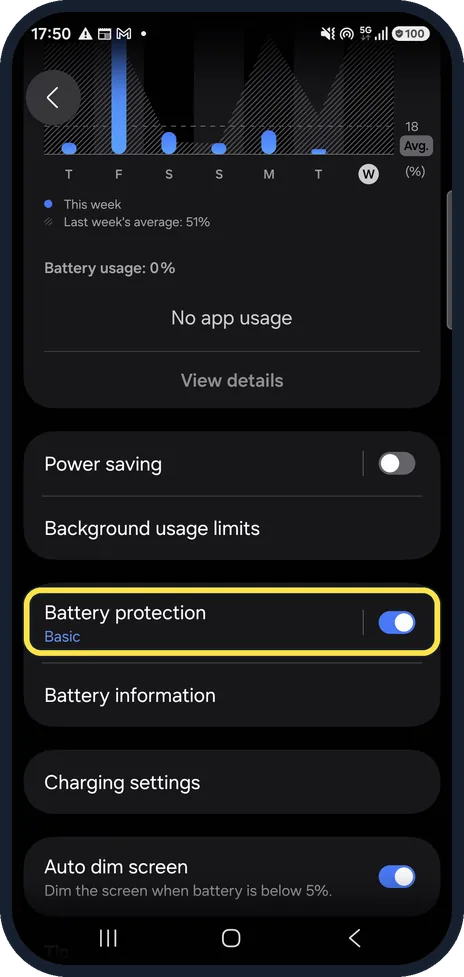
Open Battery protection
Open Settings, Battery and scroll down to Battery protection.
Watch these steps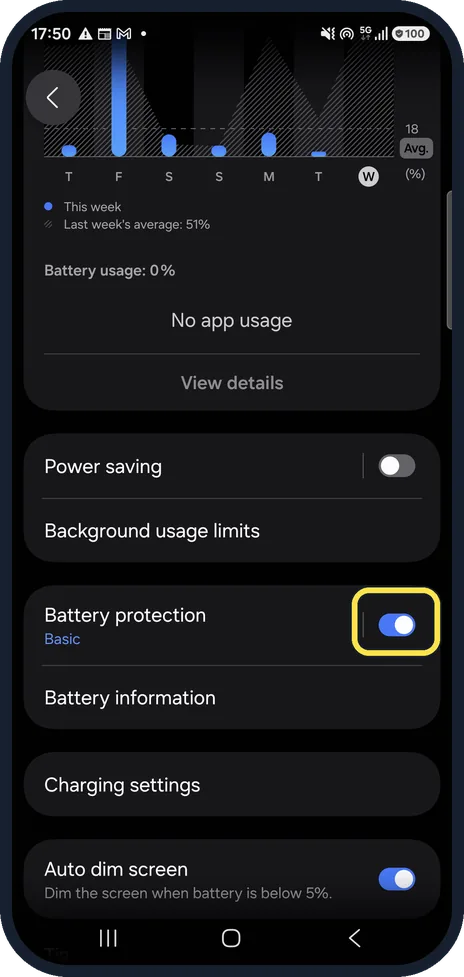
See whether it is on
Settings, Battery. The switch next to Battery protection shows whether it is on, and the word underneath shows the mode. Ours was on, with Basic. If it is off, the limits below do not apply and the cause is elsewhere (see the last step).
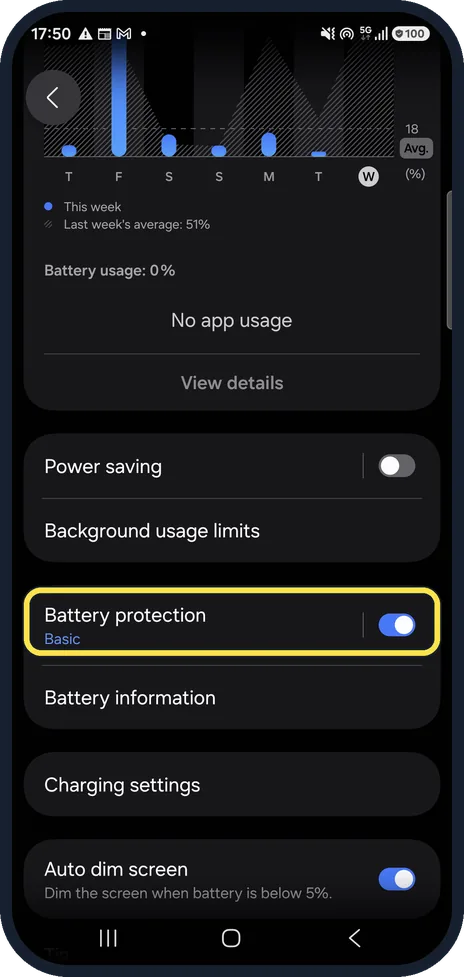
Stuck between 95% and 99%? That is Basic
With Basic, charging stops at 100% and only starts again when the battery drops to 95%. Unplugging at 96% after a long charge is normal.
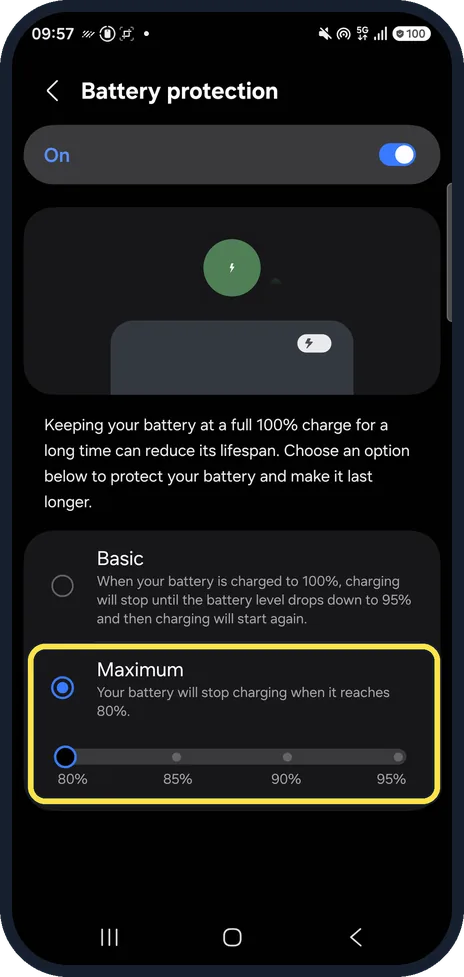
Stopped at 80%, 85% or 90%? That is Maximum
Maximum stops charging at the level you chose with its slider. Ours offered 80%, 85%, 90% and 95%. Pick Basic or switch Battery protection off to charge further.
Only 80% in the morning? Check Sleep time protection
It stops at 80% while you are asleep and finishes to 100% just before you wake up. Samsung says it learns your sleep pattern over about 2 weeks and may not work if your sleep is irregular. If your mornings vary, choose Basic or Maximum instead.
Still not reaching 100% with it off
Try another wall charger and cable, clean fluff out of the port, and check the battery health. An old battery can also stop short.
Watch these steps
If you do not see this option
- There is no Basic or Maximum Samsung's One UI 6.1 page says that below One UI 6.1 the only choice is to limit charging to 85%. Source: Galaxy Battery protection feature in One UI 6.1
- You see Adaptive too Samsung says Adaptive charges to 100% about an hour before you usually wake, and might not work well if your sleep times are irregular. Source: Galaxy Battery protection feature in One UI 6.1
If this does not work
- Basic is on, but it shows 100% for hours Samsung says this is normal: at 100% the phone runs on the charger's power instead of the battery, so the level can stay there. Source: Protect your battery for longer and safer use (Battery protection)
- Maximum is at 80%, but it shows 78% Samsung says that with Maximum, charging starts again when the level drops about 2% below the limit, so a small dip is normal. Source: Protect your battery for longer and safer use (Battery protection)
- Sleep time protection does nothing Samsung says it needs about 2 weeks to learn your sleep pattern and needs Customisation Service turned on. In multi-user mode, or without that consent, it can switch itself to Basic. Source: Protect your battery for longer and safer use (Battery protection)
About this guide
Samsung added these limits to slow battery wear. They look like a charging fault, but the phone is following a setting. Battery protection was on on our phone, set to Basic.
We selected Maximum for one picture and set it back to Basic. Step 4 is from the same phone after its One UI 9 update (Android 17).
Good to know
Samsung's older One UI 6.1 page calls a similar option Adaptive. Samsung says menu names vary by device and software version.
To set a limit on purpose: how to limit charging to 80% on a Samsung Galaxy phone.
Check the battery itself: how to check battery health on a Samsung Galaxy phone.
In short: Settings, Battery, Battery protection: Basic resumes at 95%, Maximum stops at your level, Sleep time protection holds 80% overnight.
- Samsung CA: Set a maximum charge level on your Samsung Galaxy
- Samsung UK: Galaxy Battery protection feature in One UI 6.1
- Samsung UK: Protect your battery for longer and safer use (Battery protection)
Links checked in October 2026. Menus and features can change after software updates. These steps match the version named at the top.
📷 See real photos from the Galaxy A57 in our Camera Lab, next to 10 other phones.
Did this guide work for you?
Sorry about that. What happened?