VIVO
How to check battery health on a vivo phone (OriginOS 6)

In short
Open Settings, Battery, Battery health and charging. Maximum battery capacity shows the health, and the bottom of the page lists the cycle count and the battery production date. The same page has the charge limit, Bypass Charging and Fast charging, which was off out of the box on our V70 Lite.
8 of 8 steps show a real screenshot from our V70 Lite 5G. Each step was checked against the maker's own instructions, linked at the end.
Steps
- 1
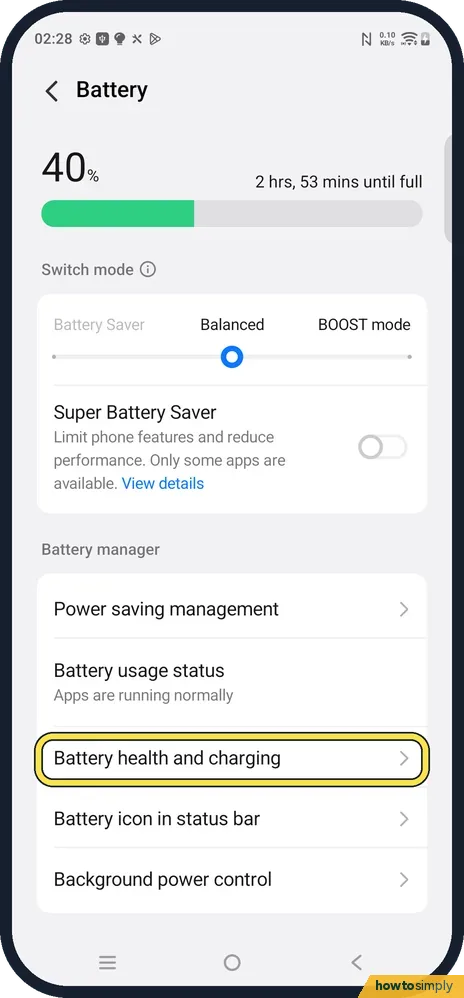
Open Battery health and charging
Open Settings, Battery and tap Battery health and charging, under Battery manager.
- 2
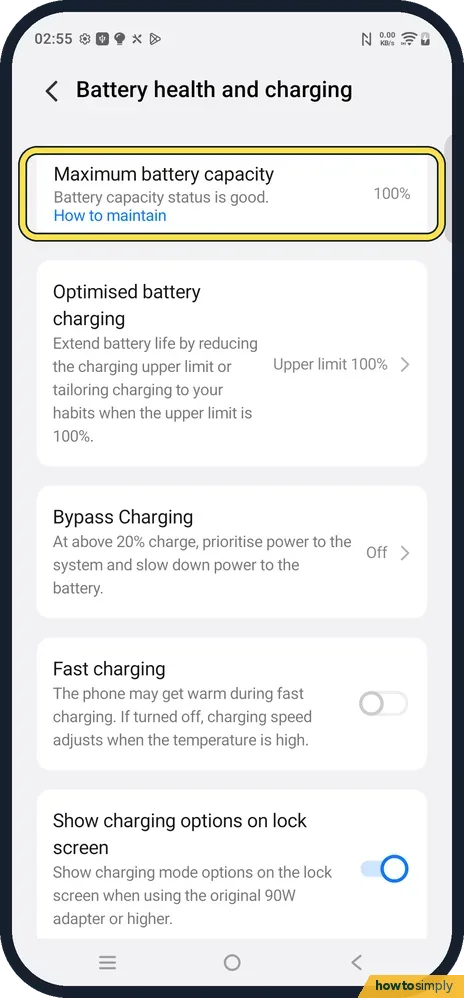
Read Maximum battery capacity
The first card. Ours: Battery capacity status is good, 100 %. How to maintain opens vivo's tips. Below 80 %, vivo says battery life may be affected.
- 3
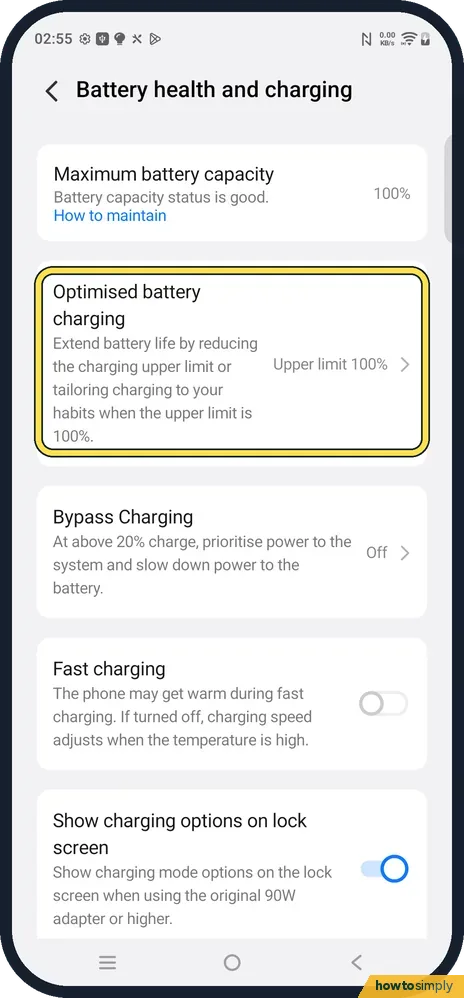
Open Optimised battery charging
The next card says it extends battery life by reducing the charging upper limit or tailoring charging to your habits when the upper limit is 100 %. Ours showed Upper limit 100 %.
- 4
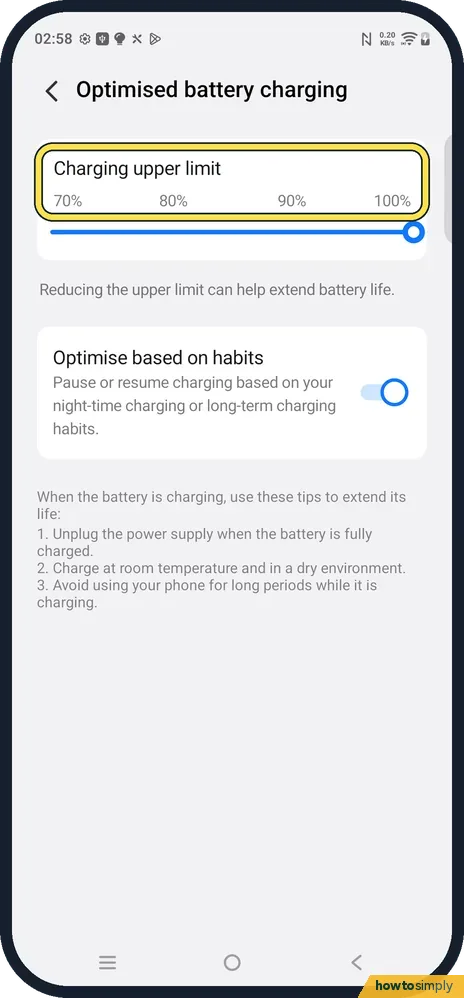
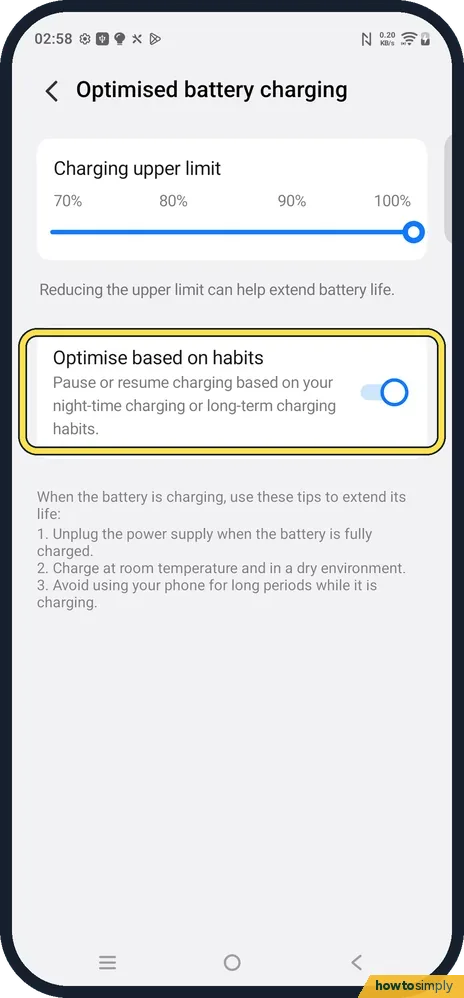
Set the charging upper limit
Drag the slider to 70 %, 80 %, 90 % or 100 %. The page says reducing the upper limit can help extend battery life. vivo notes the phone may still charge to 100 % now and then to keep the battery reading accurate.
- 5
Leave Optimise based on habits on
It pauses or resumes charging based on your night-time or long-term charging habits. It was on on ours. vivo says this is why a phone can sit at 80 % overnight and finish charging before you wake up.
- 6
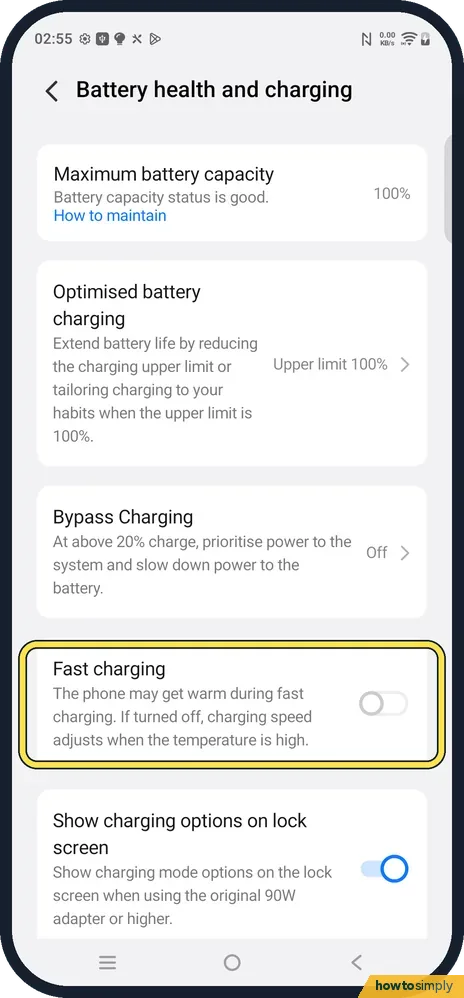
Check Fast charging
The card says the phone may get warm during fast charging, and if turned off, the charging speed adjusts when the temperature is high. On our V70 Lite it was off out of the box. vivo says Flash charge still works with it off; turn it on if you want the fastest charge.
- 7
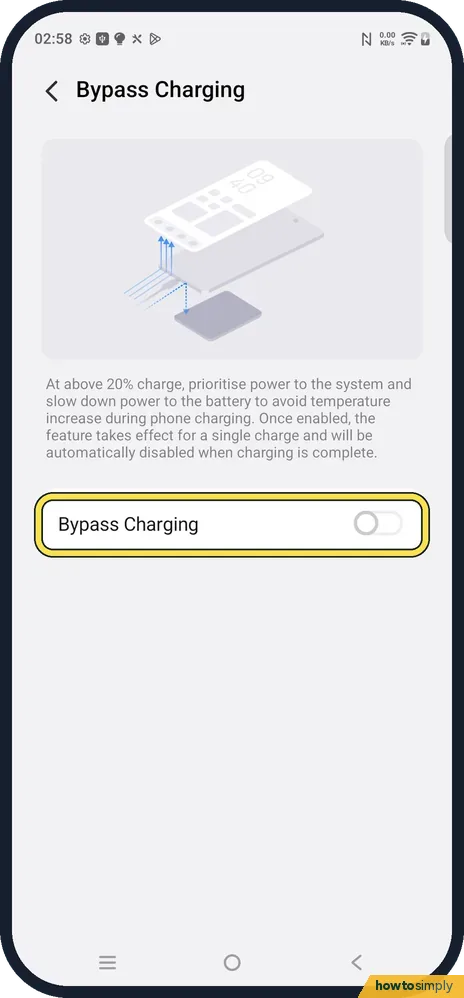
Use Bypass Charging when gaming on the charger
Tap Bypass Charging. Above 20 % charge it powers the system first and slows down power to the battery, to avoid heat while charging. It lasts for one charge and switches itself off when charging is complete. It was off on ours.
- 8
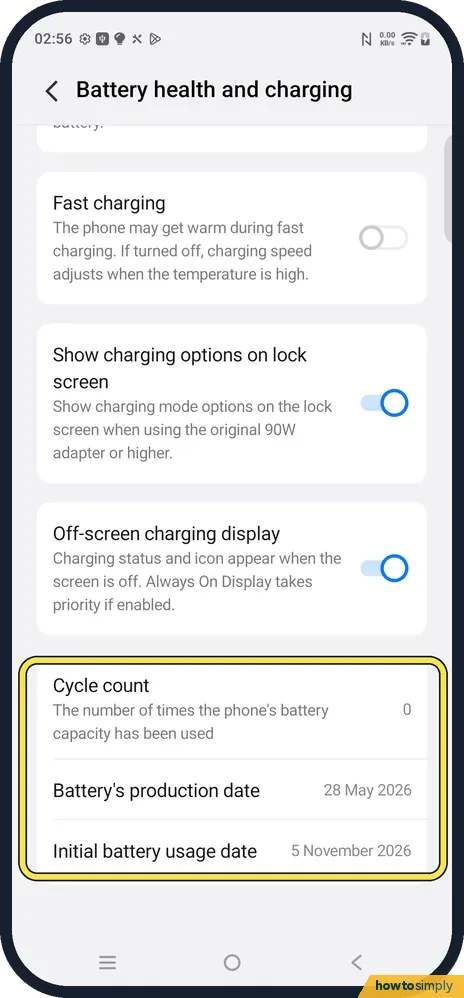
See the cycle count and battery dates
Scroll to the bottom. Cycle count is the number of times the battery's capacity has been used (0 on ours). Battery's production date said 28 May 2026 and Initial battery usage date 5 November 2026, the day we first used it.
If you do not see this option
- No Battery health and charging row? vivo says only some models support checking battery health. On older Funtouch OS phones look under Settings, Battery for Battery health or Optimise Battery Life. Sources: Battery FAQs, Battery settings FAQs
- No Bypass Charging on your vivo? It depends on the model. If the row is not on the page, your phone does not offer it.
- Looking for lock screen charging modes? Show charging options on lock screen is on the same page, but it only applies with the original 90 W adapter or higher, as the card says.
If this does not work
- Charging stops at 80 %? That is Optimise based on habits, or the upper limit set to 80 %. vivo also says demo units only charge to 60 % or 80 %.
- Charging slowly? Check that Fast charging is on. With it off, the phone adjusts the speed when it is warm. vivo also recommends the original charger and cable.
- Capacity below 80 %? vivo recommends taking the phone to a customer service centre for testing. After a battery replacement there, the capacity reading returns to 100 %.
- Phone hot while charging? vivo advises not to use the phone for long periods while it charges. For games on the charger, turn on Bypass Charging for that charge.
Good to know
Maximum battery capacity compares the battery's capacity now with when it was new. It drops slowly over the years. A sudden fall, or a phone that switches off with charge left, is worth a service centre visit.
Fast charging being off on a new phone surprises people. vivo describes it as a choice between faster charging with more warmth, or a speed that adjusts when the phone is warm. If you charge overnight, off is fine; if you top up during the day, turn it on.
vivo's own battery tips: use the original charger and cable, avoid using the phone for long while charging, charge when it drops below 20 %, unplug when full and avoid heat.
Google adds that the battery drains much faster when it is hot, even when not in use.
About this guide
- Device
- Android
- Shown on
- vivo V70 Lite 5G (V2529, EEA), OriginOS 6, Android 16 (build PD2512SF_EX_A_16.1.19.5)
- App
- Settings
- Path
- Settings › Battery
- Real screenshots
- 8 of 8 steps
- Checked
- October 2026
- Sources
- 3 official, linked below
Sources
Links checked October 2026. Menus and features can change with updates.Spotted a mistake? Menus change with updates, and we want every step to match your screen. Email us about this page or use the contact form. We read every report, and fixes are listed on What changed.
Liked this guide?
Follow us for new guides and short how-to videos.
Did this guide work for you?
Sorry about that. What happened?