
howtosimply.com/guides/how-to-change-what-the-power-button-does-on-a-xiaomi-phone/ · Checked October 2026 · Xiaomi Redmi Note 15 Pro 5G (25080RABDG), HyperOS 3.0.308.0, Android 16
In this guide
Go to Settings, System, Gestures, Press and hold power button, and choose Power menu or Digital assistant. Ours was set to Power menu when we checked on 23 October 2026.
3 of 3 steps with real screenshots · 1 official source below
- Device
- Android
- Shown on
- Xiaomi Redmi Note 15 Pro 5G (25080RABDG), HyperOS 3.0.308.0, Android 16
- App
- Settings
- Path
- Settings › System › Gestures
- Real screenshots
- 3 of 3 steps
- Checked
- October 2026
- Sources
- 1 official, linked below
Step by step
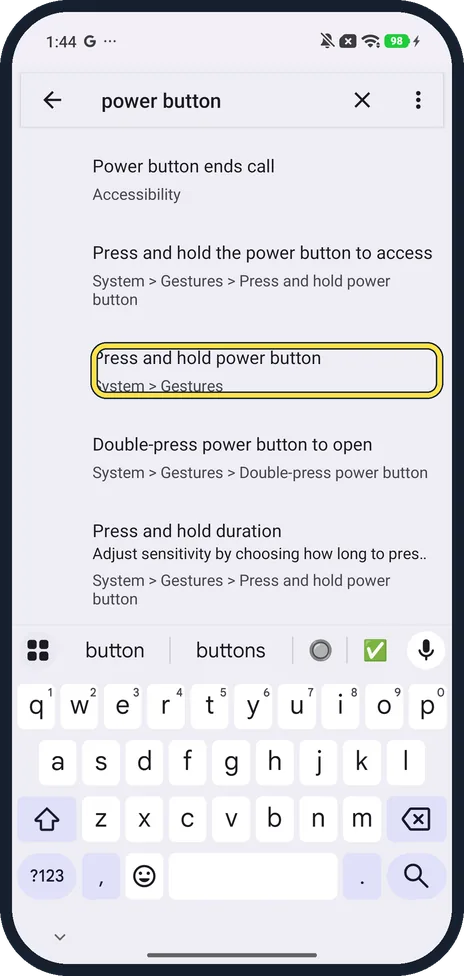
Search Settings for power button
Open Settings and type power button. Ours listed Press and hold power button with its route, System > Gestures. Tap it, or go to Settings, System, Gestures yourself.
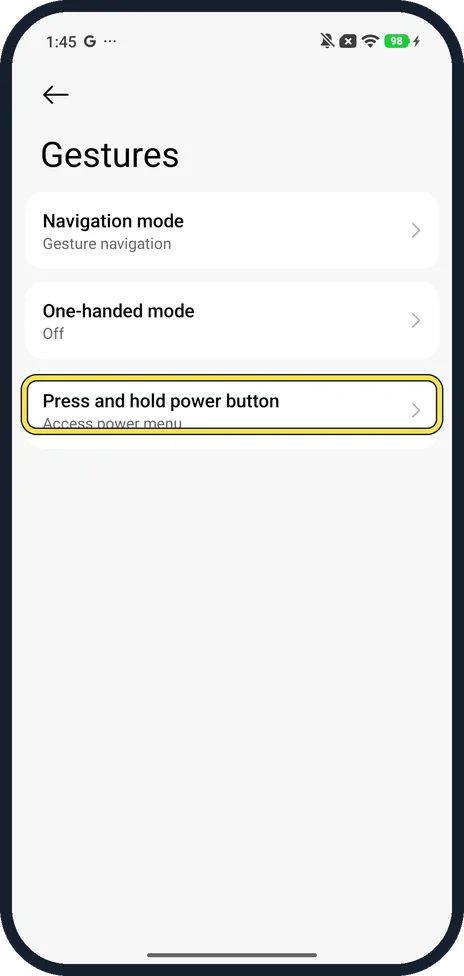
Tap Press and hold power button
The Gestures page lists Navigation mode, One-handed mode and Press and hold power button. Ours said Access power menu under it.
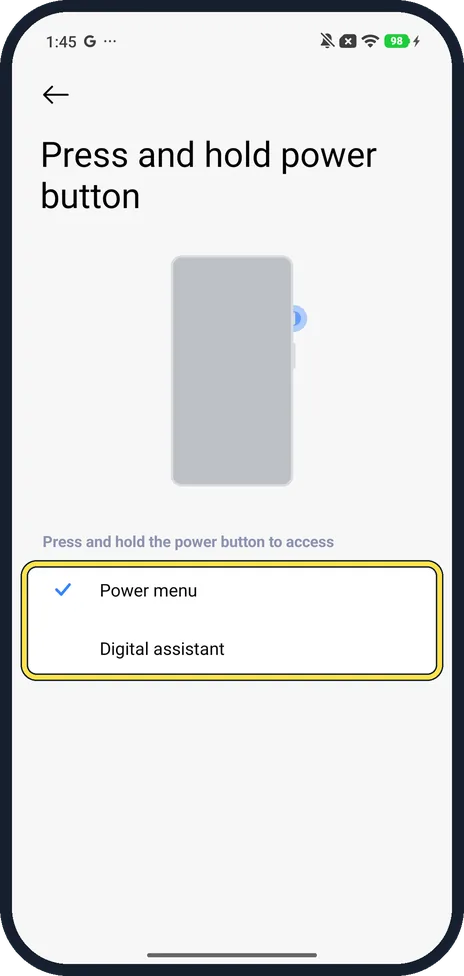
Choose Power menu or Digital assistant
Under Press and hold the power button to access, tap Power menu to get Power off and Restart, or Digital assistant to start the assistant. Ours had Power menu ticked.
If you do not see this option
- Assistant setting under Accessibility instead? Ours also lists Launch digital assistant, Press and hold the Power button for 0.5s, under Settings, Accessibility, Gesture shortcuts. It was On there. If your phone has no System, Gestures page, look there.
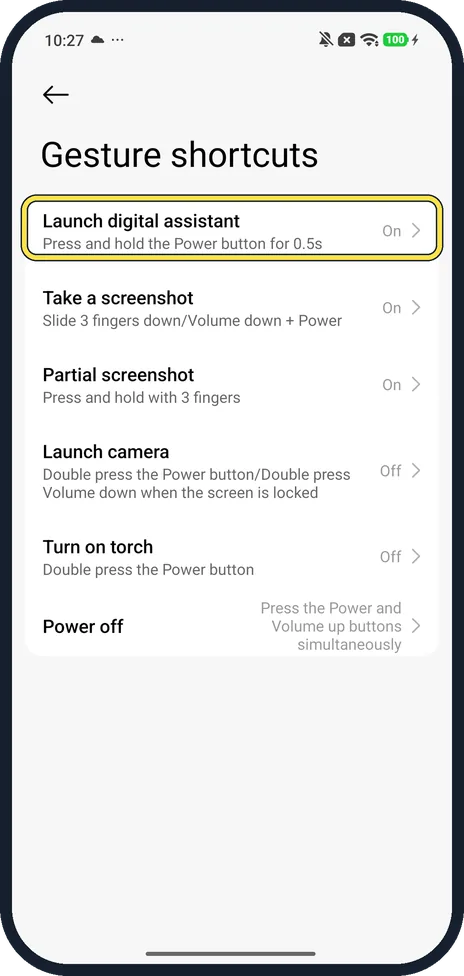
- Holding Power opens Gemini anyway? On 24 October, holding Power on ours opened Gemini even though this page said Power menu, while Launch digital assistant was On under Accessibility, Gesture shortcuts. The same page lists Power off as pressing Power and Volume up together; we didn't try it.
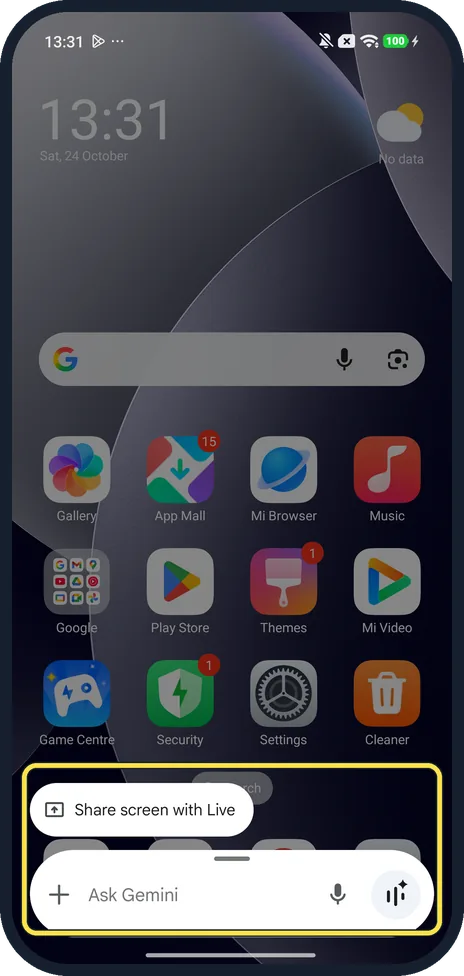
- No Gemini on your model? Xiaomi's HyperOS 3 guide says pressing and holding Power brings up the Google assistant, with a note that Google Gemini may not be available on all models. Choose Power menu if you don't use an assistant. Source: Generic User Guide for HyperOS 3.0
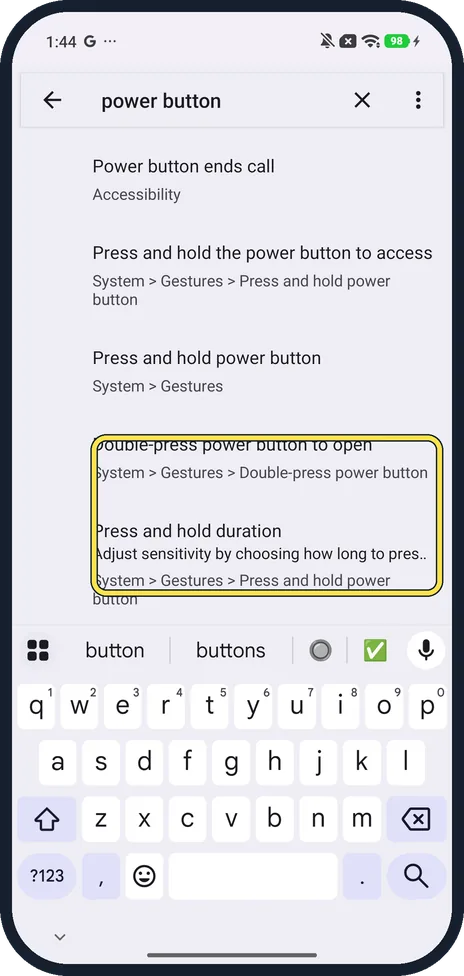
- Other power button settings? The same search found Double-press power button to open and Press and hold duration, both under System, Gestures, and Power button ends call under Accessibility.
If this does not work
- Holding Power opens the assistant, not the menu? Set Press and hold power button to Power menu (step 3), then check Launch digital assistant under Accessibility, Gesture shortcuts too.
- Can't find either setting? Search Settings for power button; ours listed every power button setting with its route.
- Need to switch the phone off right now? See how to turn off or restart a Xiaomi phone.
About this guide
Holding the power button can open the power menu or the digital assistant (Gemini on many phones). If yours opens the wrong one, this is the setting.
The screenshots are from our Redmi Note 15 Pro 5G with Xiaomi HyperOS 3 and Android 16, in Light mode, taken on 23 October 2026. We only opened these screens and changed nothing.
Good to know
Turn off or restart: how to turn off or restart a Xiaomi phone.
In short: Settings, System, Gestures, Press and hold power button: Power menu or Digital assistant.
Links checked in October 2026. Menus and features can change after software updates. These steps match the version named at the top.
Did this guide work for you?
Sorry about that. What happened?