
howtosimply.com/guides/how-to-change-what-the-power-button-does-on-an-oppo-phone/ · Checked October 2026 · CPH2689, EEA), ColorOS 16.0.5, Android 16 (build CPH2689_16.0.5.1001(EX01) · OPPO Reno13 5G
In this guide
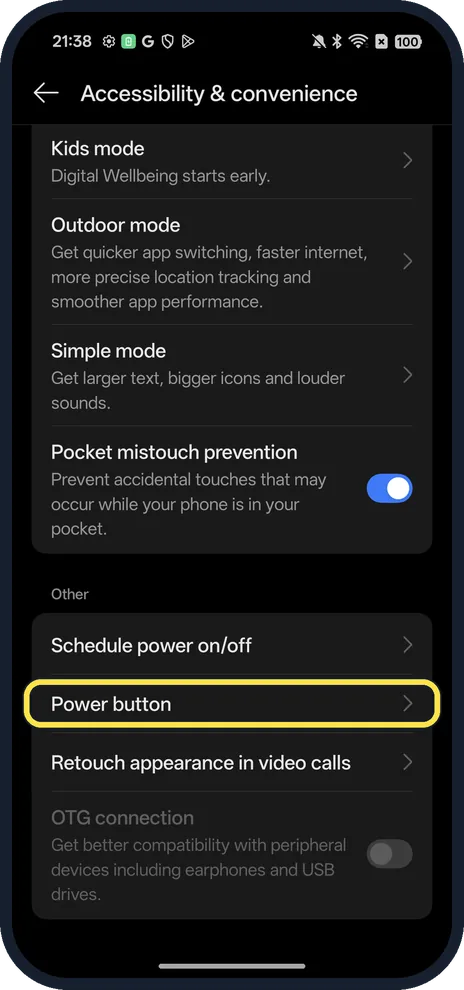
Open Settings, Accessibility & convenience, Power button. On our Reno13, holding Power opened the Digital assistant (Google); tap Press and hold the Power button and choose Power menu. Double press opened the camera.
4 of 4 steps with real screenshots · 3 official sources below
- Device
- Android
- Shown on
- OPPO Reno13 5G (CPH2689, EEA), ColorOS 16.0.5, Android 16 (build CPH2689_16.0.5.1001(EX01))
- App
- Settings
- Path
- Settings › Accessibility & convenience › Power button › Press and hold › Power menu
- Real screenshots
- 4 of 4 steps
- Checked
- October 2026
- Sources
- 3 official, linked below
Step by step
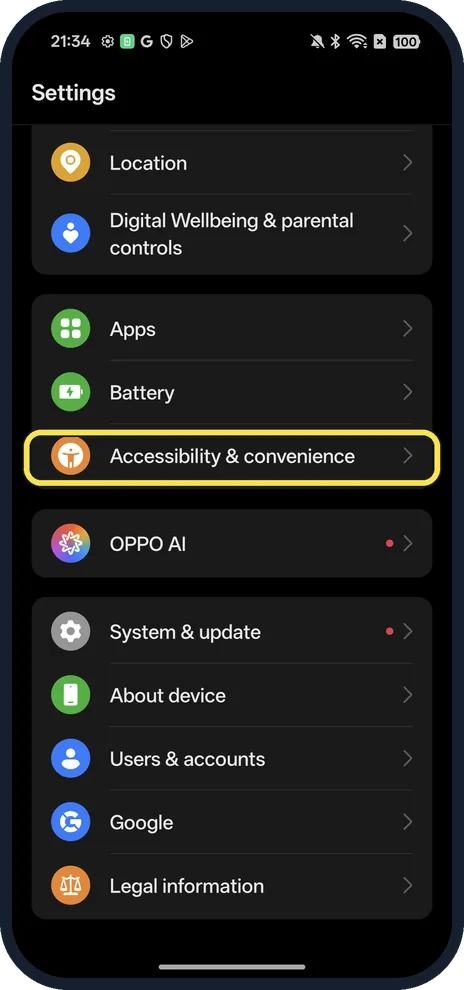
Open Accessibility & convenience
Open Settings and scroll down.
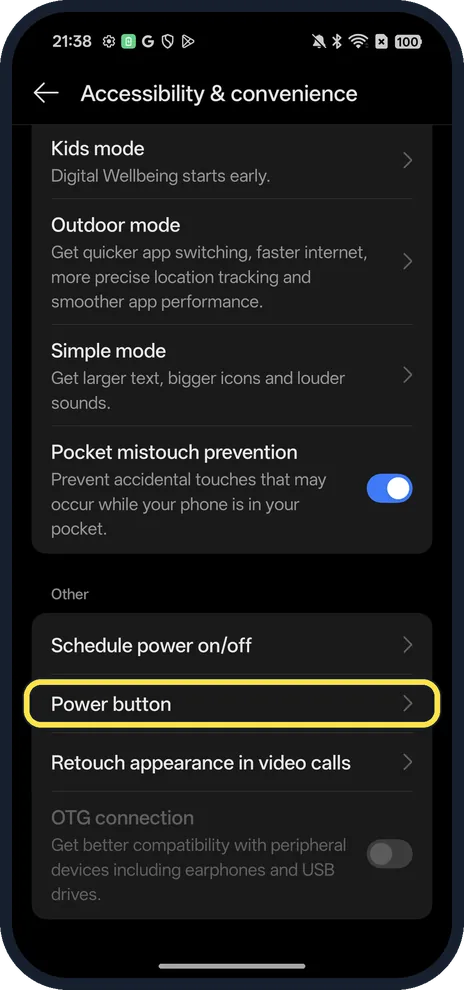
Tap Power button
Near the bottom, under Other.
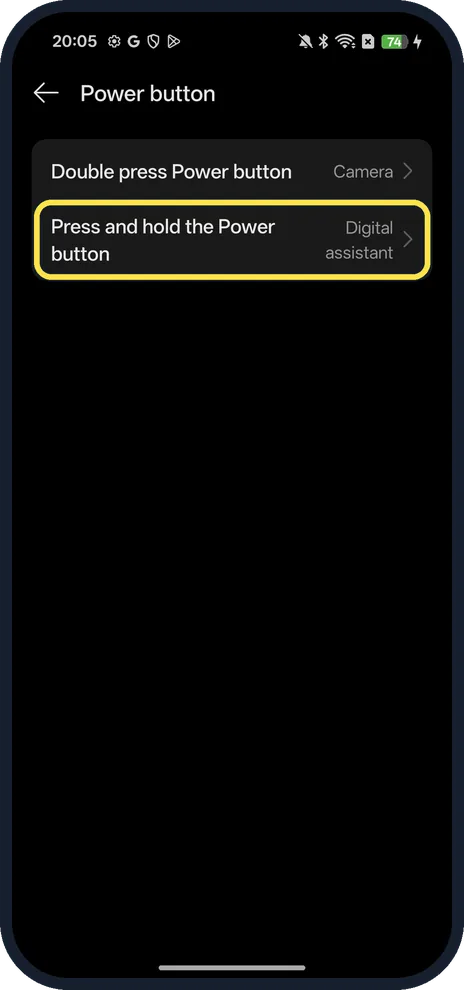
Tap Press and hold the Power button
Ours said Digital assistant.
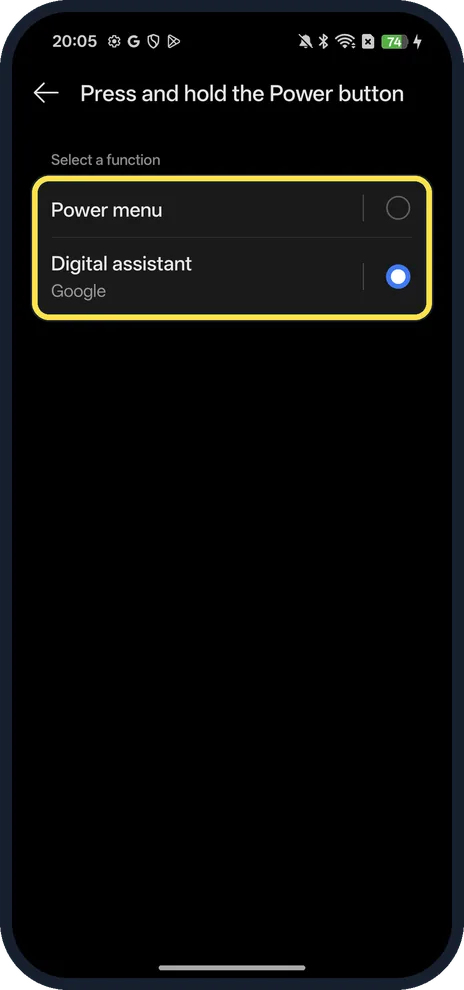
Choose Power menu
Select a function: Power menu or Digital assistant (Google).
If you do not see this option
- No Power button page? On our ColorOS 16.0.5 it is in the Other group at the bottom of Accessibility & convenience. Search Settings for power button if your version places it elsewhere.
- Looking for the end-call setting? It is not on this page. OPPO puts Press Power button to end calls in Accessibility & convenience, Accessibility, General tab (ColorOS 14 and later), and in System settings or Additional settings, Accessibility on ColorOS 12 and 13. Source: Power Button Ends Call on OPPO Phone
If this does not work
- Holding Power opens Google instead of the power menu? That was our default: Press and hold the Power button read Digital assistant. Switch it to Power menu. OPPO also says holding Power and Volume Up brings up the slider to restart. Source: 6 Ways to Extend Your OPPO Phone's Battery Life
- Calls hang up when you press Power? Turn off Press Power button to end calls, as above. Source: Power Button Ends Call on OPPO Phone
- Phone frozen? OPPO says to hold Power and Volume Up for at least 8 seconds until the OPPO logo appears; this doesn't erase your content. Source: OPPO Software Update: Fail to Receive, Download or Install OTA (Over-the-Air)
About this guide
The screenshots are from our OPPO Reno13 5G, the European model CPH2689, with ColorOS 16.0.5 and Android 16 (build CPH2689_16.0.5.1001(EX01)), in Dark mode.
Good to know
Open the camera fast: Double press Power button was set to Camera on ours, on the same page.
Switch between gestures and buttons: system navigation on an OPPO phone.
In short: Settings, Accessibility & convenience, Power button, Press and hold, Power menu.
- OPPO Support: Power Button Ends Call on OPPO Phone
- OPPO Support: 6 Ways to Extend Your OPPO Phone's Battery Life
- OPPO Support: OPPO Software Update: Fail to Receive, Download or Install OTA (Over-the-Air)
Links checked in October 2026. Menus and features can change after software updates. These steps match the version named at the top.
Did this guide work for you?
Sorry about that. What happened?