XIAOMI REDMI
How to change the device name on a Xiaomi phone (HyperOS 3)

In short
Go to Settings, About phone and tap Device name. A Rename device page opens with the current name, REDMI Note 15 Pro 5G on ours. Type the new name and tap the tick at the top right. The X closes it without saving.
4 of 4 steps show a real screenshot from our Redmi Note 15 Pro 5G. Each step was checked against the maker's own instructions, linked at the end.
Steps
- 1
Open About phone
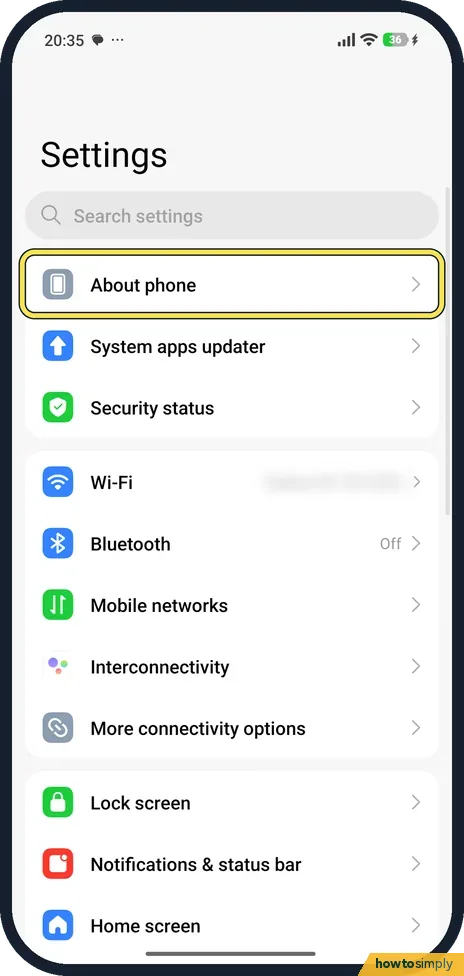
Open Settings. About phone is the first row, above System apps updater.
- 2
Tap Device name
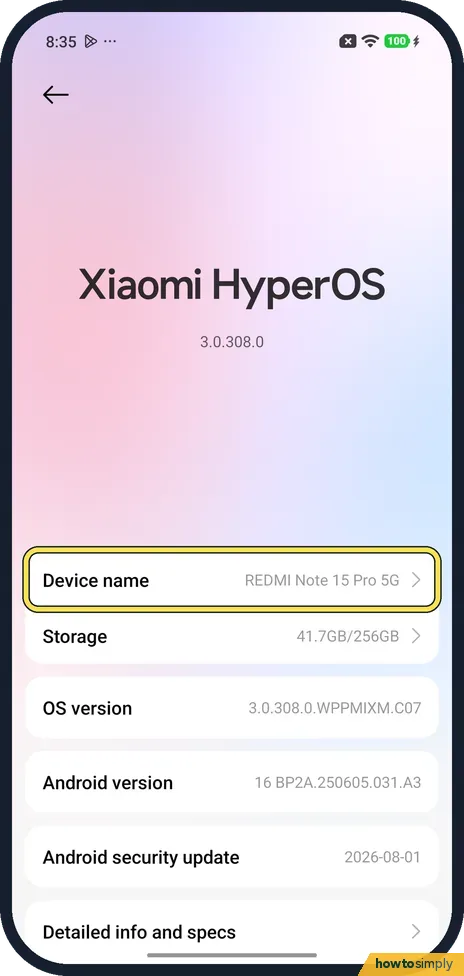
About phone opens with the Xiaomi HyperOS version. Below it, Device name showed REDMI Note 15 Pro 5G on ours. Tap it.
- 3
Type the new name
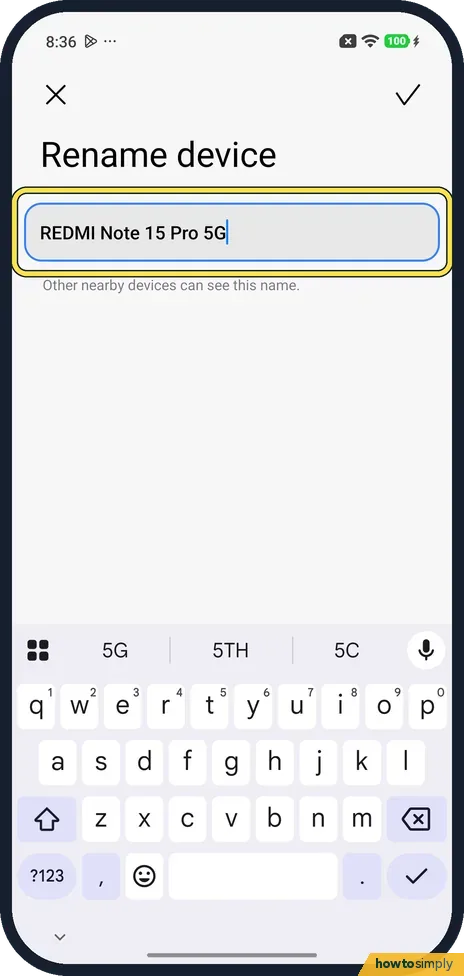
Rename device opens with the name in a box and the keyboard. Under it: Other nearby devices can see this name. Delete the old name and type yours.
- 4
Tap the tick
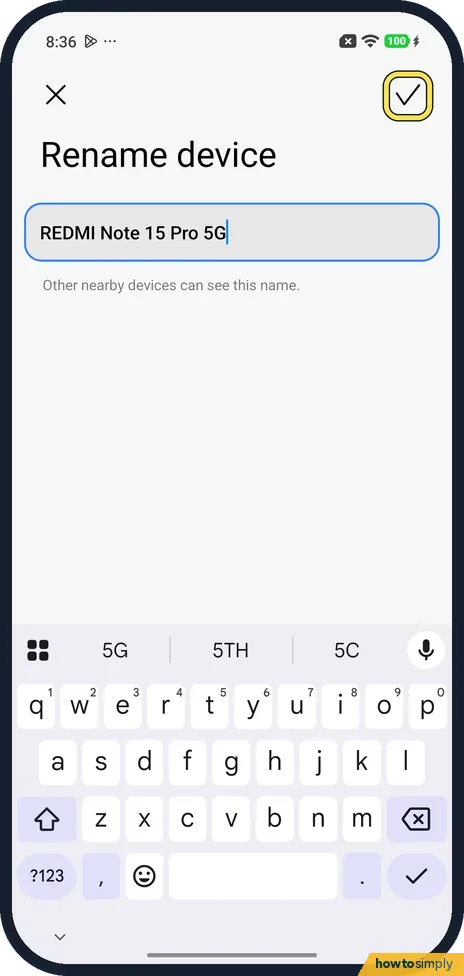
Tap the tick at the top right to save. The X at the top left closes the page and keeps the old name; we tapped X.
If you do not see this option
- On a tablet? Xiaomi says the REDMI Pad Pro uses Settings, About tablet, Device name, with the same tick to save. Source: How to rename the REDMI Pad Pro?
- Renaming from Bluetooth instead? Xiaomi also gives Settings, Bluetooth, Device name, then enter the name and tap the tick. It says nearby devices can see the name when Bluetooth is on. Source: How to rename a device via Bluetooth?
If this does not work
- Old name still shows? Xiaomi says a new device name sometimes needs a restart to take effect. Restart the phone and look again.
- Car or headphones show the old name? Pair them again after the restart: how to pair a Bluetooth device with a Xiaomi phone.
- Computer still lists the old name? Computers often remember a phone by the name it had when it first connected. Remove the phone from the computer's list of Bluetooth devices and pair again so it picks up the new name.
- Strangers can see your phone name? Anyone nearby can see the name while Bluetooth is on, as Xiaomi's user guide notes. For Quick Share, Google lets you choose who can share with you: Your devices, Contacts or Everyone for 10 minutes. Search Settings for Quick Share and tap Who can share with you.
- Quick Share shows a different name? Xiaomi says Quick Share has its own Device name, next to Account and Who can share with you in its settings. Change it there as well.
Good to know
Xiaomi says a unique name also stops others seeing your phone's model name.
Your hotspot has its own name: how to set up a hotspot on a Xiaomi phone.
The new name shows wherever the phone announces itself: in other phones' Bluetooth lists, in car and headphone menus and on computers you connect to. It does not change the model number on About phone, the IMEI, or anything stored on the phone, and it has no effect on battery or data. Accessories you already paired usually keep working; some just keep showing the old name until you pair them again. To go back, open Device name again and type the original model name, which is shown in About phone and on the box. If you share files often, see how to use Xiaomi Share and Interconnectivity.
About this guide
- Device
- Android
- Shown on
- Xiaomi Redmi Note 15 Pro 5G (25080RABDG), HyperOS 3.0.308.0, Android 16
- App
- Settings
- Path
- Settings › About phone › Device name
- Real screenshots
- 4 of 4 steps
- Checked
- October 2026
- Sources
- 5 official, linked below
Sources
Links checked October 2026. Menus and features can change with updates.Spotted a mistake? Menus change with updates, and we want every step to match your screen. Email us about this page or use the contact form. We read every report, and fixes are listed on What changed.
Liked this guide?
Follow us for new guides and short how-to videos.
Did this guide work for you?
Sorry about that. What happened?