
howtosimply.com/guides/how-to-change-what-the-power-button-does-on-a-nothing-phone/ · Checked October 2026 · 4a) Pro (A069P, EEA), Nothing OS 4.1, Android 16 (build FroggerPro-B4.1-260424-1447-EEA · Nothing Phone
In this guide
On our (4a) Pro, holding Power opened the digital assistant. Change it in Settings, Special features, Gestures, Press and hold power button: choose Power menu. To turn the phone off any time, press Power and Volume Up together.
3 of 3 steps with real screenshots · 3 official sources below
- Device
- Android
- Shown on
- Nothing Phone (4a) Pro (A069P, EEA), Nothing OS 4.1, Android 16 (build FroggerPro-B4.1-260424-1447-EEA)
- App
- Settings
- Path
- Settings › Special features › Gestures › Press and hold power button › Power menu
- Real screenshots
- 3 of 3 steps
- Checked
- October 2026
- Sources
- 3 official, linked below
Step by step
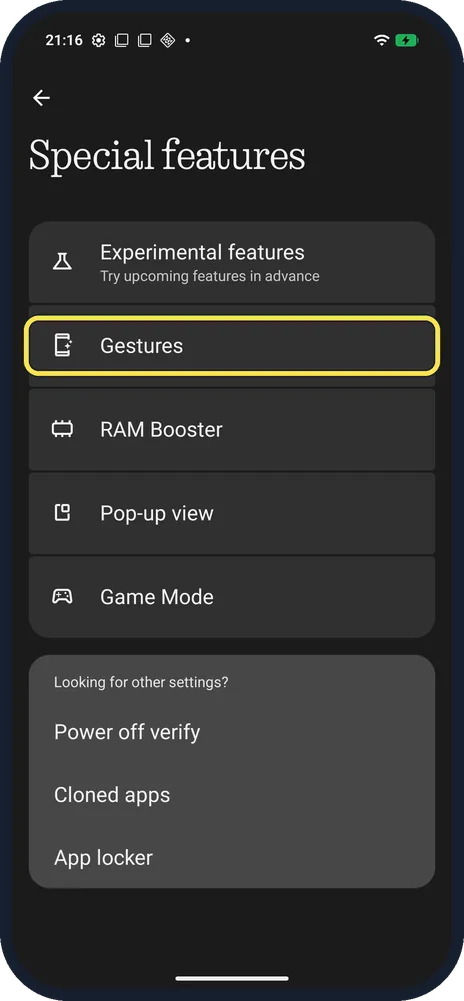
Open Gestures
Settings, Special features, Gestures.
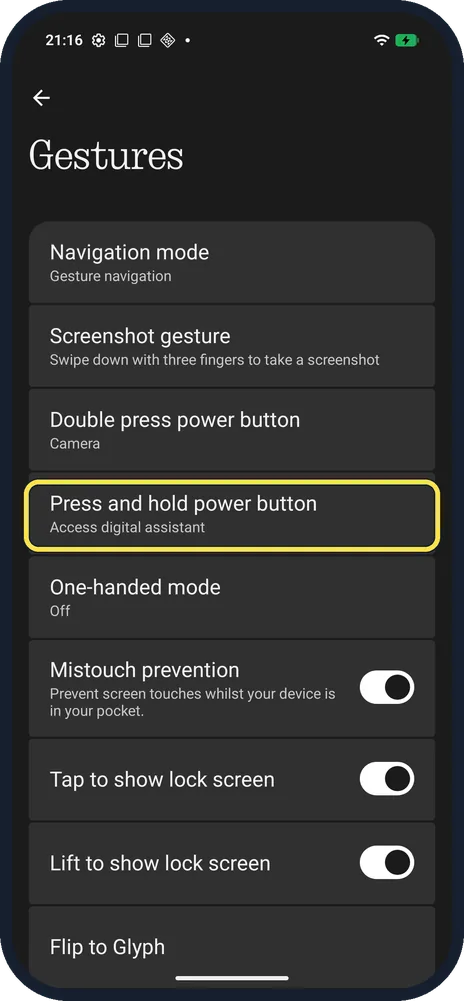
Tap Press and hold power button
It said Access digital assistant on ours.
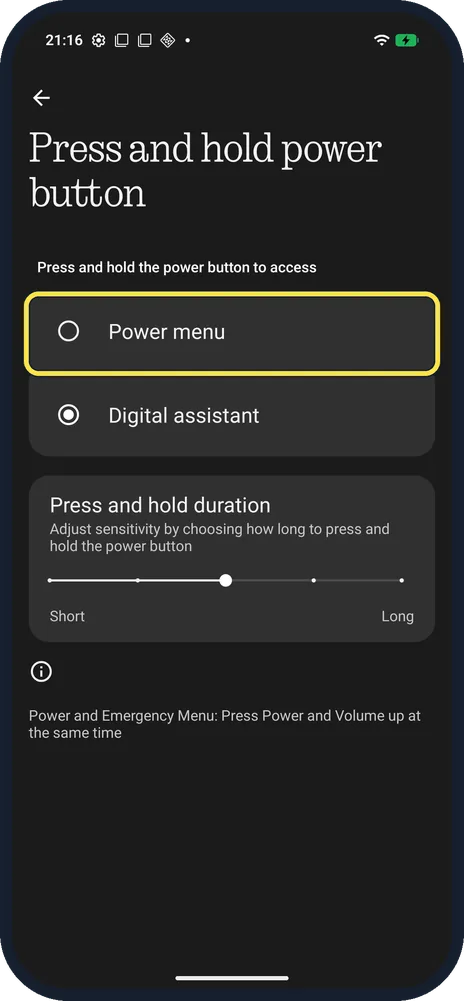
Choose Power menu
Digital assistant was selected; tap Power menu to get the off and restart menu instead.
If you do not see this option
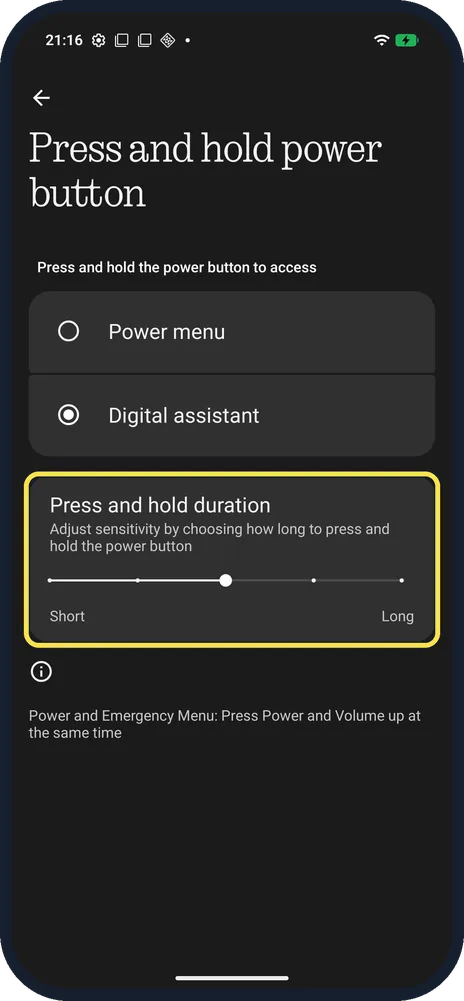
- Want a shorter or longer hold? Drag the Press and hold duration slider, from Short to Long.
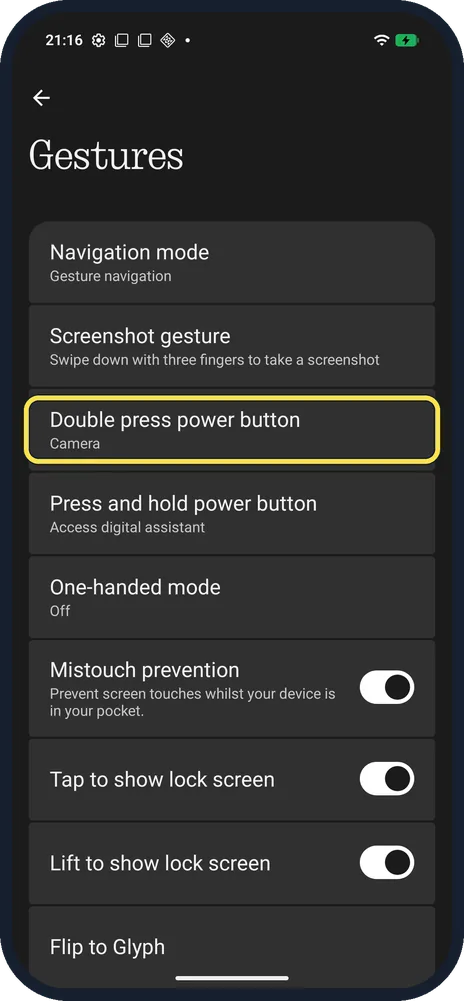
- Double press for the camera? Double press power button was set to Camera on ours, in the same Gestures list. Nothing says this opens the camera from the lock screen. Source: How do I open the camera from the lock screen?
- Turn off from the screen? Nothing says swipe down to the control centre and tap the power icon at the bottom right for Emergency, Lockdown, Power off and Restart. Source: How do I turn on / restart the Phone? · Source: How do I turn the Phone off?
If this does not work
- Need the power menu now? Nothing says press Power and Volume Up at the same time for the power menu. Source: How do I turn the Phone off?
- Phone frozen? Nothing says hold the power button for 15 seconds or more to force a shutdown or restart. Source: How do I turn on / restart the Phone?
About this guide
The screenshots are from our Nothing Phone (4a) Pro, the European model A069P, with Nothing OS 4.1 and Android 16 (build FroggerPro-B4.1-260424-1447-EEA), in Dark theme.
Good to know
To switch between gestures and buttons, see navigation mode.
For the screenshot gesture, see take a screenshot.
In short: Settings, Special features, Gestures, Press and hold power button, Power menu.
- Nothing Support: How do I open the camera from the lock screen?
- Nothing Support: How do I turn on / restart the Phone?
- Nothing Support: How do I turn the Phone off?
Links checked in October 2026. Menus and features can change after software updates. These steps match the version named at the top.
Did this guide work for you?
Sorry about that. What happened?