
howtosimply.com/guides/how-to-change-the-wallpaper-on-a-nothing-phone/ · Checked October 2026 · 4a) Pro (A069P, EEA), Nothing OS 4.1, Android 16 (build FroggerPro-B4.1-260424-1447-EEA · Nothing Phone
In this guide
Open Settings, Customisation and tap More wallpapers. Pick a wallpaper from Nothing, Colours or My photos, then tap the tick at the top right. Wallpaper Studio in the same gallery creates AI wallpapers in styles such as Sky or Black and white.
4 of 4 steps with real screenshots · 1 official source below
- Device
- Android
- Shown on
- Nothing Phone (4a) Pro (A069P, EEA), Nothing OS 4.1, Android 16 (build FroggerPro-B4.1-260424-1447-EEA), Nothing Phone (4a) Pro (A069P, EEA), Nothing OS 4.1, Android 16 (build FroggerPro-B4.1-260907-1153-EEA)
- App
- Settings
- Path
- Settings › Customisation › More wallpapers
- Real screenshots
- 4 of 4 steps
- Checked
- October 2026
- Sources
- 1 official, linked below
Step by step
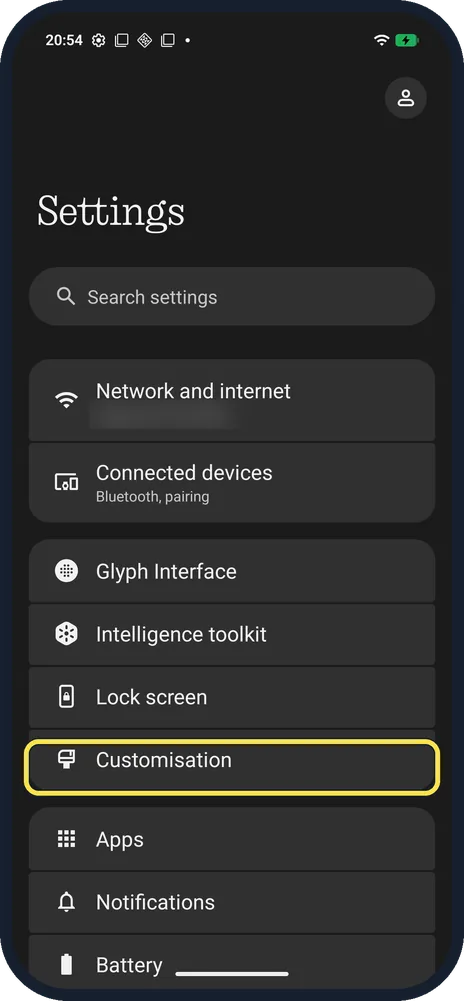
Open Customisation
Open Settings; it is below Lock screen.
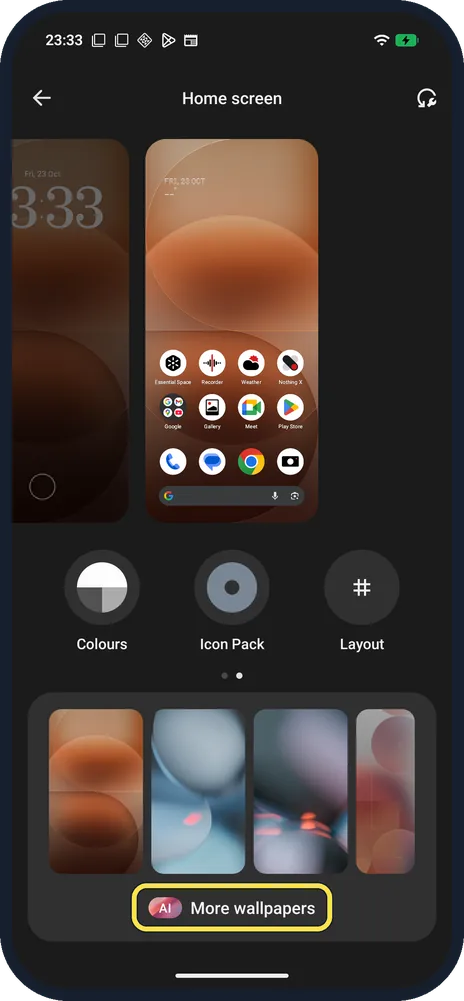
Tap More wallpapers
Under the wallpaper thumbnails at the bottom of Home screen.
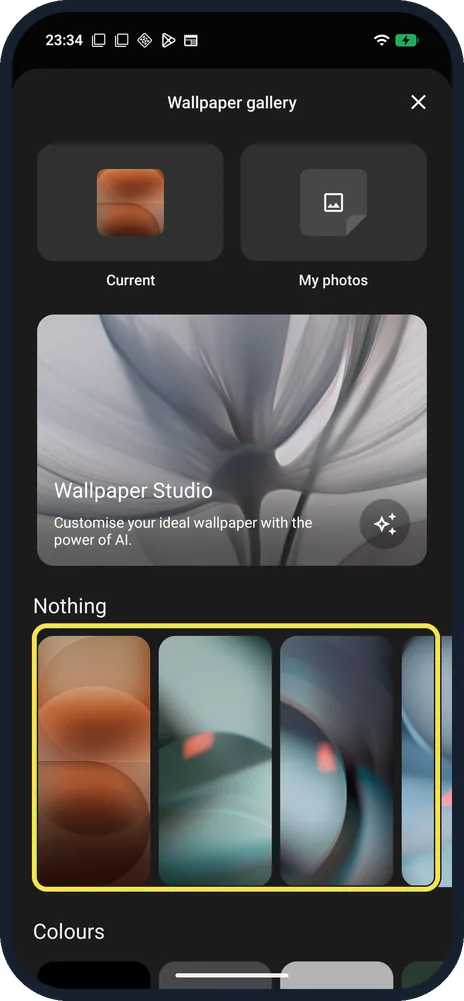
Pick a wallpaper
The Nothing row holds Nothing's own wallpapers; Colours and My photos are below and above it.
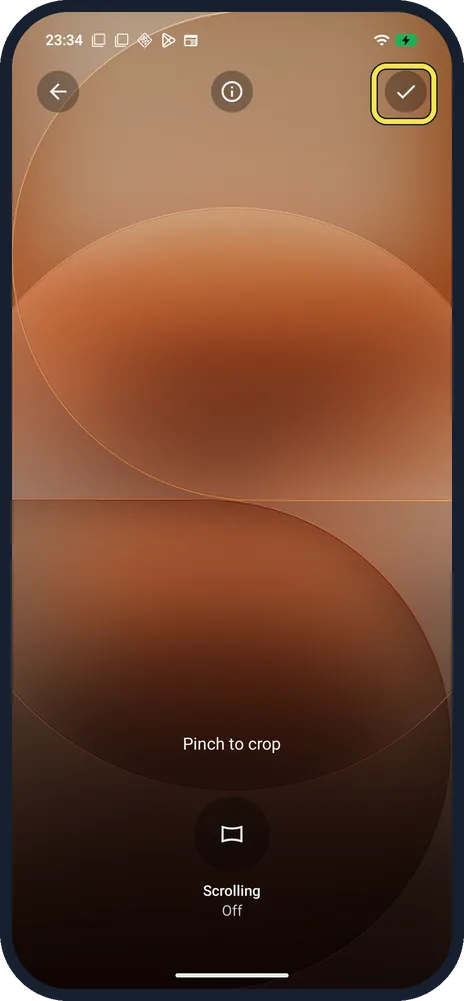
Tap the tick
Pinch to crop first if you like. Scrolling sets whether it moves with the Home screen pages; ours was Off.
If you do not see this option
- Want an AI wallpaper? Tap Wallpaper Studio in the gallery, pick a style such as Sky or Black and white, then Create wallpaper or Surprise me. We did not create one.
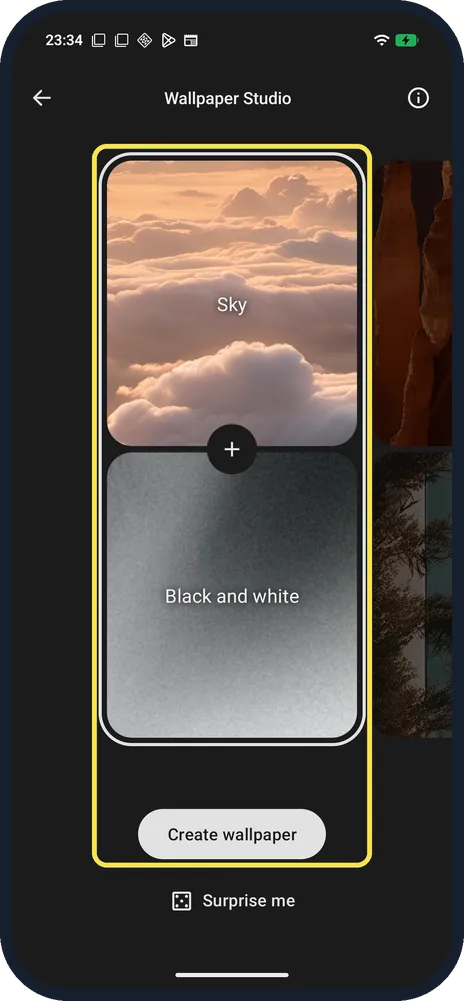
- Another way in? Nothing says to long-press an empty part of the Home screen and go to Customisation, Wallpaper and style. Source: How do I change the wallpaper and accent colours on my Phone?
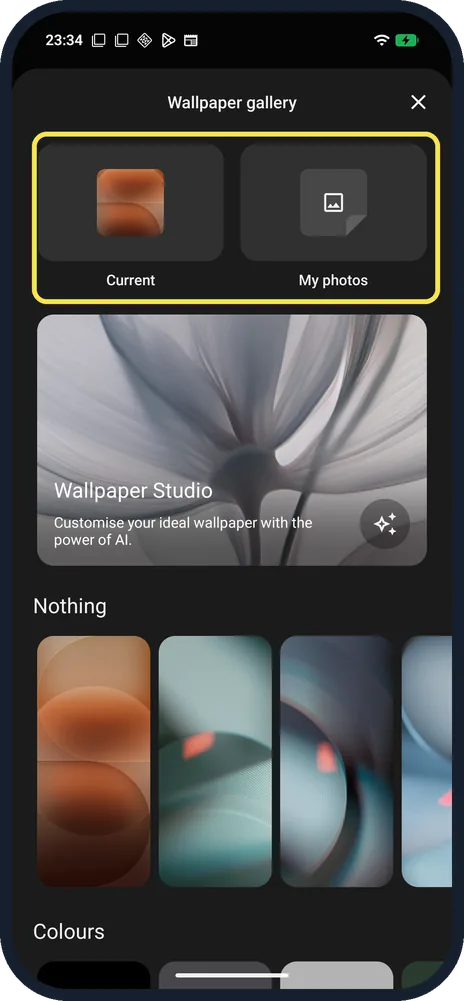
- Use your own photo? Tap My photos at the top of the gallery.
If this does not work
- Wallpaper Studio card missing? It was there on ours with build 260907 (September 2026); if yours lacks it, use Nothing or My photos.
- Colours changed with the wallpaper? Colours on the Home screen page sets accent colours from the wallpaper or basic colours. Source: How do I change the wallpaper and accent colours on my Phone?
About this guide
The screenshots are from our Nothing Phone (4a) Pro, the European model A069P, with Nothing OS 4.1 and Android 16 (build FroggerPro-B4.1-260907-1153-EEA, security update 1 September 2026), in Dark theme. We opened a preview and Wallpaper Studio but did not apply or create a wallpaper. The step 1 screenshot was taken earlier, on build FroggerPro-B4.1-260424-1447-EEA.
Good to know
To change icons too, change the icon pack.
For the lock screen, change the lock screen clock.
In short: Settings, Customisation, More wallpapers, pick one, tick.
Links checked in October 2026. Menus and features can change after software updates. These steps match the version named at the top.
Did this guide work for you?
Sorry about that. What happened?