
howtosimply.com/guides/samsung-galaxy-not-ringing-7-things-to-check/ · Checked October 2026 · Samsung Galaxy A57 5G (One UI 8.5, Android 16) and Samsung Galaxy A57 (One UI 9, Android 17 (build A576BXXU6BZIE))
In this guide
Check that Sounds and vibration is set to Sound, not Vibrate or Mute, and that the Ringtone slider under Volume is up. Then check Do not disturb and Modes, Bluetooth headphones or a watch, and call forwarding in the Phone app.
7 of 7 steps with real screenshots · 2 official sources below
- Device
- Android
- Shown on
- Samsung Galaxy A57 5G (SM-A576B), One UI 8.5, Android 16, Samsung Galaxy A57 (SM-A576B), One UI 9, Android 17 (build A576BXXU6BZIE)
- App
- Settings
- Real screenshots
- 7 of 7 steps
- What we did
- Observed: looked at each screen, changed nothing
- Our phone
- Shown on Galaxy A57, One UI 8.5
- Checked
- October 2026
- Sources
- 2 official, linked below
Step by step
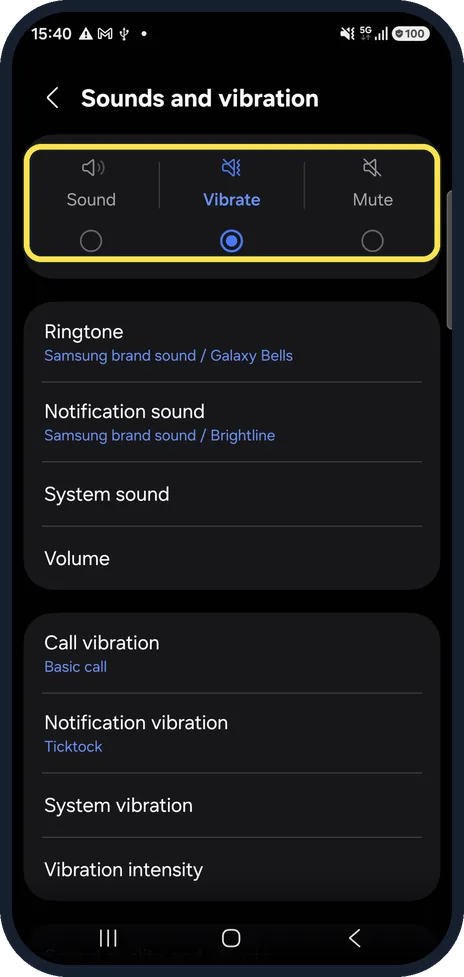
Set the sound mode to Sound
Open Settings, Sounds and vibration. Vibrate and Mute both silence the ringtone. In our picture the phone is on Vibrate, which is exactly the case where it will not ring: tap Sound.
Watch these steps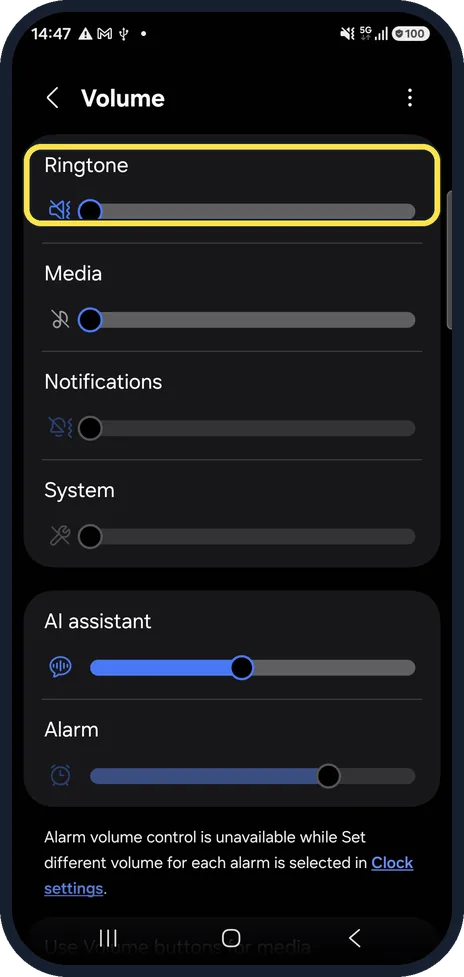
Turn up the ringtone
Tap Volume and drag the Ringtone slider up. Samsung notes it will not go up while headphones are connected or media is playing.
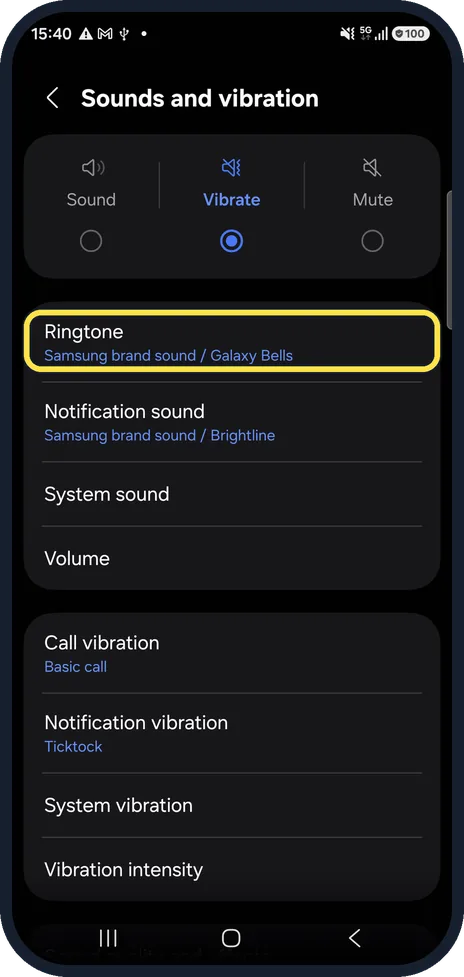
Check the ringtone itself
Tap Ringtone and play it. A silent or very quiet sound file sounds like no ring at all. Ours was Galaxy Bells.
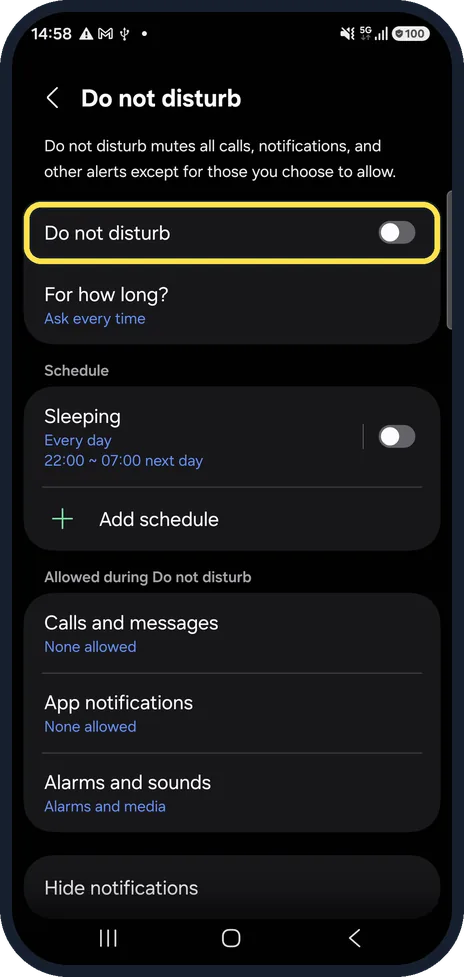
Check Do not disturb
Settings, Notifications, Do not disturb. If it is on, Calls and messages decides who can still ring; on our phone it said None allowed. Also check its schedules: ours had one called Sleeping, every day from 22:00 to 07:00. It was switched off on our phone; when a schedule is on, it silences calls during those hours.
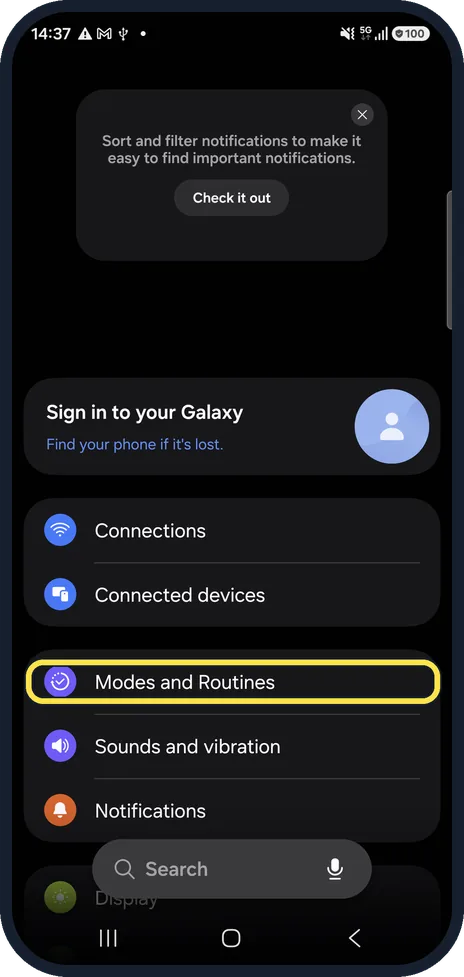
Check Modes and Routines
A Sleep or Relax mode can silence calls on a schedule. Open Settings, Modes and Routines.
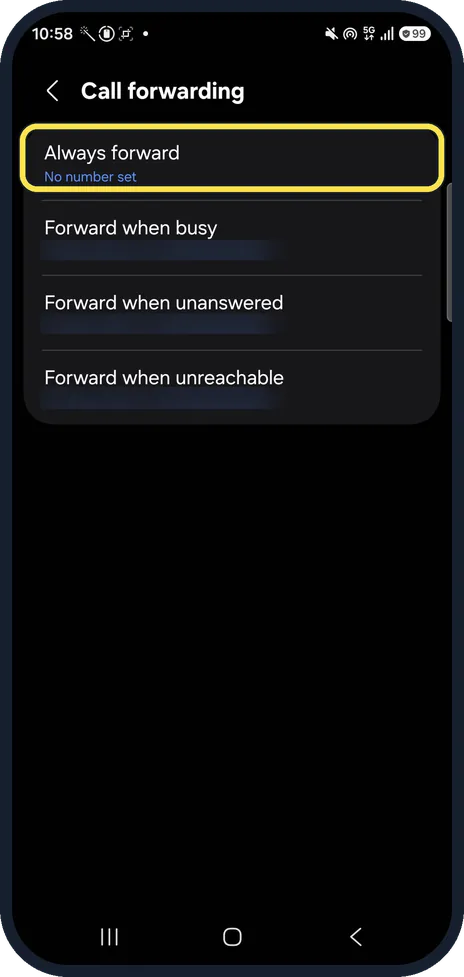
Check call forwarding
In the Phone app, tap the three dots, Settings, Supplementary services, Call forwarding. If Always forward is on, calls never reach the phone.
On ours Always forward said No number set; the other three went to the carrier's mailbox, whose number we blurred.
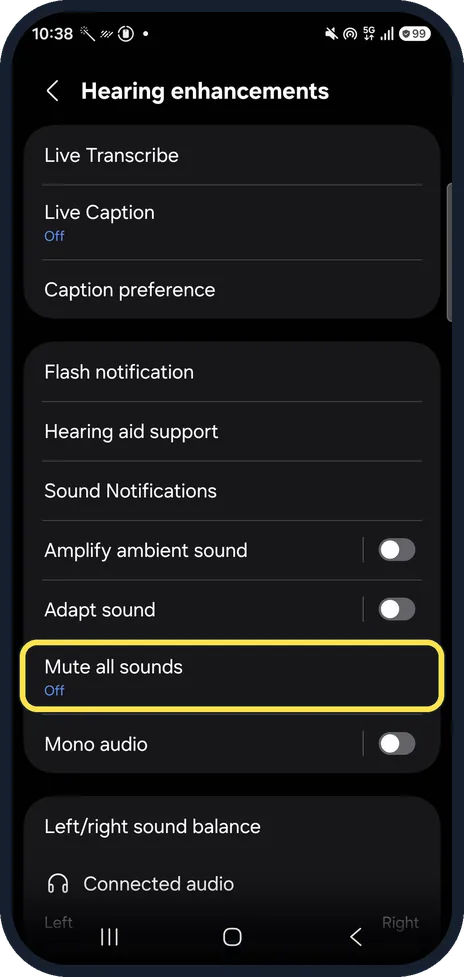
Disconnect headphones and watches
Calls ring on a connected Bluetooth headset or watch instead. Also check Settings, Accessibility, Hearing enhancements and turn off Mute all sounds.
On ours Mute all sounds read Off.
Watch these steps
If you do not see this option
- Only one person never rings through Samsung says the phone does not ring for a blocked number, and that a contact can have its own ringtone. Check the contact in the Phone app for a silent or custom ringtone, and check Block numbers. Source: Ringtones are not working on Galaxy phone
- Calls come in through another app Samsung says a custom ringtone for an app that makes calls or video calls, such as a messenger, is set in that app's own sound settings. Source: Ringtones are not working on Galaxy phone
If this does not work
- Everything above is set correctly Samsung says to restart the phone: swipe down, tap the power icon, Restart, and Restart again. Then check Airplane mode is off in the quick panel. Source: Ringtones are not working on Galaxy phone
- It still does not ring Samsung says an app may be interfering, and its last step is a factory reset, testing the ringtone before you install apps again. Back up first. Source: Ringtones are not working on Galaxy phone
About this guide
When calls arrive but the phone stays silent, the cause is almost always a setting, not the speaker. Work down this list; most fixes take seconds.
Steps 6 and 7 are from the same phone after its One UI 9 update (Android 17).
Good to know
If nothing plays at all, not even music, see no sound on a Samsung Galaxy phone? 7 things to check.
Calls going straight to voicemail is a different problem: why calls go straight to voicemail on a Samsung Galaxy.
In short: Sound mode Sound, Ringtone volume up, check the ringtone, Do not disturb, Modes, call forwarding, Bluetooth devices.
- Samsung US: Ringtones are not working on Galaxy phone
- Samsung US: Use Do not disturb mode on your Galaxy phone
Links checked in October 2026. Menus and features can change after software updates. These steps match the version named at the top.
📷 See real photos from the Galaxy A57 in our Camera Lab, next to 10 other phones.
Did this guide work for you?
Sorry about that. What happened?