
howtosimply.com/guides/how-to-change-or-mute-whatsapp-notification-sounds-on-a-pixel/ · Checked October 2026 · Google Pixel 10a, Android 17 (build CP3A.261005.005), WhatsApp 2.26.41.77
In this guide
In WhatsApp, open Settings, Notifications and tap Notification tone under Messages. To silence WhatsApp completely, open the Pixel's Settings, Apps, WhatsApp, Notifications and switch off All WhatsApp notifications. WhatsApp 2.26.41.77, Android 17.
5 of 5 steps with real screenshots · 1 official source below
- Device
- Android
- Shown on
- Google Pixel 10a, Android 17 (build CP3A.261005.005), WhatsApp 2.26.41.77
- App
- Real screenshots
- 5 of 5 steps
- Checked
- October 2026
- Sources
- 1 official, linked below
Step by step
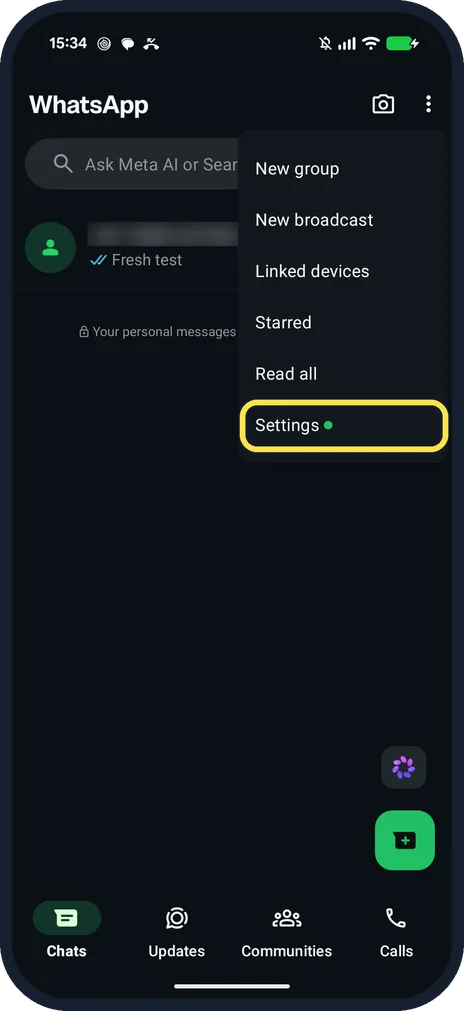
Open WhatsApp Settings
On the Chats tab, tap the three dots at the top right, then Settings.
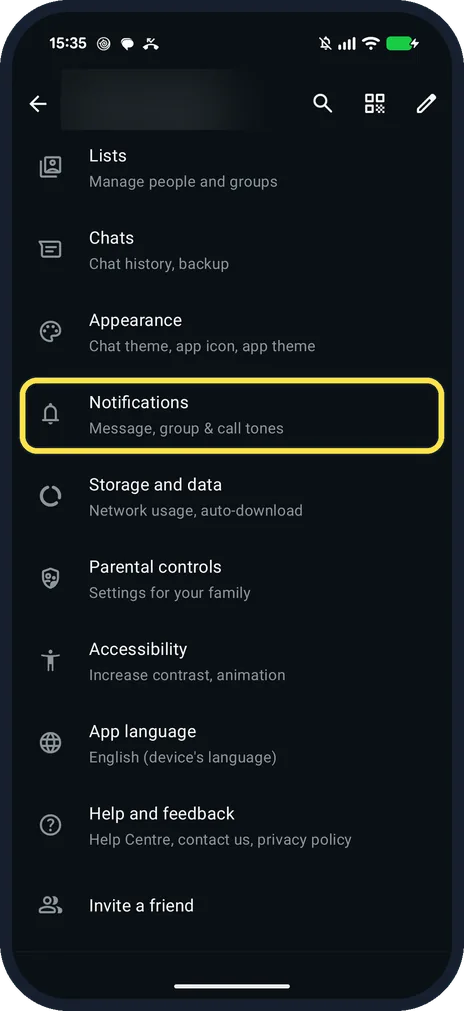
Tap Notifications
It is below Appearance: Message, group & call tones.
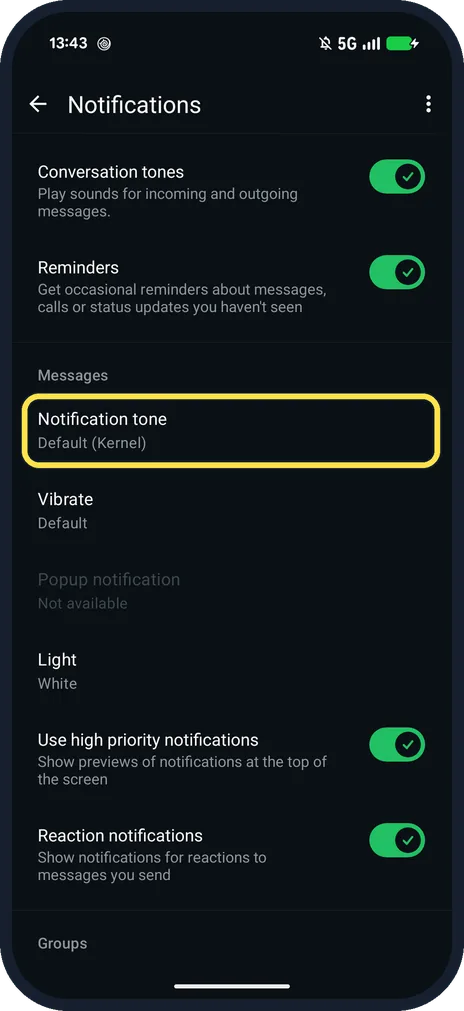
Tap Notification tone
Under Messages. Ours was Default (Kernel). Groups have their own tone further down.
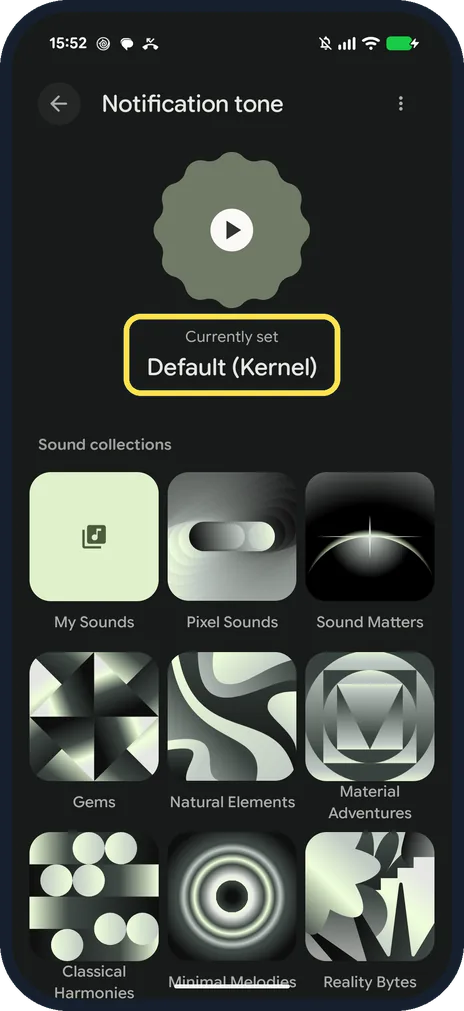
Pick a sound
Ours opened the phone's sound picker: Currently set Default (Kernel), then sound collections such as My Sounds, Pixel Sounds and Sound Matters. We went back without changing it.
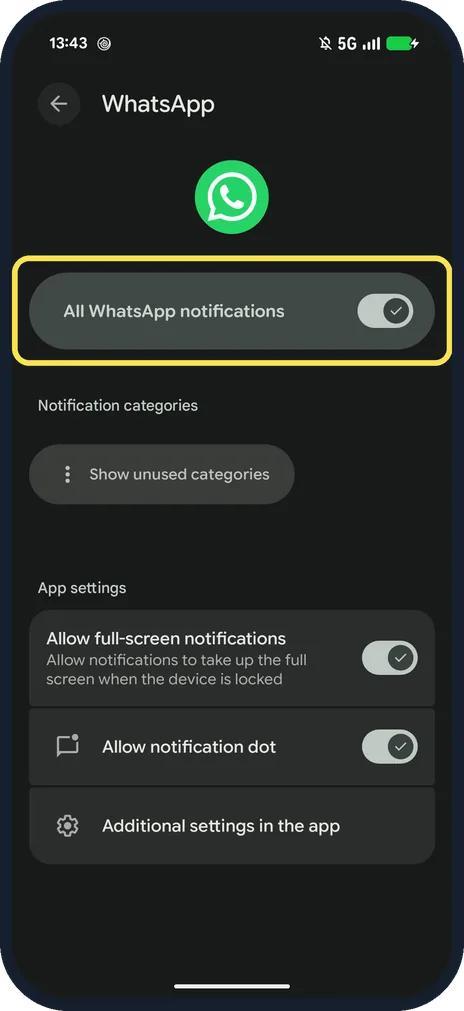
To mute WhatsApp, use the Pixel's switch
Pixel Settings, Apps, WhatsApp, Notifications: All WhatsApp notifications. Below it are categories, full-screen notifications and the notification dot.
If you do not see this option
- Sounds inside chats? Conversation tones at the top of WhatsApp's Notifications plays sounds for incoming and outgoing messages. Ours was on.
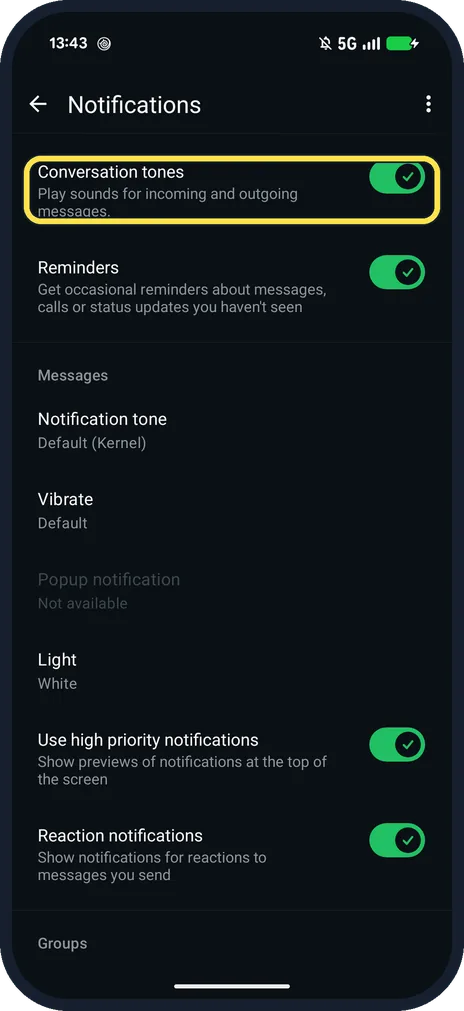
- No Popup notification? Ours showed Popup notification as Not available. WhatsApp says pop-up previews changed with Android 10 and are set in the phone's notification settings. Source: Can't see or hear notifications
If this does not work
- Notification arrives but is silent? WhatsApp says a tone set to Silent gives no sound even with Android sounds on. Also check Do Not Disturb. Source: Can't see or hear notifications
- Custom tone keeps resetting? WhatsApp says to use MP3, OGG, WAV or M4A in the Notifications folder, reset notification settings, then pick the tone again. Source: Can't see or hear notifications
About this guide
WhatsApp has its own tone settings, and Android has a master switch for the whole app. The phone's switch wins.
The screenshots are from our Google Pixel 10a with Android 17 and WhatsApp 2.26.41.77, in Dark mode, taken on 25 October 2026. We did not change any sound.
Good to know
If notifications come late, see WhatsApp notifications delayed on a Pixel.
In short: WhatsApp Settings, Notifications, Notification tone; or Pixel Settings, Apps, WhatsApp, Notifications.
Links checked in October 2026. Menus and features can change after software updates. These steps match the version named at the top.
📷 See real photos from the Pixel 10a in our Camera Lab, next to 10 other phones.
Did this guide work for you?
Sorry about that. What happened?