ONEPLUS
How to change the ringtone and vibration on a OnePlus (OxygenOS 16)

In short
Go to Settings, Sound & vibration. Ringtone (under Ringtone & alert sounds) picks the sound; ours was OnePlus new feeling. Vibration intensity has two sliders, Calls & alarms and Messages & notifications.
6 of 6 steps show a real screenshot from our Nord 5. Each step was checked against the maker's own instructions, linked at the end.
Steps
- 1
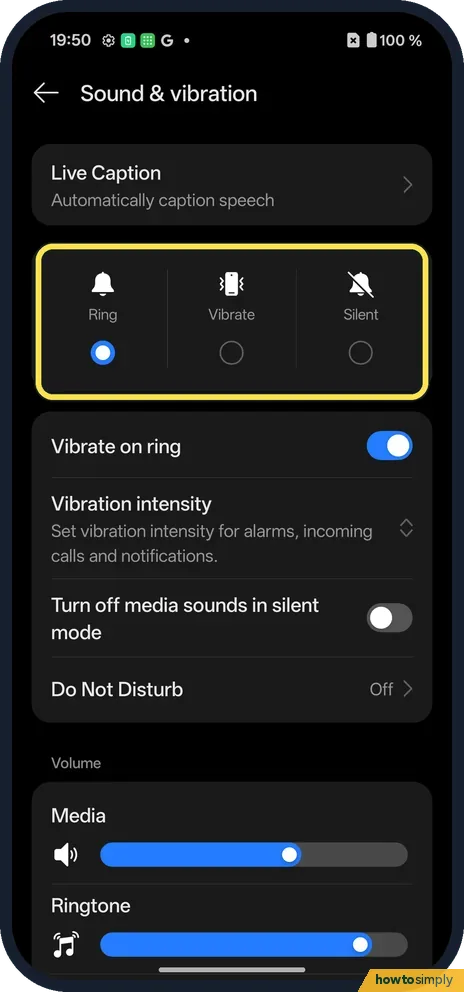
Ring, Vibrate or Silent
Open Settings and tap Sound & vibration. The three buttons at the top set the mode. Ring was picked on ours.
- 2
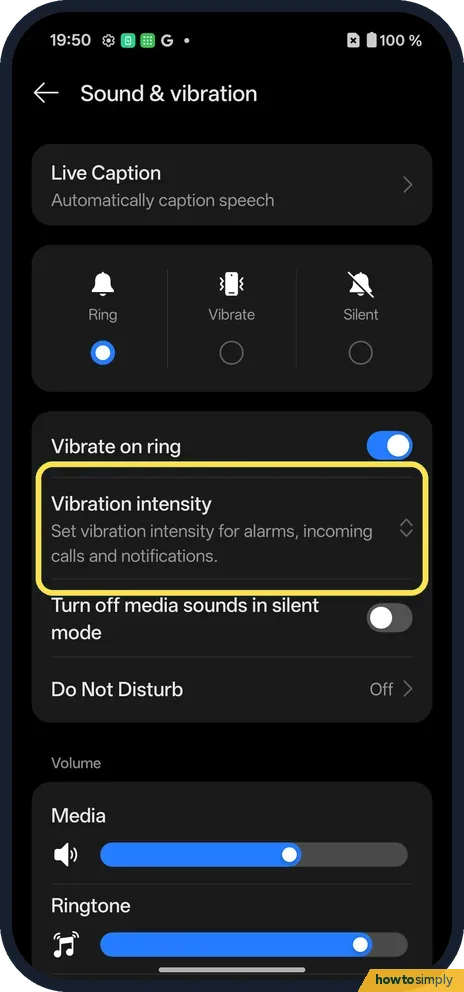
Tap Vibration intensity
It is under Vibrate on ring.
- 3
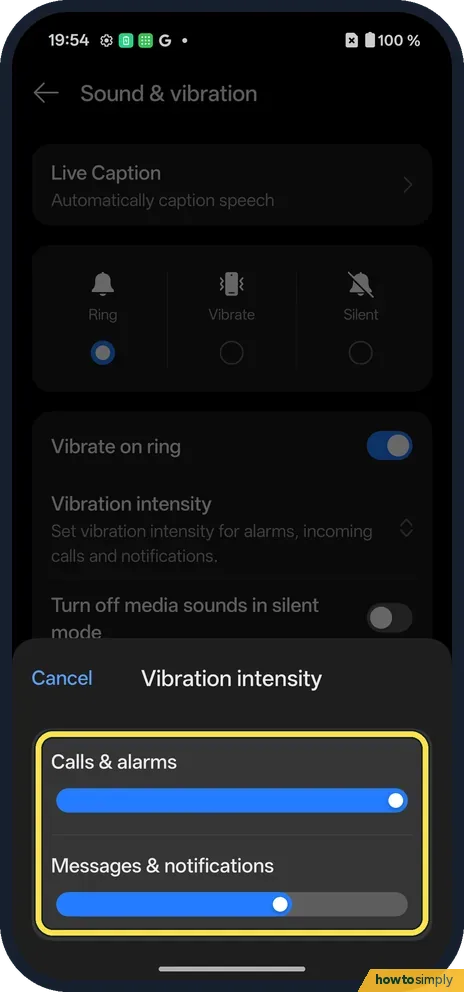
Set the strength
A panel opens with two sliders: Calls & alarms, and Messages & notifications.
- 4
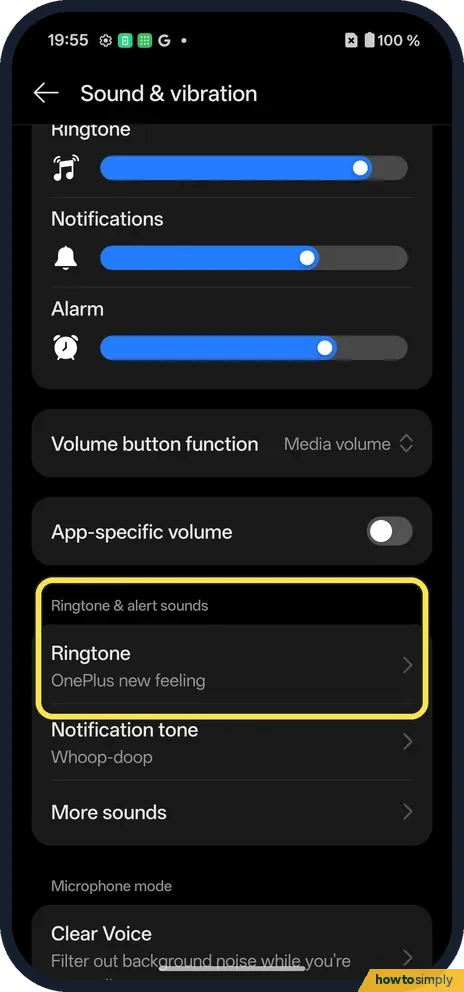
Tap Ringtone
Scroll to Ringtone & alert sounds. Ringtone said OnePlus new feeling; Notification tone is just below.
- 5
Pick a sound
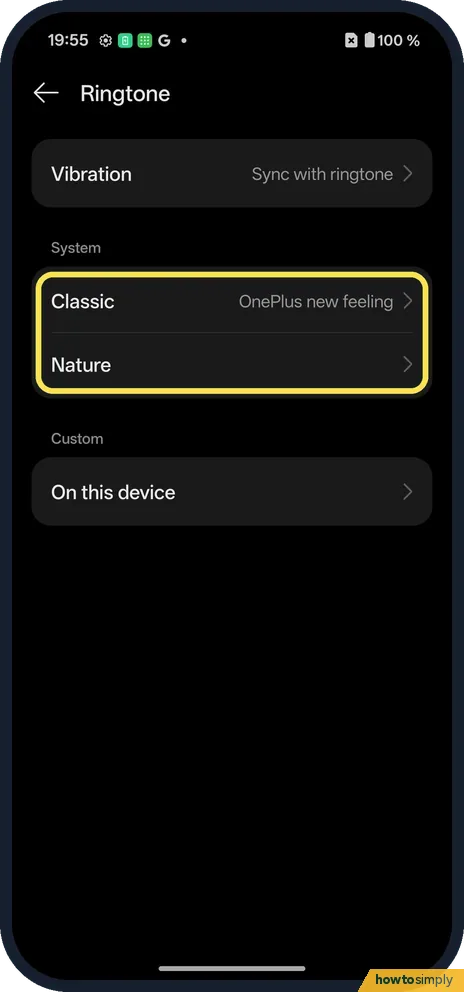
Sounds are grouped: Classic and Nature under System, and On this device under Custom for your own files.
- 6
Tap a ringtone
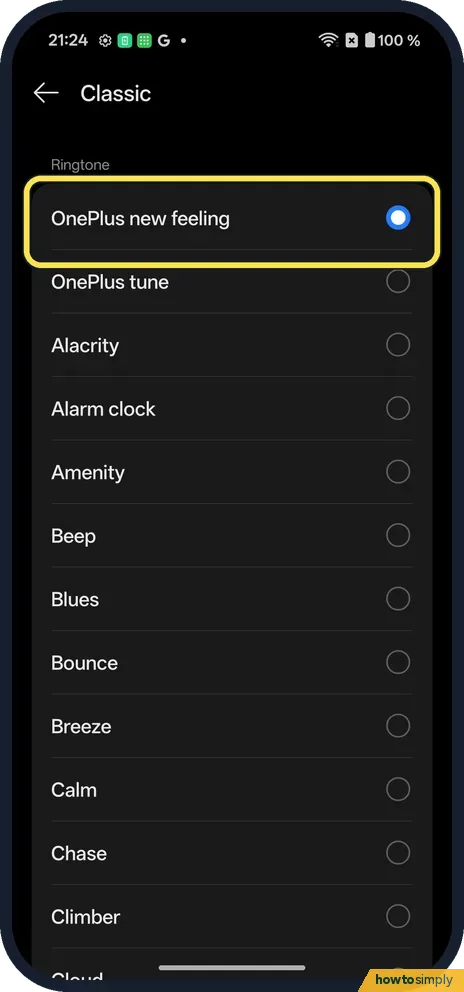
Tap Classic. OnePlus new feeling was ticked on ours; OnePlus tune, Alacrity and Alarm clock are next. Tap one to pick it.
If you do not see this option
- Phone vibrates on calls? Vibrate on ring, just below the Ring, Vibrate and Silent buttons, was on on ours.
- Volume buttons? Volume button function said Media volume on ours.
If this does not work
- No sound for calls? Check the top buttons say Ring, and that Do Not Disturb is off.
- Own ringtone missing? Look under On this device.
- Ringtone is too quiet? The ringtone you pick and the ring volume are separate. Raise the ring volume on Sound & vibration, and check Volume button function: on ours it was set to Media volume, so the side buttons change media, not the ring.
- Song you downloaded is not in the list? It must be saved on the phone, not just streamed in a music app. If you use the Files by Google app, Google describes playing the audio file, tapping More, then Set as ringtone, and allowing it to modify system settings when asked.
- Vibration feels weak even at full strength? A thick case or a soft surface such as a sofa absorbs vibration. Check both sliders in Vibration intensity: calls use Calls & alarms, while texts use Messages & notifications.
Good to know
Silence the phone at night: Do Not Disturb on a OnePlus.
On a Pixel: change the ringtone.
A new ringtone applies to all incoming calls from the moment you pick it. Messages and app notifications keep their own tone. Vibration changes apply straight away too, and stronger vibration uses slightly more battery, but not enough to notice in a normal day. To undo, go back to Ringtone and tap the sound you had before; ours was OnePlus new feeling under Classic.
The OxygenOS 14 manual says ringtones can come from music stored on the phone, from system ringtones or from the Theme Store. Setting a different ringtone for one person is usually done from that person's contact card in your contacts app rather than here. For notifications from texts and apps, see change the notification sound on a OnePlus.
About this guide
- Device
- Android
- Shown on
- OnePlus Nord 5 (CPH2709), OxygenOS 16.0.5.1201, Android 16
- App
- Settings
- Path
- Settings › Sound & vibration
- Real screenshots
- 6 of 6 steps
- Checked
- October 2026
- Sources
- 2 official, linked below
Sources
Links checked October 2026. Menus and features can change with updates.Spotted a mistake? Menus change with updates, and we want every step to match your screen. Email us about this page or use the contact form. We read every report, and fixes are listed on What changed.
Liked this guide?
Follow us for new guides and short how-to videos.
Did this guide work for you?
Sorry about that. What happened?