GOOGLE PIXEL
How to use expanded dark theme on a Google Pixel (Android 17)
Go to Settings, Display and touch, Dark theme. Turn on Use Dark theme and choose Standard or Expanded. Expanded darkens most apps, even ones without a dark mode; tap the gear next to it to switch it off for single apps.

4 of 4 steps show a real screenshot from our Pixel 10a. Each step was checked against the maker's own instructions, linked at the end.
Steps
- 1
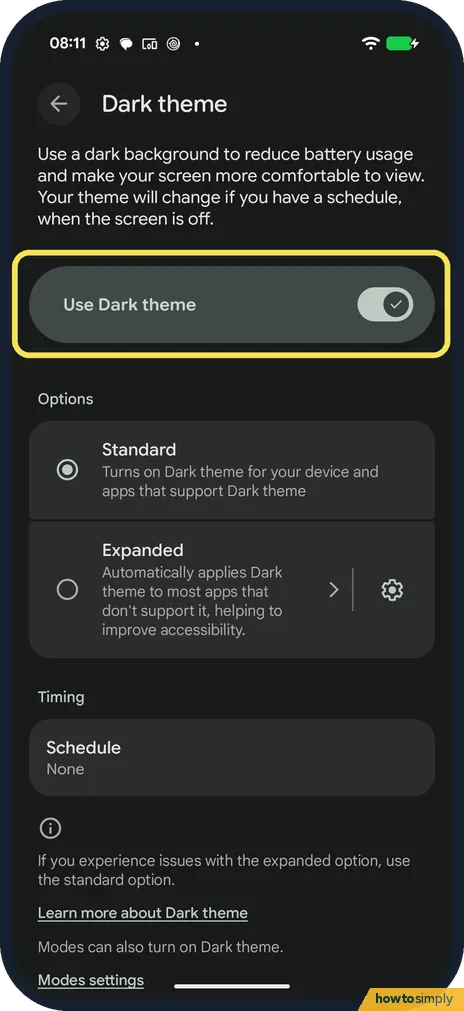
Open Dark theme
Go to Settings, Display and touch, Dark theme. Use Dark theme was on.
- 2
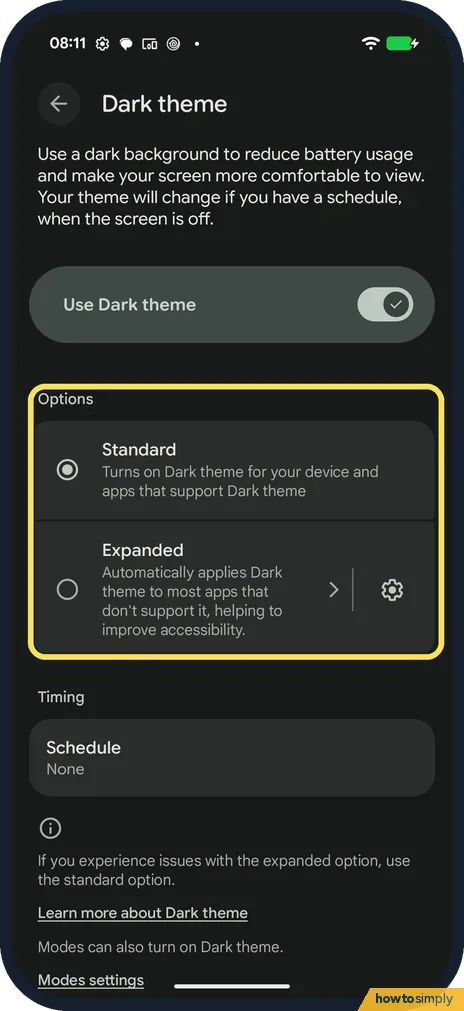
Choose Standard or Expanded
Standard darkens the phone and apps that support dark theme. Expanded applies it to most apps. Ours was on Standard.
- 3
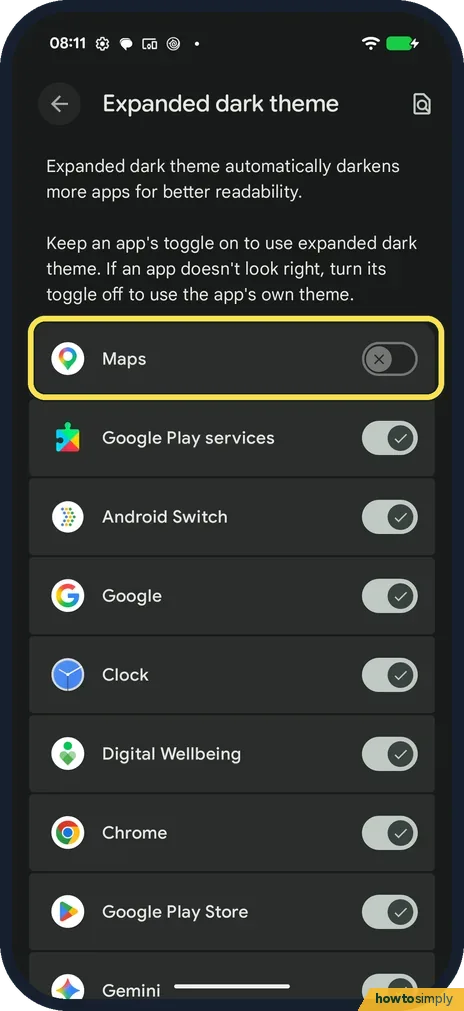
Turn it off for one app
Tap the gear next to Expanded. Each app has a switch. On ours every app was on except Maps. Turn off an app that doesn't look right.
- 4
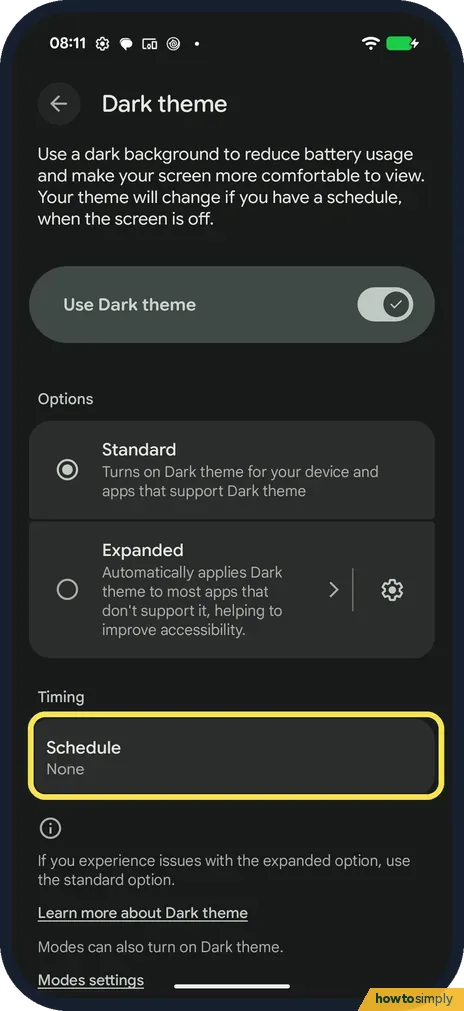
Set a schedule
Back on Dark theme, Schedule was None. Tap it to turn dark theme on at set times.
If you do not see this option
- No Expanded option? It was on our Android 17 Pixel. Phones on older Android versions only have the standard dark theme. Source: Change dark theme and colour settings on Android
- Dark theme turns on by itself? The page says Modes can also turn on Dark theme, such as Bedtime.
- Want a quicker switch? Google describes a Dark theme tile in Quick Settings. Tap it to switch, or touch and hold it to open these settings. Add the tile first if it isn't there. Source: Change dark theme and colour settings on Android
If this does not work
- An app looks wrong in dark? The page says to use the standard option, or switch that app off in Expanded.
- Dark theme changes at night? Check Schedule on the Dark theme page.
- Images or text look odd in Expanded? Google warns that with Expanded some apps may look different, with altered images or text on images that is hard to read. Turn Expanded off for that app, or choose Standard to turn it off for all apps.
- One app stays light in Expanded? Google says an app may stay light if it doesn't support Expanded, is on the phone maker's block list, or has opted out. There is nothing to fix on the phone; check the app's own settings for a dark option.
- Can't switch back to light theme? Google says Battery Saver can turn dark theme on, and light theme can't be used while it is on. Turn off Battery Saver first.
Good to know
Night-time settings: Do Not Disturb and Modes.
Google says dark theme can make your screen easier to read. Nothing else on the phone changes: wallpaper, notifications and app data stay as they were. Switching between Standard and Expanded is instant, and you can go back to light everywhere by turning off Use Dark theme. If you only switched Expanded off for one app, its switch under the gear turns it back on.
If you want a warmer screen at night rather than dark menus, see how to use Night Light on a Google Pixel.
About this guide
- Device
- Android
- Shown on
- Google Pixel 10a, Android 17 (build CP3A.260905.009)
- App
- Settings
- Path
- Settings › Display and touch › Dark theme › Use Dark theme › Standard or Expanded
- Real screenshots
- 4 of 4 steps
- Checked
- October 2026
- Sources
- 1 official, linked below
Sources
Links checked October 2026. Menus and features can change with updates.Spotted a mistake? Menus change with updates, and we want every step to match your screen. Email us about this page or use the contact form. We read every report, and fixes are listed on What changed.
Liked this guide?
Follow us for new guides and short how-to videos.
Did this guide work for you?
Sorry about that. What happened?