
howtosimply.com/guides/no-sound-on-a-samsung-galaxy-phone-7-things-to-check/ · Checked October 2026 · Samsung Galaxy A57 5G (SM-A576B), One UI 8.5, Android 16
In this guide
Check that the sound mode is Sound, not Vibrate or Mute, under Settings, Sounds and vibration, and raise the sliders under Volume. Then check that the audio is not going to a Bluetooth device, unplug anything from the USB-C port, clean the speaker gently and restart the phone.
6 of 7 steps with real screenshots · 2 official sources below
- Device
- Android
- Shown on
- Samsung Galaxy A57 5G (SM-A576B), One UI 8.5, Android 16
- App
- Settings
- Path
- Settings › Sounds and vibration: Sound selected › Volume sliders up
- Real screenshots
- 6 of 7 steps
- Our phone
- Shown on Galaxy A57, One UI 8.5
- Checked
- October 2026
- Sources
- 2 official, linked below
Step by step
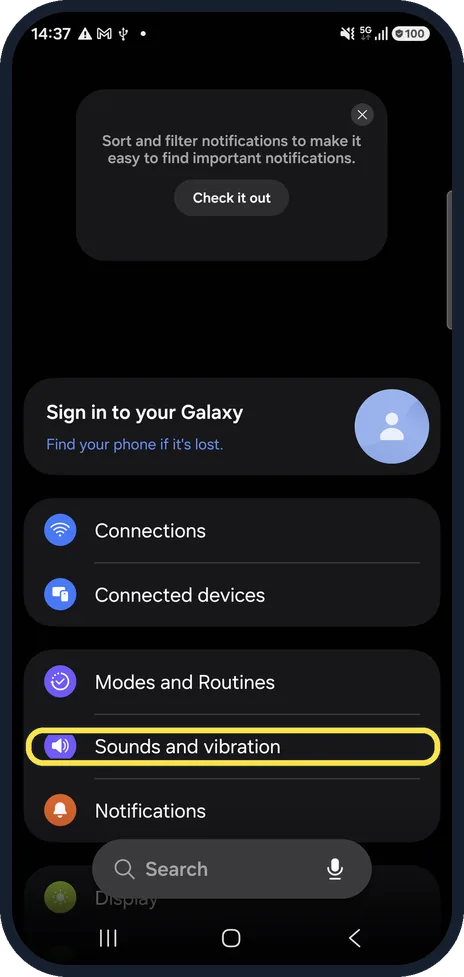
Open Sounds and vibration
Open Settings and tap Sounds and vibration.
Watch these steps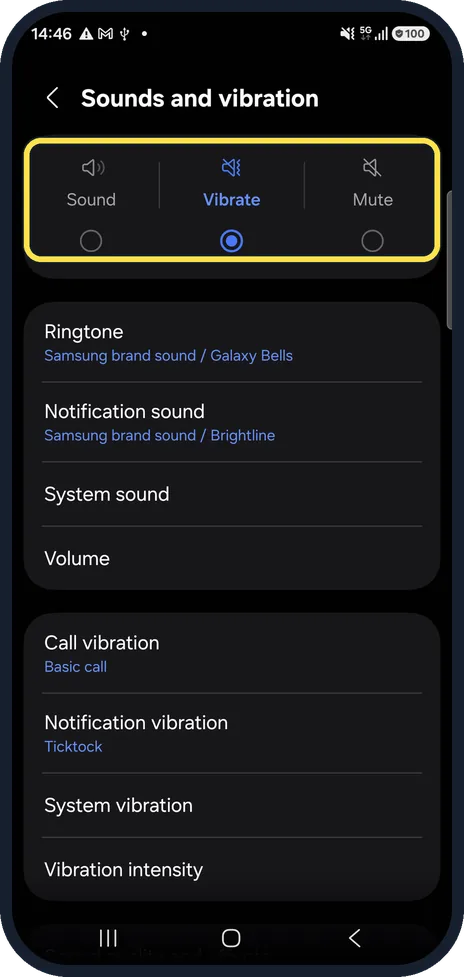
Choose Sound, not Vibrate or Mute
At the top, Sound must be selected. With Vibrate or Mute, calls and notifications make no sound.
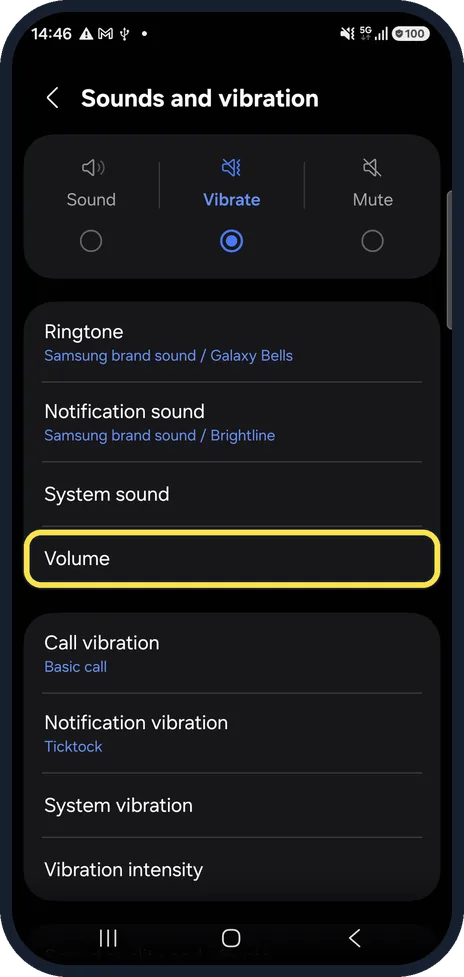
Open Volume
Tap Volume to see a slider for each kind of sound.
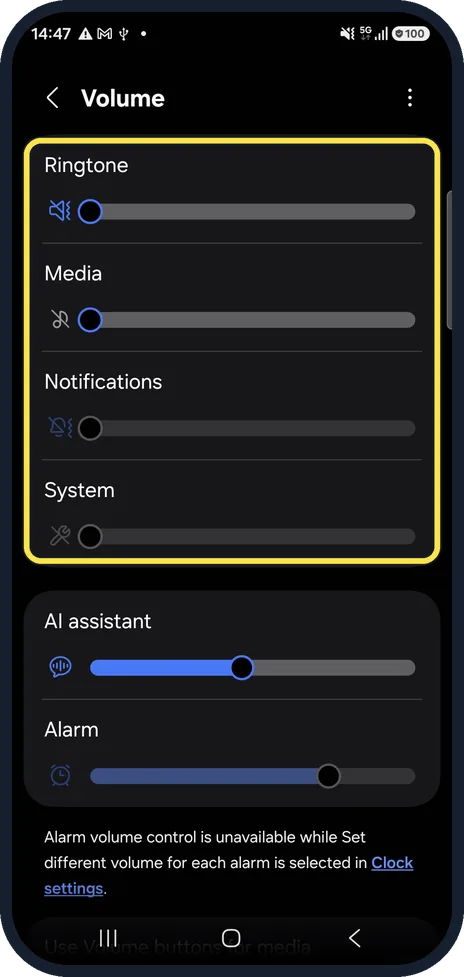
Raise the right slider
Ringtone, Media, Notifications, System and Alarm each have their own volume. Videos and music use Media; calls ringing use Ringtone. Drag the slider for the sound that is missing to the right. On our A57 the page also has a slider for the AI assistant.
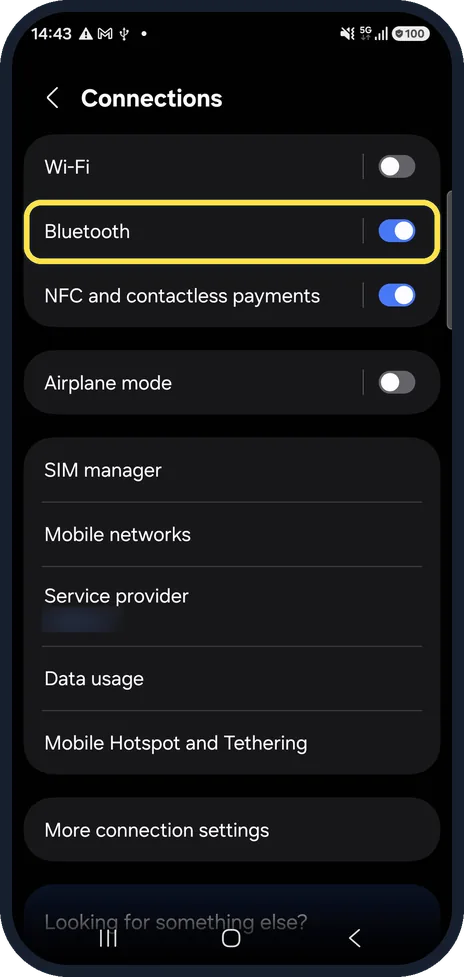
Check Bluetooth
Open Settings, Connections. If Bluetooth is on, the sound may be going to earbuds, a speaker or a car. Switch Bluetooth off and try again.
Unplug and clean
Remove anything plugged into the phone, such as headphones or an adapter. Take off a case or film that covers the speaker openings, and brush the speaker gently with a dry, soft toothbrush.
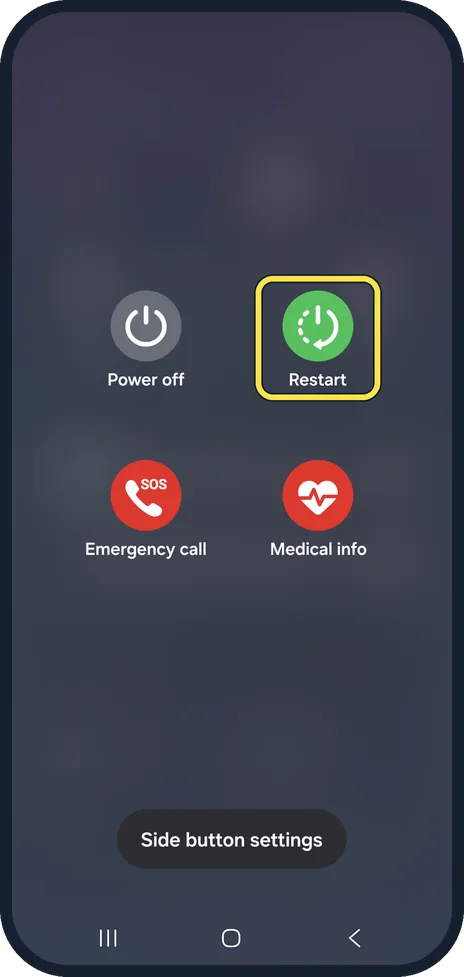
Restart, then update
Swipe down from the top with two fingers, tap the power icon, then Restart. Samsung also gives Side key and Volume down together for the same menu. If the problem remains, install the latest software update under Settings, Software update.
Watch these steps
If you do not see this option
- The Alarm slider will not move On our A57 the Volume page notes that alarm volume can't be changed there while Set different volume for each alarm is on in the Clock app's settings. Set the volume on each alarm in Clock, or turn that option off.
- Your phone has no Power key Samsung says that on phones without a dedicated power button you swipe down with two fingers, tap the Power icon at the top and then Power off; wait 30 seconds before switching on again. Source: What to do if the sound on your Galaxy smartphone is not working properly
If this does not work
- Music stops when you leave the app Samsung says the app may be stopped in the background: take it out of Sleeping apps and check Power mode and Data saver. Source: What to do if the sound on your Galaxy smartphone is not working properly
- Calls are quiet or noisy Samsung says a case or protective film can block the small air vent near the camera. Take it off and test again. Source: What to do if the sound on your Galaxy smartphone is not working properly
About this guide
When a Galaxy stays silent, the cause is usually a setting or a connected device rather than the speaker. Samsung's own checklist starts with the quick checks below.
Good to know
If sound works in safe mode but not normally, a downloaded app is the cause. Samsung lists safe mode and, as the very last step, a factory reset after a backup.
In short: Settings, Sounds and vibration: Sound selected, Volume sliders up. Bluetooth off. Unplug, clean the speaker, restart, update.
- Samsung UK: What to do if the sound on your Galaxy smartphone is not working properly
- Samsung CA: Set up the Side button or Bixby key on your Galaxy phone
Links checked in October 2026. Menus and features can change after software updates. These steps match the version named at the top.
📷 See real photos from the Galaxy A57 in our Camera Lab, next to 10 other phones.
Did this guide work for you?
Sorry about that. What happened?