
howtosimply.com/guides/samsung-galaxy-microphone-not-working-6-fixes/ · Checked October 2026 · Samsung Galaxy A57 5G (SM-A576B), One UI 8.5, Android 16
In this guide
Open Settings, Security and privacy, Privacy, Controls and alerts and make sure Microphone access is on. Then allow the app under Permission manager, Microphone, switch Bluetooth off for a test, restart the phone and clean the microphone opening.
6 of 6 steps with real screenshots · 2 official sources below
- Device
- Android
- Shown on
- Samsung Galaxy A57 5G (SM-A576B), One UI 8.5, Android 16
- App
- Maps
- Real screenshots
- 6 of 6 steps
- What we did
- Observed: looked at each screen, changed nothing
- Our phone
- Shown on Galaxy A57, One UI 8.5
- Checked
- October 2026
- Sources
- 2 official, linked below
Step by step
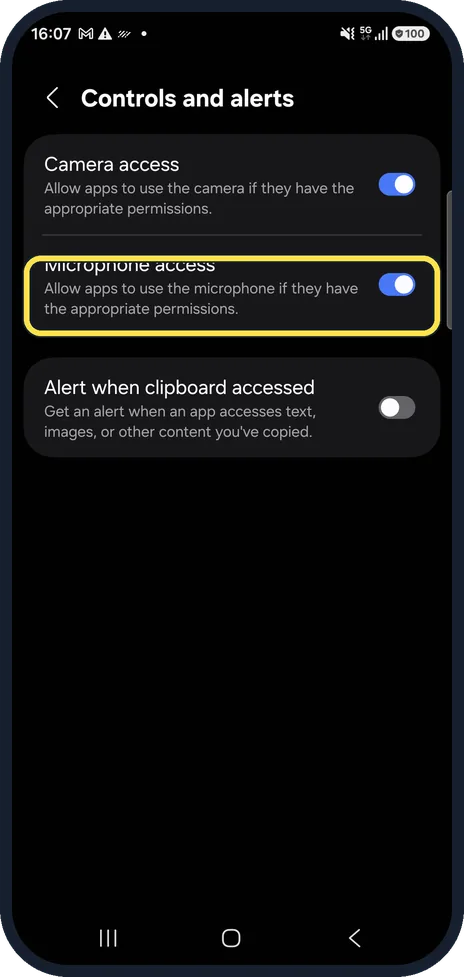
Check Microphone access
Go to Settings, Security and privacy, Privacy, Controls and alerts. When Microphone access is off, no app can use the microphone.
On our Galaxy, Microphone access was on, between Camera access and Alert when clipboard accessed.
Watch these steps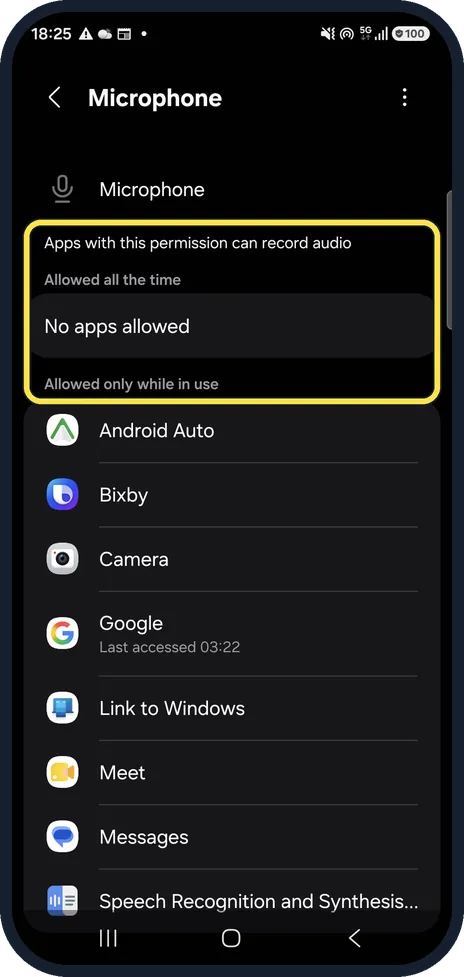
Open the Microphone permission list
Go to Settings, Security and privacy, More privacy settings, Permission manager, Microphone. The page shows which apps can record audio.
On our Galaxy, Allowed all the time read No apps allowed, and Allowed only while in use listed apps such as Android Auto, Bixby and Camera.
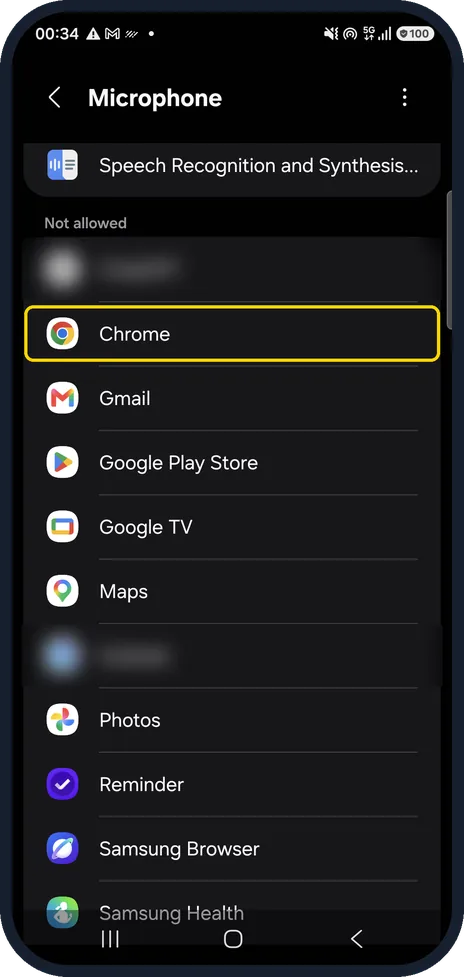
Allow the app that cannot record
Scroll down to Not allowed. Apps there cannot use the microphone: tap the app and allow it.
On our Galaxy, Not allowed included Chrome, Gmail, Google Play Store, Maps and Samsung Browser.
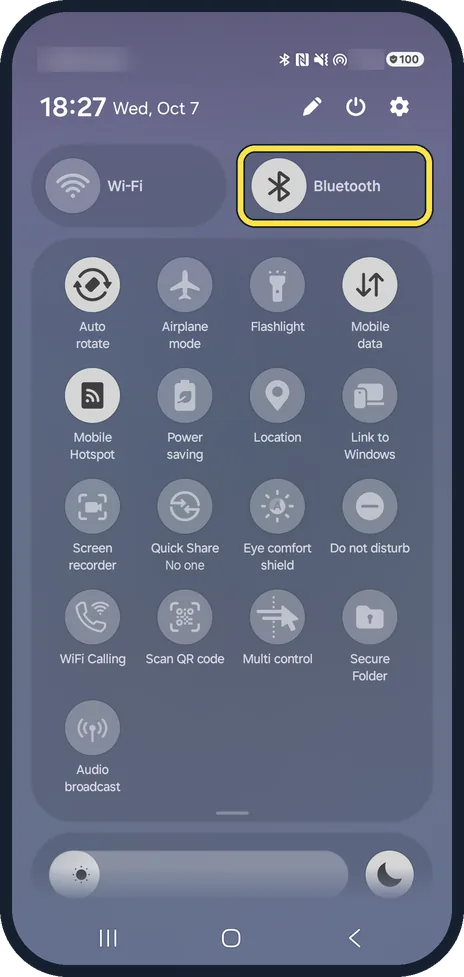
Switch Bluetooth off for a test
Connected earbuds or a car kit can take over calls and the microphone. Swipe down from the top, tap Bluetooth to turn it off, then try again. On our Galaxy, Bluetooth was on.
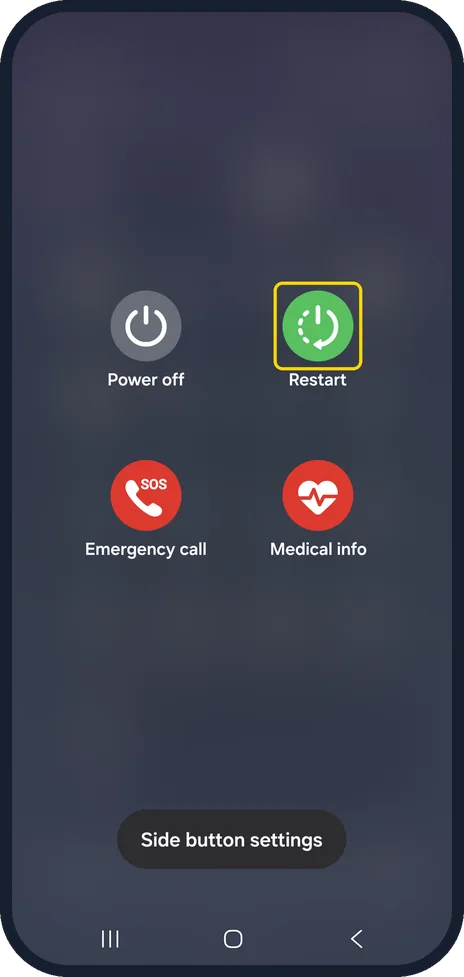
Restart the phone
Samsung recommends a restart. Open the quick panel, tap the power icon at the top, then tap Restart.
On our Galaxy the menu showed Power off, Restart, Emergency call and Medical info.
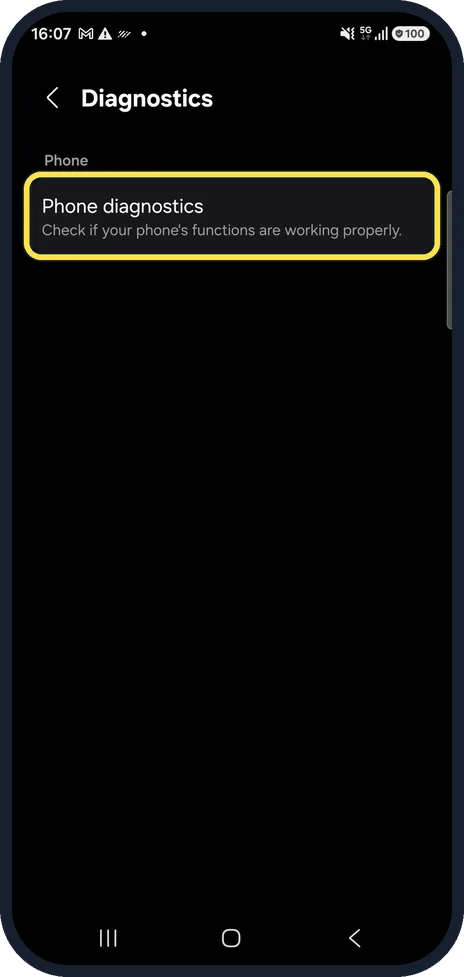
Test it in Diagnostics
Go to Settings, Device care, Diagnostics. On our Galaxy this page held one card, Phone diagnostics, described as Check if your phone's functions are working properly.
Samsung's guide uses these checks to test the microphone. If that test fails as well, the phone needs a repair.
Watch these steps
If you do not see this option
- Microphone access is not where you expect On our Galaxy it sat in Controls and alerts, between Camera access and Alert when clipboard accessed. On older One UI versions a few names and positions differ.
- The app is not under Not allowed Check Allowed only while in use as well. An app listed there already has permission, so the cause lies elsewhere: try Bluetooth off and a restart.
- You cannot find Restart On our Galaxy the power icon at the top of the quick panel opened the menu with Power off, Restart, Emergency call and Medical info.
If this does not work
- Clean the microphone opening Remove the case and check that nothing covers the microphone at the bottom of the phone, which Samsung UK points to. Wipe it with a soft, dry brush or cloth; do not push pins into it. Sources: Microphone issues with Galaxy phone or tablet, Galaxy phone microphone not working during calls
- The microphone seems busy A green dot at the top of the screen means an app is using the camera or microphone. Close that app, or restart the phone as Samsung recommends. Sources: Microphone issues with Galaxy phone or tablet, Galaxy phone microphone not working during calls
- Diagnostics fails too If the microphone check in Phone diagnostics fails, the fault is in the hardware and the phone needs a repair by Samsung. Sources: Microphone issues with Galaxy phone or tablet, Galaxy phone microphone not working during calls
About this guide
If nobody can hear you on calls, or an app records silence, first find out whether it is one app or all of them. A single app points to a permission; every app points to a switch, a headset or the hardware.
Good to know
A green dot at the top of the screen means an app is using the camera or microphone right now: green dot on a Samsung Galaxy: what it means.
Bluetooth headset problems: Samsung Galaxy Bluetooth not connecting? 6 fixes.
In short: Microphone access on, the app allowed under Permission manager, Bluetooth off for a test, restart, Diagnostics, clean the opening.
- Samsung US: Microphone issues with Galaxy phone or tablet
- Samsung UK: Galaxy phone microphone not working during calls
Links checked in October 2026. Menus and features can change after software updates. These steps match the version named at the top.
📷 See real photos from the Galaxy A57 in our Camera Lab, next to 10 other phones.
Did this guide work for you?
Sorry about that. What happened?