XIAOMI REDMI
How to allow Autostart for an app on a Xiaomi phone (HyperOS 3)
Open Settings, tap Apps, then Background autostart at the top. Find the app in the list of apps that aren't allowed to start in the background and turn its switch on. On HyperOS 3 this switch is not on the app's own App info page.

4 of 4 steps show a real screenshot from our Redmi Note 15 Pro 5G. Each step was checked against the maker's own instructions, linked at the end.
Steps
- 1
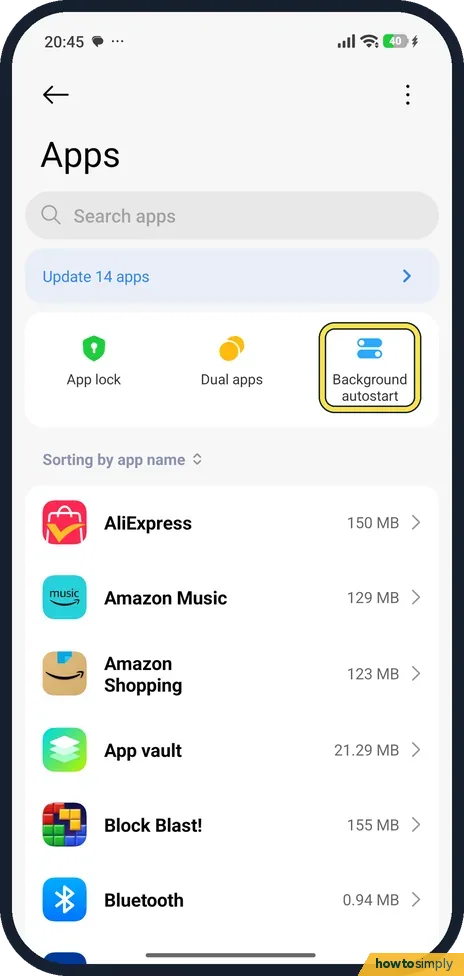
Open Apps and tap Background autostart
Open Settings and tap Apps. Three shortcuts sit at the top: App lock, Dual apps and Background autostart. Tap Background autostart.
- 2
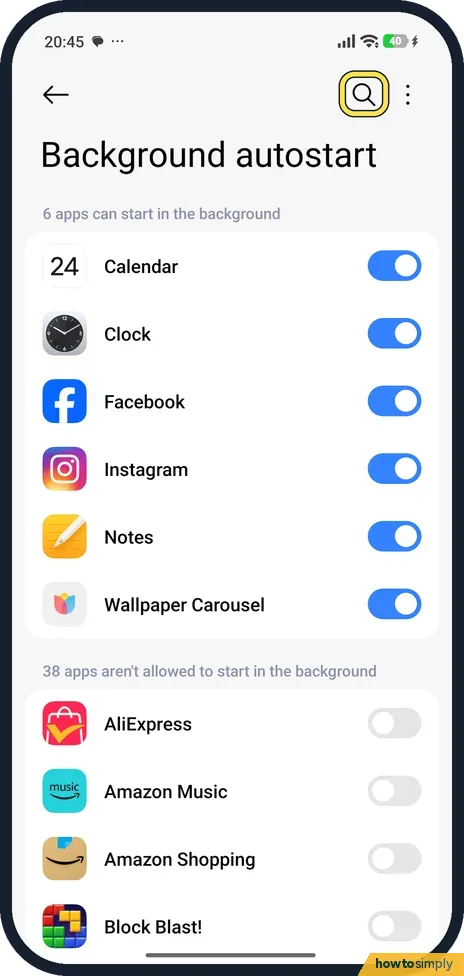
Find the app
The list has two parts: apps that can start in the background (6 on our phone) and apps that aren't allowed to (38 on ours). Scroll, or tap the magnifier at the top to search.
- 3
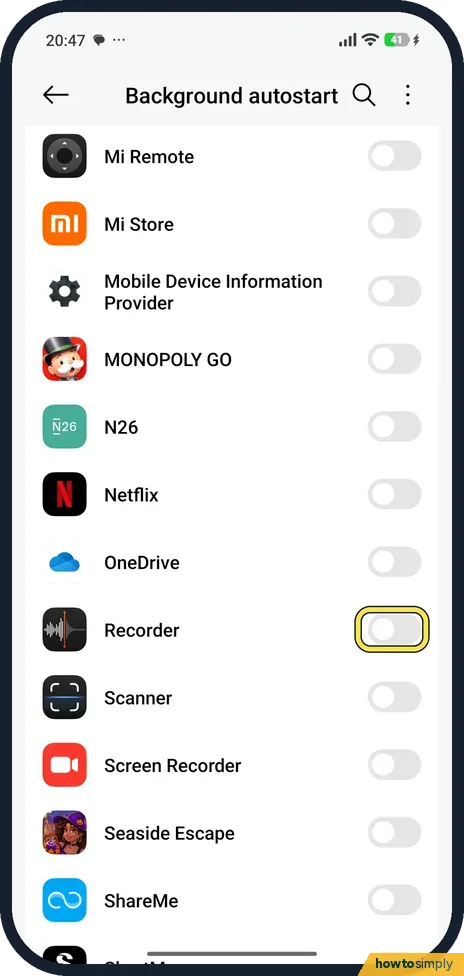
Turn the app's switch on
Tap the grey switch next to the app.
- 4
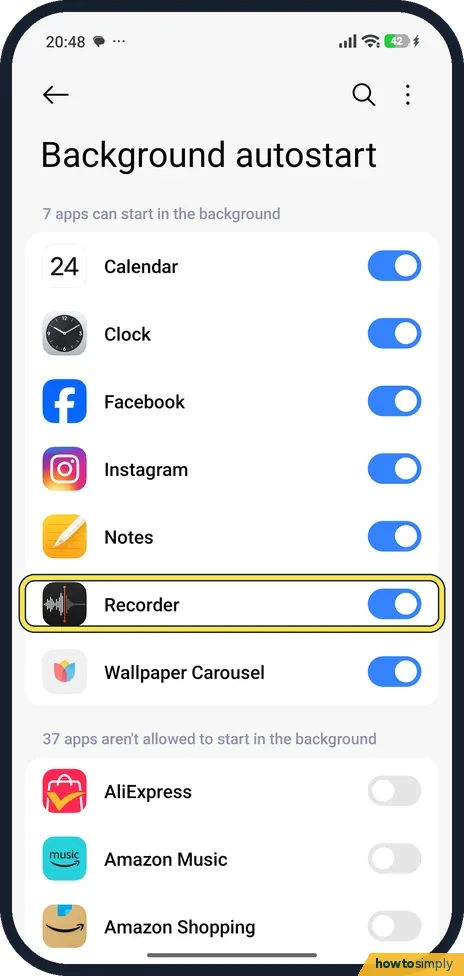
Check that it moved up
The app moves to the top list. Ours then said 7 apps can start in the background.
If you do not see this option
- No Autostart on the App info page? Older MIUI guides say to open the app's App info and turn on Autostart there. On our HyperOS 3 phone, App info has Storage, Network access, Power, Permissions and Notifications, but no Autostart row. Use Settings, Apps, Background autostart instead. Xiaomi's help page for the Xiaomi 14T reaches the same list through Apps, Permissions. Source: How to switch on/off the Background autostart for APPs
If this does not work
- App still stops after a while? Battery saver can still close it. Set the app to No restrictions under App info, Power: Xiaomi closing apps in the background? 3 settings to check.
- App closes when you clear Recents? Lock it in Recents: touch and hold its card and tap the padlock.
- App says HyperOS blocked it, but autostart is on? Xiaomi's user guide warns that some apps may wrongly say HyperOS has stopped them from starting. Check the app's other permissions too, such as Notifications, under Settings, Apps and the app.
- App only fails after a restart? That is the case autostart is for. Xiaomi's guide says the feature lets apps start automatically when you turn on the phone. If it still fails, open the app once after restarting.
Good to know
Autostart lets more apps run in the background, which uses some battery. Turn it on only for apps that need it.
Once allowed, the app can start itself after a restart and wake in the background to sync or receive messages. Expect slightly more battery and data use from that app. Nothing else changes, and the app's data and permissions stay the same.
To undo it, open Background autostart and turn the app's switch off; it moves back to the list of apps that are not allowed. If an app that needs to run behaves badly afterwards, its notifications may be the real issue. See turn off notifications for an app to check its notification switch.
About this guide
- Device
- Android
- Shown on
- Xiaomi Redmi Note 15 Pro 5G (25080RABDG), HyperOS 3.0.308.0, Android 16
- App
- Settings
- Path
- Settings › Apps › Background autostart
- Real screenshots
- 4 of 4 steps
- Checked
- October 2026
- Sources
- 2 official, 1 other, linked below
Sources
Links checked October 2026. Menus and features can change with updates.Spotted a mistake? Menus change with updates, and we want every step to match your screen. Email us about this page or use the contact form. We read every report, and fixes are listed on What changed.
Liked this guide?
Follow us for new guides and short how-to videos.
Did this guide work for you?
Sorry about that. What happened?