XIAOMI REDMI
How to set up a hotspot on a Xiaomi phone (HyperOS 3)
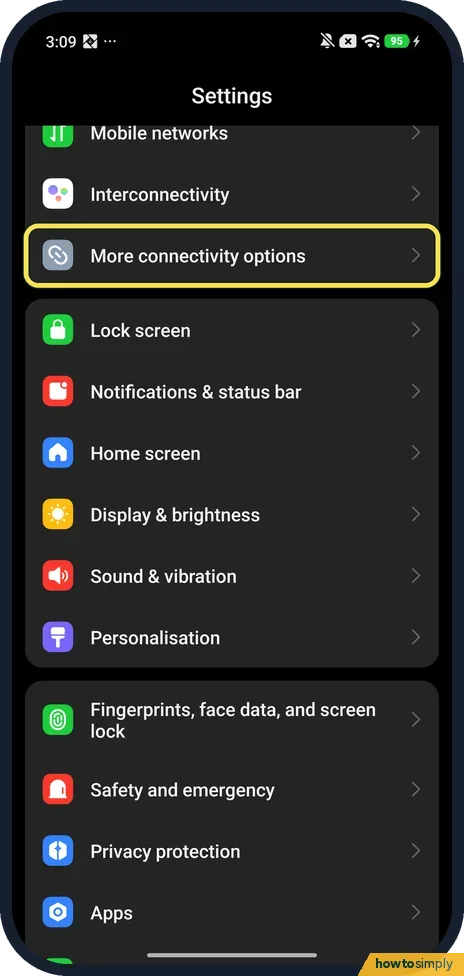
Open Settings, More connectivity options, Portable hotspot. Tap Set up portable hotspot to check the network name and password, then turn on Portable hotspot at the top. Turn off hotspot automatically, on by default on ours, switches it off when no devices are connected.

6 of 6 steps show a real screenshot from our Redmi Note 15 Pro 5G. Each step was checked against the maker's own instructions, linked at the end.
Steps
- 1
Open More connectivity options
Open Settings and tap More connectivity options. On our phone Portable hotspot was inside it, not on the first Settings screen.
- 2
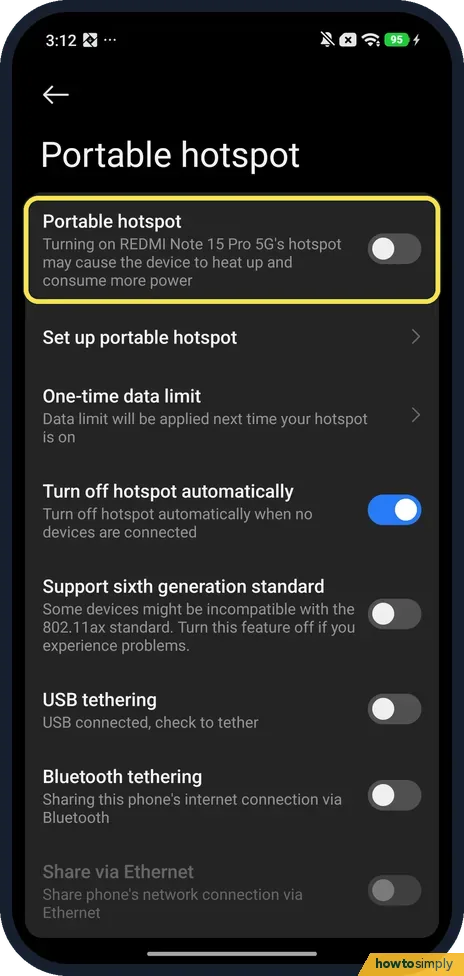
Find the Portable hotspot switch
Tap Portable hotspot. The switch at the top turns sharing on; it was off on ours. Its note warns that the hotspot may cause the device to heat up and consume more power. Set it up first with the rows below.
- 3
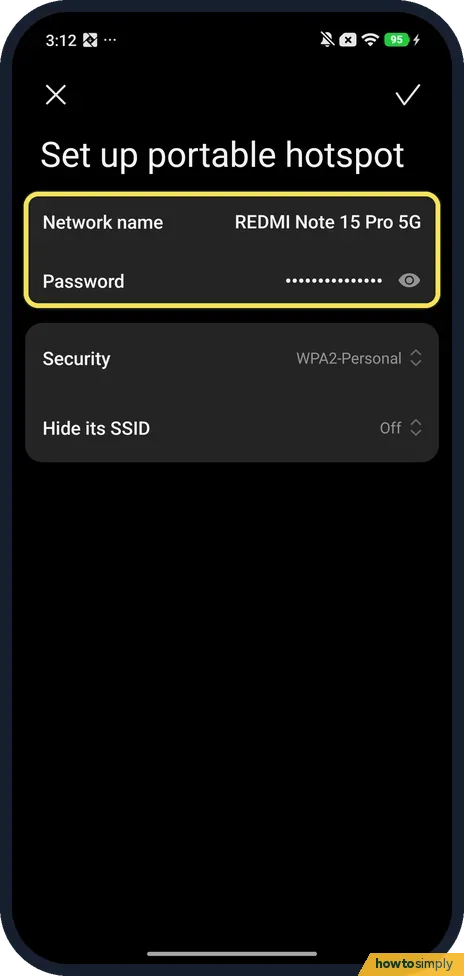
Check the name and password
Tap Set up portable hotspot. Ours: Network name REDMI Note 15 Pro 5G, the Password shown as dots with an eye to reveal it, Security WPA2-Personal and Hide its SSID Off. Change what you want and tap the tick at the top right.
- 4
Set a data limit if you need one
One-time data limit, the next row, applies to the next time the hotspot is on. Ours was off, with Size 50.0 MB and When exceeded Turn off and notify.

- 5
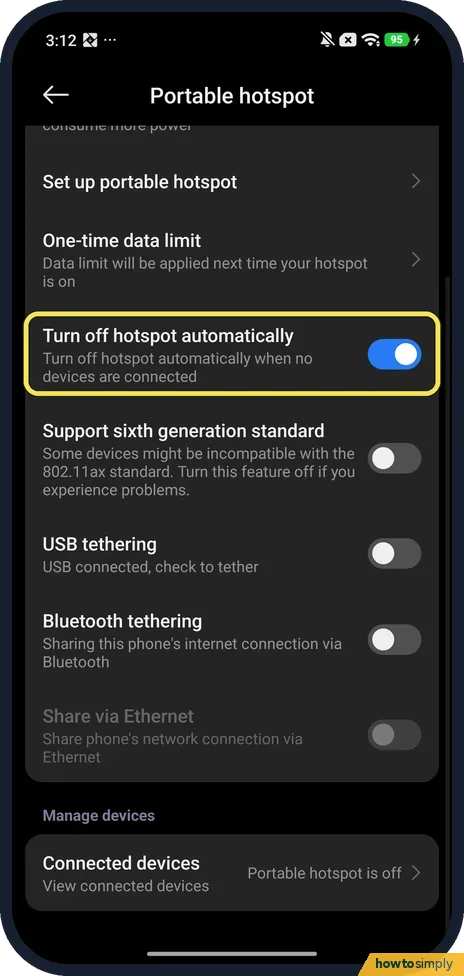
Decide on Turn off hotspot automatically
Back on Portable hotspot, Turn off hotspot automatically was on: it turns the hotspot off when no devices are connected. There was no choice of minutes on ours, only the switch. Turn it off if the hotspot keeps switching itself off.
- 6
Limit how many devices can join, then turn it on
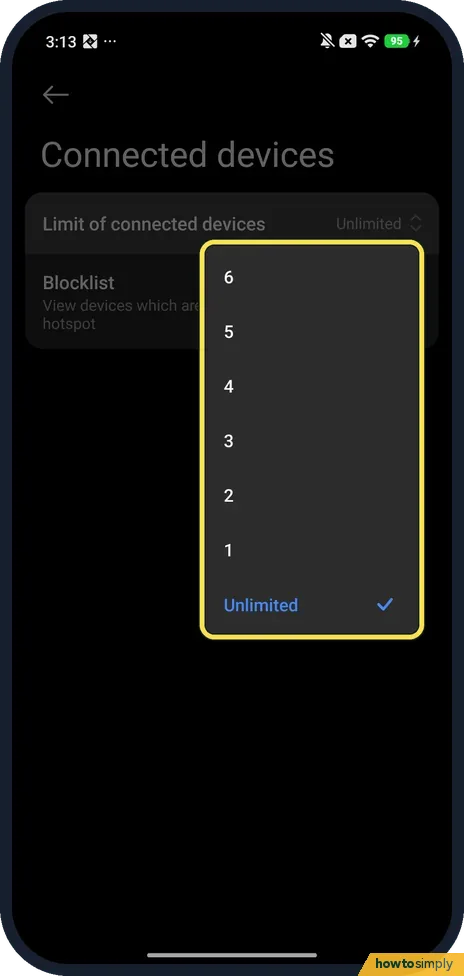
At the bottom, Connected devices has Limit of connected devices: Unlimited on ours, or 6 down to 1. Then go back to the top and turn on the Portable hotspot switch, and join the network from the other device with the password.
If you do not see this option
- Can't find Portable hotspot? Xiaomi gives the route Settings, Portable hotspot, and says there is a Hotspot tile in Control Centre too. On our phone with HyperOS 3.0.309.0 it was under More connectivity options; search Settings for hotspot if your list differs. Source: Generic User Guide for HyperOS 3.0
- Old laptop can't see it? Support sixth generation standard was off on ours. The page says some devices might be incompatible with the 802.11ax standard and to turn it off if you experience problems.
- No band or 5 GHz choice? Our Set up portable hotspot page had only Network name, Password, Security and Hide its SSID: no band selector.
If this does not work
- Hotspot turns itself off? Turn off hotspot automatically was on on ours. Turn it off to keep the hotspot on with nothing connected.
- Someone you don't want keeps joining? Connected devices has a Blocklist: View devices which aren't allowed to connect to this hotspot. Ours was empty, with an Add button at the bottom. Changing the password also stops them.
- No internet on the other device? Google says your carrier may limit hotspot use, and mobile data must be on.
- Laptop connects but pages will not load? Check the phone itself can browse on mobile data, with Wi-Fi off on the phone. If it cannot, the problem is the phone's data, not the hotspot.
- Battery drains fast while sharing? Google advises plugging the phone in while tethering and turning tethering off when you are done.
- Cast will not turn on? Xiaomi's user guide says you need to turn off Portable hotspot before you enable Cast.
Good to know
Mobile data not working? Xiaomi mobile data not working.
While the hotspot is on, everything the other devices do counts against your mobile data allowance, and the phone runs warmer and uses more battery. Google says some carriers limit or charge extra for tethering, so check your plan. Turning Portable hotspot off ends sharing at once; the name and password you set are kept for next time.
Google says up to 10 devices can share a Wi-Fi hotspot, and that a phone can also share by USB cable or Bluetooth. To let someone join a normal Wi-Fi network instead, see share a Wi-Fi password from a Xiaomi phone.
About this guide
- Device
- Android
- Shown on
- Xiaomi Redmi Note 15 Pro 5G (25080RABDG), HyperOS 3.0.309.0, Android 16
- App
- Settings
- Path
- Settings › More connectivity options › Portable hotspot › Set up portable hotspot
- Real screenshots
- 6 of 6 steps
- Checked
- October 2026
- Sources
- 2 official, linked below
Sources
Links checked October 2026. Menus and features can change with updates.Spotted a mistake? Menus change with updates, and we want every step to match your screen. Email us about this page or use the contact form. We read every report, and fixes are listed on What changed.
Liked this guide?
Follow us for new guides and short how-to videos.
Did this guide work for you?
Sorry about that. What happened?