
macOS 27 compared with macOS 26: We rewrote this guide on macOS 27.0.1 (MacBook Neo): it now has 5 steps instead of 8. The macOS 26 page keeps the steps and screenshots as they were.
howtosimply.com/guides/mac-won-t-connect-to-wi-fi-8-fixes-that-work/ · Checked October 2026 · MacBook Neo · macOS 27.0.1
In this guide
Switch Wi-Fi off and on under System Settings, Wi-Fi, and restart the Mac. Then check that the date and time are set automatically, disconnect any VPN for a test and install macOS updates.
5 of 5 steps with real screenshots · 1 official source below
- Device
- Mac
- Shown on
- macOS 27.0.1 (MacBook Neo)
- App
- System Settings
- Real screenshots
- 5 of 5 steps
- Checked
- October 2026
- Sources
- 1 official, linked below
Step by step
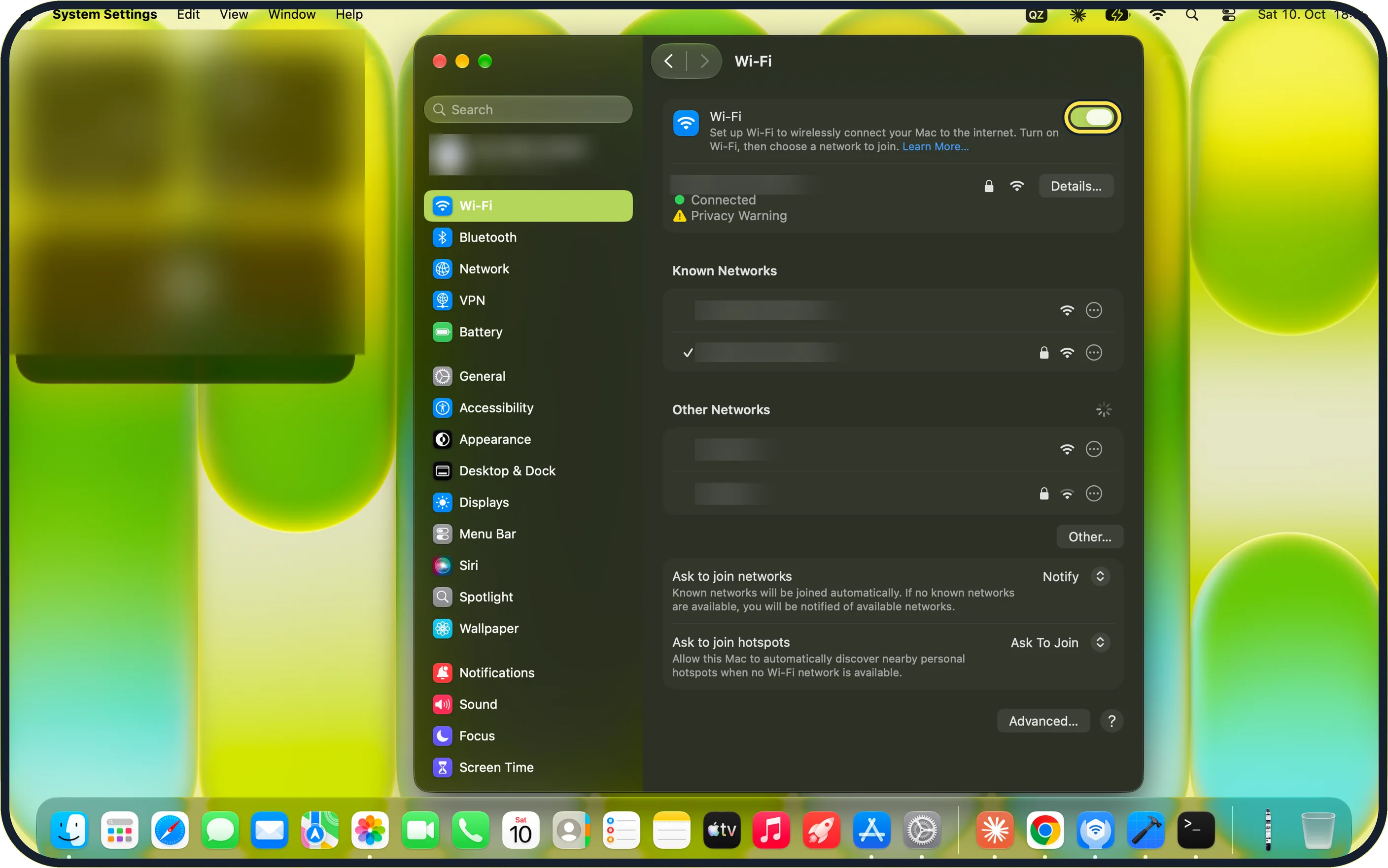
Zoomed in on the setting. Tap to see the whole screenTap the picture to see it full size Turn Wi-Fi off and on
Open System Settings, click Wi-Fi in the sidebar and switch Wi-Fi off. Wait ten seconds and switch it on again. On our MacBook Neo the Wi-Fi page shows the switch at the top, the joined network as Connected with a Privacy Warning, and Known Networks and Other Networks below.
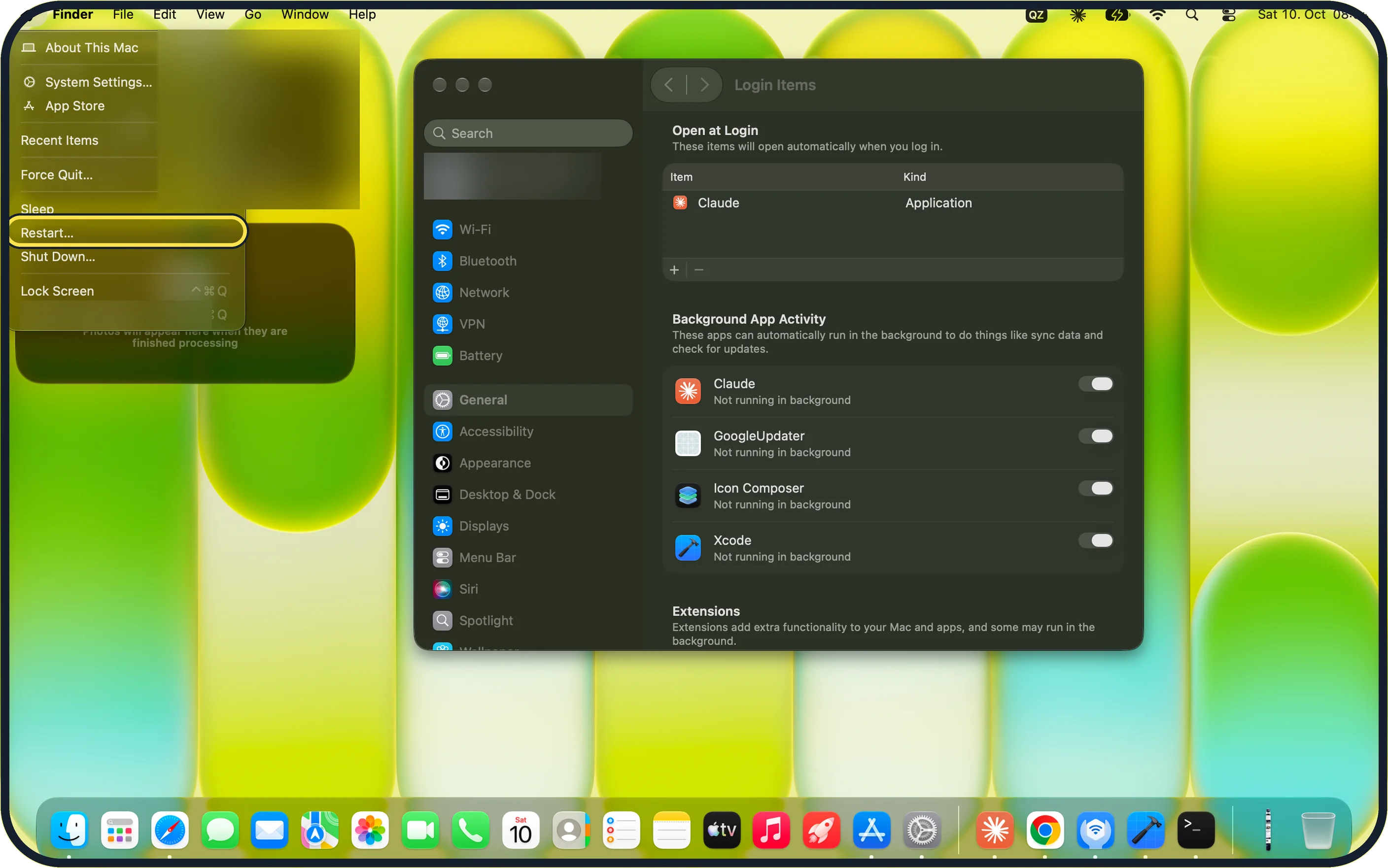
Zoomed in on the setting. Tap to see the whole screenTap the picture to see it full size Restart the Mac
Choose Apple menu, Restart…, then click Restart. On our MacBook Neo, Restart… sits between Sleep and Shut Down… in the Apple menu.
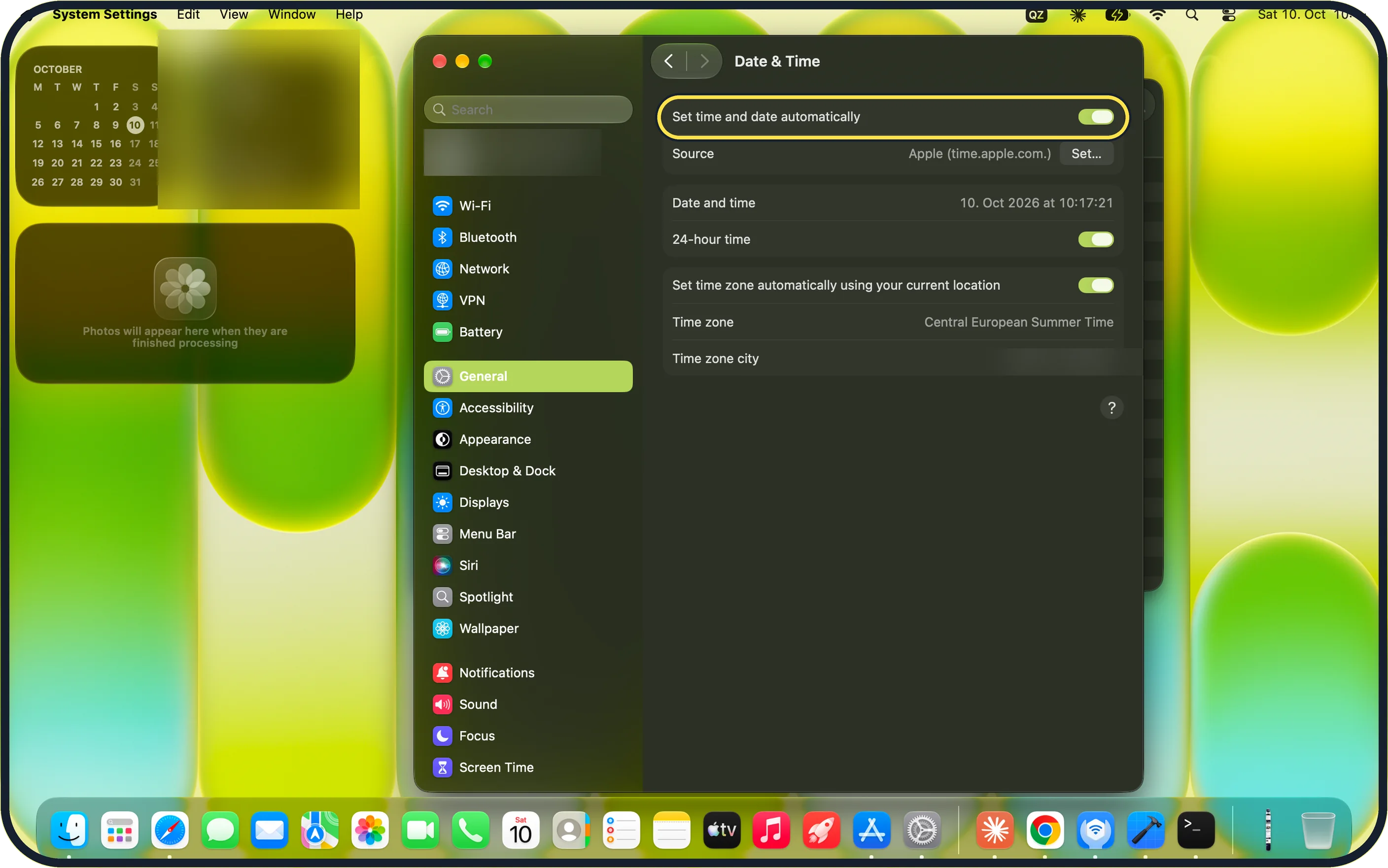
Zoomed in on the setting. Tap to see the whole screenTap the picture to see it full size Check the date and time
Open System Settings, General, Date & Time and switch on Set time and date automatically. On our MacBook Neo it is on, with Source: Apple (time.apple.com.).
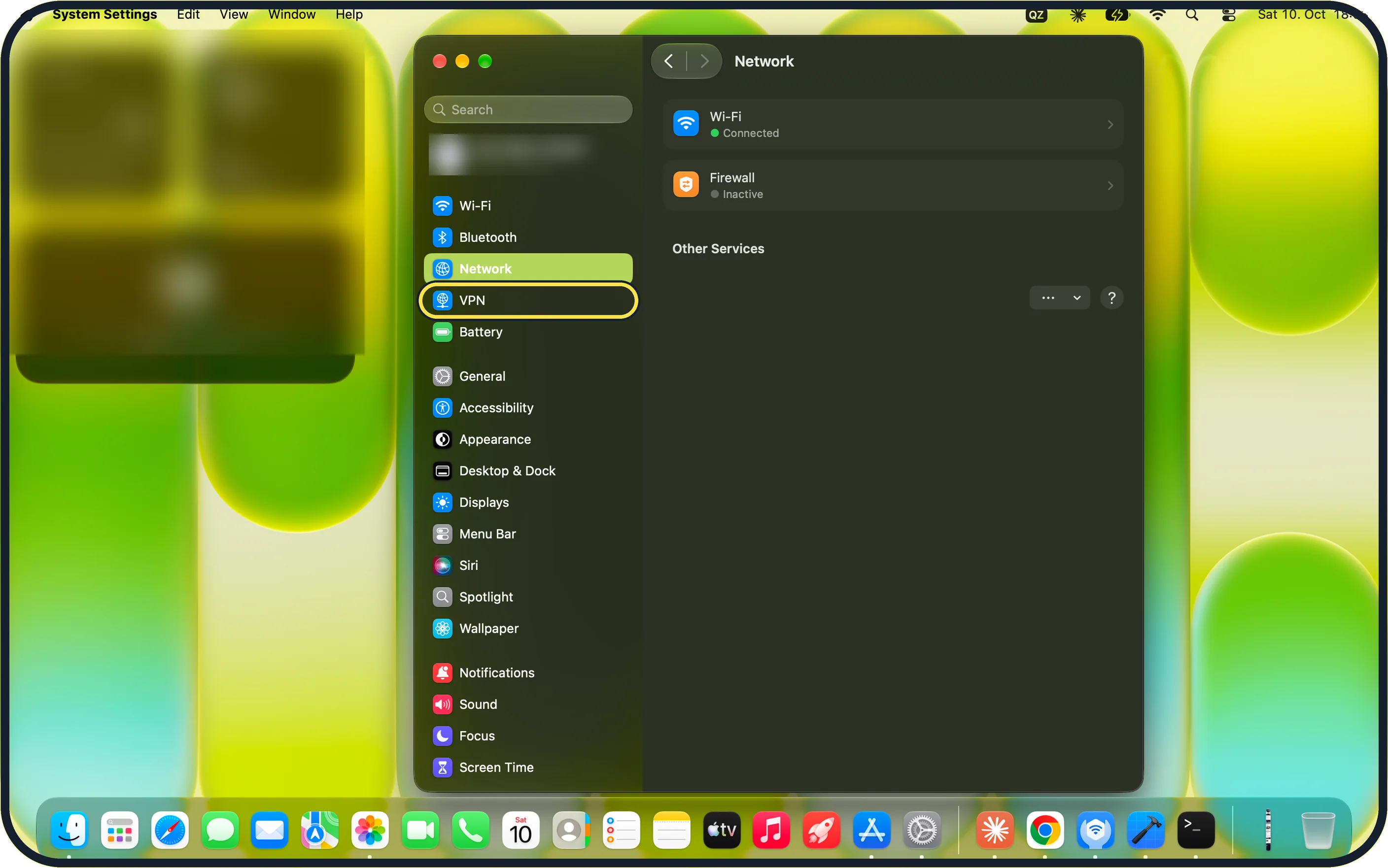
Zoomed in on the setting. Tap to see the whole screenTap the picture to see it full size Turn off VPN for a test
Click VPN in the System Settings sidebar and disconnect any VPN, then try Wi-Fi again. Apple's Wi-Fi article says VPN or other network software could be affecting access to the internet. On our MacBook Neo, VPN is its own sidebar row directly under Network. The Network page lists Wi-Fi (Connected), Firewall (Inactive) and Other Services, with no VPN entry when none is set up.
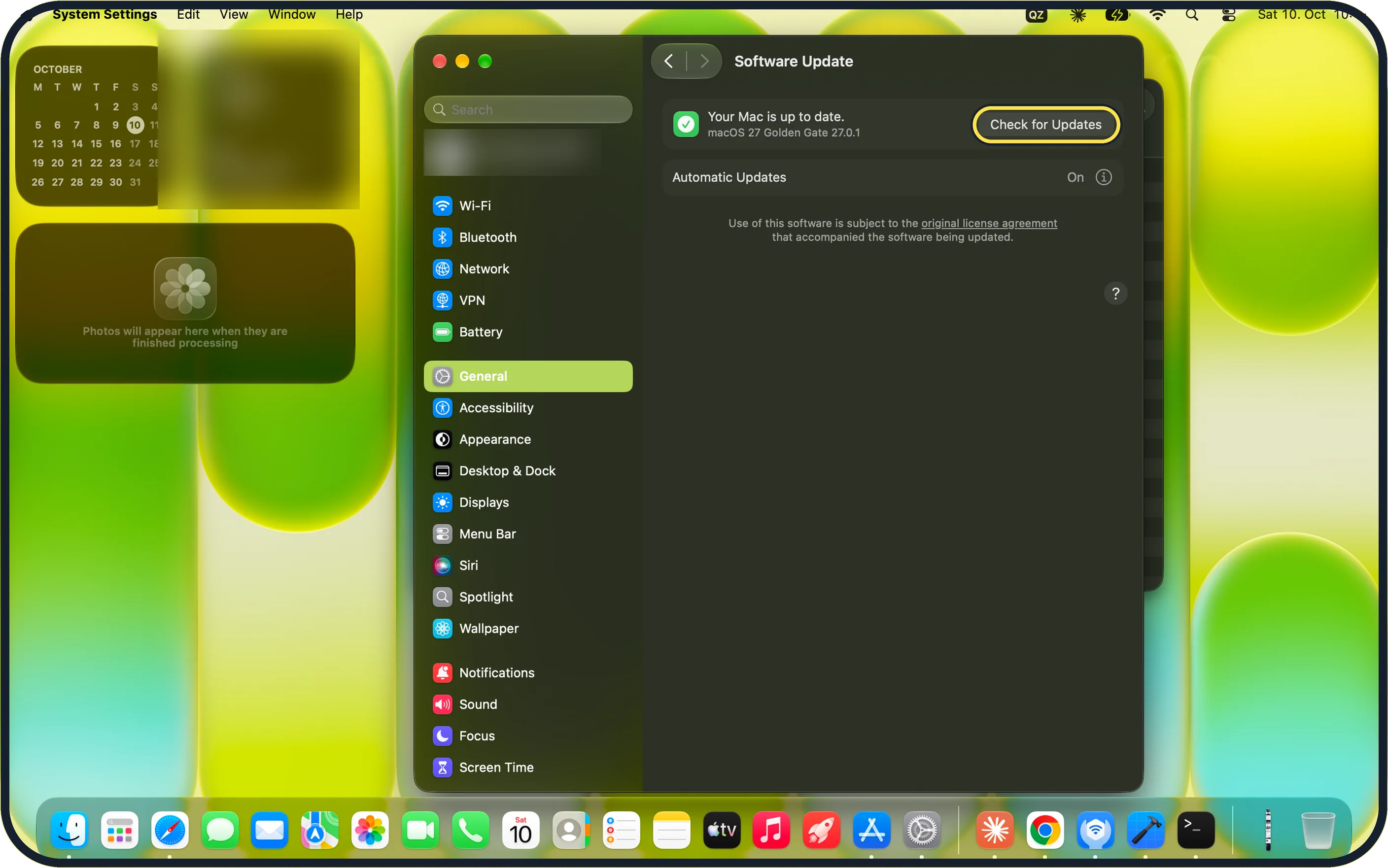
Zoomed in on the setting. Tap to see the whole screenTap the picture to see it full size Update macOS
Get online another way, for example through your iPhone's Personal Hotspot, then open System Settings, General, Software Update and click Check for Updates. Our MacBook Neo reports: Your Mac is up to date, macOS 27 Golden Gate 27.0.1.
What we saw on our device
- Turn Wi-Fi off and on: On our MacBook Neo the Wi-Fi page shows the switch at the top, the joined network as Connected with a Privacy Warning, and Known Networks and Other Networks below.
- Restart the Mac: On our MacBook Neo, Restart… sits between Sleep and Shut Down… in the Apple menu.
- Check the date and time: On our MacBook Neo it is on, with Source: Apple (time.apple.com.).
- Turn off VPN for a test: On our MacBook Neo, VPN is its own sidebar row directly under Network.
If you do not see this option
- No Wi-Fi switch on the Network page On our MacBook Neo, Network shows Wi-Fi as a row (step 4): click the row to reach the Wi-Fi switch. Wi-Fi also has its own row at the top of the System Settings sidebar (step 1).
- No VPN to disconnect Our MacBook Neo shows no VPN entry on the Network page when no VPN is configured (step 4). VPN apps from other makers can have their own menu-bar icon: quit the app for the test.
If this does not work
- Check Wi-Fi Recommendations Apple's Wi-Fi article says to check the Wi-Fi menu for an item named Wi-Fi Recommendations. If it appears, choose it for advice on the problem it found. Source: If your Mac isn't connecting to the internet over Wi-Fi
- Run Wireless Diagnostics Apple's Wi-Fi article: press and hold Option while clicking Wi-Fi in Control Centre or the menu bar, then choose Open Wireless Diagnostics and follow the steps. Source: If your Mac isn't connecting to the internet over Wi-Fi
- The network is joined but pages do not load On our MacBook Neo the Wi-Fi page marks the joined network with a tick under Known Networks (step 1). If yours is joined and pages still fail, restart the router: unplug it for 30 seconds. Apple's Wi-Fi article also says to install the router's latest firmware, as its maker recommends, and that restarting the Mac renews its IP address. Source: If your Mac isn't connecting to the internet over Wi-Fi
- Wi-Fi Recommendations appears in the Wi-Fi menu or Control Centre. Apple says this means the Mac has found a problem and has advice for it. Choose it to read the advice. It is not offered on a personal hotspot or on networks with enterprise security such as WPA2 Enterprise. Source: If your Mac isn't connecting to the internet over Wi-Fi
- The Mac gets online on another network, such as a phone hotspot. Then the Mac is probably fine and the first network is the problem. Restart the router, install its firmware updates if you manage it, or ask your internet provider or network administrator about an outage. Source: If your Mac isn't connecting to the internet over Wi-Fi
- The Mac joins Wi-Fi but no page loads. Restart the Mac: Apple says it then renews its internet address. Check that the date and time are right, and switch off VPN or security software for a test, because it can block the connection. Source: If your Mac isn't connecting to the internet over Wi-Fi
About this guide
Check first whether other devices work on the same Wi-Fi. If they do, the Mac needs attention. If nothing connects, restart the router or contact your provider.
Screenshots: MacBook Neo, macOS 27.0.1, dark mode.
Good to know
If other devices on the same Wi-Fi fail as well, restart the router: unplug it for 30 seconds and give it a few minutes to come back.
Wi-Fi that is fine near the router and poor elsewhere is a signal problem, not a Mac problem.
In short: Wi-Fi off and on, restart, date and time, VPN off, update macOS, Wireless Diagnostics.
Links checked in October 2026. Menus and features can change after software updates. These steps match the version named at the top.
Did this guide work for you?
Sorry about that. What happened?