ONEPLUS
How to use the camera timer on a OnePlus (OxygenOS 16)

In short
Open the Camera and tap the three lines at the top right. Set Timer to 3 s or 10 s, then tap the shutter. The same menu changes the aspect ratio.
3 of 3 steps show a real screenshot from our Nord 5. Each step was checked against the maker's own instructions, linked at the end.
Steps
- 1
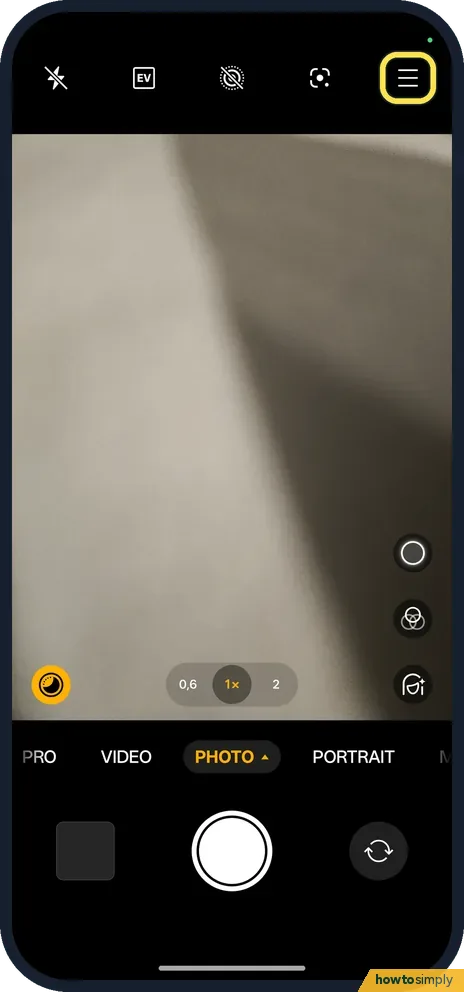
Open the camera menu
Tap the three lines at the top right.
- 2
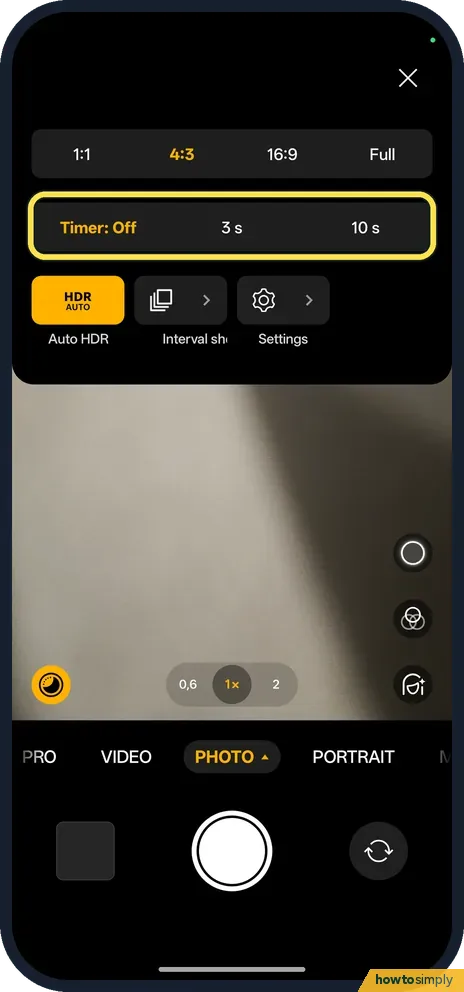
Pick a timer
The Timer row has Off, 3 s and 10 s.
- 3
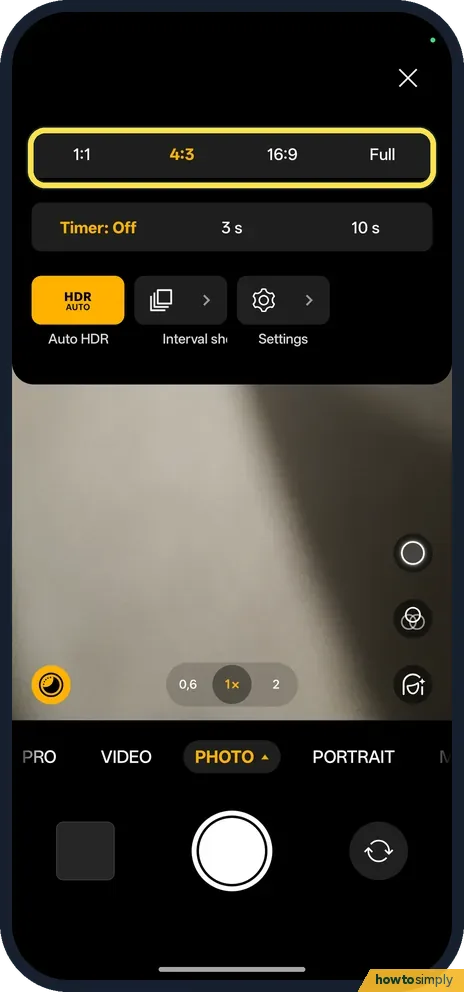
Change the shape too
The row above sets the aspect ratio: 1:1, 4:3, 16:9 or Full.
If you do not see this option
- No Timer row? It is in the three-line menu in Photo mode on ours, below the aspect ratio row.
- On OxygenOS 14? The OnePlus manual says aspect ratio, timer and flash are set from the Camera screen itself. Source: OxygenOS 14.0 User Manual
If this does not work
- Timer stays on? Set it back to Off in the same menu.
- Want a series of photos? Interval shooting is in the same menu, next to Auto HDR.
- Photo still blurry with the timer? The timer removes the shake from your finger, not movement of the phone or the subject. Rest the phone on something flat and solid, and ask people to hold still until the photo is taken.
- Group shot framed wrong after the countdown? Set up the shot with everyone in place first, using a spare person or the grid lines, then start the timer and step in. The phone cannot reframe once the countdown starts.
- Dark scene still soft? The manual describes a Night mode with a Tripod option that improves quality when the phone is held perfectly still. Pair that with a stable surface rather than relying on the timer alone.
Good to know
Turn on camera grid lines on a OnePlus.
The timer stays on until you set it back to Off, so the next photo you take will wait too. That can be useful for a series of selfies, but switch it off when you are done so a quick snapshot is not delayed. The timer has no effect on photo quality, battery or storage.
There are other ways to take a photo without touching the screen. The OnePlus manual lists Shooting methods in the Camera settings, with touch or gesture capture, and a Volume button action setting that can make the volume keys work as the shutter. For straighter group photos, turn on grid lines first.
About this guide
- Device
- Android
- Shown on
- OnePlus Nord 5 (CPH2709), OxygenOS 16.0.5.1201, Android 16
- App
- Camera
- Path
- Camera › Menu › Timer
- Real screenshots
- 3 of 3 steps
- Checked
- October 2026
- Sources
- 1 official, linked below
Sources
Links checked October 2026. Menus and features can change with updates.Spotted a mistake? Menus change with updates, and we want every step to match your screen. Email us about this page or use the contact form. We read every report, and fixes are listed on What changed.
Liked this guide?
Follow us for new guides and short how-to videos.
Did this guide work for you?
Sorry about that. What happened?