ONEPLUS
How to turn off the camera shutter sound on a OnePlus (OxygenOS 16)

In short
Open the Camera, tap the three lines at the top right, then Settings. Switch Shutter sound off.
3 of 3 steps show a real screenshot from our Nord 5. Each step was checked against the maker's own instructions, linked at the end.
Steps
- 1
Open the camera menu
Tap the three lines at the top right.

- 2
Tap Settings
The gear is in the menu.
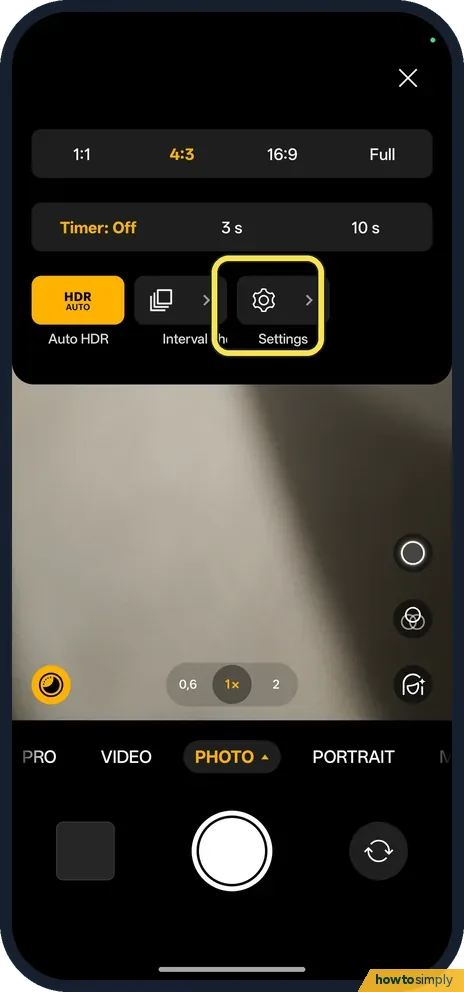
- 3
Switch Shutter sound off
It is under General.
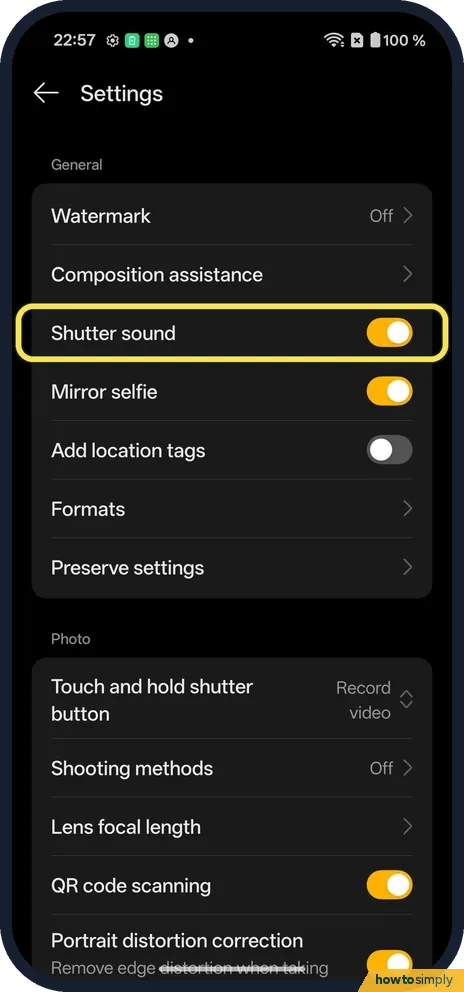
If you do not see this option
- Looking in the phone's Settings? The switch is in the Camera's own Settings, from the three lines at the top right.
- Row not where you expect? On ours it is under General, between Composition assistance and Mirror selfie.
If this does not work
- Switch missing? Scroll the Camera Settings list from the top; the General group comes first on ours.
- On OxygenOS 14? The OnePlus manual lists Shutter sound in the Camera settings too.
- Still hear a click in another app? The switch belongs to the OnePlus Camera app only. Apps with their own camera screen, such as messaging or social apps, handle sound themselves, so look in that app's own settings.
- Switch will not move? Close the Camera from the recent apps screen and open it again. If the switch still cannot be changed, restart the phone and try once more.
- Switch turned itself back on? Open Camera Settings again after a major software update and check the row. If it keeps changing, restart the phone and set it once more.
- Shutter sound row not shown at all? The OnePlus manual notes that camera features may vary across models and versions. If the row is missing on your phone, the option may not be offered for that model or software version.
Good to know
Turn off mirrored selfies on a OnePlus.
Once the switch is off, the Camera takes photos silently until you turn it back on. To undo it, open the Camera, tap the three lines, then Settings, and switch Shutter sound on again. Nothing else changes: photo quality, flash and the timer behave the same, and the setting does not affect battery life.
The same Camera Settings page holds other options worth a look. The manual lists Grid and guides for composition, Record location for adding where a photo was taken, and Shooting methods for touch or gesture capture. If you share photos online, it is worth knowing how to remove location from a photo before sharing.
About this guide
- Device
- Android
- Shown on
- OnePlus Nord 5 (CPH2709), OxygenOS 16.0.5.1201, Android 16
- App
- Camera
- Path
- Camera › Menu › Settings › Shutter sound
- Real screenshots
- 3 of 3 steps
- Checked
- October 2026
- Sources
- 1 official, linked below
Sources
Links checked October 2026. Menus and features can change with updates.Spotted a mistake? Menus change with updates, and we want every step to match your screen. Email us about this page or use the contact form. We read every report, and fixes are listed on What changed.
Liked this guide?
Follow us for new guides and short how-to videos.
Did this guide work for you?
Sorry about that. What happened?