ONEPLUS
How to reset network settings on a OnePlus (OxygenOS 16)

In short
Go to Settings, System & update, Back up & reset, Reset phone, and tap Reset network and Bluetooth settings. Tap Reset to confirm. Wi-Fi, Bluetooth and mobile network settings are reset; your apps and files stay.
4 of 4 steps show a real screenshot from our Nord 5. Each step was checked against the maker's own instructions, linked at the end.
Steps
- 1
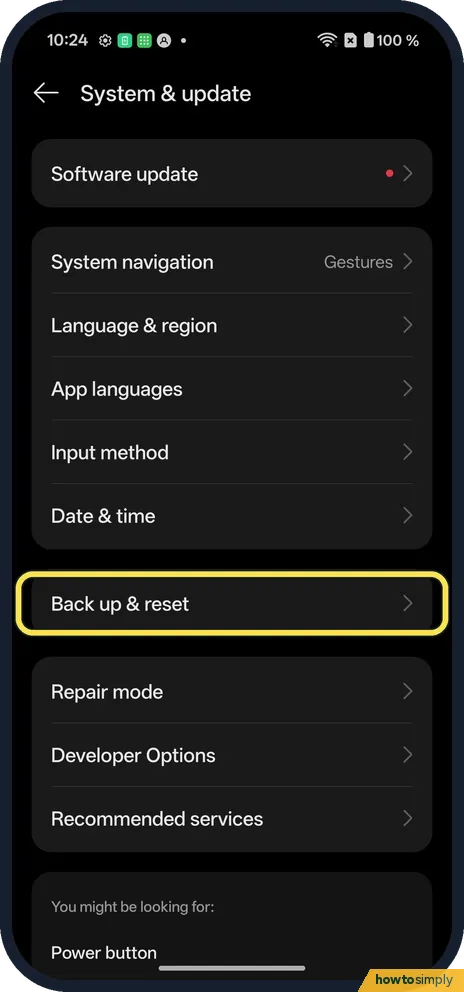
Open Back up & reset
Open Settings, System & update, and tap Back up & reset.
- 2
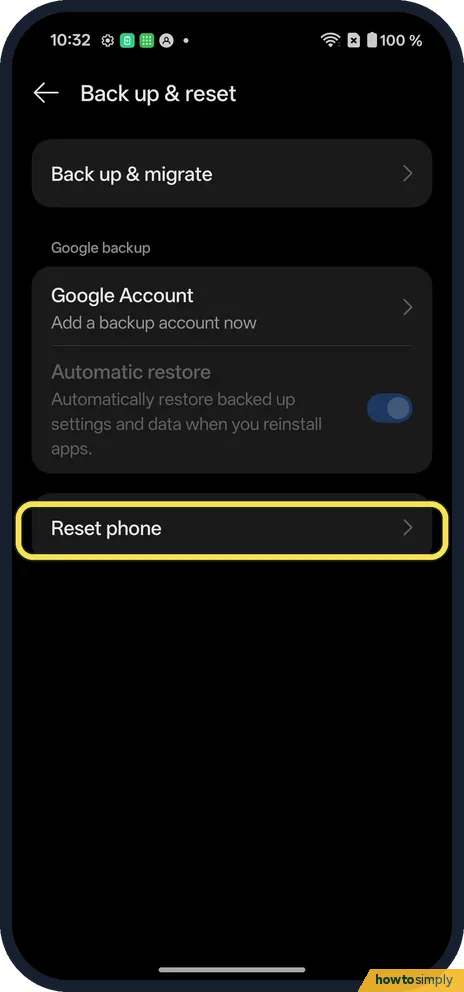
Tap Reset phone
It is in its own box below the Google backup section.
- 3
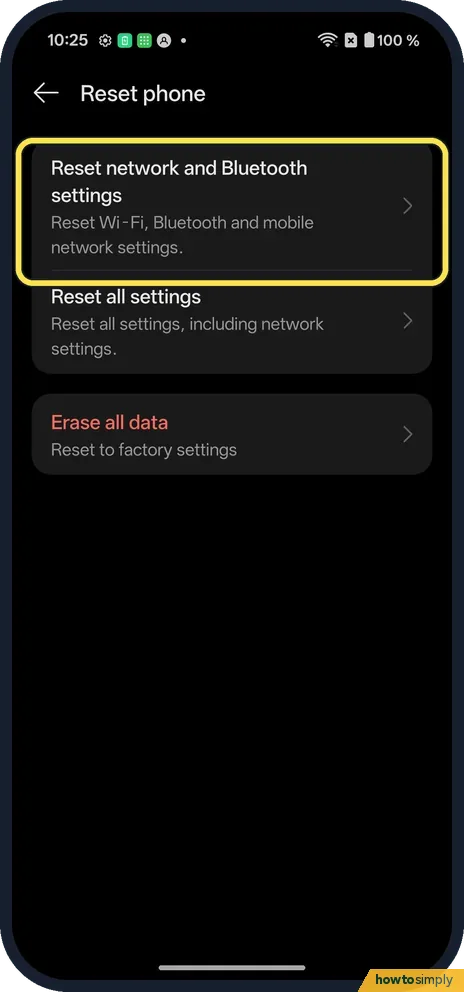
Tap Reset network and Bluetooth settings
It is the first of three. Its line says Reset Wi-Fi, Bluetooth and mobile network settings.
- 4
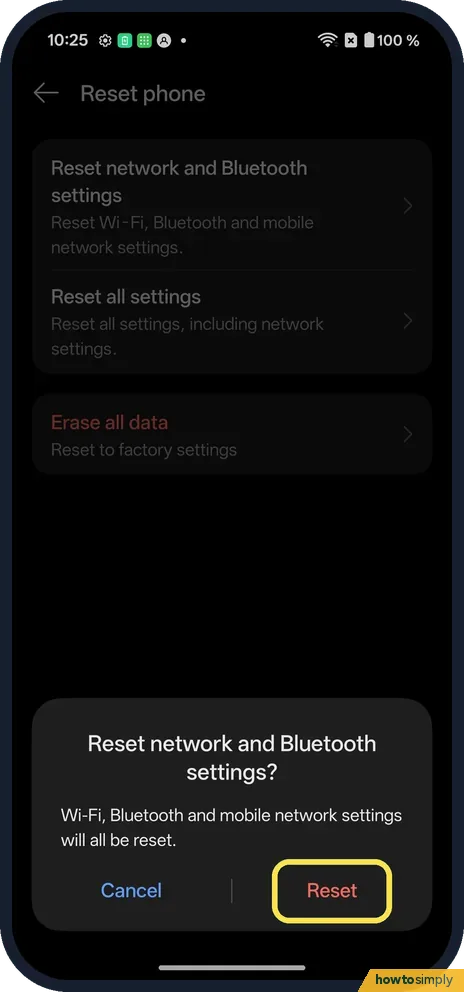
Tap Reset
The box says Wi-Fi, Bluetooth and mobile network settings will all be reset. We tapped Cancel.
If you do not see this option
- OxygenOS 14 (OnePlus manual)? The manual's path is Settings, Additional settings, Back up and reset, Reset phone. On our OxygenOS 16 phone it is under System & update. Source: OxygenOS 14.0 User Manual
- Asked for a password? The manual says you enter your lock screen password on the Reset phone page. Source: OxygenOS 14.0 User Manual
If this does not work
- Still no internet? Restart the phone and router. Check Private DNS: Private DNS on a OnePlus.
- Wi-Fi passwords gone? Saved networks are forgotten. Before you reset, share them to another phone: share a Wi-Fi password.
- No data indicator after the reset? Google's help says to look for a symbol such as 4G next to the signal bars, with Wi-Fi off. If none shows, you may be in a coverage gap; move or go outside, and contact your mobile provider if it happens often.
- Earbuds or car no longer connect? Bluetooth settings are part of the reset. Pair the device again from the Bluetooth page as if it were new, and remove the phone from the car's own list first if the car refuses.
- VPN or work network missing afterwards? Open your VPN app and check that it is connected. If your work or school set up Wi-Fi for you, ask them for the details again.
Good to know
Factory reset a OnePlus.
After the reset, the phone forgets saved Wi-Fi networks, and Bluetooth and mobile network settings go back to their defaults. Your apps, photos, messages and accounts are not touched. There is no undo: you reconnect to each Wi-Fi network, and pair a Bluetooth device again if it no longer connects. Expect a few minutes of setup at home and in the car.
If Wi-Fi still fails only at home, Google suggests restarting the router: unplug it, wait 30 seconds, plug it back in and wait for its lights. If the problem is one app, not the whole phone, see how to check an app's mobile data and Wi-Fi access before resetting anything.
About this guide
- Device
- Android
- Shown on
- OnePlus Nord 5 (CPH2709), OxygenOS 16.0.5.1201, Android 16
- App
- Settings
- Path
- Settings › System & update › Back up & reset › Reset phone
- Real screenshots
- 4 of 4 steps
- Checked
- October 2026
- Sources
- 4 official, linked below
Sources
Links checked October 2026. Menus and features can change with updates.Spotted a mistake? Menus change with updates, and we want every step to match your screen. Email us about this page or use the contact form. We read every report, and fixes are listed on What changed.
Liked this guide?
Follow us for new guides and short how-to videos.
Did this guide work for you?
Sorry about that. What happened?