XIAOMI REDMI
How to change battery mode and see battery use on a Xiaomi phone (HyperOS 3)
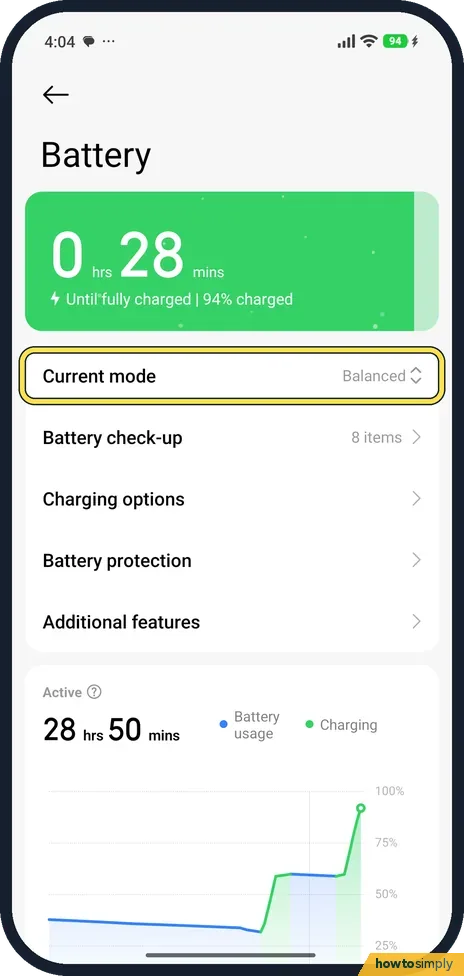
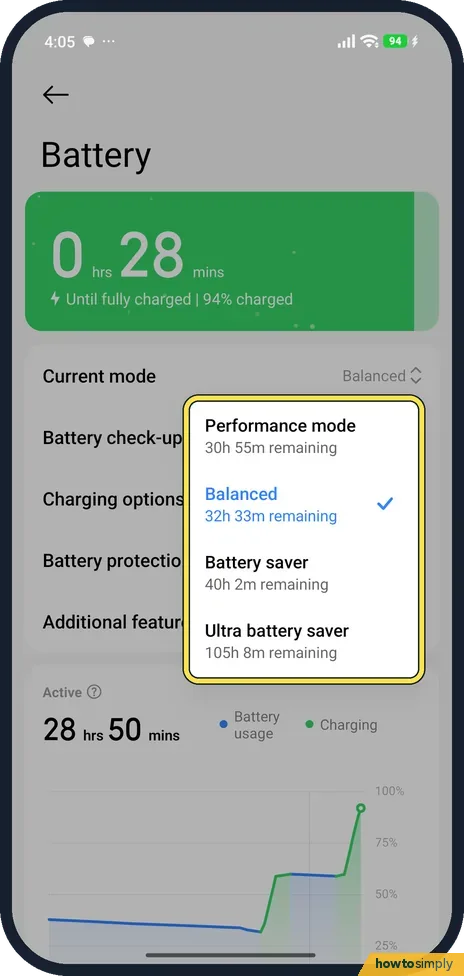
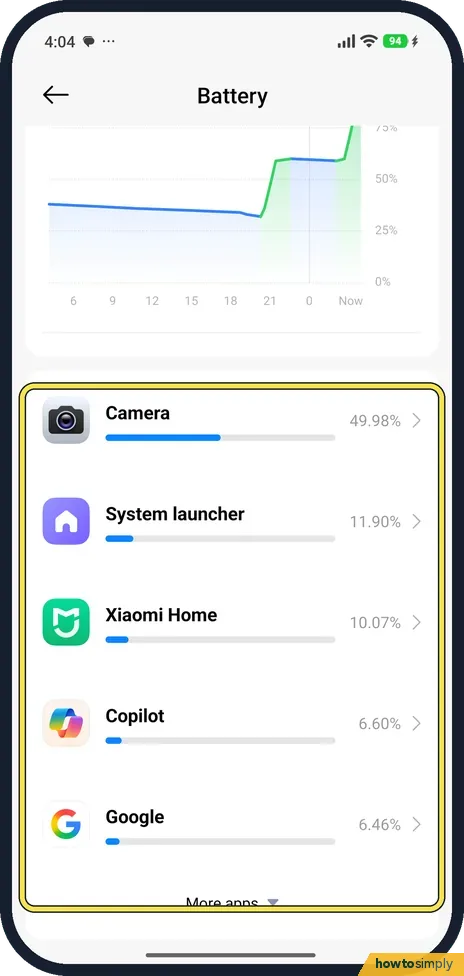
Go to Settings, Battery, tap Current mode and choose Performance mode, Balanced, Battery saver or Ultra battery saver. Scroll down the same page to see which apps used the most battery.

4 of 4 steps show a real screenshot from our Redmi Note 15 Pro 5G. Each step was checked against the maker's own instructions, linked at the end.
Steps
- 1
Open Battery
Go to Settings, Battery. The top shows the time left; ours was charging. Current mode was Balanced.
- 2
Choose a mode
Tap Current mode. Ours listed Performance mode, Balanced, Battery saver and Ultra battery saver, each with an estimate of the time left.
- 3
See which apps use the battery
Scroll down below the chart. Each app shows its share of battery use; on ours Camera came first. Tap an app for more.
- 4
Show the percentage in the status bar
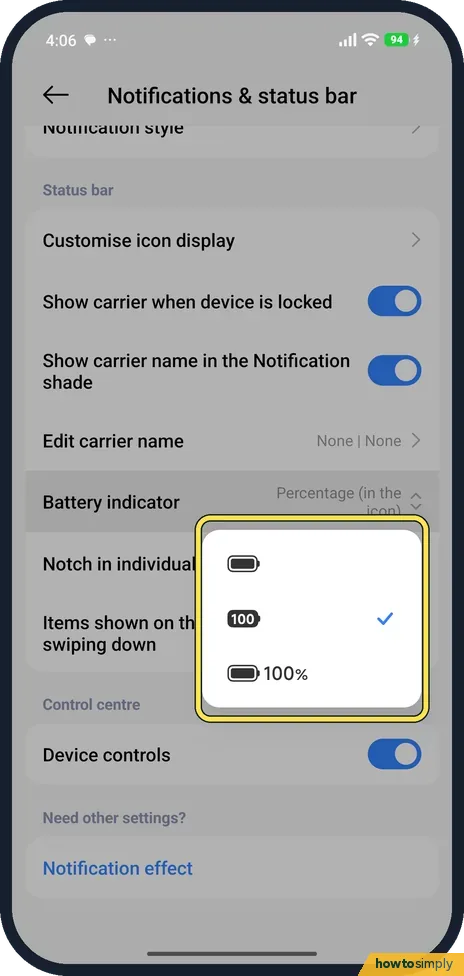
Go to Settings, Notifications & status bar, Battery indicator, and pick a style. Ours showed the percentage in the icon.
If you do not see this option
- No Battery in Settings? Xiaomi says battery settings are also in the Security app, under Battery, and that battery features may not be available on some models. Source: Generic User Guide for HyperOS 3.0
- Want it faster? Xiaomi says you can also turn on Battery saver and Ultra battery saver from Control Centre. Source: Generic User Guide for HyperOS 3.0
If this does not work
- An app drains the battery? Its row in the list shows its share. HyperOS can also close apps in the background: Xiaomi closing apps in the background.
- Apps stop working in Ultra battery saver? Xiaomi says it restricts most power-hungry features and keeps only calls, messages and network connectivity. Switch Current mode back to Balanced, which Xiaomi recommends for normal use.
- Emails and chats arrive late? Check whether Battery saver is on. Xiaomi says it reduces background activity of apps and stops sync, so new mail and some messages may only appear when you open the app. Switch back to Balanced when you need them on time.
- Want more detail than the percentages? Tap the line chart on the Battery page. Xiaomi's user guide says this shows the usage trend and the power each app used in more detail below it.
- Phone runs hot in Performance mode? Xiaomi says Performance mode increases performance but consumes more power, and extra power means extra heat. Use it for games or heavy apps, then go back to Balanced.
Good to know
Battery health and charge limit: how to check battery health on a Xiaomi phone.
A mode change takes effect at once and stays until you change it again, and the time-left estimate updates to match. Battery saver and Ultra battery saver trade features for runtime: sync, background activity and animations are cut back, and in Ultra battery saver only calls, messages and network connectivity carry on as normal. Performance mode does the opposite. None of the modes delete anything, and switching back to Balanced restores normal behaviour. The screen is usually one of the biggest users of power, so a shorter screen timeout or a darker theme can help on top of any mode: see how to change the screen timeout on a Xiaomi phone.
About this guide
- Device
- Android
- Shown on
- Xiaomi Redmi Note 15 Pro 5G (25080RABDG), HyperOS 3.0.308.0, Android 16
- App
- Settings
- Path
- Settings › Battery › Current mode
- Real screenshots
- 4 of 4 steps
- Checked
- October 2026
- Sources
- 1 official, linked below
Sources
Links checked October 2026. Menus and features can change with updates.Spotted a mistake? Menus change with updates, and we want every step to match your screen. Email us about this page or use the contact form. We read every report, and fixes are listed on What changed.
Liked this guide?
Follow us for new guides and short how-to videos.
Did this guide work for you?
Sorry about that. What happened?