GOOGLE PIXEL
How to use one-handed mode on a Google Pixel (Android 17)

In short
Open Settings, System, Gestures, One-handed mode, and turn on Use one-handed mode. Then swipe down on the bottom edge of the screen to pull the top half down. To exit, swipe up from the bottom or tap anywhere above the app.
5 of 5 steps show a real screenshot from our Pixel 10a. Each step was checked against the maker's own instructions, linked at the end.
Steps
- 1
Open One-handed mode
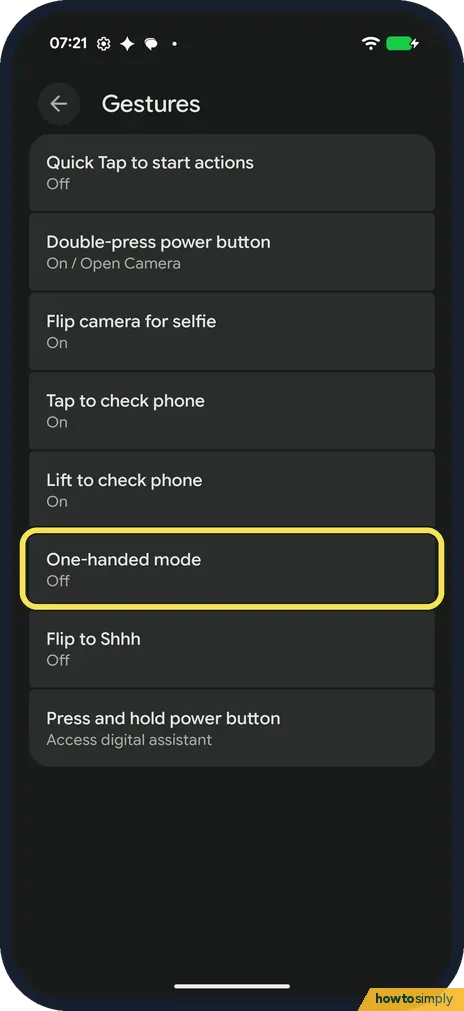
Open Settings, tap System, then Gestures. One-handed mode is in the list; ours said Off. Google says you can also search Settings for One-handed mode.
- 2
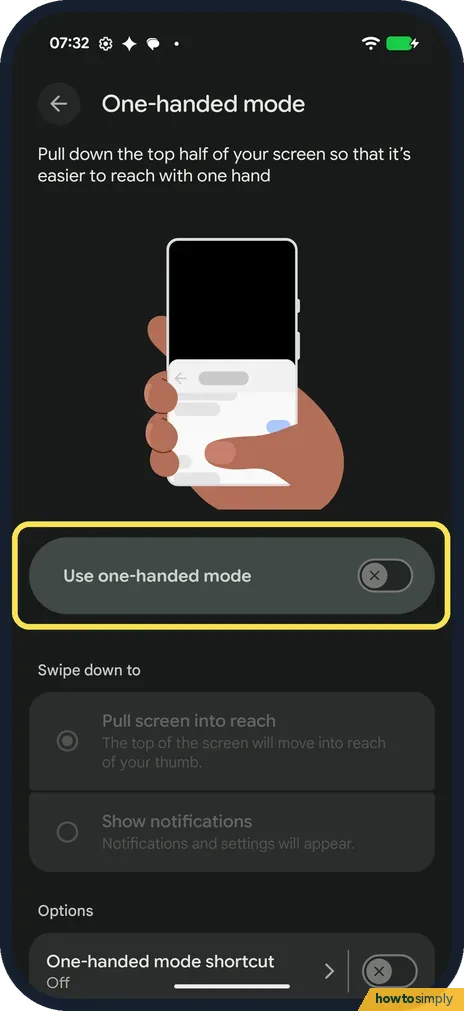
Turn on Use one-handed mode
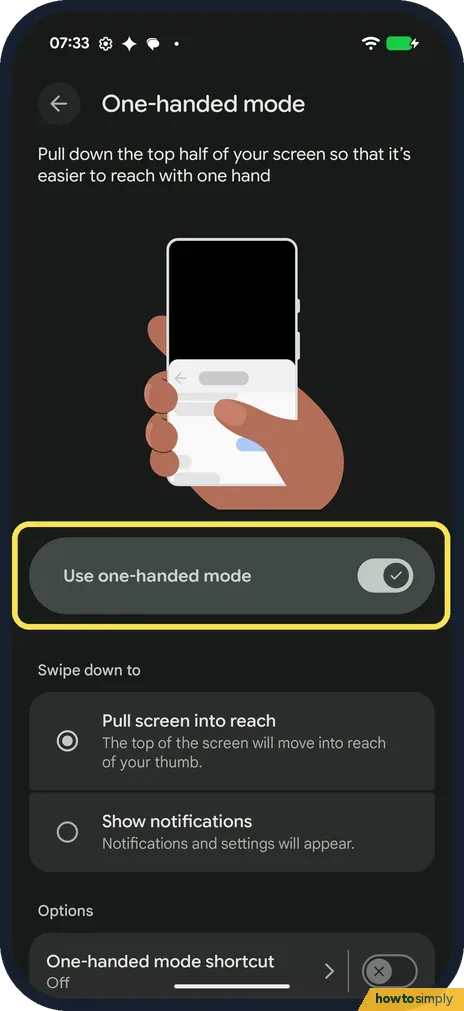
The page says it pulls down the top half of your screen so that it's easier to reach with one hand. Turn on Use one-handed mode.
- 3
Choose what the swipe does
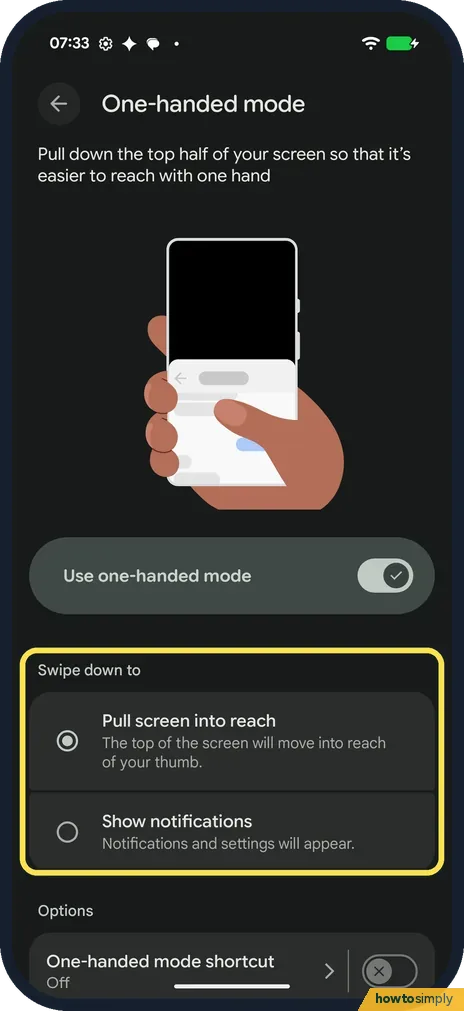
Under Swipe down to, pick Pull screen into reach (the top of the screen moves into reach of your thumb) or Show notifications (notifications and settings appear). We kept Pull screen into reach.
- 4
Swipe down on the bottom edge
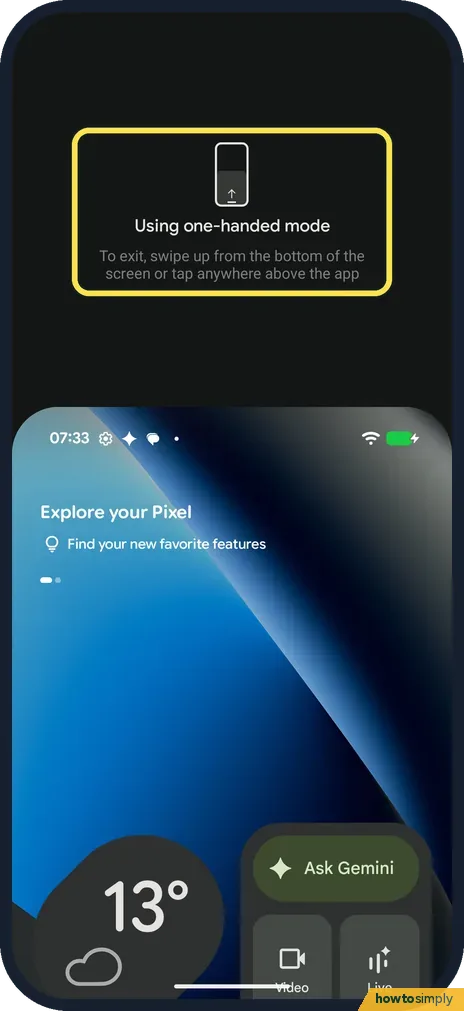
Make a short swipe down on the bottom edge of the screen. On ours the whole screen moved down and the top said Using one-handed mode. To get out of it, the screen says to swipe up from the bottom of the screen or tap anywhere above the app.
- 5
Turn it off again
To stop it, go back to the One-handed mode page and turn off Use one-handed mode. We did. With the switch off, the Swipe down to choices are greyed out.
If you do not see this option
- Not under Gestures? Google's steps don't name a menu: open Settings, search for One-handed mode and turn on Use one-handed mode. Source: Use one-handed mode
- Looking under Accessibility? Google lists one-handed mode in its Android Accessibility help and says you can add it to Quick Settings as an accessibility shortcut. On our Redmi with HyperOS 3, it is under Accessibility, General. Source: Use one-handed mode
- Older phone without the option? Google says some one-handed mode steps only work on Android 12 and up. Check your version first if search finds nothing. Source: Use one-handed mode
If this does not work
- The swipe doesn't work? Check that Use one-handed mode is on, and swipe down on the very bottom edge, not in the middle of the screen.
- Notifications came down instead? Swipe down to is set to Show notifications. Pick Pull screen into reach on the One-handed mode page.
- Text still too small to reach comfortably? Make everything bigger: how to change text and display size on a Google Pixel.
- Screen jumps down by accident? The trigger sits on the bottom edge, where your thumb also rests while typing or swiping home. If it fires when you don't want it, turn the mode off, or keep it on and make deliberate short swipes only.
Good to know
Under Options at the bottom of the page, One-handed mode shortcut was Off on ours. We didn't open it.
Prefer buttons at the bottom? See how to switch to 3-button navigation.
Other gestures on the same list: Quick Tap and other gestures.
The setting has no effect on battery, data or privacy and does not change any app. It only moves the picture down while you use it. Turning off Use one-handed mode removes the swipe completely, and your Swipe down to choice is kept greyed out until you turn it back on. If reaching the top is hard because everything feels small, Simple View makes text and icons bigger, which is a different fix for the same problem.
About this guide
- Device
- Android
- Shown on
- Google Pixel 10a, Android 17 (build CP3A.261005.005)
- App
- Settings
- Path
- Settings › System › Gestures
- Real screenshots
- 5 of 5 steps
- Checked
- October 2026
- Sources
- 2 official, linked below
Sources
Links checked October 2026. Menus and features can change with updates.Spotted a mistake? Menus change with updates, and we want every step to match your screen. Email us about this page or use the contact form. We read every report, and fixes are listed on What changed.
Liked this guide?
Follow us for new guides and short how-to videos.
Did this guide work for you?
Sorry about that. What happened?