XIAOMI REDMI
How to use mono audio and audio balance on a Xiaomi phone (HyperOS 3)

In short
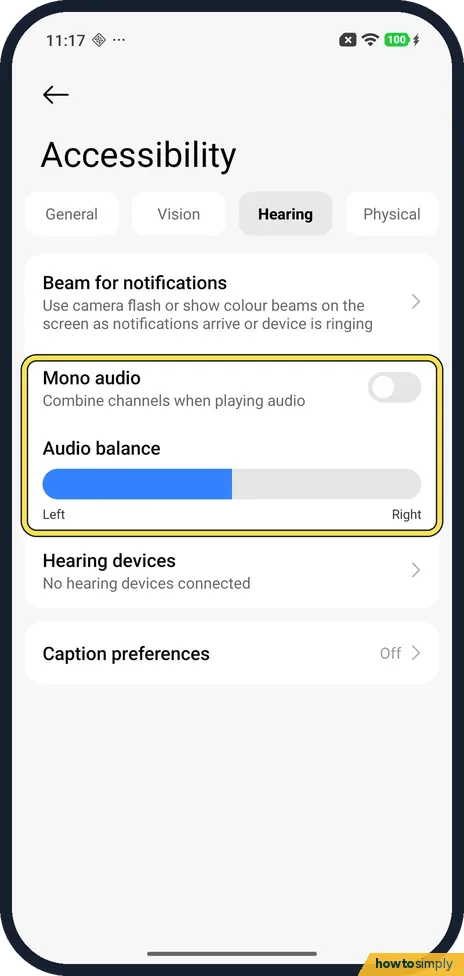
Go to Settings, Accessibility and tap the Hearing tab. Turn on Mono audio to combine channels, or drag the Audio balance bar towards Left or Right. On ours Mono audio was off and the bar was filled to the middle.
5 of 5 steps show a real screenshot from our Redmi Note 15 Pro 5G. Each step was checked against the maker's own instructions, linked at the end.
Steps
- 1
Open Accessibility
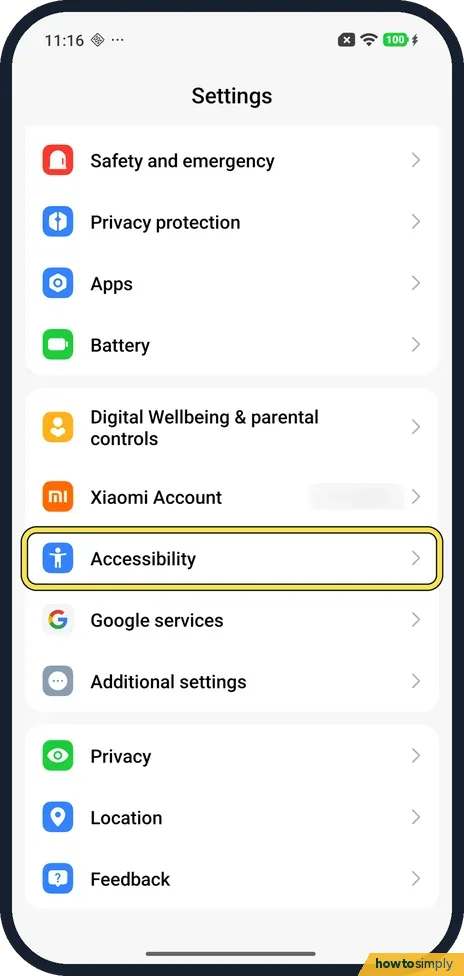
Open Settings and tap Accessibility, below Xiaomi Account. On ours it was in the main Settings list, not under Additional settings.
- 2
Open the Hearing tab
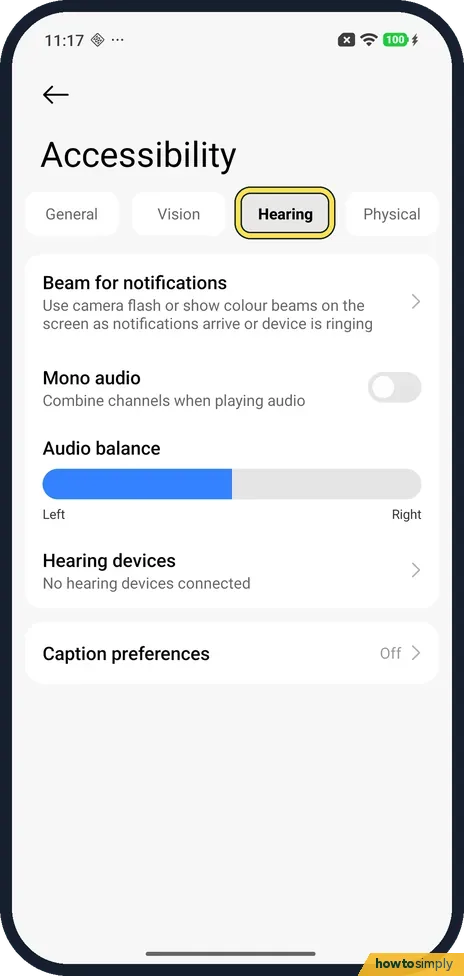
Tap Hearing, the third tab at the top, between Vision and Physical.
- 3
Turn on Mono audio
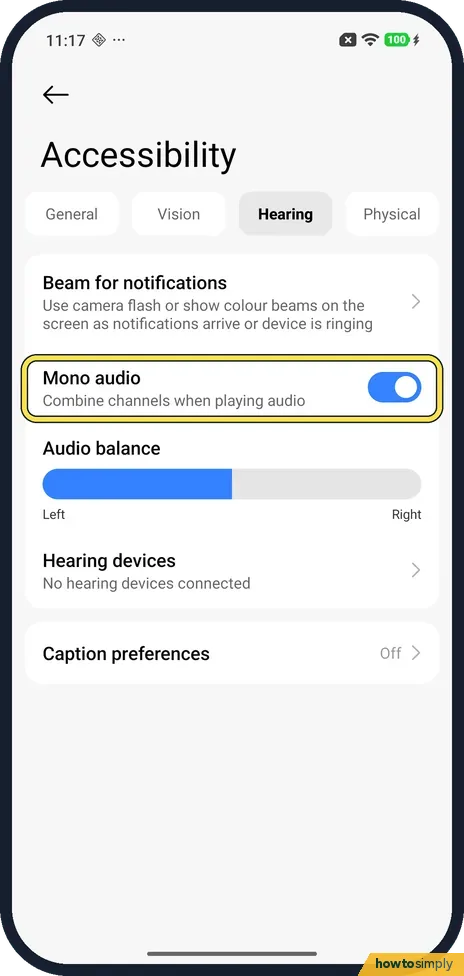
Mono audio is below Beam for notifications: Combine channels when playing audio. It was off on ours. Tap the switch; it turns blue.
- 4
Set Audio balance
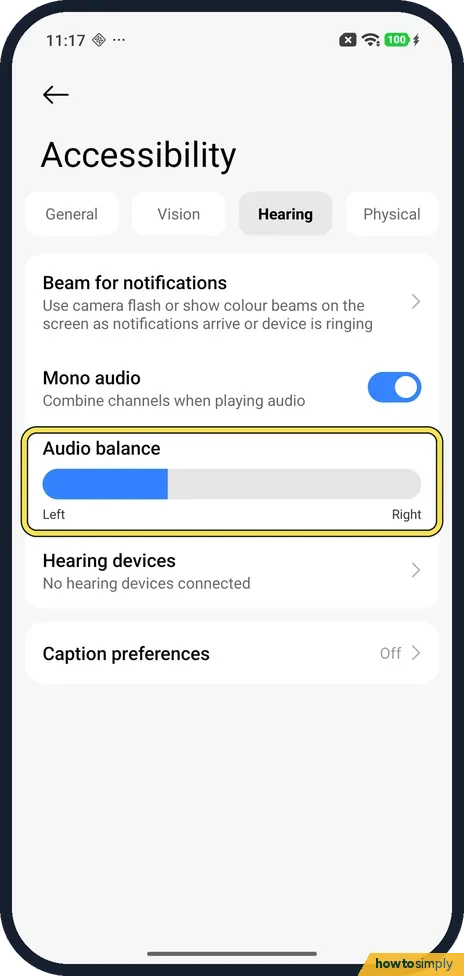
Below it, drag the Audio balance bar towards Left or Right, as Xiaomi says. The blue part shows where it is set: on ours it was filled to the middle, and shorter after we dragged it left.
- 5
Put it back
To undo it, drag the bar back until the blue part ends in the middle, and turn Mono audio off. Ours looked as it did at the start.
If you do not see this option
- Accessibility under Additional settings? Xiaomi's HyperOS 3 guide gives Settings, Additional settings, Accessibility, Hearing. On our Redmi Note 15 Pro 5G Accessibility was in the main Settings list. Source: Generic User Guide for HyperOS 3.0
- No Hearing tab? Xiaomi's guide says to tap Hearing to adjust audio on the Hearing page. Ours had four tabs: General, Vision, Hearing and Physical. Source: Generic User Guide for HyperOS 3.0
If this does not work
- Sound louder on one side? Check Audio balance on the Hearing tab. The blue part should end in the middle, as it did on ours.
- One earbud quieter? Xiaomi's help for its Buds 5 Pro says to check in the Xiaomi Earbuds app that both earbuds are connected, clean dirt from the speaker holes and turn off Dimensional audio.
- Uneven in one song or video only? Xiaomi says the audio itself can have unbalanced left and right channels. Mono audio plays the combined channels, so turn it on.
- Speech hard to follow even when balanced? Captions may help more than sound settings. Xiaomi's HyperOS 3 guide lists Live Caption on the same Hearing page, which turns speech on the phone into captions. Google says the captioning is processed on the device and is not sent to Google.
Good to know
Beam for notifications, at the top of the Hearing tab, uses the camera flash or colour beams on the screen as notifications arrive or the phone rings. Hearing devices said No hearing devices connected on ours.
Caption preferences, below, was Off on ours. For reading out text instead, see Select to Speak and text-to-speech.
Mono audio is handy if you use one earbud at a time or hear better in one ear, because you no longer miss what plays only on the other side. Neither setting changes the main volume level. Caption preferences on the same tab sets how captions look, though Xiaomi notes that not all apps support them.
About this guide
- Device
- Android
- Shown on
- Xiaomi Redmi Note 15 Pro 5G (25080RABDG), HyperOS 3.0.308.0, Android 16
- App
- Settings
- Path
- Settings › Accessibility › Hearing
- Real screenshots
- 5 of 5 steps
- Checked
- October 2026
- Sources
- 2 official, linked below
Sources
Links checked October 2026. Menus and features can change with updates.Spotted a mistake? Menus change with updates, and we want every step to match your screen. Email us about this page or use the contact form. We read every report, and fixes are listed on What changed.
Liked this guide?
Follow us for new guides and short how-to videos.
Did this guide work for you?
Sorry about that. What happened?