GOOGLE PIXEL
How to use mono audio and audio balance on a Google Pixel (Android 17)

In short
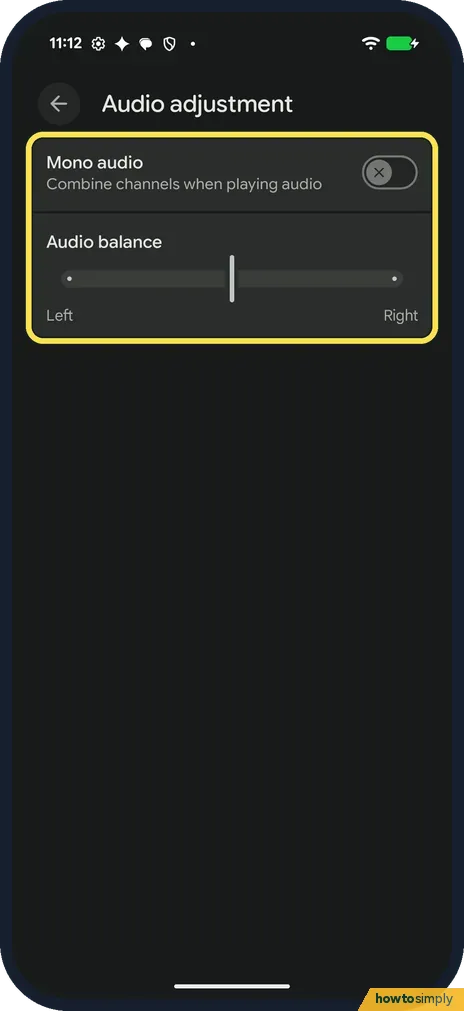
Open Settings, Accessibility and, under Audio, tap Audio adjustment. Turn on Mono audio to combine the left and right channels, or drag the Audio balance slider towards Left or Right. On ours Mono audio was off and the slider was in the middle.
5 of 5 steps show a real screenshot from our Pixel 10a. Each step was checked against the maker's own instructions, linked at the end.
Steps
- 1
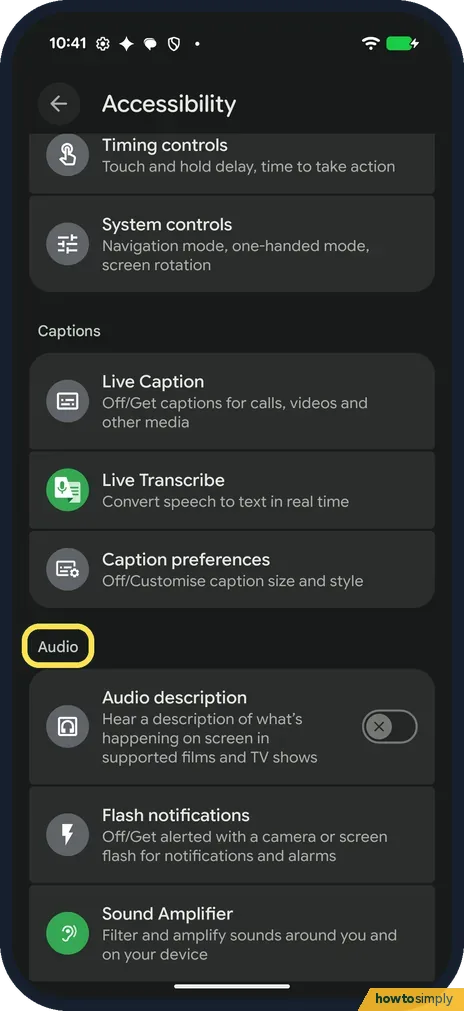
Scroll to Audio
Open Settings and tap Accessibility. Scroll down past Captions to the Audio heading. Its first row is Audio description.
- 2
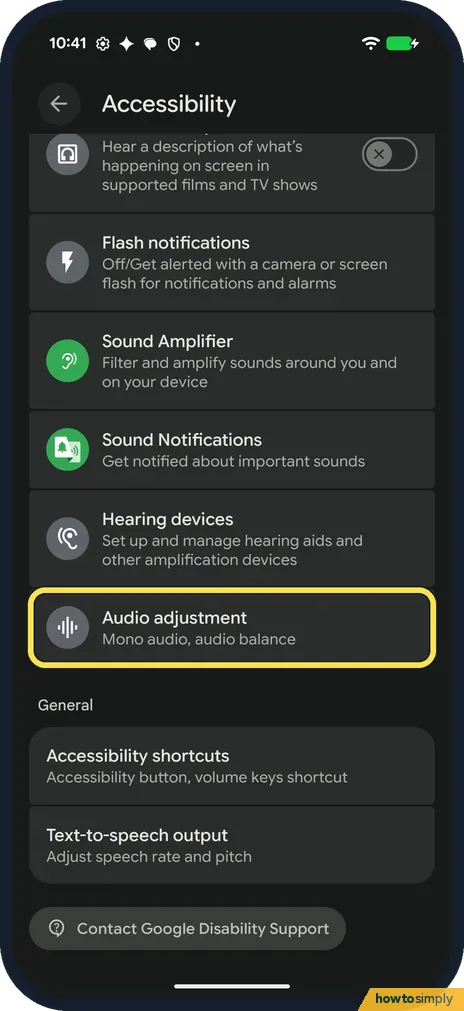
Tap Audio adjustment
Audio adjustment is the last row under Audio, below Hearing devices: Mono audio, audio balance. Tap it.
- 3
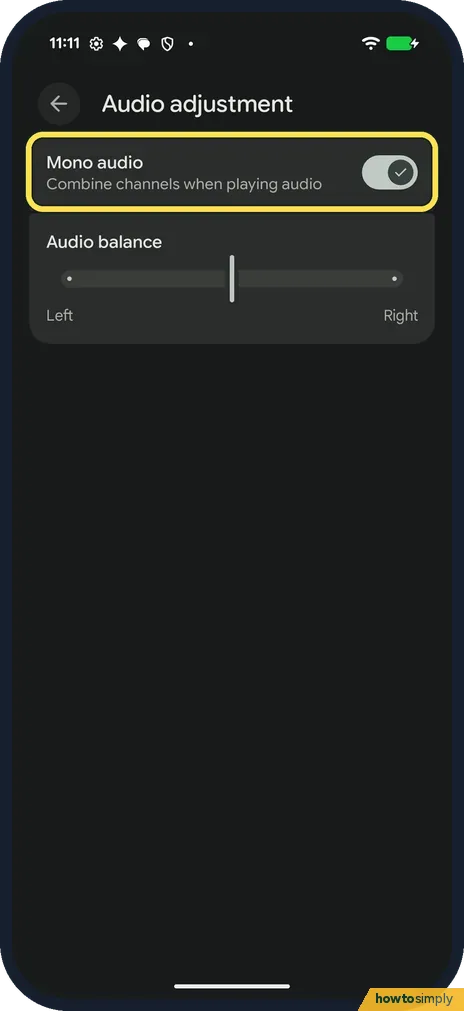
Turn on Mono audio
Mono audio is at the top: Combine channels when playing audio. It was off on ours, a grey switch with a cross. Tap it: it turns light, with a tick.
- 4
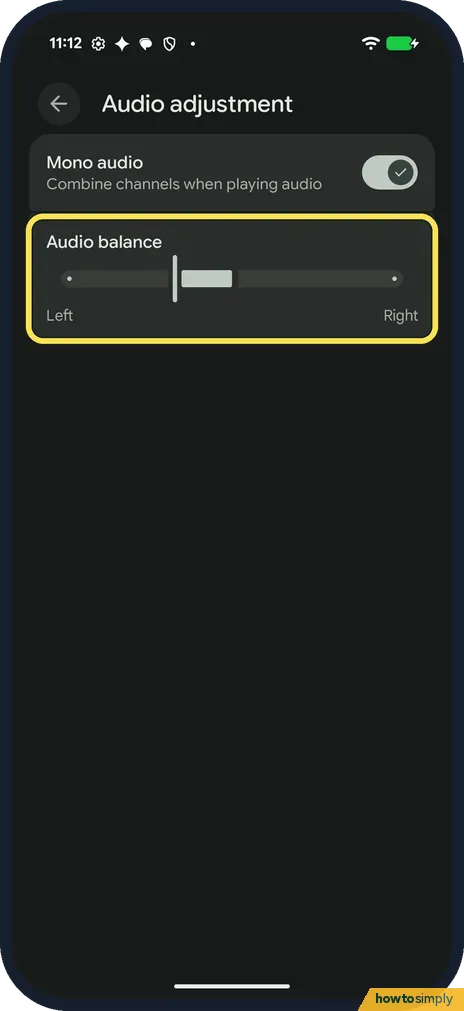
Set Audio balance
Below it, drag the Audio balance slider towards Left or Right to make that side louder. Ours started in the middle. When we dragged it left, a light bar filled the track between the slider and the middle.
- 5
Put it back
To undo it, drag Audio balance back to the middle and turn Mono audio off. On ours the light bar went away and the switch showed its cross again.
If you do not see this option
- No Audio adjustment row? Google says names can vary by market and device. On our Pixel 10a with Android 17 it was the last row under Audio in Accessibility. Source: Use accessibility features on Android
- Looking in Sound and vibration? Google lists Mono audio with its features for hearing and says to use the Audio adjustment features in your Accessibility settings. On ours, that is where it was. Source: Use accessibility features on Android
If this does not work
- Sound louder on one side? Check Audio balance on the same page. The slider should sit in the middle, as it was on ours.
- Pixel Buds still uneven? Google says Pixel Buds have their own volume balance between the left and right earbuds, which can also switch to mono, and that the setting applies across all paired devices. Check it in the earbuds' settings too.
- One earbud quieter on Xiaomi buds? Xiaomi's help for its Buds 5 Pro says to check in the Xiaomi Earbuds app that both earbuds are connected, clean the speaker holes, and that the audio itself may have unbalanced channels.
- No sound at all from Bluetooth? Google's Bluetooth help says to raise the volume on both the phone and the accessory, check that another paired device isn't playing the audio instead, and make sure Media audio is on in the saved device's settings.
Good to know
The same Audio group on ours also had Audio description, Sound Amplifier, Sound Notifications and Hearing devices, for hearing aids. Flash notifications is there too.
For how music sounds, see how to use Adaptive Sound.
Mono audio is useful if you hear better in one ear or wear a single earbud, because nothing in a stereo track is lost on the side you are not using. Both settings stay as you left them until you change them. Google lists other hearing features in Accessibility, such as Live Caption for media and calls, and Sound Amplifier for surrounding speech. For a live transcript of speech around you, see how to use Live Transcribe.
About this guide
- Device
- Android
- Shown on
- Google Pixel 10a, Android 17 (build CP3A.261005.005)
- App
- Settings
- Path
- Settings › Accessibility › Audio adjustment
- Real screenshots
- 5 of 5 steps
- Checked
- October 2026
- Sources
- 4 official, linked below
Sources
Links checked October 2026. Menus and features can change with updates.Spotted a mistake? Menus change with updates, and we want every step to match your screen. Email us about this page or use the contact form. We read every report, and fixes are listed on What changed.
Liked this guide?
Follow us for new guides and short how-to videos.
Did this guide work for you?
Sorry about that. What happened?