
howtosimply.com/guides/how-to-use-bypass-charging-on-an-honor-phone/ · Checked October 2026 · BRP-NX1M, EEA), MagicOS 10.0, Android 16 (build 10.0.0.169(C430E7R2P1) · HONOR Magic7 Lite
In this guide
Open Settings, Battery, More battery settings and turn on Bypass charging under Other. While the phone is plugged in with the screen on, power goes straight to the system instead of the battery, which reduces heat. It needs at least 20 % battery and lasts only for the current charging session.
3 of 3 steps with real screenshots · 2 official sources below
- Device
- Android
- Shown on
- HONOR Magic7 Lite (BRP-NX1M, EEA), MagicOS 10.0, Android 16 (build 10.0.0.169(C430E7R2P1))
- App
- Settings
- Path
- Settings › Battery › More battery settings
- Real screenshots
- 3 of 3 steps
- Checked
- October 2026
- Sources
- 2 official, linked below
Step by step
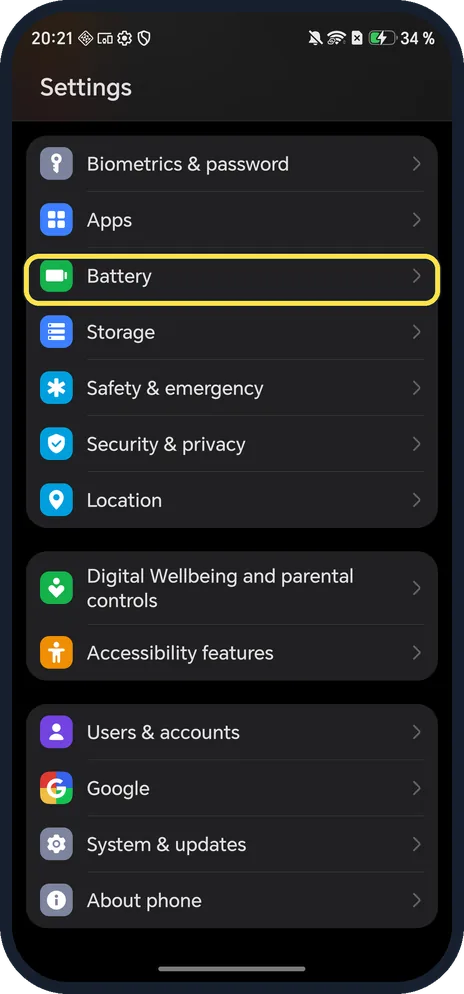
Open Battery
Open Settings and scroll down.
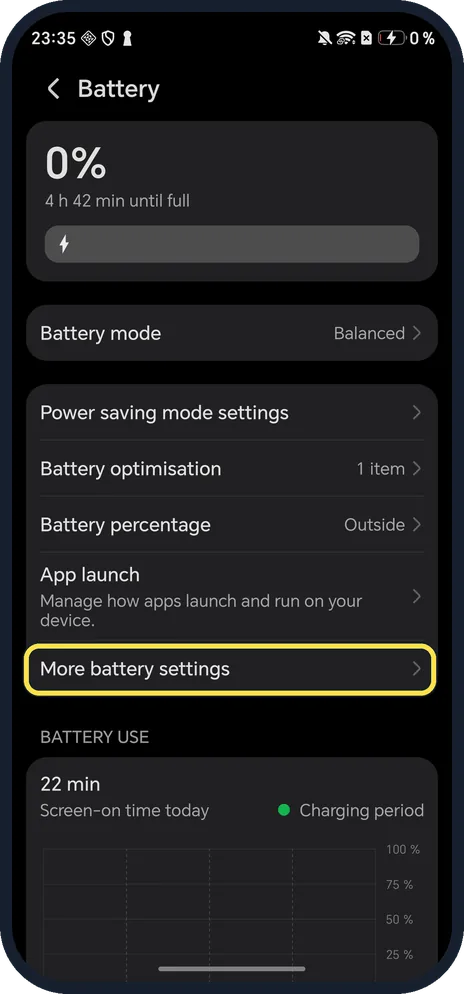
Tap More battery settings
Below App launch.
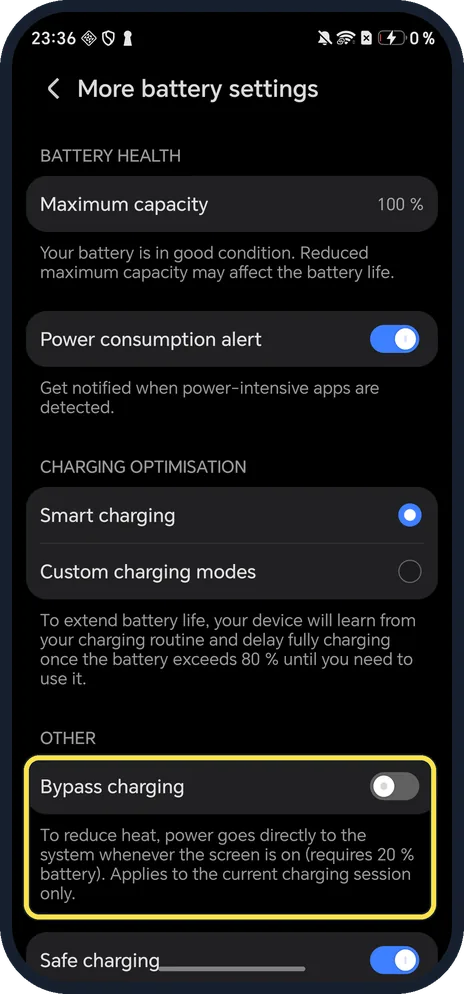
Turn on Bypass charging
Under OTHER. The description says power goes directly to the system whenever the screen is on, it requires 20 % battery and applies to the current charging session only.
If you do not see this option
- Want the battery to stop at 80 % overnight? That is Smart charging, under Charging optimisation on the same page: the phone learns your routine and delays charging past 80 %. Source: Enabling Smart Charge and Smart Battery Capacity
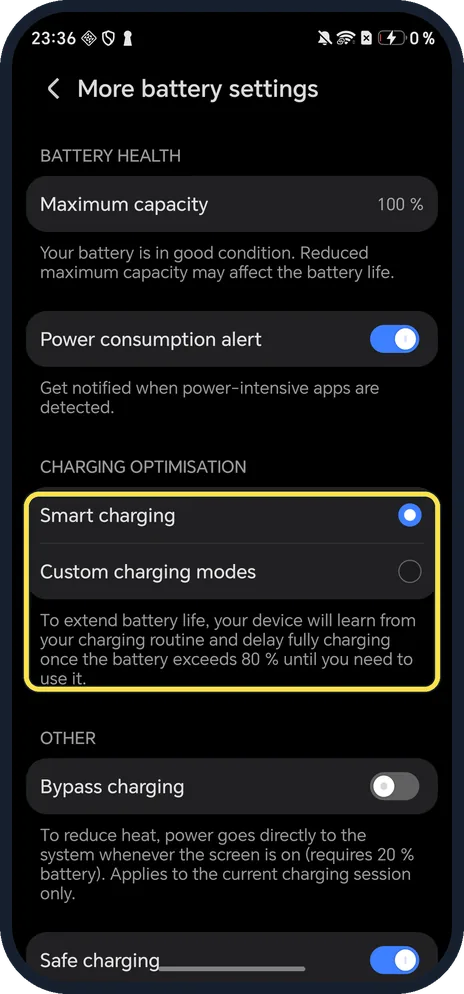
- Switch greyed out or won't turn on? The description says it needs at least 20 % battery; charge a little first.
If this does not work
- Turned off by itself? That is expected: it applies to the current charging session only. Turn it on again next time.
- Charging stops at 80 %? That is Smart Charge, not Bypass charging. HONOR says to tap Resume Charging in the notification panel. Source: Phone stops charging at 80 % and other Smart Charge FAQs
About this guide
The screenshots are from our HONOR Magic7 Lite, the European model BRP-NX1M, with MagicOS 10.0 and Android 16 (build 10.0.0.169(C430E7R2P1)), in Dark mode. Our phone was at 0 % while charging, below the 20 % Bypass charging needs, so we did not switch it on.
Good to know
To see battery wear, check battery health on an HONOR phone.
To save power, turn on Power saving mode.
In short: Settings, Battery, More battery settings, Bypass charging (20 % or more, this session).
- HONOR Support (MY): Enabling Smart Charge and Smart Battery Capacity
- HONOR Support: Phone stops charging at 80 % and other Smart Charge FAQs
Links checked in October 2026. Menus and features can change after software updates. These steps match the version named at the top.
Did this guide work for you?
Sorry about that. What happened?