
howtosimply.com/guides/how-to-check-battery-health-on-an-honor-phone/ · Checked October 2026 · BRP-NX1M, EEA), MagicOS 10.0, Android 16 (build 10.0.0.169(C430E7R2P1) · HONOR Magic7 Lite
In this guide
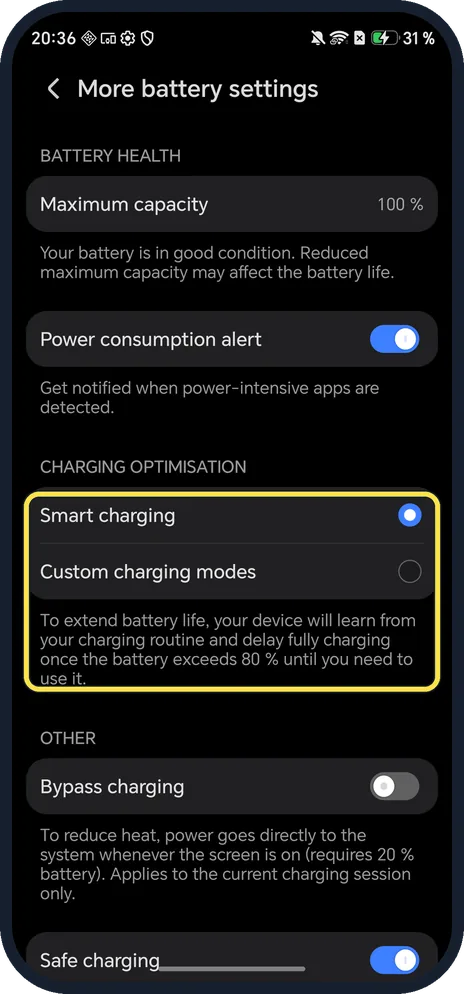
Open Settings, Battery, More battery settings. Battery health shows Maximum capacity (100 % on our Magic7 Lite); scroll down for manufacture date, first use and cycle count (103 on ours).
3 of 3 steps with real screenshots · 3 official sources below
- Device
- Android
- Shown on
- HONOR Magic7 Lite (BRP-NX1M, EEA), MagicOS 10.0, Android 16 (build 10.0.0.169(C430E7R2P1))
- App
- Settings
- Path
- Settings › Battery
- Real screenshots
- 3 of 3 steps
- Checked
- October 2026
- Sources
- 3 official, linked below
Step by step
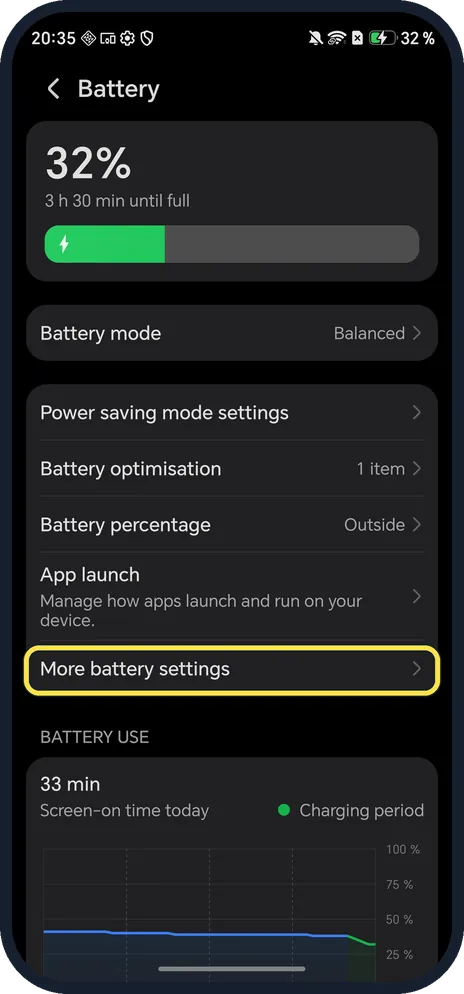
Open More battery settings
Open Settings, tap Battery and scroll to More battery settings.
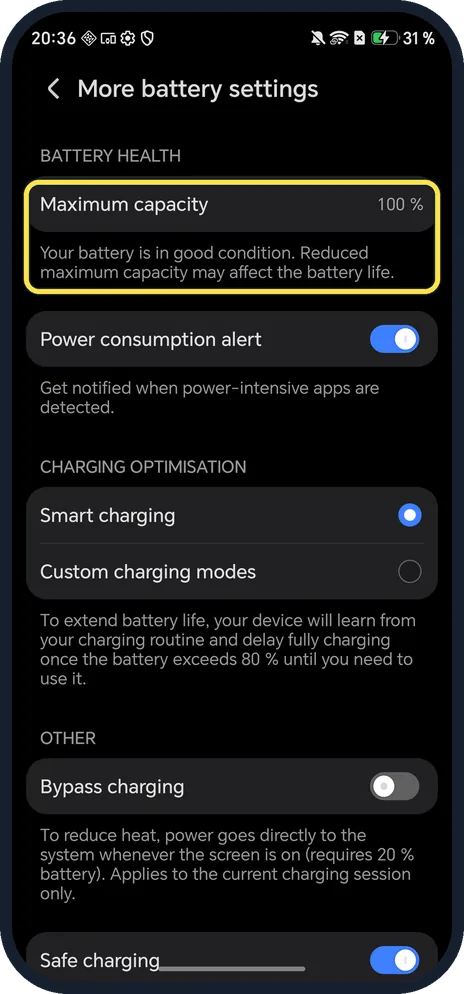
Read Maximum capacity
Under BATTERY HEALTH. Ours said 100 % and Your battery is in good condition.
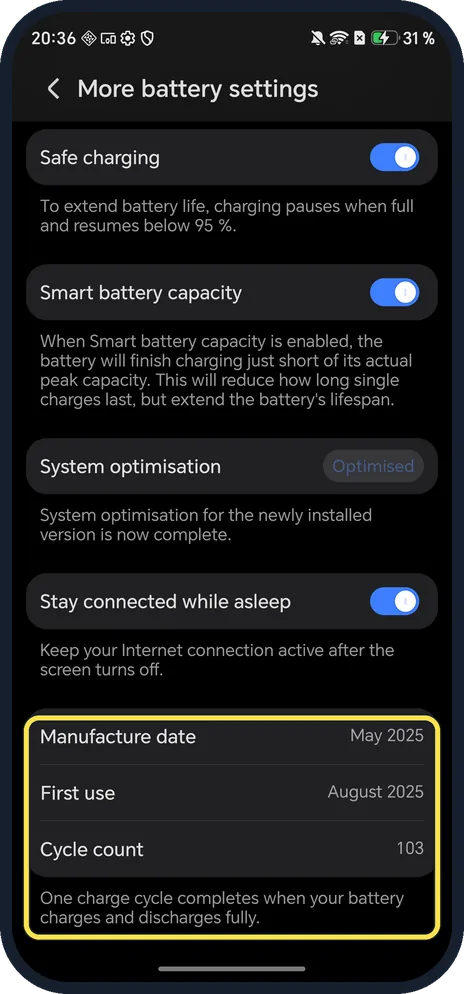
Scroll down for the cycle count
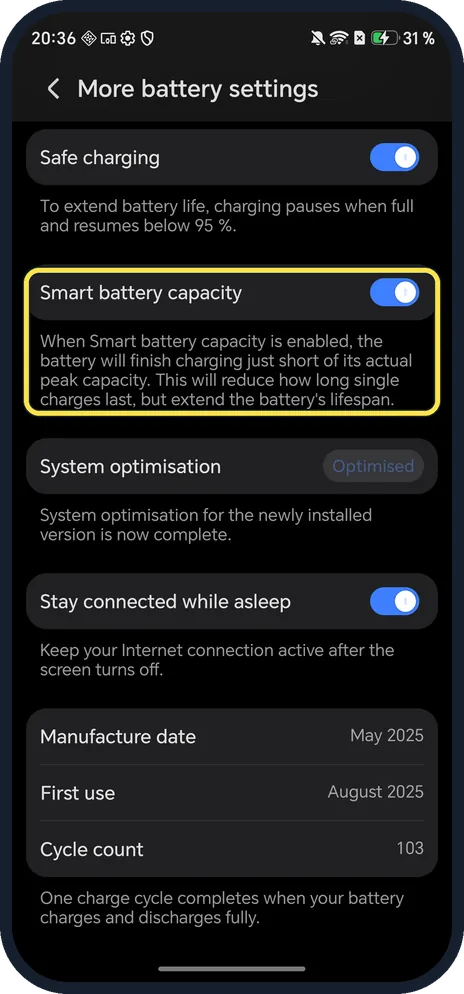
Ours: Manufacture date May 2025, First use August 2025, Cycle count 103. One cycle is one full charge and discharge.
If you do not see this option
- No More battery settings, or no Smart Charge? HONOR says the features and screens vary by product and software version; if the Smart Charge switch is not there, your phone does not support it. Source: Enabling Smart Charge and Smart Battery Capacity · Source: Phone stops charging at 80 % and other Smart Charge FAQs
- No cycle count or Maximum capacity? HONOR's own battery articles only list Smart Charge and Smart Battery Capacity under More battery settings, so older models may not show these rows. Ours showed capacity at the top and cycle count at the bottom. Source: Enabling Smart Charge and Smart Battery Capacity
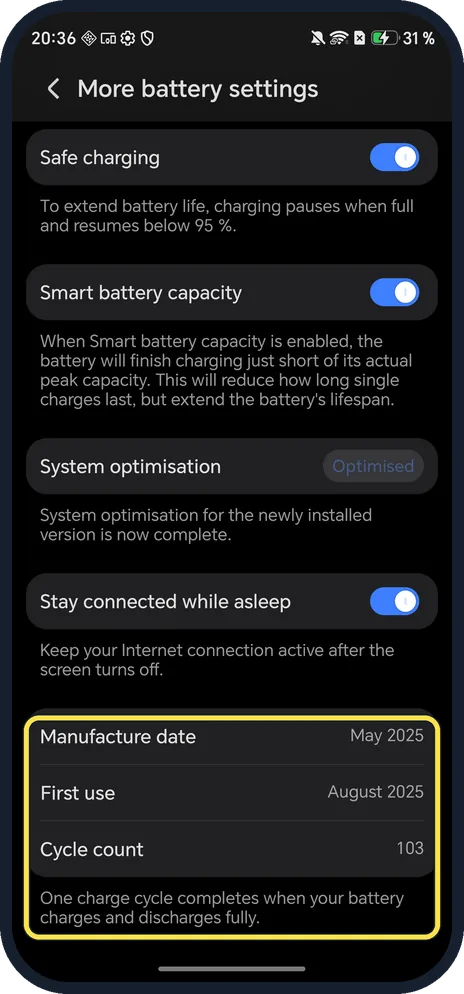
- Where is Smart charging? Under CHARGING OPTIMISATION on the same page; it was on in ours. The caption says the phone learns your charging routine and delays fully charging once the battery exceeds 80 % until you need it.
- Want it to stop below 100 % every time? Smart battery capacity, lower on the same page, finishes charging just short of peak capacity. HONOR says it slows battery ageing and recommends keeping it on. Source: Enabling Smart Charge and Smart Battery Capacity
If this does not work
- Charging stops at 80 %? That is Smart Charge. HONOR says to tap Resume Charging in the notification panel, or turn Smart Charge off in More battery settings. Source: Phone stops charging at 80 % and other Smart Charge FAQs
- Power bank stops at 80 %? HONOR says the power bank sees the phone as disconnected once Smart Charge pauses; reconnect and tap Resume Charging. Source: Phone stops charging at 80 % and other Smart Charge FAQs
- Capacity looks low on a new phone? Compare the manufacture date and cycle count; a high cycle count on a "new" phone is worth raising with the seller.
- Battery drains fast? HONOR says to check power consumption details on the Battery page (BATTERY USE on ours) and force stop power-hungry apps you don't need. Source: The battery drains quickly and has a short standby time
About this guide
HONOR shows more battery detail than most Android phones: capacity, cycle count, and the month the battery was made.
The screenshots are from our HONOR Magic7 Lite, the European model BRP-NX1M, with MagicOS 10.0 and Android 16 (build 10.0.0.169(C430E7R2P1)), in Dark mode. Our numbers will differ from yours.
Good to know
To show the exact level in the status bar, show battery percentage on an HONOR phone.
To make a charge last longer, turn on Power saving mode.
In short: Settings, Battery, More battery settings: capacity at the top, cycle count at the bottom.
- HONOR Support (MY): Enabling Smart Charge and Smart Battery Capacity
- HONOR Support: Phone stops charging at 80 % and other Smart Charge FAQs
- HONOR Support (MEA): The battery drains quickly and has a short standby time
Links checked in October 2026. Menus and features can change after software updates. These steps match the version named at the top.
Did this guide work for you?
Sorry about that. What happened?