
howtosimply.com/guides/how-to-show-battery-percentage-on-an-honor-phone/ · Checked October 2026 · BRP-NX1M, EEA), MagicOS 10.0, Android 16 (build 10.0.0.169(C430E7R2P1) · HONOR Magic7 Lite
In this guide
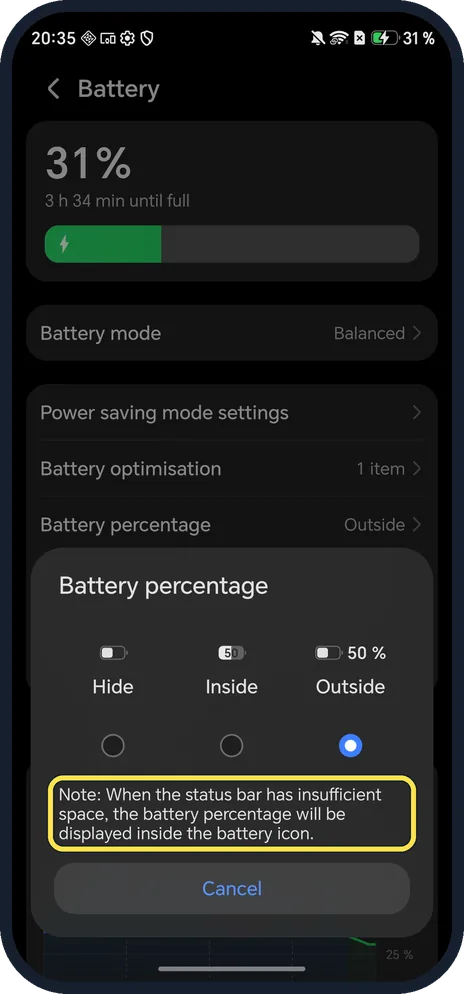
Open Settings, tap Battery, then Battery percentage, and choose Outside (next to the icon), Inside (in the icon) or Hide. Ours was set to Outside.
4 of 4 steps with real screenshots · 3 official sources below
- Device
- Android
- Shown on
- HONOR Magic7 Lite (BRP-NX1M, EEA), MagicOS 10.0, Android 16 (build 10.0.0.169(C430E7R2P1))
- App
- Settings
- Path
- Settings › Battery › Battery percentage: Hide › Inside or Outside
- Real screenshots
- 4 of 4 steps
- Checked
- October 2026
- Sources
- 3 official, linked below
Step by step
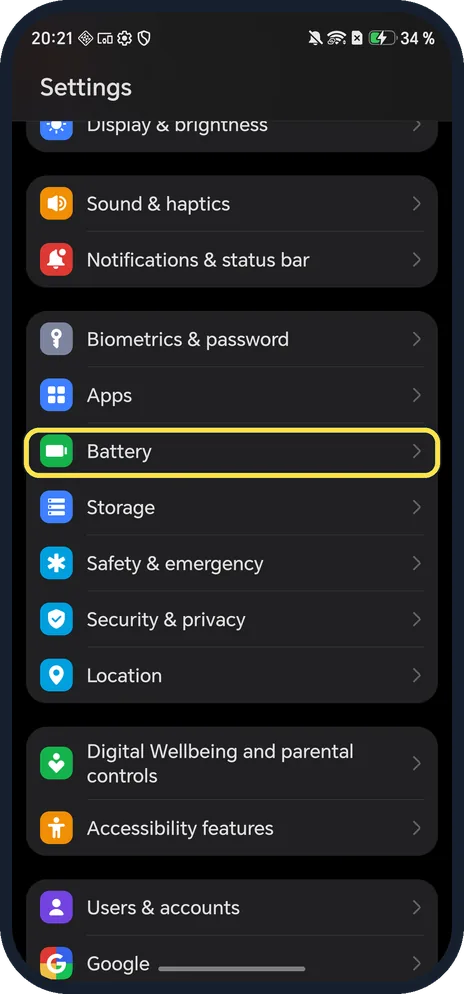
Open Battery
Open Settings and tap Battery.
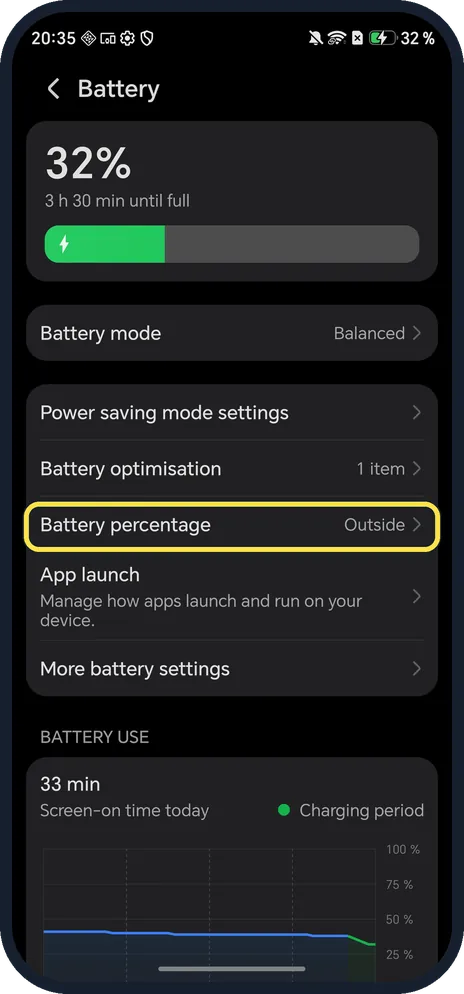
Tap Battery percentage
It shows the current choice on the right; ours said Outside.
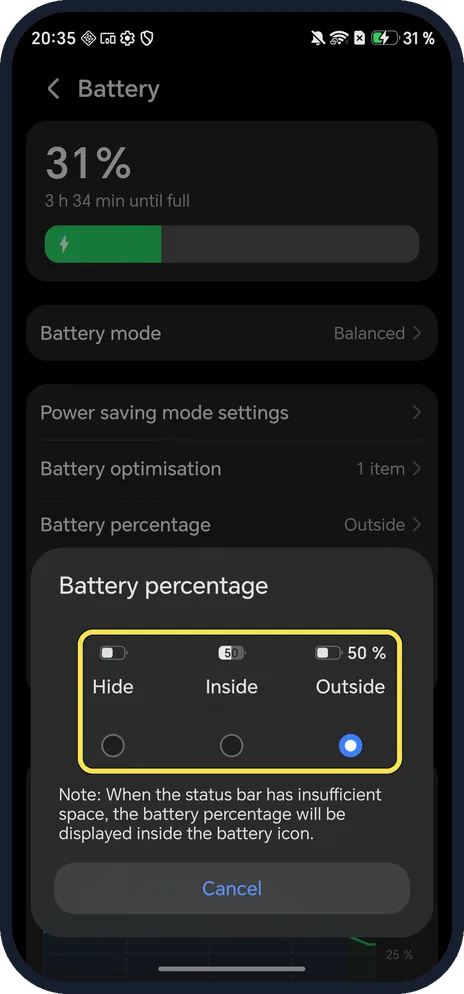
Pick Hide, Inside or Outside
Tap the circle under the one you want. Outside shows 50 % next to the icon; Inside puts the number in the icon.
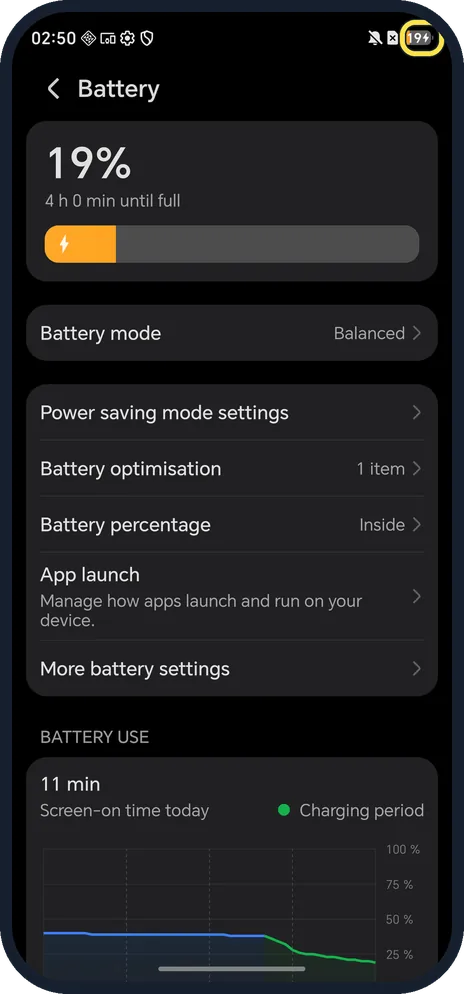
Check the status bar
With Inside, ours showed 19 inside the battery icon at the top right, and the row read Inside. We set it back to Outside.
If you do not see this option
- Number moved into the icon by itself? HONOR's note on our phone says that when the status bar has insufficient space, the percentage is displayed inside the battery icon, even with Outside chosen.
- Battery percentage greyed out? HONOR says that with Power saving mode on, the Battery percentage option is dimmed and the percentage always shows. Turn off Power saving mode to change it. Source: Unable to configure the Sleep, Auto-sync data and Battery percentage options
- No Battery percentage on the Battery page? HONOR's guide also gives System Manager, Battery percentage on older phones, with the choice of inside or next to the battery icon. Source: Battery Settings
If this does not work
- Percentage inside the icon with Outside chosen? HONOR says the larger Magic Capsule moves the percentage inside the battery icon. Tap the capsule to switch to Card mode, then tap X to close it. Source: Magic Capsule hides status icons or shows them inside the battery icon
- Other status icons missing too? HONOR says Magic Capsule hides status icons so they don't overlap it. Swipe down to the notification panel and Control Center to see them. Source: Magic Capsule hides status icons or shows them inside the battery icon
About this guide
MagicOS puts the battery percentage choice on the Battery page, not under Notifications & status bar.
The screenshots are from our HONOR Magic7 Lite, the European model BRP-NX1M, with MagicOS 10.0 and Android 16 (build 10.0.0.169(C430E7R2P1)), in Dark mode.
Good to know
To see how worn the battery is, check battery health on an HONOR phone.
To stretch a low battery, turn on Power saving mode.
In short: Settings, Battery, Battery percentage: Hide, Inside or Outside.
- HONOR Support (MY): Battery Settings
- HONOR Support (SA): Unable to configure the Sleep, Auto-sync data and Battery percentage options
- HONOR Support (UK): Magic Capsule hides status icons or shows them inside the battery icon
Links checked in October 2026. Menus and features can change after software updates. These steps match the version named at the top.
Did this guide work for you?
Sorry about that. What happened?