XIAOMI REDMI
How to find the IMEI and model number on a Xiaomi phone (HyperOS 3)
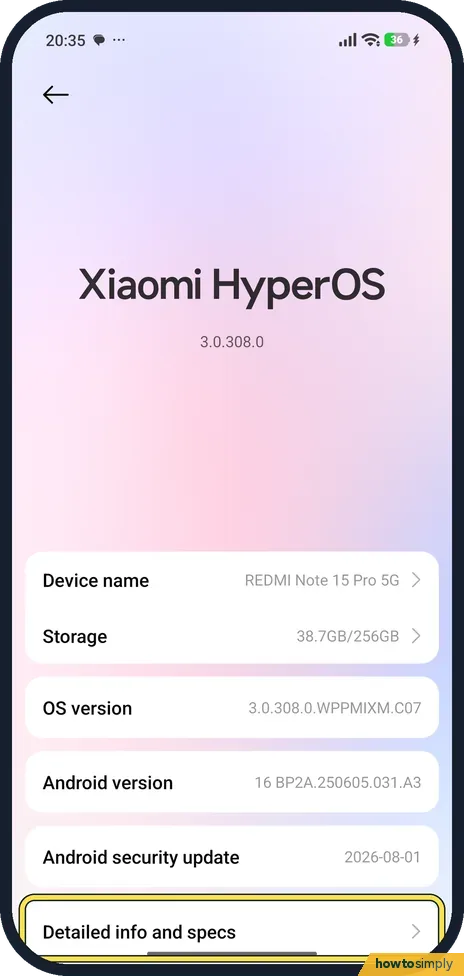
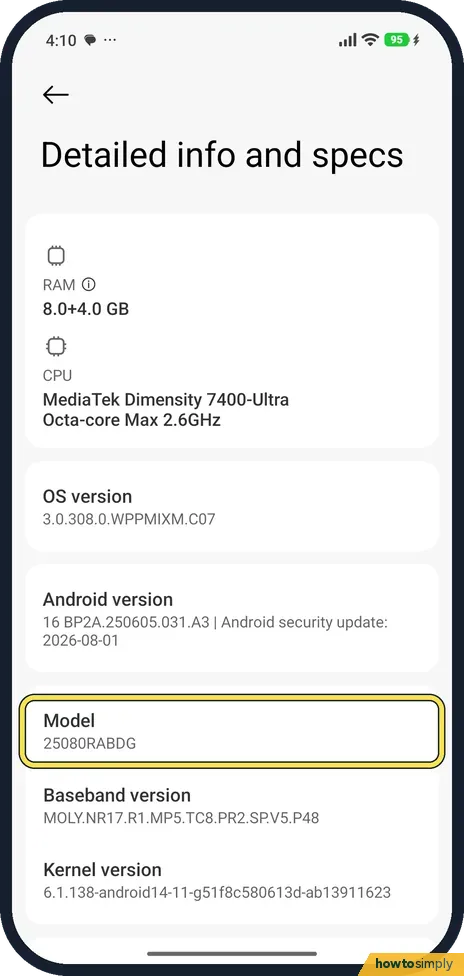
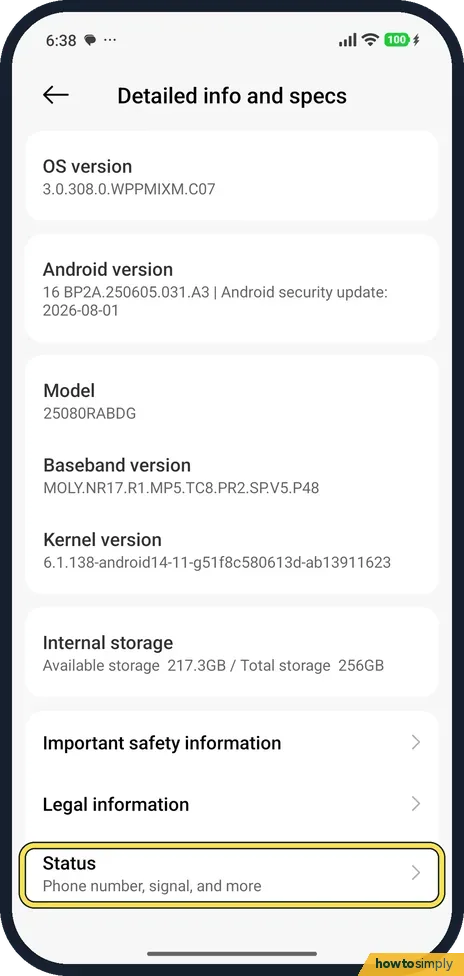
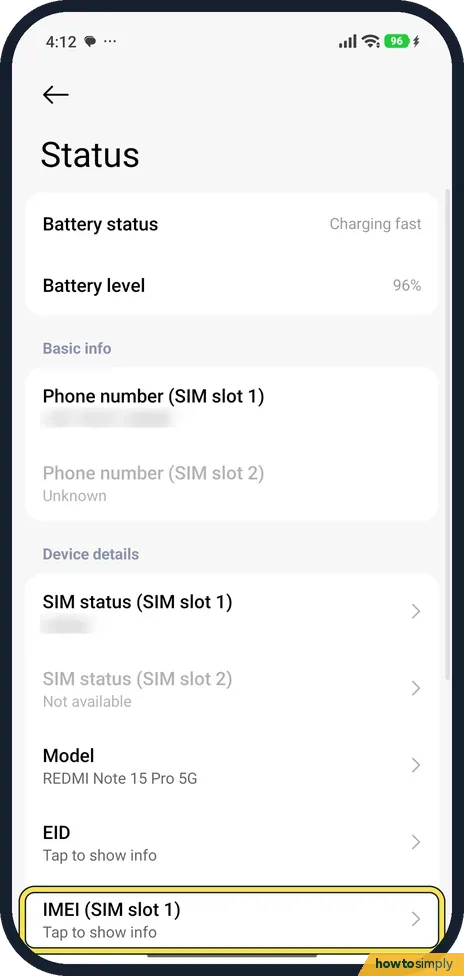
Go to Settings, About phone, Detailed info and specs. Model shows the model number. Scroll down, tap Status, and tap IMEI (Tap to show info) to see the IMEI.

4 of 4 steps show a real screenshot from our Redmi Note 15 Pro 5G. Each step was checked against the maker's own instructions, linked at the end.
Steps
- 1
Open Detailed info and specs
Go to Settings, About phone, and tap Detailed info and specs at the bottom.
- 2
Read the model number
Model is listed here. Ours was 25080RABDG, with the OS version and Android version above it.
- 3
Tap Status
Scroll to the bottom of the same page. Status (Phone number, signal, and more) is the last row, below Legal information.
- 4
Tap IMEI
Here Model reads REDMI Note 15 Pro 5G. IMEI (SIM slot 1) says Tap to show info. Tap it to see the number.
If you do not see this option
- Two different model names? Detailed info and specs shows the model number (25080RABDG on ours). Status shows the name (REDMI Note 15 Pro 5G). Use the number for parts and help pages.
- Only one SIM? With one SIM, the SIM slot 2 rows are greyed out: on ours SIM status (SIM slot 2) said Not available.
If this does not work
- Phone won't open Settings? Xiaomi says the IMEI is also printed on the bottom of the box.
- Dial code *#06#? Xiaomi says dialling *#06# shows the IMEI. When we typed it into our phone's Phone app over a USB connection, no pop-up appeared, so we have not confirmed it on this phone. Status always worked.
- Phone lost or stolen? You can still get the IMEI if the phone was signed in to your Google Account. Google says to open the Find Hub app or go to android.com/find, then select the Settings icon next to the device to see its IMEI.
- Two IMEI numbers? A dual SIM phone has one IMEI for each SIM slot, which is why the Status page lists IMEI (SIM slot 1) and a slot 2 row. Give both when a carrier or insurer asks for the IMEI, unless they ask for a specific slot.
Good to know
Test the hardware from the same page: how to open the CIT hardware test.
Looking up the IMEI changes nothing on the phone. Keep a note of it somewhere safe that is not the phone itself, such as with your purchase receipt or the box, so you have it if the phone goes missing. If the phone is lost, Google says your mobile service provider can use the IMEI to disable the device, so call them with the number ready. For finding, ringing or locking a lost phone, see how to turn on Find device on a Xiaomi phone.
About this guide
- Device
- Android
- Shown on
- Xiaomi Redmi Note 15 Pro 5G (25080RABDG), HyperOS 3.0.308.0, Android 16
- App
- Settings
- Path
- Settings › About phone › Detailed info and specs (model) › Status › IMEI › Tap to show info
- Real screenshots
- 4 of 4 steps
- Checked
- October 2026
- Sources
- 2 official, linked below
Sources
Links checked October 2026. Menus and features can change with updates.Spotted a mistake? Menus change with updates, and we want every step to match your screen. Email us about this page or use the contact form. We read every report, and fixes are listed on What changed.
Liked this guide?
Follow us for new guides and short how-to videos.
Did this guide work for you?
Sorry about that. What happened?