
howtosimply.com/guides/how-to-find-the-imei-model-and-serial-number-on-a-samsung-galaxy/ · Checked October 2026 · Samsung Galaxy A57 (One UI 9, Android 17 (build A576BXXU6BZIE)) and Samsung Galaxy A57 5G (One UI 8.5, Android 16)
In this guide
Open Settings, About phone. The model name, serial number and IMEI are listed there. You can also dial *#06# in the Phone app to show the IMEI.
5 of 6 steps with real screenshots · 2 official sources below
- Device
- Android
- Shown on
- Samsung Galaxy A57 (SM-A576B), One UI 9, Android 17 (build A576BXXU6BZIE), Samsung Galaxy A57 5G (SM-A576B), One UI 8.5, Android 16
- App
- Settings
- Path
- Settings › About phone: model name
- Real screenshots
- 5 of 6 steps
- What we did
- Observed: looked at each screen, changed nothing
- Our phone
- Shown on Galaxy A57, One UI 8.5
- Checked
- October 2026
- Sources
- 2 official, linked below
Step by step
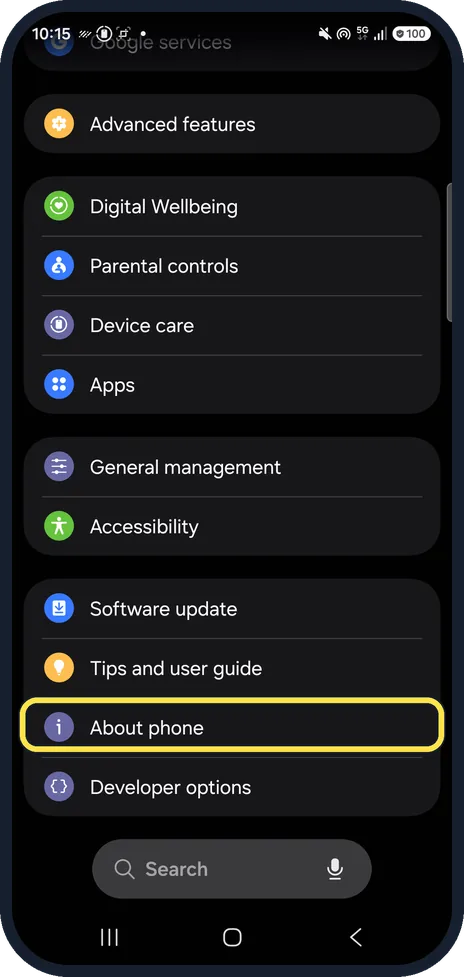
Open About phone
Open Settings and tap About phone at the bottom.
On ours it was near the bottom, between Tips and user guide and Developer options.
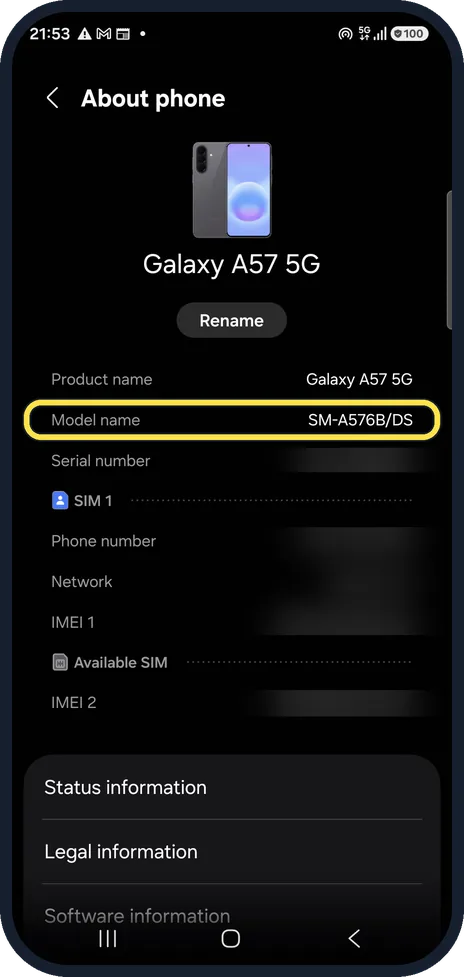
Read the model name
Model name shows the exact model, here SM-A576B/DS. /DS means dual SIM.
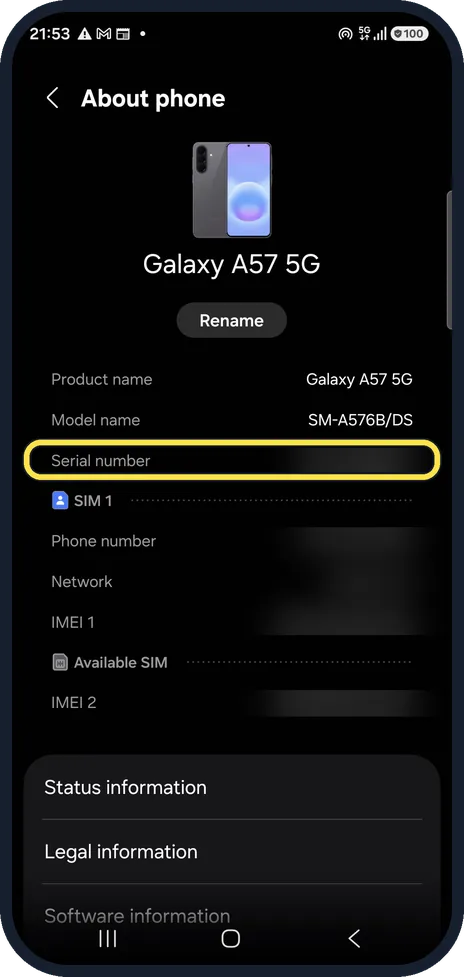
Find the serial number
Serial number is the line below. We blurred ours.
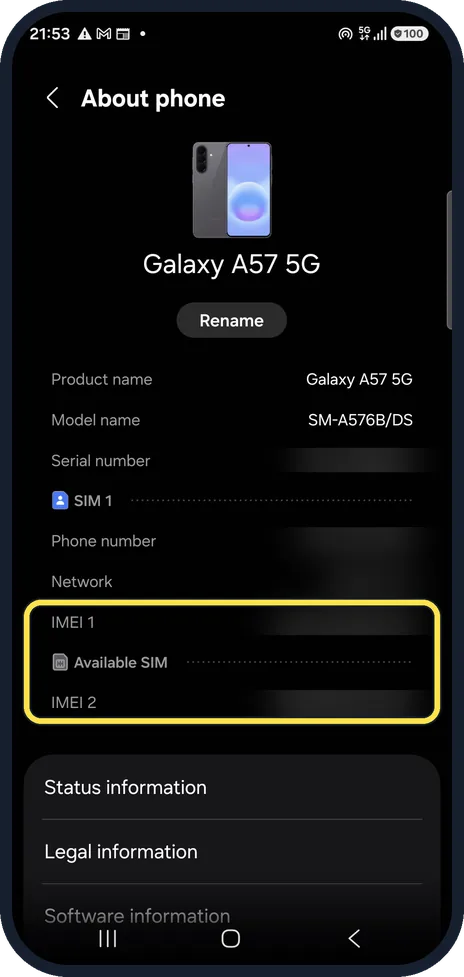
Find the IMEI
IMEI 1 belongs to the first SIM, IMEI 2 to the second SIM or eSIM. We blurred both.
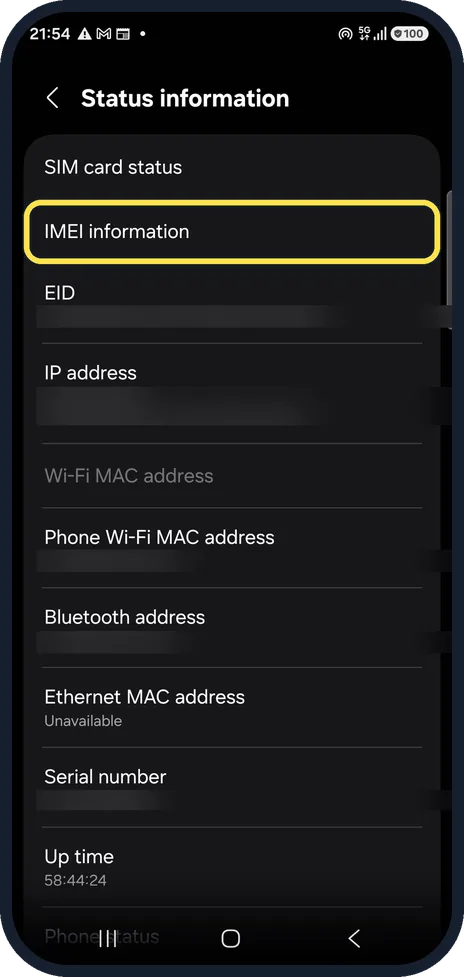
More detail in Status information
Status information, lower down, has IMEI information and the EID for eSIMs, plus the MAC addresses. We blurred the private values.
Or dial *#06#
Samsung says dialling *#06# in the Phone app shows the IMEI and serial number straight away; no call is made. We did not try it on our phone.
If you do not see this option
- You have a Galaxy tablet The steps are the same; the menu is called About tablet instead of About phone. Source: Find your Samsung phone or tablet's IMEI, model, or serial number
- Dialling *#06# shows nothing Samsung says the code only works where your carrier supports it. Use Settings, About phone instead. Source: Find your Samsung phone or tablet's IMEI, model, or serial number
If this does not work
- The phone will not turn on Samsung lists other places for the IMEI and serial number: printed small on the back near the bottom, the original box, your carrier account, the bill of sale, and the Samsung Members app (Support tab, then your device name) if you use a Samsung account. Source: Find your Samsung phone or tablet's IMEI, model, or serial number
- Your Galaxy has a removable battery On select models, such as the Xcover6 Pro, Samsung says the IMEI and serial number are also printed under the battery. Source: Find your Samsung phone or tablet's IMEI, model, or serial number
About this guide
You need the IMEI to report a stolen phone or unlock it from a carrier, and the model and serial number for repairs and warranty. All three are in About phone.
Step 1 is from the same phone after its One UI 9 update (Android 17).
Good to know
Samsung lists other places too: the original box, the label on the back of some models, your carrier's account and the receipt.
In short: Settings, About phone: model name, serial number, IMEI 1 and 2. Or dial *#06#.
- Samsung Latin: How to find phones model number serial number or IMEI number
- Samsung US: Find your Samsung phone or tablet's IMEI, model, or serial number
Links checked in October 2026. Menus and features can change after software updates. These steps match the version named at the top.
📷 See real photos from the Galaxy A57 in our Camera Lab, next to 10 other phones.
Did this guide work for you?
Sorry about that. What happened?