
howtosimply.com/guides/how-to-free-up-storage-on-an-honor-phone/ · Checked October 2026 · BRP-NX1M, EEA), MagicOS 10.0, Android 16 (build 10.0.0.169(C430E7R2P1) · HONOR Magic7 Lite
In this guide
Open Settings, Storage and tap Clean up. Under RECOMMENDED, tap Clean up next to Junk files (43,31 MB on ours). Used storage went from 27,68 GB to 27,64 GB. Clean up by category lists large files and apps to delete.
4 of 4 steps with real screenshots · 1 official source below
- Device
- Android
- Shown on
- HONOR Magic7 Lite (BRP-NX1M, EEA), MagicOS 10.0, Android 16 (build 10.0.0.169(C430E7R2P1))
- App
- Settings
- Path
- Settings › Storage › Clean up › Junk files
- Real screenshots
- 4 of 4 steps
- Checked
- October 2026
- Sources
- 1 official, linked below
Step by step
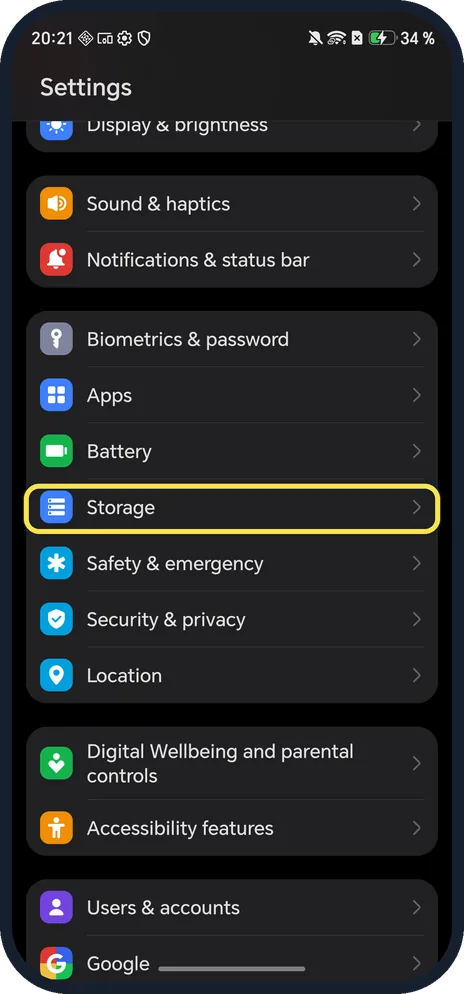
Open Storage
Open Settings and tap Storage.
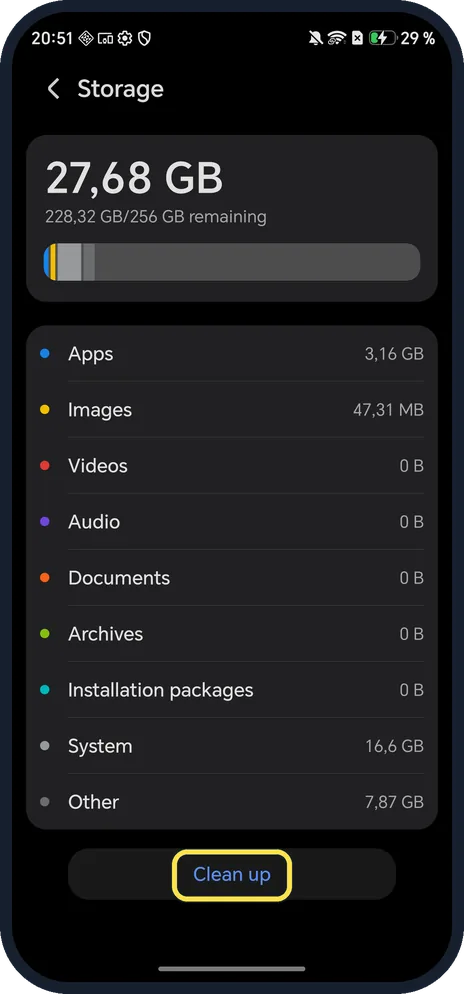
Tap Clean up
At the bottom, under the list of what uses space.
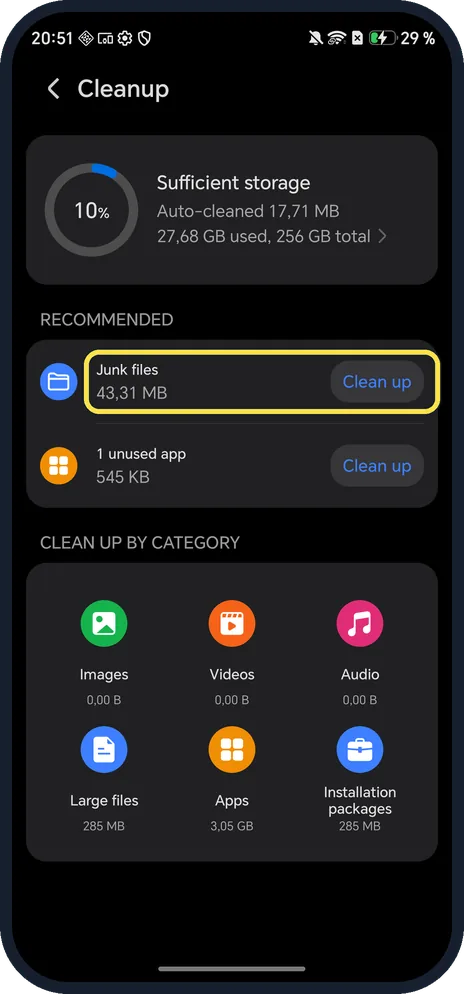
Clean up junk files
Tap Clean up beside Junk files.
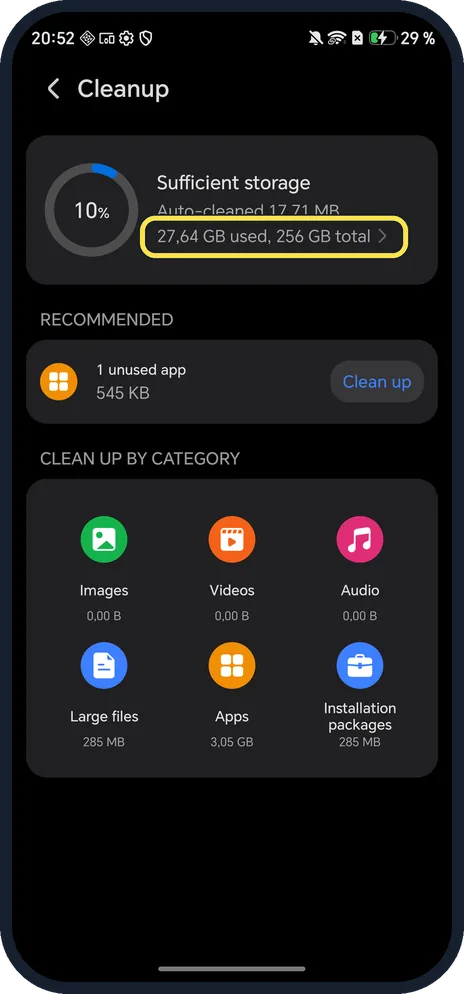
Check what is left
Junk files left the RECOMMENDED list and the header read 27,64 GB used. 1 unused app was still offered; we left it.
If you do not see this option
- No Clean up button in Storage? HONOR's guide for older phones uses the Optimizer or SystemManager app: tap Cleanup, pick what to delete and tap DELETE, or tap OPTIMIZE. Source: Phone indicated to not have sufficient storage space
- Space used by another user? HONOR says sub-users and PrivateSpace take space too: search Settings for Users or PrivateSpace and delete what you no longer need. Source: Phone indicated to not have sufficient storage space
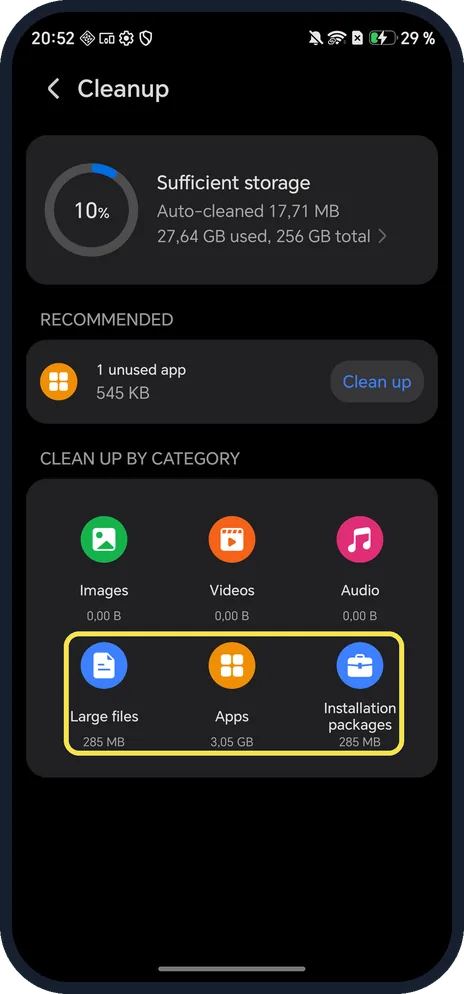
- Most of the space is apps or photos? CLEAN UP BY CATEGORY on ours listed Images, Videos, Audio, Large files, Apps and Installation packages.
If this does not work
- System uses a lot? System (16,6 GB on ours) is the phone's own software; Clean up does not offer it.
- Still under 10 % free? HONOR says to uninstall apps you rarely use, move large files to a memory card if your phone takes one, and as a last resort back up and reset the phone. Source: Phone indicated to not have sufficient storage space
- Storage warning with plenty of space? HONOR says it may come from a website pushing cleaner apps; clear the browser cache. Source: Phone indicated to not have sufficient storage space
About this guide
The screenshots are from our HONOR Magic7 Lite, the European model BRP-NX1M, with MagicOS 10.0 and Android 16 (build 10.0.0.169(C430E7R2P1)), in Dark mode. It had 27,68 GB used of 256 GB. We cleaned junk files only.
Good to know
To clear one app's cache, use Settings, Apps, Manage apps, the app, Storage, Clear cache: clear app cache on an HONOR phone.
Before deleting photos, back them up to the cloud or a computer.
In short: Settings, Storage, Clean up, Junk files.
Links checked in October 2026. Menus and features can change after software updates. These steps match the version named at the top.
Did this guide work for you?
Sorry about that. What happened?