GOOGLE PIXEL
How to use Battery diagnostics on a Google Pixel (Android 17)

In short
Google says to open Settings, Battery, Battery diagnostics. Pick what you need help with: Battery draining too quickly, Phone is very warm, Issue with charging or Other issue. On our Pixel 10a it said Battery health is normal and found no charging issues.
4 of 4 steps show a real screenshot from our Pixel 10a. Each step was checked against the maker's own instructions, linked at the end.
Steps
- 1
Pick what you need help with
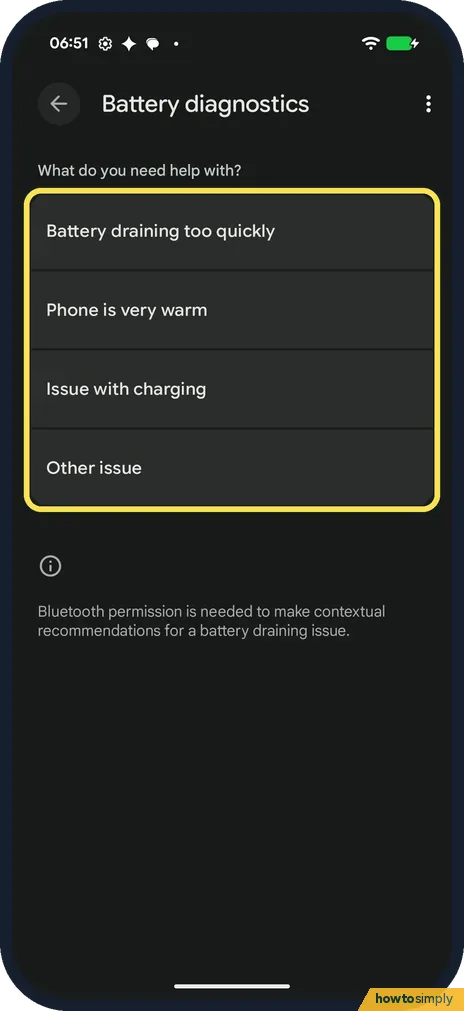
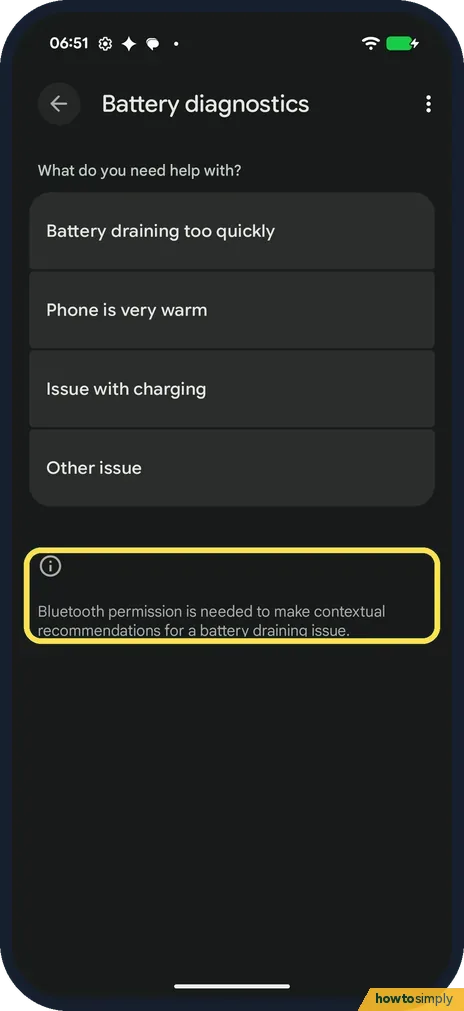
Google says to open Settings, Battery, Battery diagnostics. It asks What do you need help with? The choices are Battery draining too quickly, Phone is very warm, Issue with charging and Other issue.
- 2
Battery draining too quickly
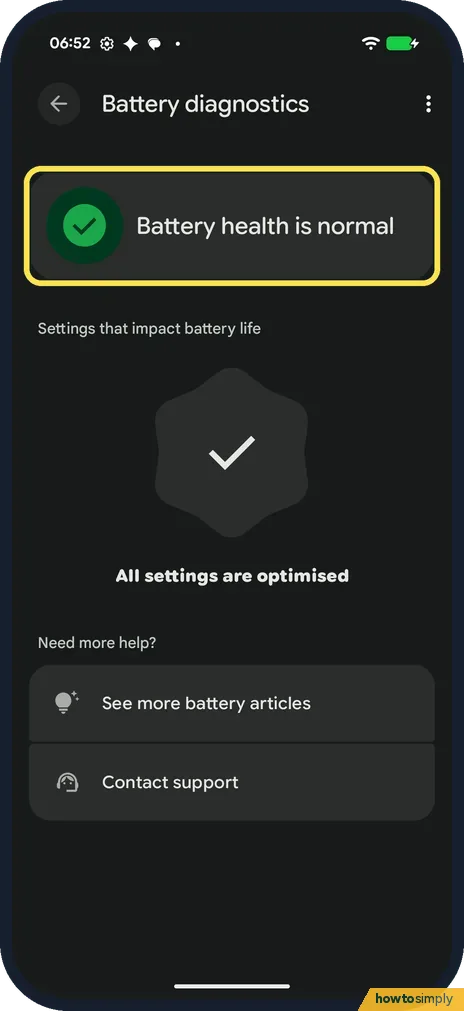
Tap Battery draining too quickly. Ours said Battery health is normal.
- 3
Check the settings result
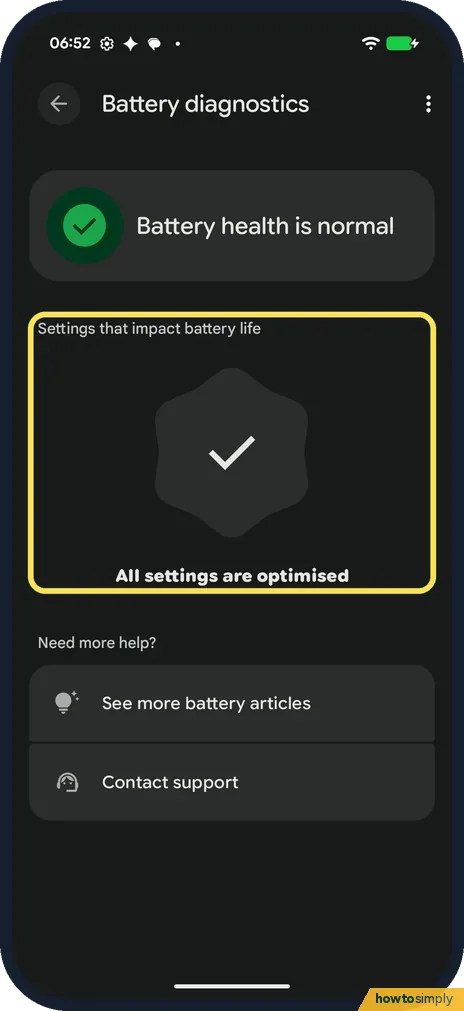
Below, under Settings that impact battery life, ours said All settings are optimised.
- 4
Issue with charging
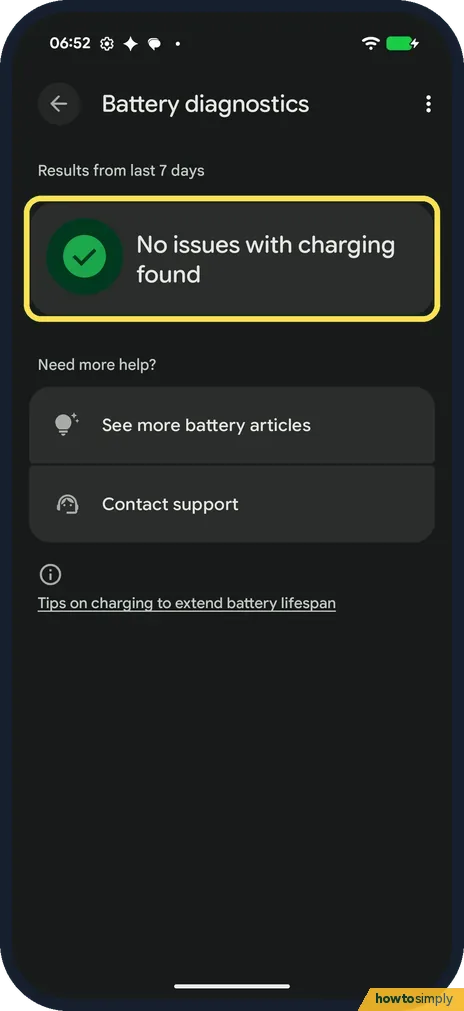
Go back and tap Issue with charging. It looks at the results from the last 7 days. Ours said No issues with charging found.
If you do not see this option
- Asked for Bluetooth permission? The first page says Bluetooth permission is needed to make contextual recommendations for a battery draining issue. We didn't grant it, and the check still ran.
- Which Pixels have it? Google says Battery diagnostics is on the Pixel 6 and later, including the Pixel Fold. Source: Fix issues with your Pixel phone battery
If this does not work
- Battery health is normal but it still drains? Then an app or a setting is more likely. See Pixel battery draining fast: what to check.
- Battery icon shows a question mark? Google says to take the phone to an authorised repair centre or get more support.
- Results still look wrong? Restart the phone and run it again: how to turn off or restart a Google Pixel. Contact support is at the bottom of each result.
- Drains even with healthy battery? Google suggests an overnight test. Charge the phone, leave it unused overnight, and check how much it lost. Under 10% is normal; more than that means looking at Battery usage, sorted by apps or by systems.
- One app keeps showing up? For Google apps, Google suggests uninstalling updates; for other apps, clearing storage or cache. If that does not help, use Developer contact in the app's App info page to report it.
- Drain started after an update? Check Settings, System, Software update for a newer version, since Google lists updates among its first fixes. Some extra activity right after an update is normal for a few days.
Good to know
To slow down battery wear, see how to limit charging to 80% on a Google Pixel.
Battery diagnostics only checks and advises; it changes no settings by itself. When it suggests a change, you decide whether to make it. Google says that sharing Device and battery diagnostics can send battery health and charging state signals, and app battery usage information only if you grant permission. If you want the full picture, the Battery health page shows the remaining capacity: how to check battery health on a Google Pixel.
About this guide
- Device
- Android
- Shown on
- Google Pixel 10a, Android 17 (build CP3A.261005.005)
- App
- Settings
- Path
- Settings › Battery
- Real screenshots
- 4 of 4 steps
- Checked
- October 2026
- Sources
- 3 official, linked below
Sources
Links checked October 2026. Menus and features can change with updates.Spotted a mistake? Menus change with updates, and we want every step to match your screen. Email us about this page or use the contact form. We read every report, and fixes are listed on What changed.
Liked this guide?
Follow us for new guides and short how-to videos.
Did this guide work for you?
Sorry about that. What happened?