GOOGLE PIXEL
How to show battery percentage on a Google Pixel (Android 17)

In short
Open Settings, Battery and turn on Battery percentage, the last switch on the page: Show battery percentage in status bar. On our Pixel the number then showed inside the battery icon at the top right. Turn the switch off to hide it again.
5 of 5 steps show a real screenshot from our Pixel 10a. Each step was checked against the maker's own instructions, linked at the end.
Steps
- 1
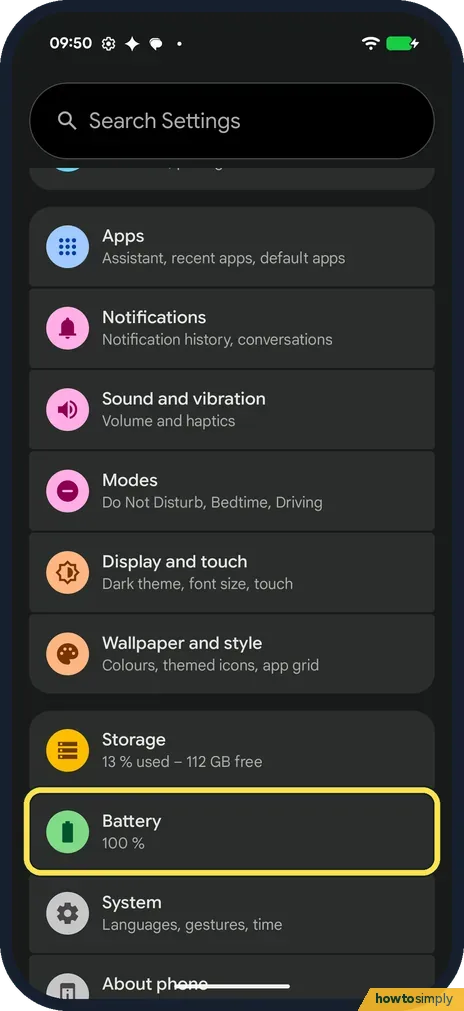
Open Battery
Open Settings and tap Battery. Ours said 100 % under it.
- 2
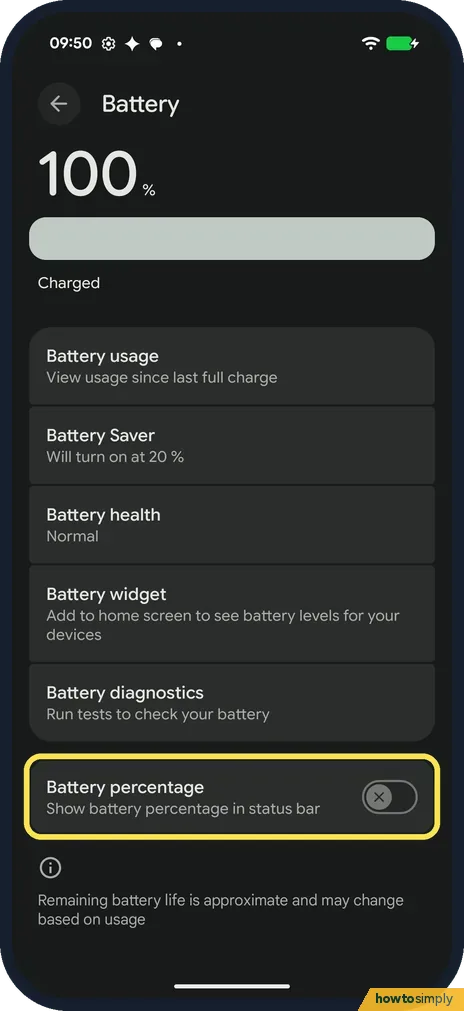
Find Battery percentage
Battery percentage is the last switch on the Battery page, below Battery diagnostics: Show battery percentage in status bar. It was off on ours.
- 3
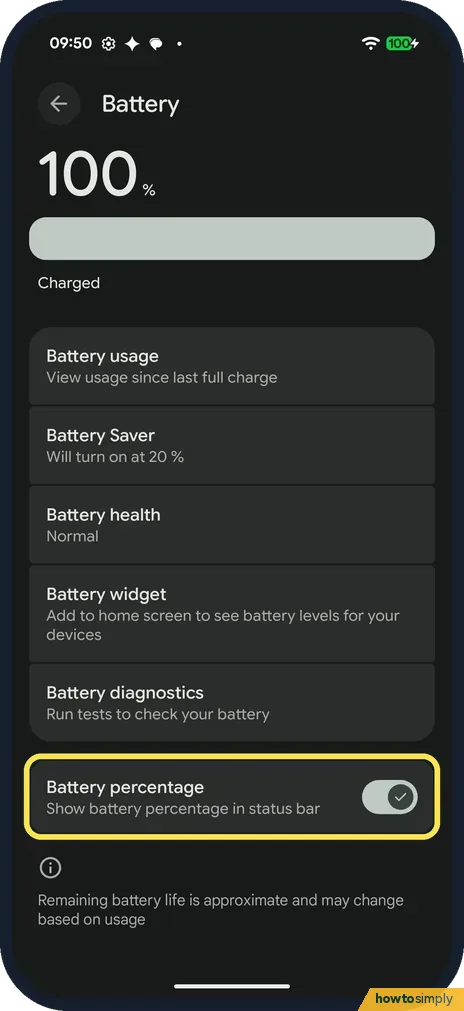
Turn it on
Tap the switch. It turns light, with a tick. On ours the number showed in the status bar straight away.
- 4
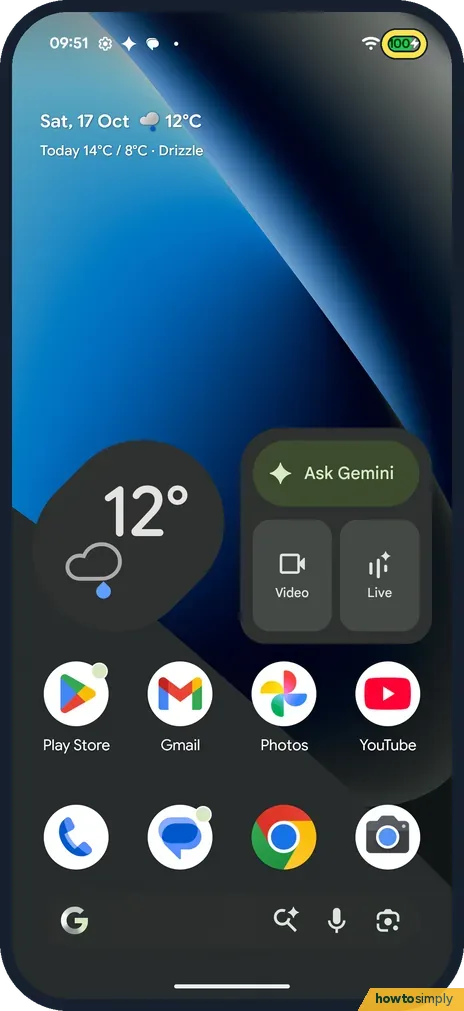
See the percentage
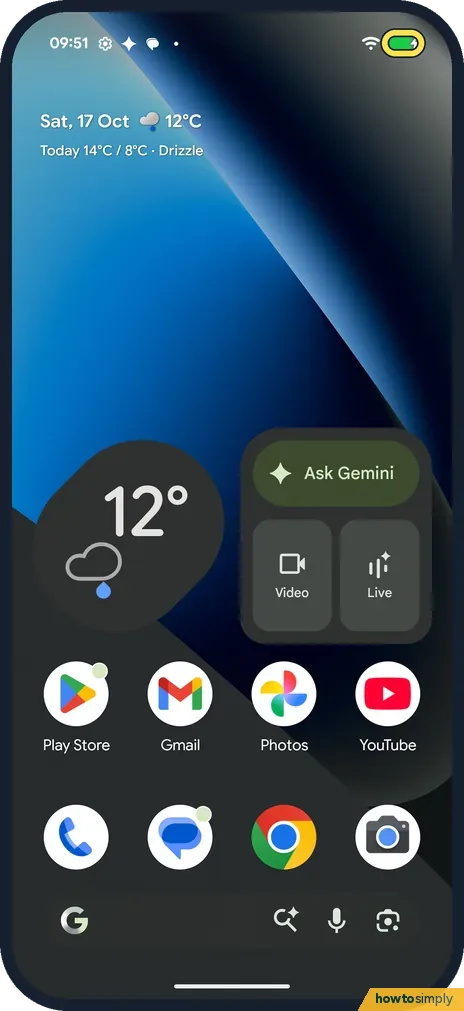
Go to the home screen. On ours the number, 100, sat inside the battery icon at the top right, not next to it.
- 5
To hide it again
Turn Battery percentage off. On ours the icon then showed only the battery level, with no number.
If you do not see this option
- Battery and charging, not Battery? Google's Pixel help names a Battery and charging page in one of its steps. On our Android 17 Pixel 10a the row in Settings was just Battery. Source: Check battery level on your Pixel phone
- On a Pixel Tablet? Google gives the same switch for the Pixel Tablet: Settings, Battery, Battery percentage. It says some of those steps work only on Android 15 and up. Source: Check battery level and usage on your Pixel Tablet
- Older Android version? Google says some of the Pixel phone battery steps only work on Android 14 and up. Source: Check battery level on your Pixel phone
If this does not work
- Question mark in the battery icon? Google says that if the battery icon shows a question mark, take the phone to an authorised repair centre for inspection.
- Want the time left, not just the number? Google says Settings shows under Battery how much charge is left and about how long it will last. Our Battery page said Charged, as it was full.
- Percentage drops fast? See which apps use the battery: how to see battery use by app on a Google Pixel. More checks: Pixel battery draining fast.
- Number disappears in some apps? Full-screen videos and games hide the status bar, and the percentage goes with it. Swipe down from the top edge to bring the status bar back for a moment.
- Time left estimate looks wrong? Google recommends keeping Adaptive Battery and battery optimisation on for the best results from your battery. See where Adaptive Battery is on a Pixel.
Good to know
Google says the Battery widget on the home screen shows the battery level of your Pixel and of connected devices.
Battery Saver, on the same page, said Will turn on at 20 % on ours: how to use Battery Saver. For the battery's condition, see how to check battery health.
The switch only adds a number to the icon; it does not change how the phone charges or how fast the battery drains. It stays on until you turn it off on the same Battery page, and nothing else on the phone depends on it.
About this guide
- Device
- Android
- Shown on
- Google Pixel 10a, Android 17 (build CP3A.261005.005)
- App
- Settings
- Path
- Settings › Battery
- Real screenshots
- 5 of 5 steps
- Checked
- October 2026
- Sources
- 3 official, linked below
Sources
Links checked October 2026. Menus and features can change with updates.Spotted a mistake? Menus change with updates, and we want every step to match your screen. Email us about this page or use the contact form. We read every report, and fixes are listed on What changed.
Liked this guide?
Follow us for new guides and short how-to videos.
Did this guide work for you?
Sorry about that. What happened?