ONEPLUS
How to turn TalkBack on or off on a OnePlus (OxygenOS 16)

In short
Press and hold both volume keys for a few seconds: on ours the TalkBack shortcut was set to Volume keys. Or go to Settings, Accessibility & convenience, Accessibility, Vision tab, TalkBack and use the TalkBack switch.
3 of 3 steps show a real screenshot from our Nord 5. Each step was checked against the maker's own instructions, linked at the end.
Steps
- 1
Open the Vision tab
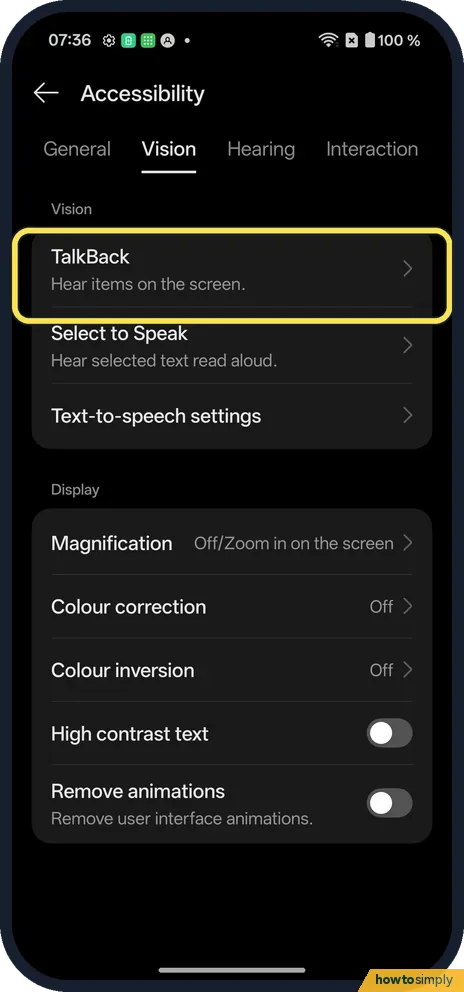
Open Settings, Accessibility & convenience, Accessibility. On the Vision tab, TalkBack is at the top.
- 2
Check the shortcut
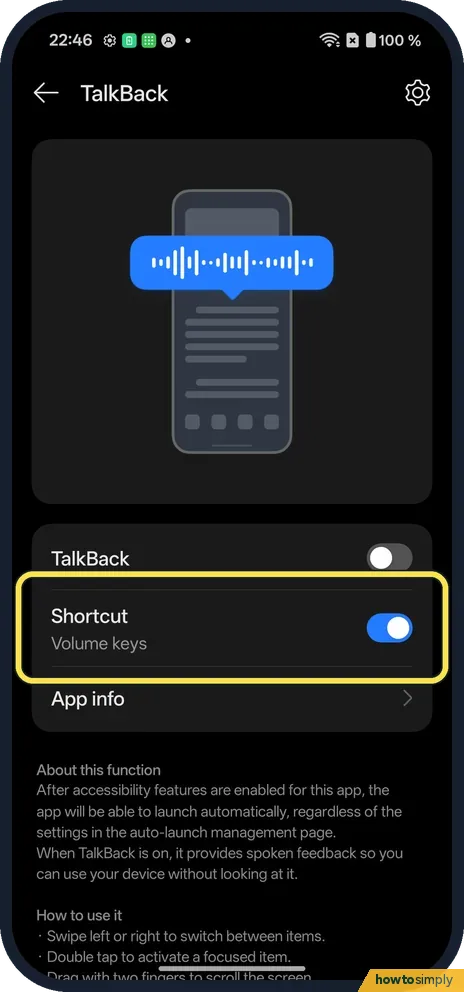
Shortcut said Volume keys and was on. Press and hold both volume keys to turn TalkBack on or off.
- 3
Pick a different shortcut
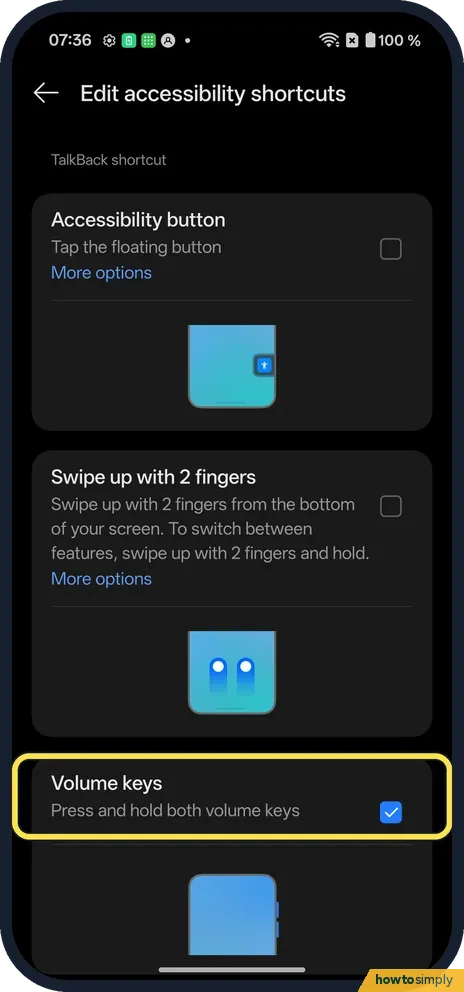
Tap the word Shortcut, not its switch. Ours offered Accessibility button, Swipe up with 2 fingers and Volume keys, which was ticked.
If you do not see this option
- On OxygenOS 14? The OnePlus manual puts TalkBack under Settings, Additional settings, Accessibility, Vision. Source: OxygenOS 14.0 User Manual
- Don't want the volume keys? Pick Accessibility button or Swipe up with 2 fingers on the same shortcut page.
If this does not work
- Volume keys do nothing? The Shortcut switch on the TalkBack page must be on, set to Volume keys.
- Can't tap anything? With TalkBack on, tap once to select, then double-tap. The OnePlus manual says holding both volume keys for more than 3 seconds turns it off.
- Turned on by accident and stuck? Google's other ways to turn it off are to say "Hey Google, turn off TalkBack", or to unlock the phone and switch it off in Accessibility settings, using one-finger focus and a double-tap on each item.
- Cannot scroll a list? With TalkBack on, one finger only moves the focus. Google says to place two fingers on the screen and drag up or down to scroll.
- Gestures for home and back do nothing? Google says that with gesture navigation, home, back and recent apps need two fingers while TalkBack is on.
- Hard to hit a small button? Google says you can swipe right with one finger to move to the next item, one at a time. When the item you want is read out, double-tap anywhere on the screen to use it.
Good to know
Use the accessibility button and shortcuts on a OnePlus.
With TalkBack on, the phone draws a box around the item it is reading and speaks it aloud. Google notes it also reads password characters aloud, which matters in a public place; secure fields can be changed so they are not spoken. Turning TalkBack off returns every tap and gesture to normal at once, and no other setting is changed.
Google also lists a keyboard shortcut, Action + Alt + T, for an external keyboard on the latest Android 16. If you only need text read out now and then, see use Select to Speak and text-to-speech on a OnePlus.
About this guide
- Device
- Android
- Shown on
- OnePlus Nord 5 (CPH2709), OxygenOS 16.0.5.1201, Android 16
- App
- Settings
- Path
- Settings › Accessibility & convenience › Accessibility › Vision › TalkBack
- Real screenshots
- 3 of 3 steps
- Checked
- October 2026
- Sources
- 3 official, linked below
Sources
Links checked October 2026. Menus and features can change with updates.Spotted a mistake? Menus change with updates, and we want every step to match your screen. Email us about this page or use the contact form. We read every report, and fixes are listed on What changed.
Liked this guide?
Follow us for new guides and short how-to videos.
Did this guide work for you?
Sorry about that. What happened?