
howtosimply.com/guides/how-to-turn-off-talkback-on-a-samsung-galaxy/ · Checked October 2026 · Samsung Galaxy A57 (One UI 9, Android 17 (build A576BXXU6BZIE)) and Samsung Galaxy A57 5G (One UI 8.5, Android 16)
In this guide
Open Settings, Accessibility, TalkBack and switch it off. While TalkBack is on, tap once to select, double-tap to activate and scroll with two fingers. If a volume-key shortcut is set up, holding it for 3 seconds also turns TalkBack off. To stop it coming back, switch off TalkBack shortcut.
5 of 6 steps with real screenshots · 1 official source below
- Device
- Android
- Shown on
- Samsung Galaxy A57 (SM-A576B), One UI 9, Android 17 (build A576BXXU6BZIE), Samsung Galaxy A57 5G (SM-A576B), One UI 8.5, Android 16
- App
- Settings
- Path
- Settings › Accessibility › TalkBack
- Real screenshots
- 5 of 6 steps
- What we did
- Observed: looked at each screen, changed nothing
- Our phone
- Shown on Galaxy A57, One UI 8.5
- Checked
- October 2026
- Sources
- 1 official, linked below
Step by step
Use the TalkBack gestures
While TalkBack is on, a single tap only selects an item and reads it aloud. Double-tap anywhere to open it, and scroll with two fingers.
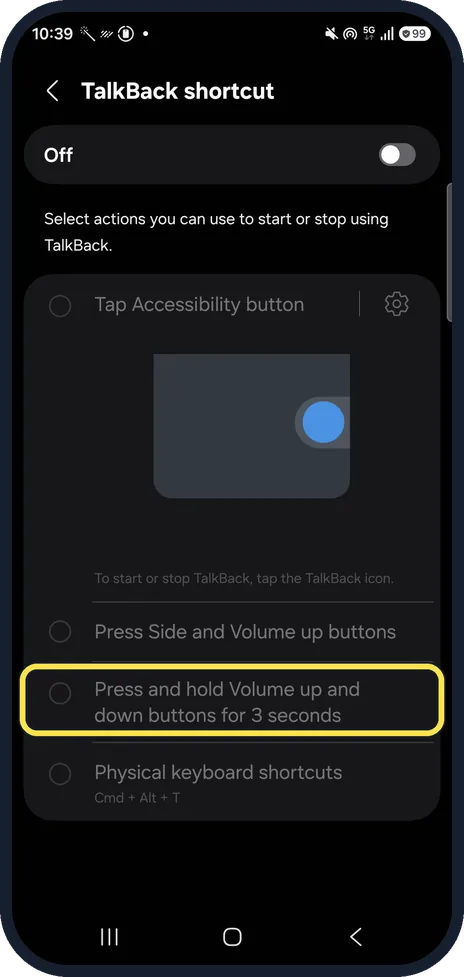
Try the volume-key shortcut
If the shortcut is set up, press and hold volume up and volume down together for 3 seconds. This is often how TalkBack gets switched on by accident.
TalkBack shortcut in Accessibility shows which actions start it. Ours was Off; its list includes Press and hold Volume up and down buttons for 3 seconds.
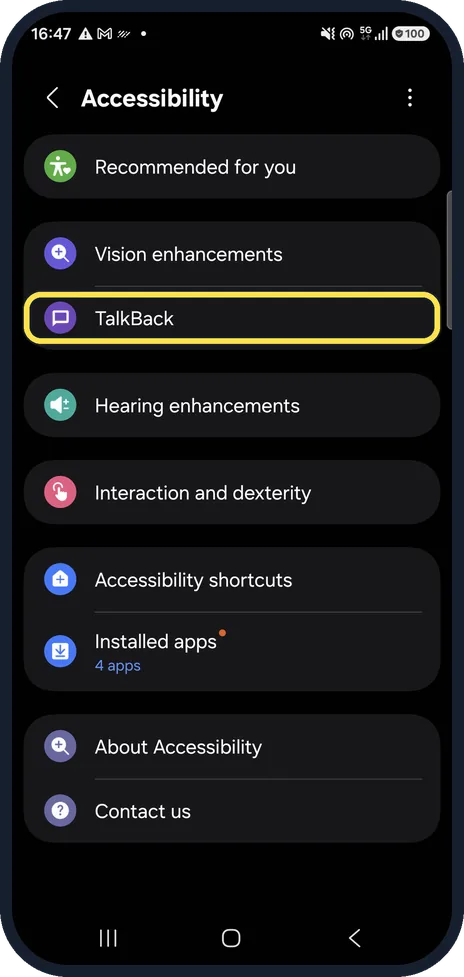
Open TalkBack in Accessibility
Settings, Accessibility. TalkBack is the first item under the vision settings.
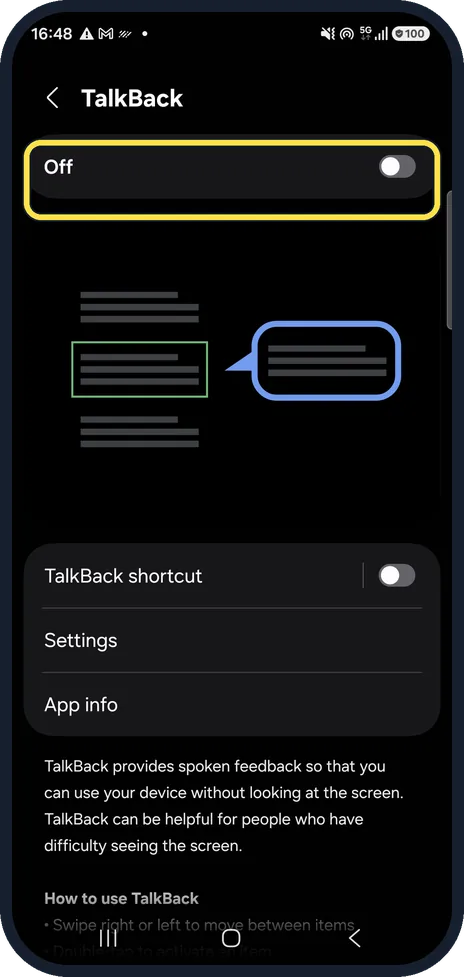
Switch it off
The switch at the top turns TalkBack on and off. With TalkBack on, select it and double-tap.
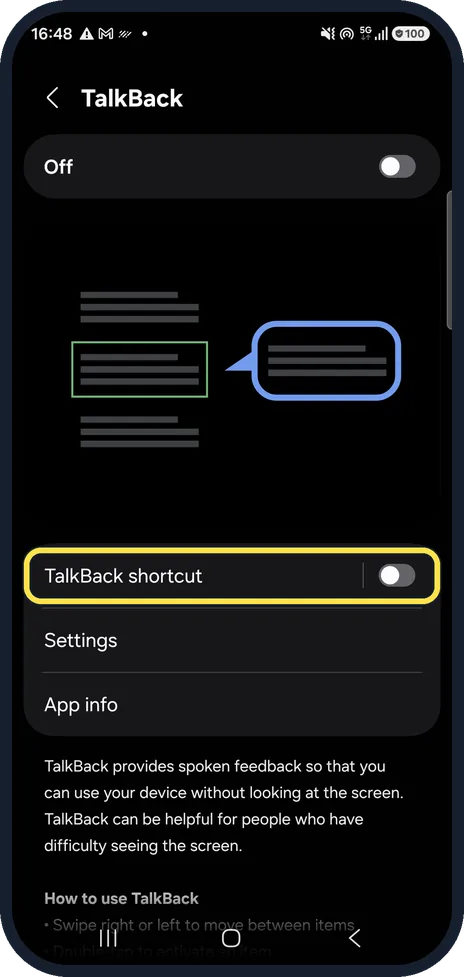
Turn off the shortcut
TalkBack shortcut lets a button combination start TalkBack. Switch it off so it cannot come back by accident. Ours was off.
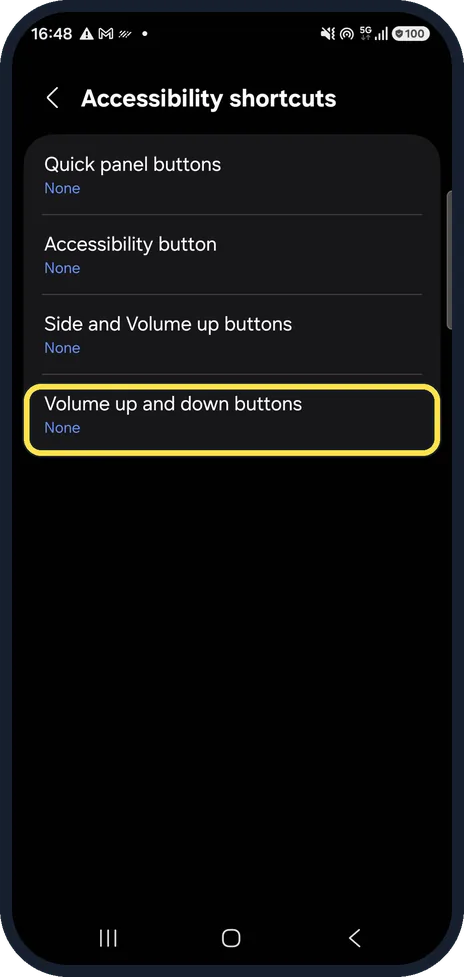
Check Accessibility shortcuts
Accessibility, Accessibility shortcuts lists which buttons start an accessibility feature. On ours, Volume up and down buttons was set to None. Samsung's older guide calls this Advanced settings.
If you do not see this option
- Your phone says Screen reader, not TalkBack Samsung says that before One UI 3.1 it is called Voice Assistant: Accessibility, Screen reader, then the switch next to Voice Assistant. Source: Use TalkBack or Voice Assistant on your Galaxy device
- You cannot tap the Settings icon Samsung says to swipe down from the top with two fingers, tap the Settings icon and double-tap it. Then swipe with two fingers to reach Accessibility. Source: Use TalkBack or Voice Assistant on your Galaxy device
If this does not work
- The volume keys did nothing Samsung says the keys only work if the TalkBack shortcut is on. The first time, tap Use in the pop-up, then press both keys again for 3 seconds. Source: Use TalkBack or Voice Assistant on your Galaxy device
- Your phone says Voice Assistant Samsung says it is called Voice Assistant before One UI 3.1: Accessibility, Screen reader, then the Voice Assistant switch. Source: Use TalkBack or Voice Assistant on your Galaxy device
- TalkBack confirms nothing you tap Samsung says that with TalkBack on, you tap the switch and then double-tap it, then tap Turn off and double-tap that too. Source: Use TalkBack or Voice Assistant on your Galaxy device
About this guide
TalkBack is Samsung's screen reader. When it is on by accident, single taps only select things and one-finger swipes do not scroll, so the phone seems broken. It is not.
Step 2 is from the same phone after its One UI 9 update (Android 17).
Good to know
Screen not reacting to touch at all? Samsung Galaxy touchscreen not responding? 6 fixes.
In short: Tap to select, double-tap to open, two fingers to scroll. Settings, Accessibility, TalkBack, off; then TalkBack shortcut off.
Links checked in October 2026. Menus and features can change after software updates. These steps match the version named at the top.
📷 See real photos from the Galaxy A57 in our Camera Lab, next to 10 other phones.
Did this guide work for you?
Sorry about that. What happened?