
howtosimply.com/guides/how-to-turn-on-the-personal-hotspot-on-an-oppo-phone/ · Checked October 2026 · CPH2689, EEA), ColorOS 16.0.5, Android 16 (build CPH2689_16.0.5.1001(EX01) · OPPO Reno13 5G
In this guide
Open Settings, Mobile network, Personal hotspot and turn on the switch. Hotspot settings shows the name and password other devices need. It can also share over Bluetooth or USB.
4 of 4 steps with real screenshots · 3 official sources below
- Device
- Android
- Shown on
- OPPO Reno13 5G (CPH2689, EEA), ColorOS 16.0.5, Android 16 (build CPH2689_16.0.5.1001(EX01))
- App
- Settings
- Path
- Settings › Mobile network
- Real screenshots
- 4 of 4 steps
- Checked
- October 2026
- Sources
- 3 official, linked below
Step by step
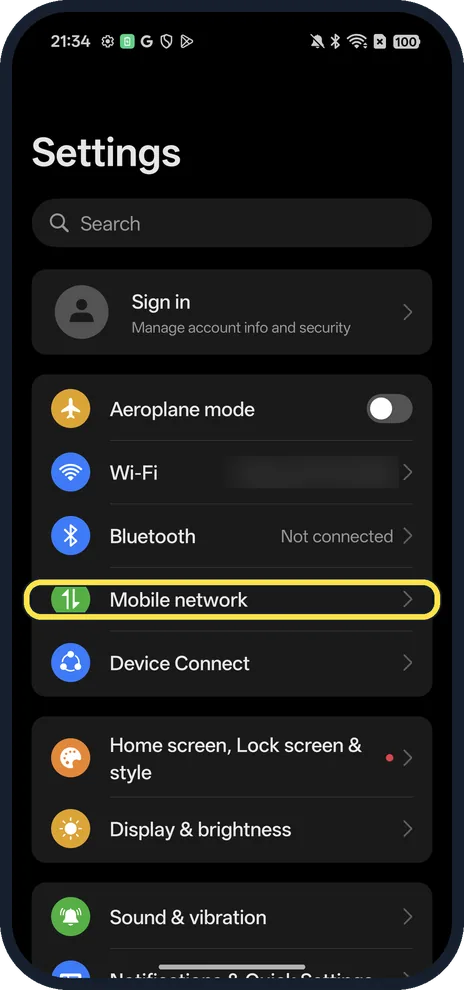
Open Mobile network
Open Settings; it is below Bluetooth.
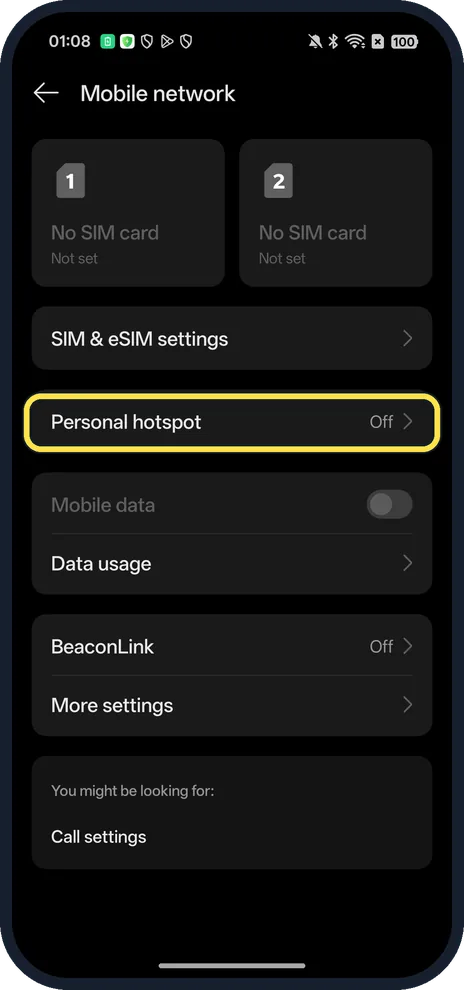
Tap Personal hotspot
Ours said Off.
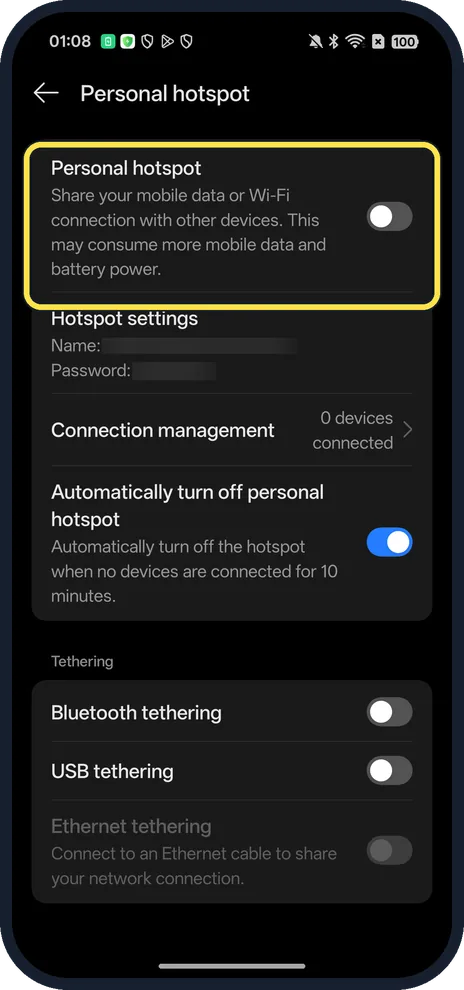
Turn on Personal hotspot
The page says it shares your mobile data or Wi-Fi connection and may use more data and battery.
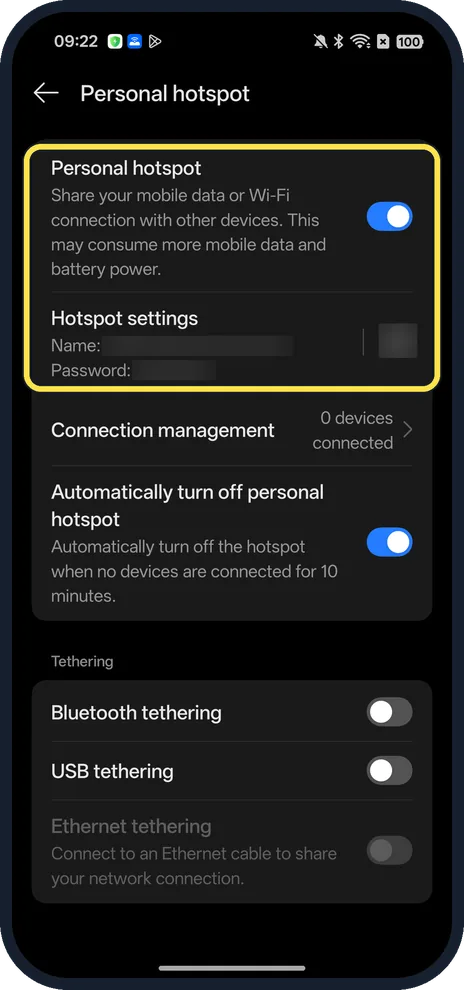
Check it is on
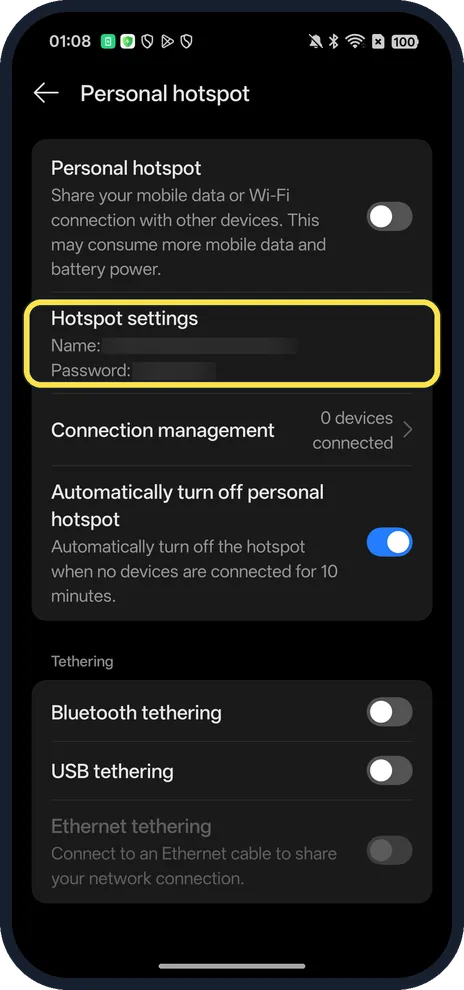
The switch turns blue and a QR code icon appears next to Hotspot settings. Ours worked without a SIM, sharing its Wi-Fi, with 0 devices connected.
If you do not see this option
- No SIM in the phone? Ours had none: Mobile network showed No SIM card for both slots, and the hotspot still turned on, sharing Wi-Fi.
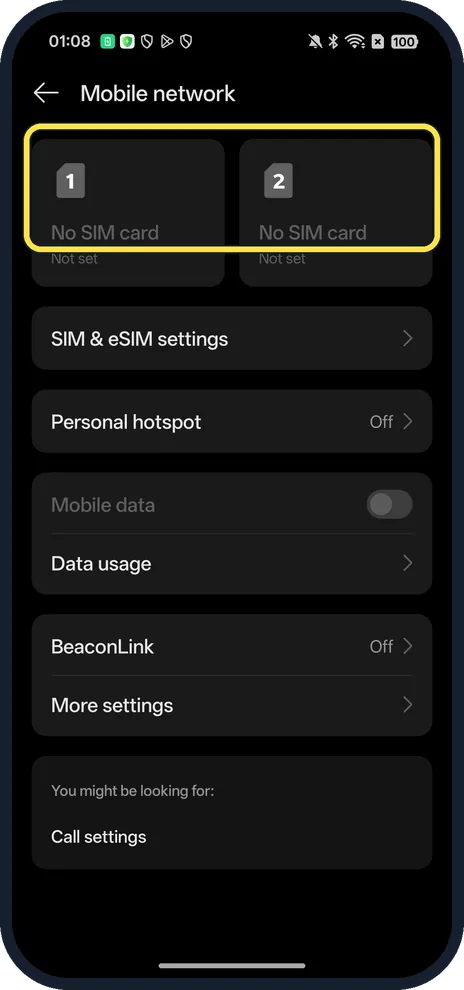
- No Mobile network row? OPPO says the same menu is called Mobile Network, Dual SIM & Cellular, SIM card & mobile data or Dual SIM & mobile network depending on the phone. Source: How to Use the Mobile Data Network on Your OPPO Phone
- Faster way? OPPO says to long-press the Personal Hotspot icon in the pull-down panel to go straight to its settings page. Source: How Do You Access Hidden Features in the OPPO Control Center
- Need the password? Tap Hotspot settings to see or change the name and password.
If this does not work
- Hotspot turns itself off? Automatically turn off personal hotspot switches it off when no devices are connected for 10 minutes. Turn that off on the same page.
- Others connect but have no internet? The page says the hotspot shares your mobile data or Wi-Fi connection, so the OPPO itself needs a working one. Google says the same for Android hotspots; check Data usage and your plan. Source: Share a mobile connection by hotspot or tethering on Android
- Want to share over a cable? Use USB tethering or Bluetooth tethering, in the Tethering section above Ethernet tethering. Source: Share a mobile connection by hotspot or tethering on Android
About this guide
The screenshots are from our OPPO Reno13 5G, the European model CPH2689, with ColorOS 16.0.5 and Android 16 (build CPH2689_16.0.5.1001(EX01)), in Dark mode. Ours has no SIM; we turned the hotspot on for a screenshot and off again. The name, password and QR code are blurred.
Good to know
If Wi-Fi or mobile data still fails, reset network settings.
To use less battery, turn on Power saving mode.
In short: Settings, Mobile network, Personal hotspot on.
- Google Android Help: Share a mobile connection by hotspot or tethering on Android
- OPPO Support: How to Use the Mobile Data Network on Your OPPO Phone
- OPPO Support: How Do You Access Hidden Features in the OPPO Control Center
Links checked in October 2026. Menus and features can change after software updates. These steps match the version named at the top.
Did this guide work for you?
Sorry about that. What happened?