ONEPLUS
How to turn on a hotspot on a OnePlus (OxygenOS 16)

In short
Go to Settings, Mobile network, Personal hotspot and switch it on. Hotspot settings has the name and password other devices use. The hotspot turns off by itself after 10 minutes with nothing connected.
6 of 6 steps show a real screenshot from our Nord 5. Each step was checked against the maker's own instructions, linked at the end.
Steps
- 1
Open Personal hotspot
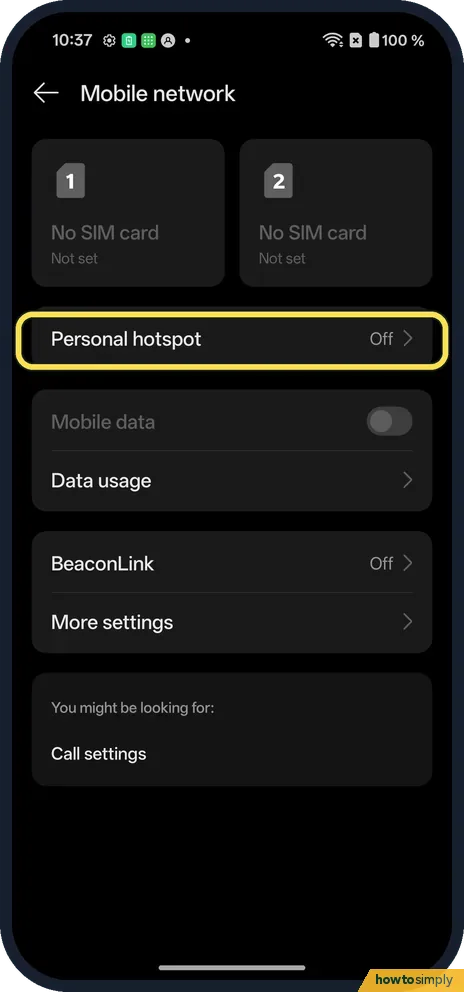
Open Settings, Mobile network. Personal hotspot said Off.
- 2
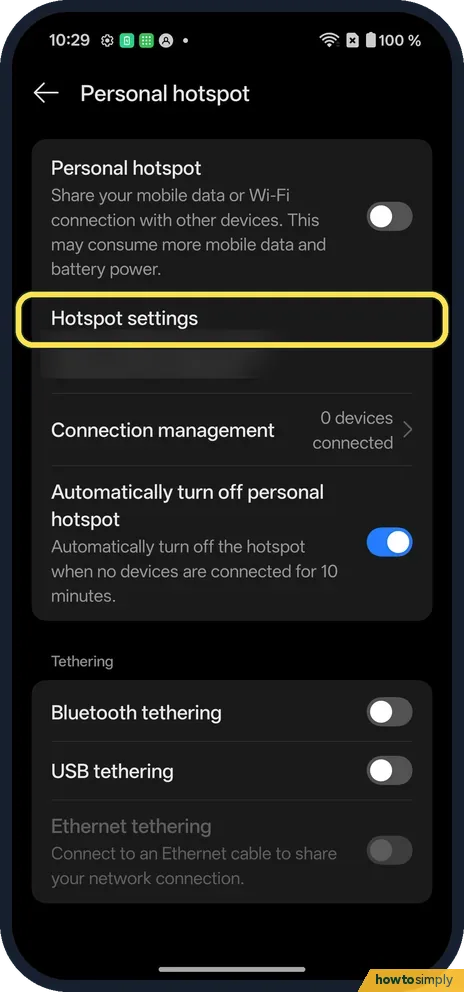
Tap Hotspot settings
Set the name and password before you switch it on.
- 3
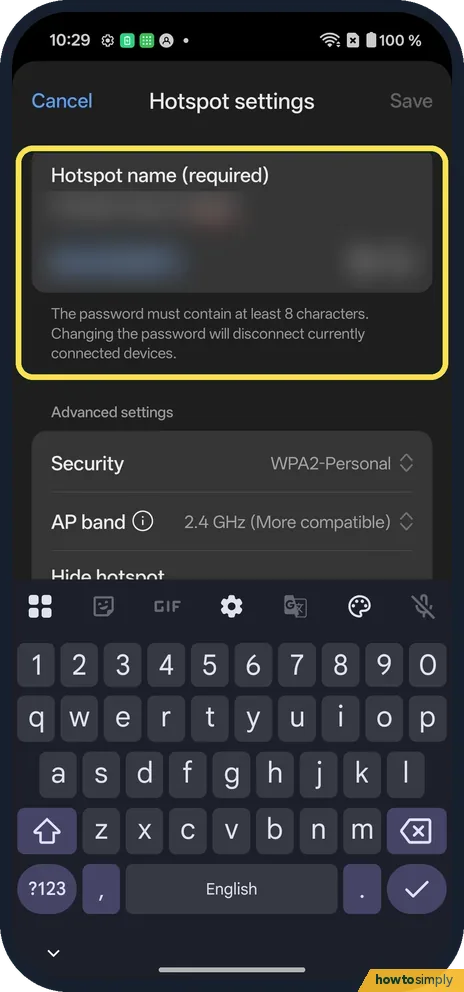
Check the name and password
The password must contain at least 8 characters. Changing it disconnects devices. Ours used WPA2-Personal and 2.4 GHz.
- 4
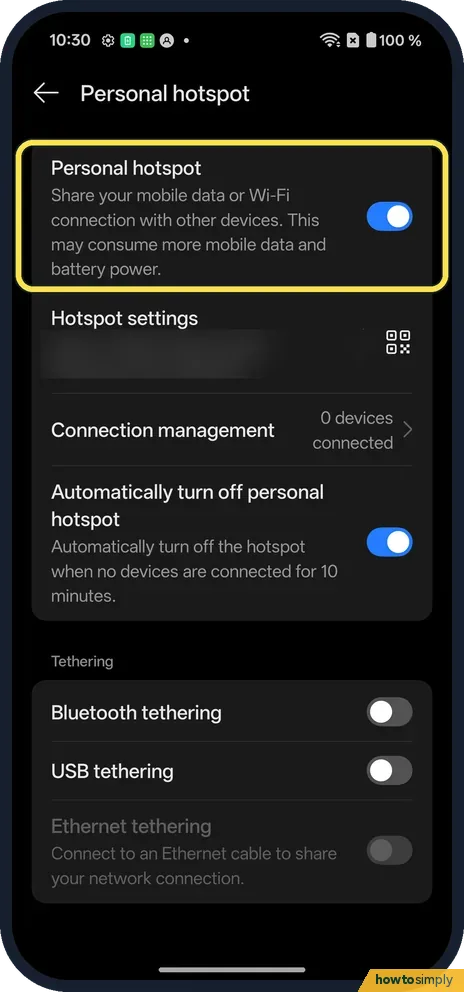
Switch it on
Tap the Personal hotspot switch. It says Share your mobile data or Wi-Fi connection with other devices. A QR code shows next to Hotspot settings.
- 5
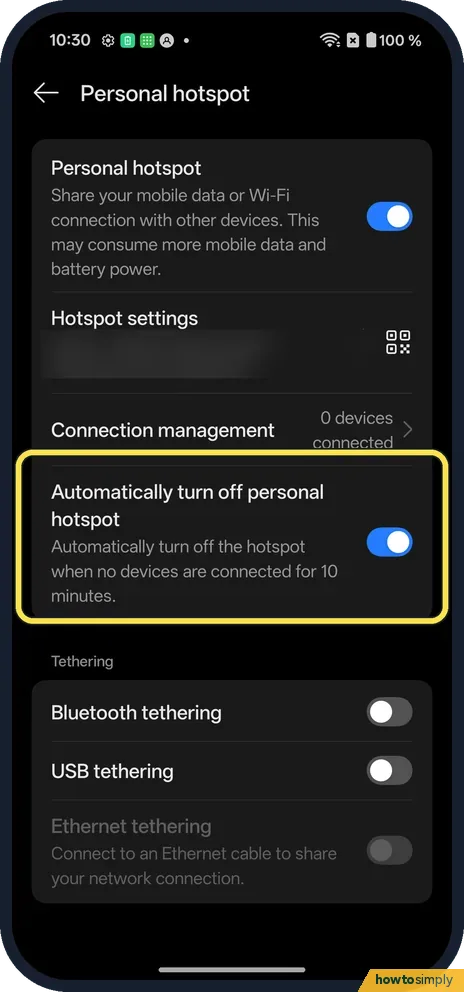
Check the auto-off
Automatically turn off personal hotspot when no devices are connected for 10 minutes. It was on.
- 6
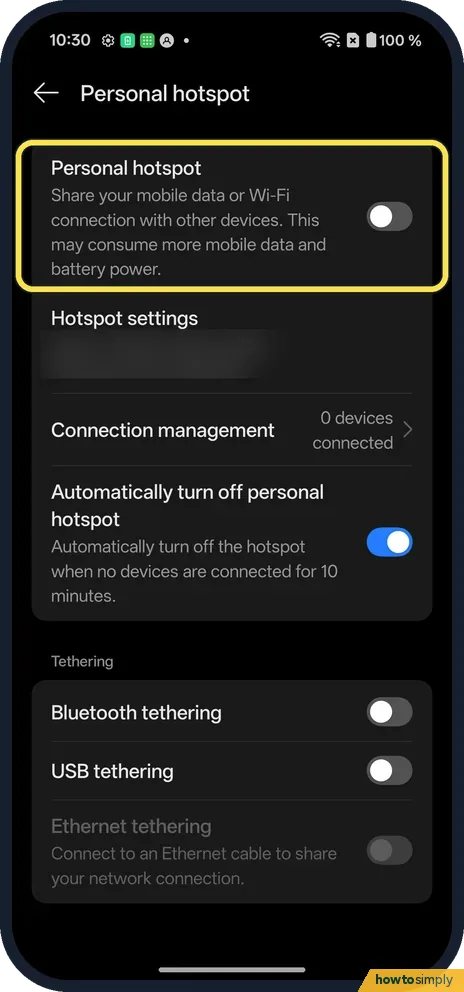
Switch it off
Tap the Personal hotspot switch again.
If you do not see this option
- OxygenOS 14 (OnePlus manual)? The manual's path is Settings, Connection & sharing, Personal hotspot. Ours is under Mobile network. Source: OxygenOS 14.0 User Manual
- No SIM? Mobile network said No SIM card on ours. The hotspot still switched on, but had no mobile data to share.
- No Wi-Fi on the other device? OnePlus's manual also describes Bluetooth tethering on the Personal hotspot page, and USB tethering with a cable. Both share the same mobile data. Source: OxygenOS 14.0 User Manual
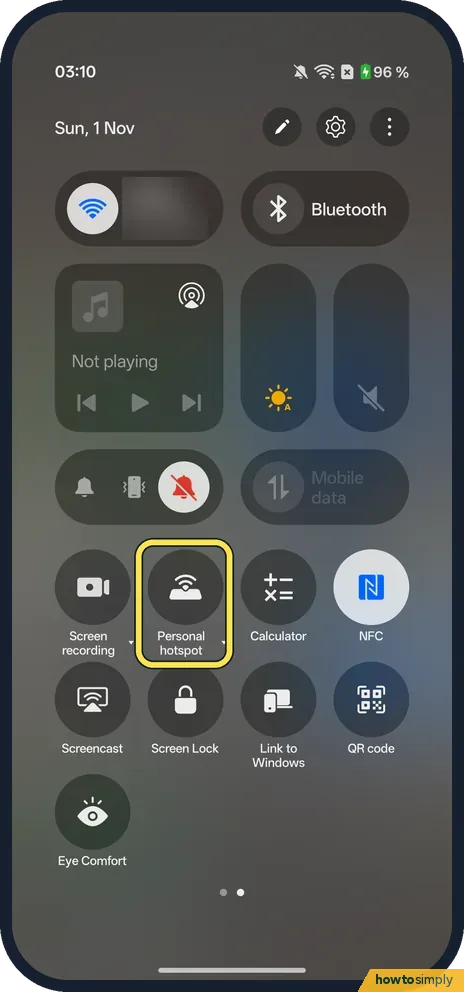
- Quick Settings tile? On our Nord 5 the tile is called Personal hotspot, on the second page of Quick Settings.
- Hidden hotspot or a device limit? Hotspot settings on our OxygenOS 16 phone has Hide hotspot (off on ours), and Connection management has a device limit (10) and a data usage limit (Unrestricted).
If this does not work
- Connected, but no internet? Check mobile data is on and your plan allows tethering.
- Quick connect? The manual says to tap the QR code beside Hotspot settings and scan it with the other device.
- Laptop cannot see the hotspot? Make sure the switch is on and the phone is close by. If you set the network as hidden in Hotspot settings, the laptop will not list it; type the name by hand or turn hidden off.
- Works, then stops after a while? The auto-off setting turns the hotspot off after 10 minutes with nothing connected. Switch it on again, or turn the auto-off setting off if a device keeps dropping and reconnecting.
- Too many devices on it? Google says you can share with up to 10 other devices over a Wi-Fi hotspot. OnePlus's manual also lists Connection management for setting the maximum number of connections and limiting data use.
- Mac will not tether by cable? Google says Mac computers cannot tether with Android by USB. Use the Wi-Fi hotspot instead.
Good to know
Check battery health on a OnePlus.
While the hotspot is on, the phone keeps its mobile data and Wi-Fi radio busy, so battery drains faster. Google suggests plugging in your devices, turning tethering off when you are done, and using a setting that turns the hotspot off when nothing is connected, which ours had on. Data used by connected devices counts against your own plan, just as if you had used it on the phone.
Switching the hotspot off disconnects every device straight away. Your name and password stay saved, so they reconnect next time without typing it again. If you want to share a Wi-Fi network instead of mobile data, see share a Wi-Fi password on a OnePlus.
About this guide
- Device
- Android
- Shown on
- OnePlus Nord 5 (CPH2709), OxygenOS 16.0.5.1201, Android 16
- App
- Settings
- Path
- Settings › Mobile network › Personal hotspot
- Real screenshots
- 6 of 6 steps
- Checked
- October 2026
- Sources
- 2 official, linked below
Sources
Links checked October 2026. Menus and features can change with updates.Spotted a mistake? Menus change with updates, and we want every step to match your screen. Email us about this page or use the contact form. We read every report, and fixes are listed on What changed.
Liked this guide?
Follow us for new guides and short how-to videos.
Did this guide work for you?
Sorry about that. What happened?