
howtosimply.com/guides/how-to-turn-on-the-hotspot-on-a-nothing-phone/ · Checked October 2026 · 4a) Pro (A069P, EEA), Nothing OS 4.1, Android 16 (build FroggerPro-B4.1-260424-1447-EEA · Nothing Phone
In this guide
Open Settings, Network and internet, Hotspot and tethering, Wi-Fi hotspot and turn on Use Wi-Fi hotspot. Set the Hotspot name and Hotspot password on the same page first.
5 of 5 steps with real screenshots · 4 official sources below
- Device
- Android
- Shown on
- Nothing Phone (4a) Pro (A069P, EEA), Nothing OS 4.1, Android 16 (build FroggerPro-B4.1-260424-1447-EEA), Nothing Phone (4a) Pro (A069P, EEA), Nothing OS 4.1, Android 16 (build FroggerPro-B4.1-260907-1153-EEA)
- App
- Settings
- Path
- Settings › Network and internet › Hotspot and tethering › Wi-Fi hotspot
- Real screenshots
- 5 of 5 steps
- Checked
- October 2026
- Sources
- 4 official, linked below
Step by step
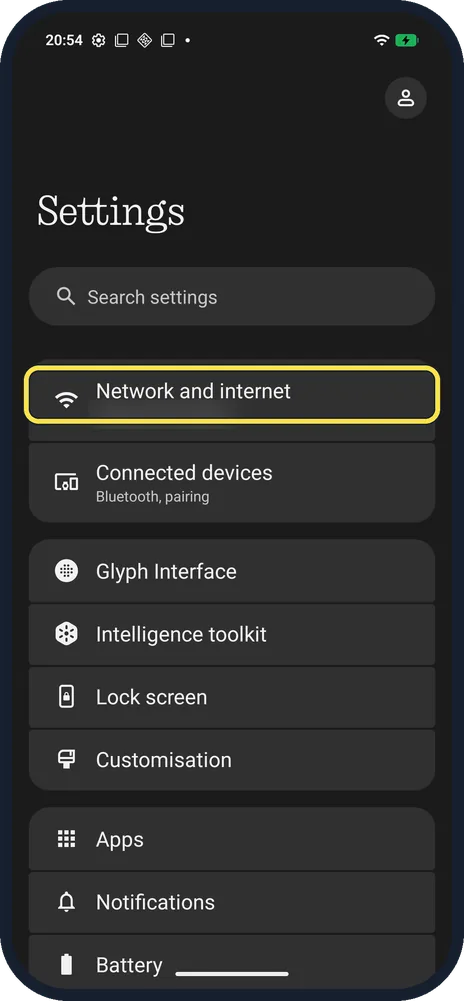
Open Network and internet
Open Settings and tap Network and internet, the first row.
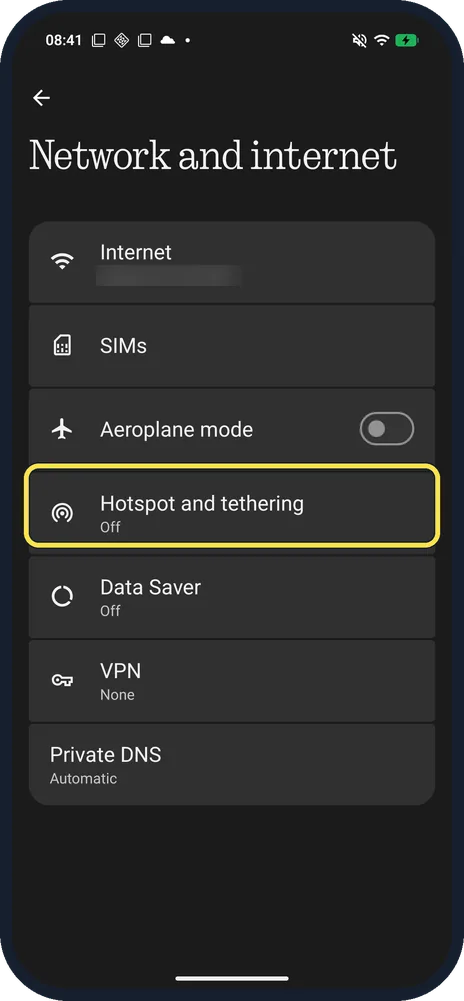
Tap Hotspot and tethering
Below Aeroplane mode. Ours said Off.
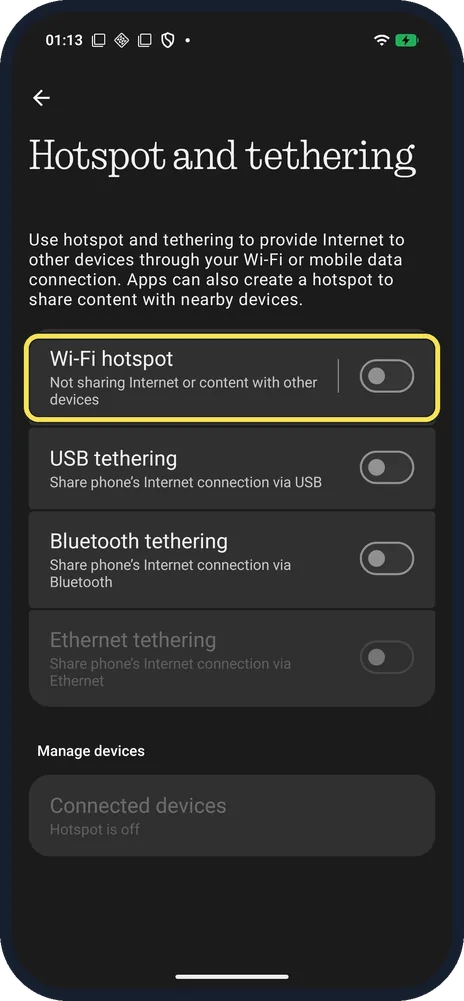
Tap Wi-Fi hotspot
Ours said Not sharing Internet or content with other devices.
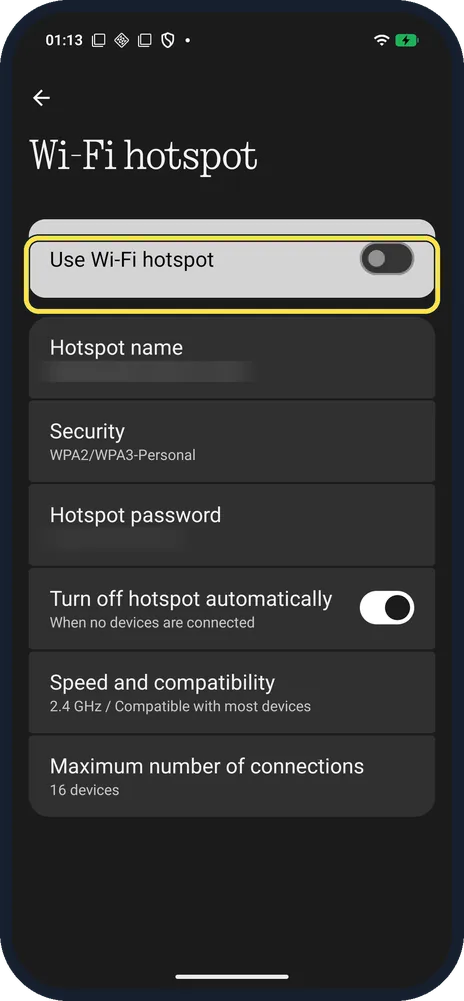
Turn on Use Wi-Fi hotspot
Set or check Hotspot name and Hotspot password below first.
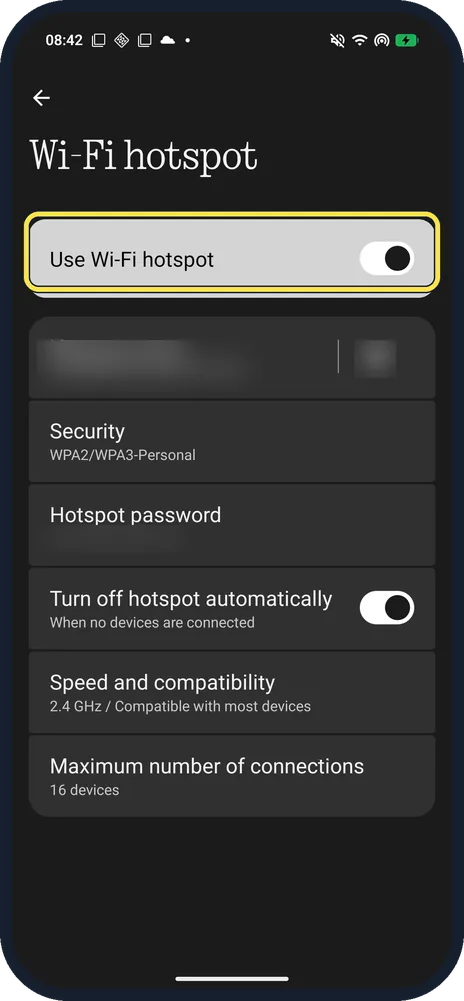
Check it is on
The switch turns on and a hotspot icon shows in the status bar. Ours worked without a SIM, sharing its Wi-Fi.
If you do not see this option
- Row called WiFi Hotspot? Nothing's support page gives the route as Settings, Network & Internet, Hotspot and Tethering, WiFi Hotspot; ours says Wi-Fi hotspot. Source: How do I use the Hotspot feature?
- No Hotspot tile in Quick Settings? Google says to tap Edit at the bottom left of Quick Settings and drag Hotspot in. Source: Share a mobile connection by hotspot or tethering on Android
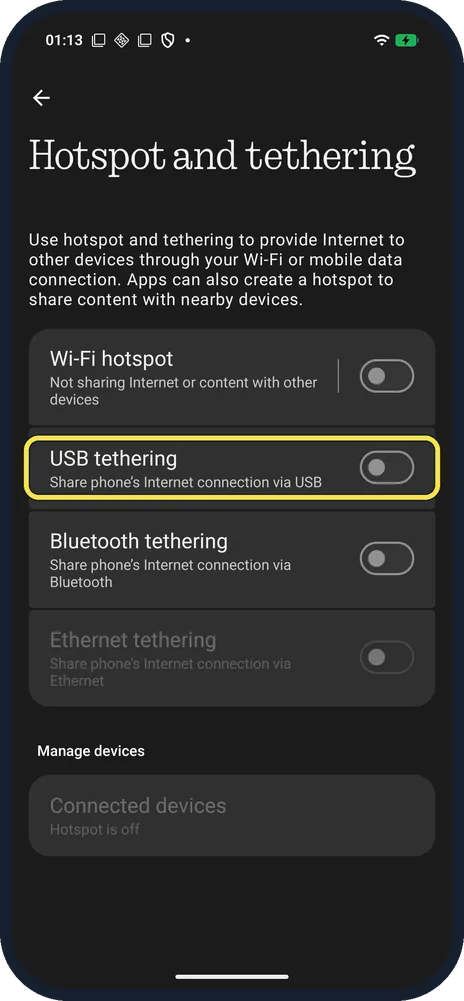
- Share over a cable instead? Turn on USB tethering on Hotspot and tethering. Source: What is the USB tethering feature and how do I use it?
If this does not work
- Hotspot on but no internet? Nothing says tethering only works while the phone itself is online over mobile data or Wi-Fi. Google adds that some operators limit or charge extra for tethering, so check with yours. Sources: What is Bluetooth tethering and how do I use it?, Share a mobile connection by hotspot or tethering on Android
- Phone gets warm? Nothing says the hotspot uses a lot of energy and causes heat; that is normal, so turn it off when you are done. Source: How do I use the Hotspot feature?
- An older device can't see the hotspot? Speed and compatibility was 2.4 GHz / Compatible with most devices on ours; keep that setting.
About this guide
The screenshots are from our Nothing Phone (4a) Pro, the European model A069P, with Nothing OS 4.1 and Android 16 (build FroggerPro-B4.1-260907-1153-EEA, security update 1 September 2026), in Dark theme. We turned the hotspot on for a screenshot and off again; the names, password and QR code are blurred.
The step 1 screenshot was taken earlier, on build FroggerPro-B4.1-260424-1447-EEA.
Good to know
If Wi-Fi misbehaves, reset Wi-Fi and Bluetooth settings.
To watch data use in the status bar, show internet speed.
In short: Settings, Network and internet, Hotspot and tethering, Wi-Fi hotspot, on.
- Nothing Support: How do I use the Hotspot feature?
- Nothing Support: What is the USB tethering feature and how do I use it?
- Nothing Support: What is Bluetooth tethering and how do I use it?
- Google Android Help: Share a mobile connection by hotspot or tethering on Android
Links checked in October 2026. Menus and features can change after software updates. These steps match the version named at the top.
Did this guide work for you?
Sorry about that. What happened?