
howtosimply.com/guides/how-to-turn-on-the-driving-focus-on-an-iphone/ · Checked October 2026 · iPhone 17e · iOS 27.0.1
In this guide
Open Settings, tap Focus, then Driving. If it is not listed, as on our iPhone 17e, tap + at the top right, choose Driving and tap Customise Focus. Tap While Driving and choose Automatically, When Connected to Car Bluetooth or Manually. Manually was the default on our iPhone 17e.
5 of 5 steps with real screenshots · 1 official source below
- Device
- iPhone
- Shown on
- iOS 27.0.1 (iPhone 17e)
- App
- Settings
- Path
- Settings › Focus › + › Driving › While Driving
- Real screenshots
- 5 of 5 steps
- Checked
- October 2026
- Sources
- 1 official, linked below
Step by step
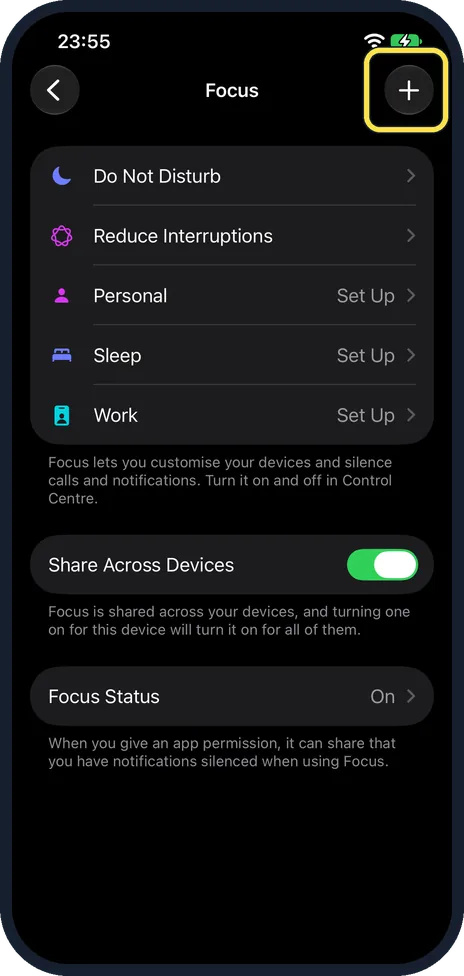
Open Settings, Focus and tap +
Driving was not in our list: it held Do Not Disturb, Reduce Interruptions, Personal, Sleep and Work. Apple says that if you do not see Driving, tap + at the top right.
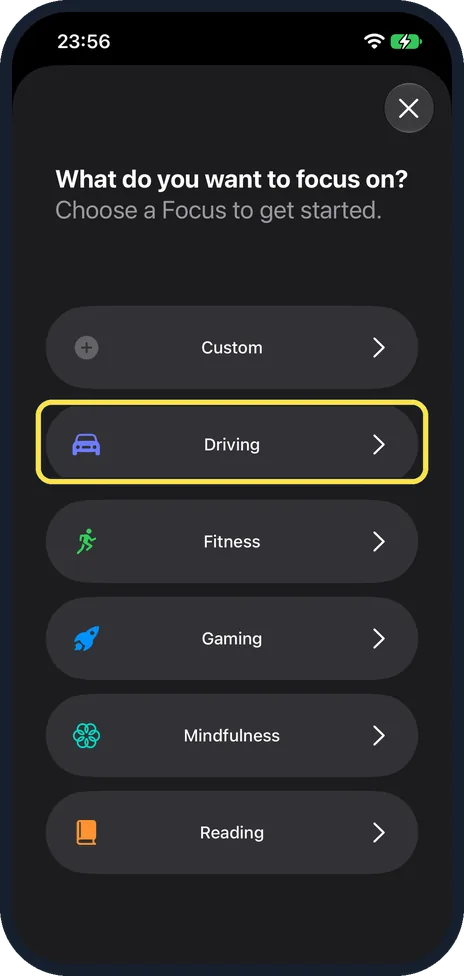
Tap Driving
The page asks: What do you want to focus on? Driving is the second choice, below Custom.
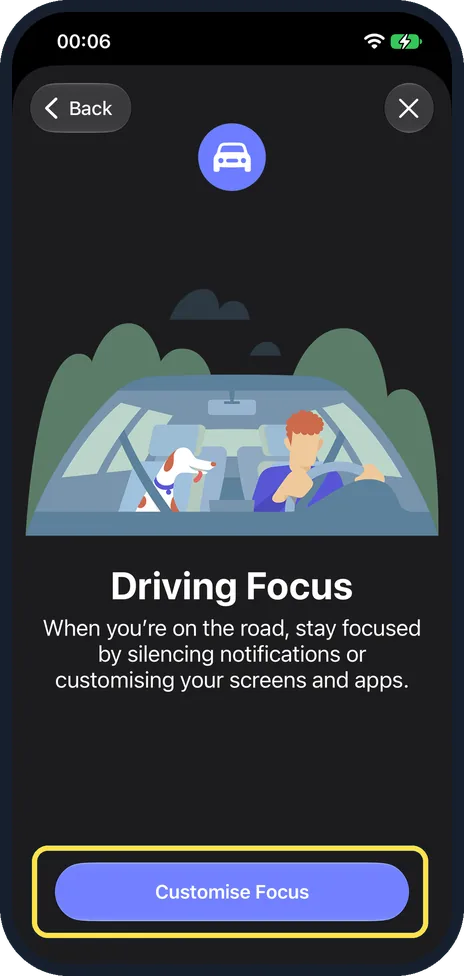
Tap Customise Focus
The Driving Focus page explains it silences notifications on the road. Tap the button at the bottom.
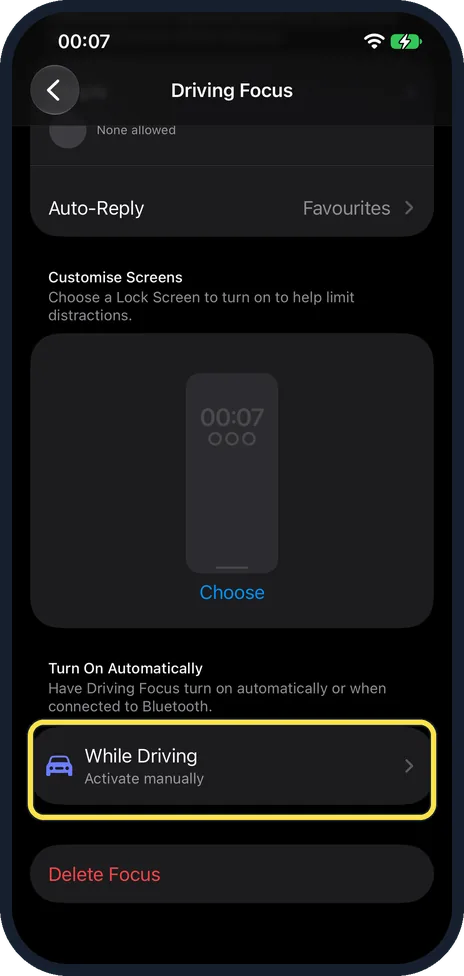
Tap While Driving
While Driving is under Turn On Automatically. Ours said Activate manually.
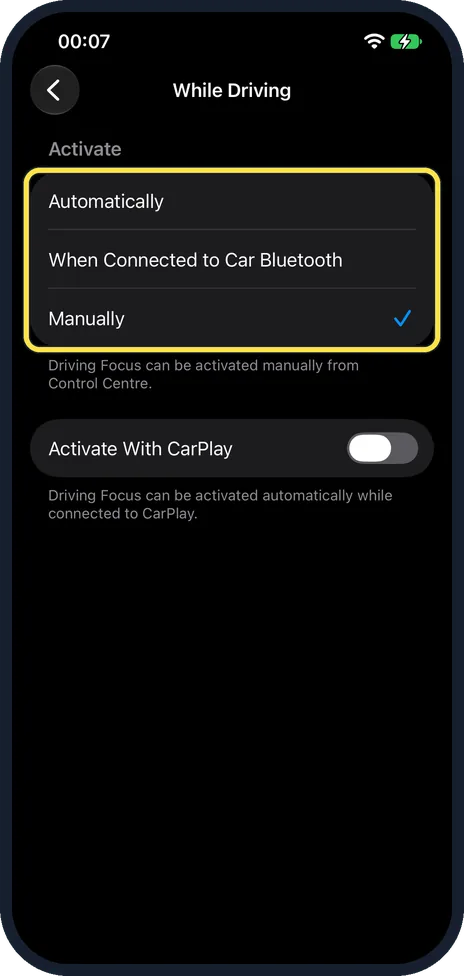
Choose when it starts
Pick Automatically, When Connected to Car Bluetooth or Manually. Activate With CarPlay is a separate switch below.
If you do not see this option
- Driving is not in the Focus list? That was the case on our iPhone 17e. Apple says to tap + and then Driving, as in steps 1 and 2. Source: Stay focused while driving with iPhone
- No CarPlay choice under While Driving? Apple's guide lists Activate With CarPlay as a fourth choice. On our iPhone 17e with iOS 27.0.1 it was a separate switch below Automatically, When Connected to Car Bluetooth and Manually. Source: Stay focused while driving with iPhone
If this does not work
- It turns on as a passenger? Choose When Connected to Car Bluetooth or Manually instead of Automatically.
- Calls still come through? Apple says calls are allowed only when the iPhone is connected to CarPlay, a car Bluetooth system or a hands-free accessory. Source: Stay focused while driving with iPhone
About this guide
The Driving Focus silences messages and other alerts on the road. It can start by itself when the phone thinks you are driving or when it joins your car by Bluetooth.
The screenshots are from our iPhone 17e with iOS 27.0.1, in Dark mode. Driving was not set up on ours, so we added it, looked at the choices and deleted it again.
Good to know
To turn it on by hand with Manually, Apple says to use Control Centre: tap Focus, then Driving.
The Driving Focus page also has Auto-Reply; ours was set to Favourites. Apple says you can choose who gets it and change the message.
For other Focus types, see how to create a custom Focus on an iPhone.
In short: Settings, Focus, Driving (or +, Driving), While Driving, choose Automatically, Car Bluetooth or Manually.
Links checked in October 2026. Menus and features can change after software updates. These steps match the version named at the top.
Did this guide work for you?
Sorry about that. What happened?