XIAOMI REDMI
How to turn on Quick ball on a Xiaomi phone (HyperOS 3)
Go to Settings, Additional settings, Quick ball and turn on Quick ball. A small handle appears at the edge of the screen. Tap it to open a fan of shortcut icons. Select shortcuts, on the same page, changes them.

4 of 4 steps show a real screenshot from our Redmi Note 15 Pro 5G. Each step was checked against the maker's own instructions, linked at the end.
Steps
- 1
Open Quick ball
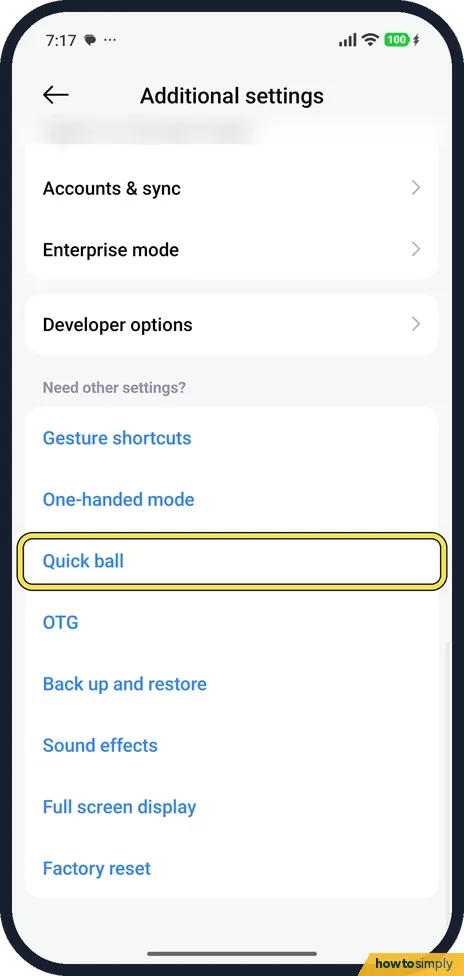
Go to Settings, Additional settings. Quick ball is under Need other settings?
- 2
Turn on Quick ball
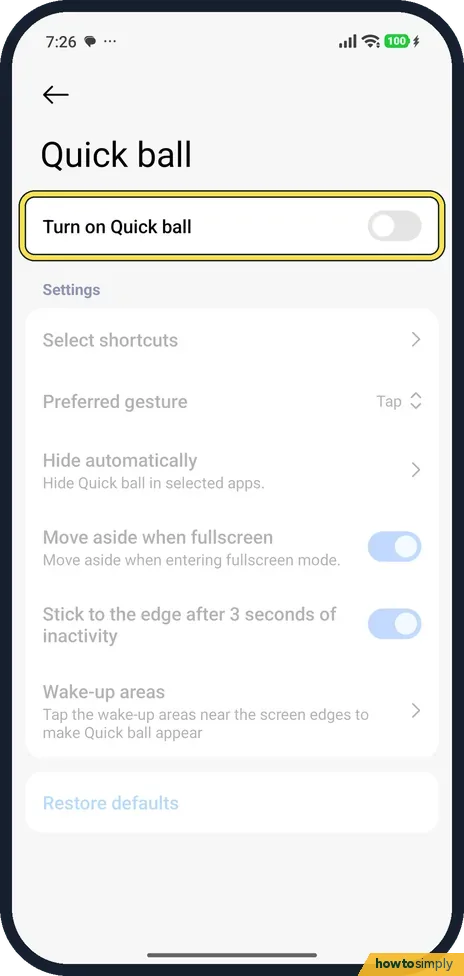
Turn on Quick ball. The settings below it, such as Select shortcuts and Hide automatically, become available.
- 3
Find the handle
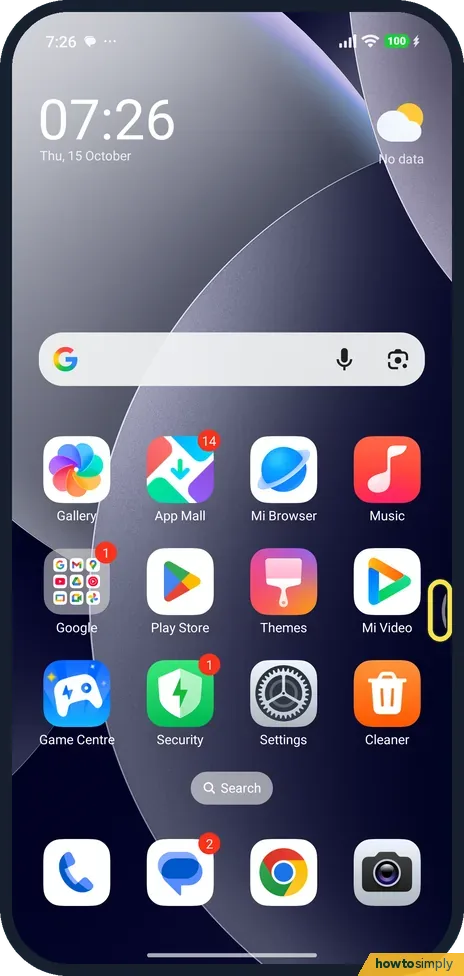
A small handle sits at the right edge of the screen.
- 4
Tap it for shortcuts
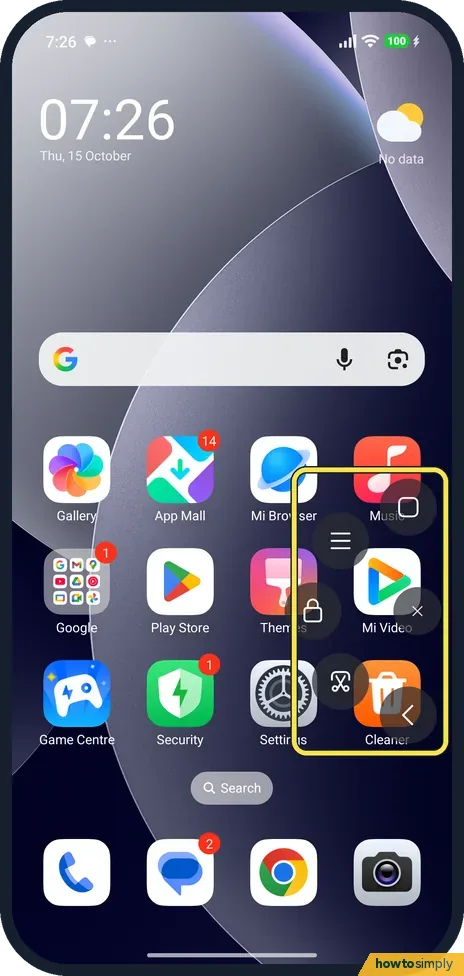
Tap the handle. Shortcut icons fan out around it in a half circle. Tap one, or tap away to close the fan.
If you do not see this option
- Not in Additional settings? nextpit describes it on other HyperOS phones under Additional settings, Accessibility, as Touch Assistant. On ours it was Quick ball, directly in Additional settings. Source: How to use Quick Ball on Xiaomi HyperOS
- Want different shortcuts? Tap Select shortcuts on the Quick ball page.
- Gets in the way in games or videos? Move aside when fullscreen was on on ours. Hide automatically hides it in apps you pick.
- Need bigger buttons instead? Xiaomi's user guide offers the Accessibility menu as another on-screen shortcut set, in Settings, Additional settings, Accessibility. Google describes it as a large menu for screenshots, locking the screen, volume, brightness, Quick Settings and notifications. Sources: Generic User Guide for HyperOS 3.0, Use the Accessibility Menu
If this does not work
- Ball disappeared? Stick to the edge after 3 seconds of inactivity was on: the ball moves to the edge when you don't use it.
- Opens by accident? Preferred gesture was Tap on ours. Change it on the Quick ball page, or turn Quick ball off.
- Options on the page are greyed out? Select shortcuts, Hide automatically and the other settings only become available once Quick ball itself is on. Turn on the main switch at the top first, then change them.
- Ball hidden in an app you need it in? Open the Quick ball page and check Hide automatically. Remove that app from the list there and the handle returns in it.
Good to know
Another way to reach apps: floating windows and the sidebar.
Quick ball only adds a floating handle. It does not change your navigation gestures or buttons, and it does not affect how apps behave. Any shortcut you pick still works the normal way too. If the handle distracts you in certain apps, Hide automatically and Move aside when fullscreen deal with that without turning the feature off. To remove it completely, go back to Settings, Additional settings, Quick ball and turn off Quick ball; the handle disappears straight away. For gestures that need no on-screen handle at all, see how to use gesture shortcuts on a Xiaomi phone.
On our Redmi with HyperOS 3.0.309.0, on 1 November 2026, Select shortcuts offered Home, Menu, Lock, Screenshot and Back. Lock locks the screen; there was no volume shortcut in that list, so use the Accessibility menu if you need on-screen volume buttons.
About this guide
- Device
- Android
- Shown on
- Xiaomi Redmi Note 15 Pro 5G (25080RABDG), HyperOS 3.0.308.0, Android 16
- App
- Settings
- Path
- Settings › Additional settings › Quick ball
- Real screenshots
- 4 of 4 steps
- Checked
- October 2026
- Sources
- 3 official, 1 other, linked below
Sources
Links checked October 2026. Menus and features can change with updates.Spotted a mistake? Menus change with updates, and we want every step to match your screen. Email us about this page or use the contact form. We read every report, and fixes are listed on What changed.
Liked this guide?
Follow us for new guides and short how-to videos.
Did this guide work for you?
Sorry about that. What happened?