
howtosimply.com/guides/how-to-turn-on-dolby-atmos-and-use-the-equaliser-on-a-samsung-galaxy/ · Checked October 2026 · Samsung Galaxy S26 (SM-S942N, Korean model), One UI 9, Android 17
In this guide
Open Settings, Sounds and vibration, Sound quality and effects. Turn on Dolby Atmos and pick Auto, Movie, Music or Voice; tap Equalizer for presets like Bass boost; Adapt sound tunes headphones to your age.
5 of 5 steps with real screenshots · 1 official source below
- Device
- Android
- Shown on
- Samsung Galaxy S26 (SM-S942N, Korean model), One UI 9, Android 17
- App
- Settings
- Path
- Settings › Sounds and vibration
- Real screenshots
- 5 of 5 steps
- Checked
- October 2026
- Sources
- 1 official, linked below
Step by step
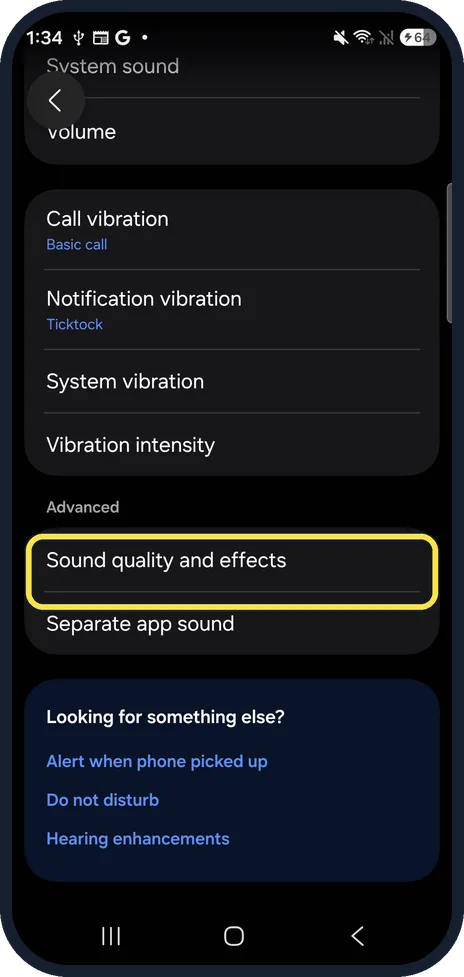
Open Sound quality and effects
Open Settings, Sounds and vibration and scroll to Advanced: Sound quality and effects. The first time, ours asked to find nearby devices; we allowed it.
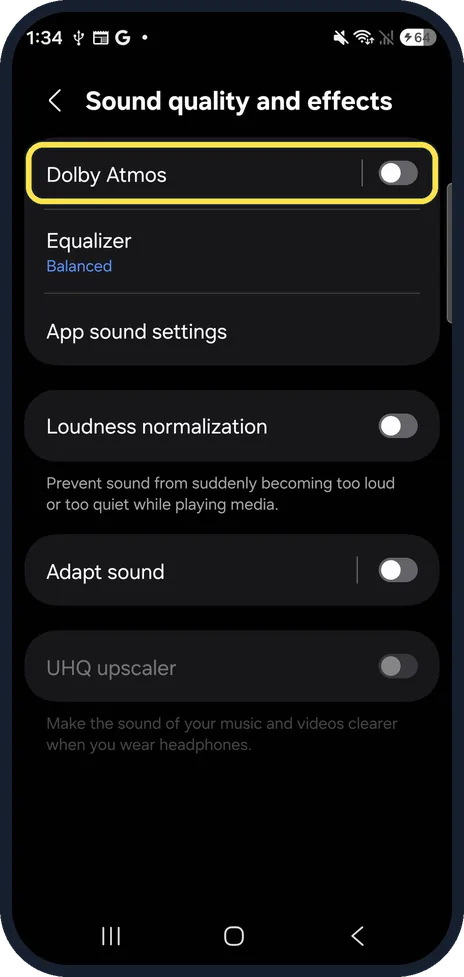
Tap Dolby Atmos
The page lists Dolby Atmos, Equalizer, App sound settings, Loudness normalization, Adapt sound and UHQ upscaler. Tap the words Dolby Atmos, not the switch, to see its modes.
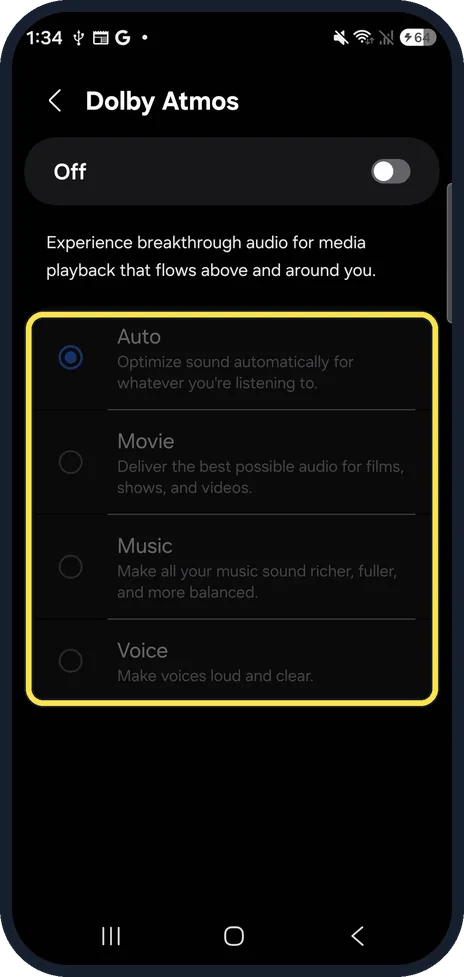
Turn it on and pick a mode
Turn on the switch, then pick Auto, Movie, Music or Voice. Samsung's screen says Voice makes voices loud and clear. Ours was off, with Auto selected.
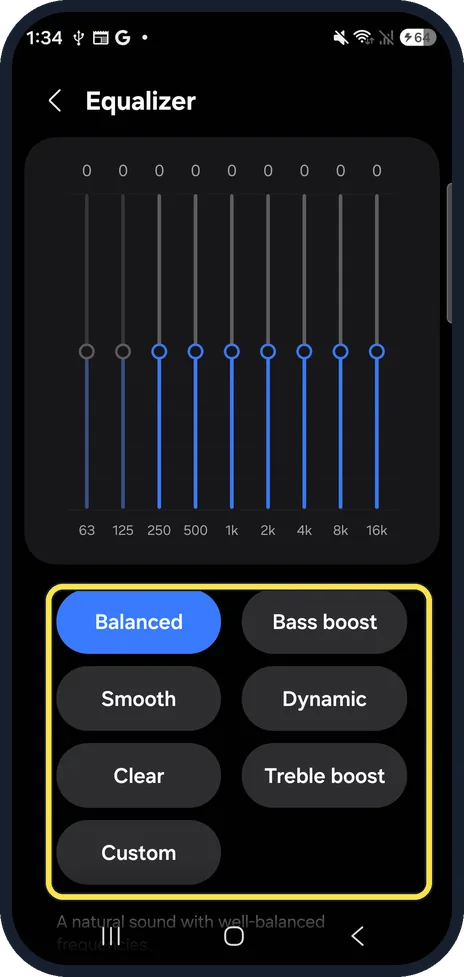
Pick an equaliser preset
Back on the page, tap Equalizer: Balanced, Bass boost, Smooth, Dynamic, Clear, Treble boost or Custom. Custom lets you drag the nine bands from 63 Hz to 16 kHz.
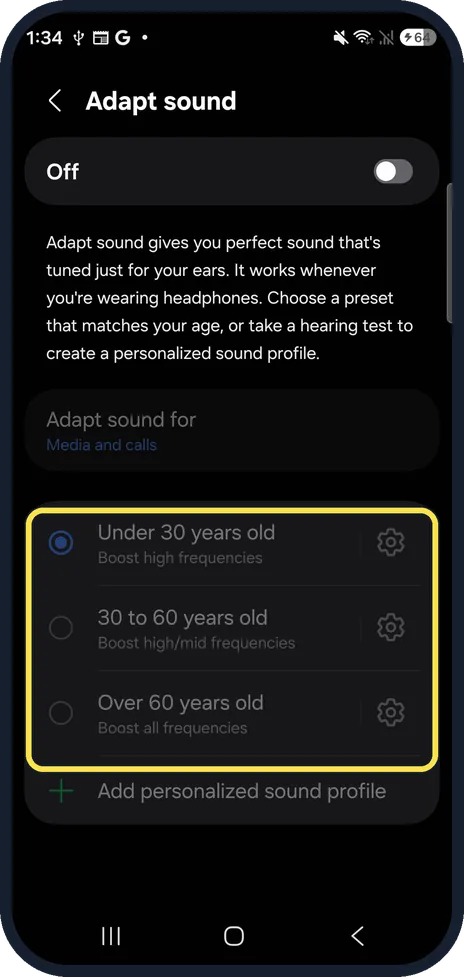
Use Adapt sound for headphones
Adapt sound works when headphones are connected. Pick Under 30, 30 to 60 or Over 60 years old, or Add personalized sound profile for a hearing test. Samsung recommends a quiet room with headphones on.
If you do not see this option
- Dolby Atmos modes or Adapt sound presets greyed out? On ours they stay grey until you turn on the switch at the top of each page (steps 3 and 5). Adapt sound says it works whenever you are wearing headphones.
- UHQ upscaler is greyed out? On ours it was grey: its note says it makes music and videos clearer when you wear headphones, so it needs wired or Bluetooth headphones connected.
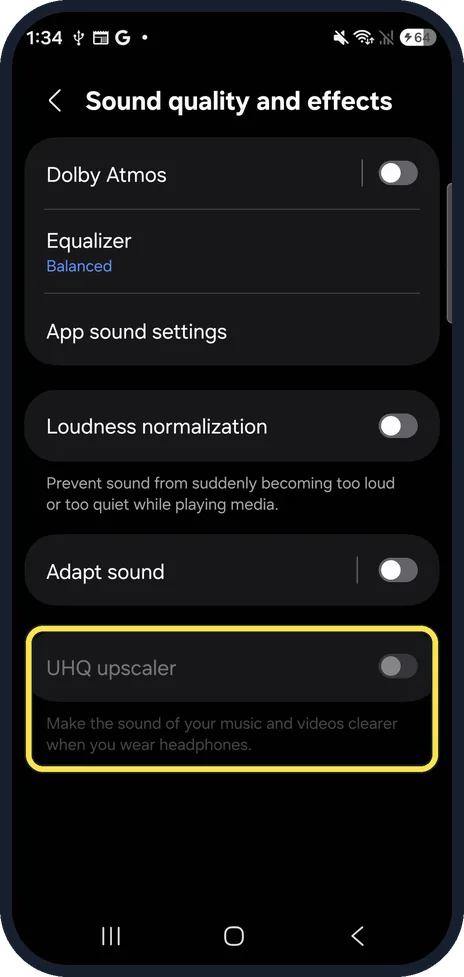
If this does not work
- Sound still too quiet? See Samsung Galaxy volume too low? 6 fixes.
- Volume jumps between apps? Loudness normalization, on the same page, stops sound becoming too loud or too quiet between media.
About this guide
One UI keeps its sound options on one page that is easy to miss at the bottom of Sounds and vibration.
The screenshots are from our Samsung Galaxy S26, the Korean model SM-S942N, with One UI 9 and Android 17, in Dark mode. Menus can differ on models sold in other regions. Dolby Atmos and Adapt sound were off and the equaliser on Balanced; we changed nothing.
Good to know
Play one app's sound somewhere else: how to play one app's sound on a different device.
In short: Settings, Sounds and vibration, Sound quality and effects: Dolby Atmos mode, Equalizer preset, Adapt sound for headphones.
Links checked in October 2026. Menus and features can change after software updates. These steps match the version named at the top.
Did this guide work for you?
Sorry about that. What happened?