ONEPLUS
How to turn off emergency alerts on a OnePlus (OxygenOS 16)

In short
Go to Settings, Safety & emergency, Wireless emergency alerts. Switch off Extreme threats, Severe threats, AMBER alerts or Test alerts, or Allow alerts for all of them. Some government alerts cannot be switched off.
3 of 3 steps show a real screenshot from our Nord 5. Each step was checked against the maker's own instructions, linked at the end.
Steps
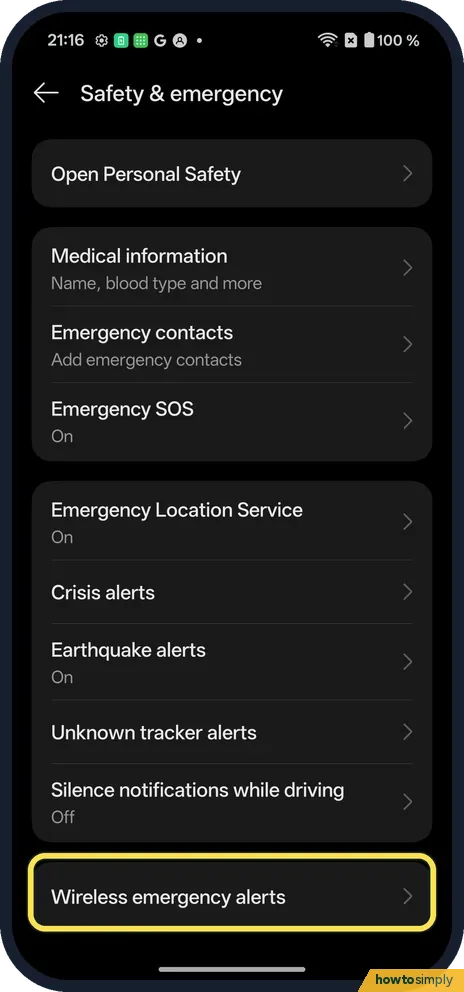
- 1
Open Safety & emergency
Wireless emergency alerts is the last row.
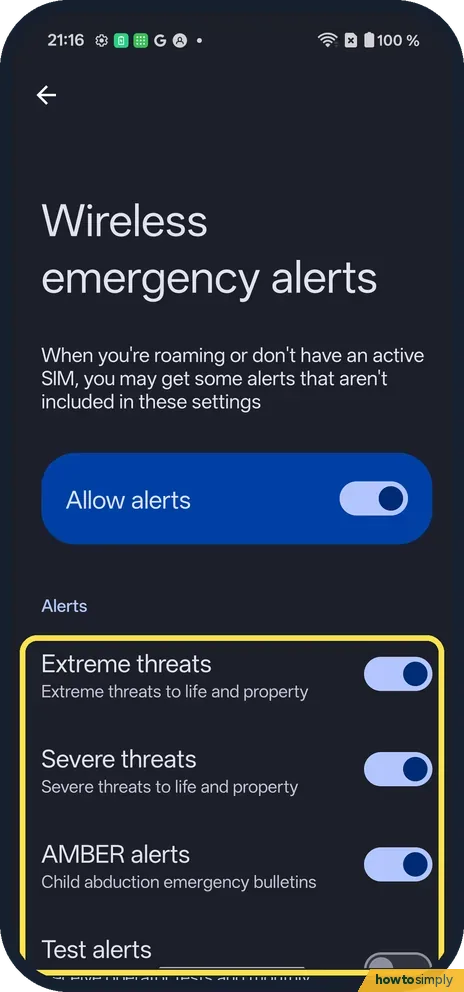
- 2
Switch off a type
Extreme threats, Severe threats, AMBER alerts, Test alerts.
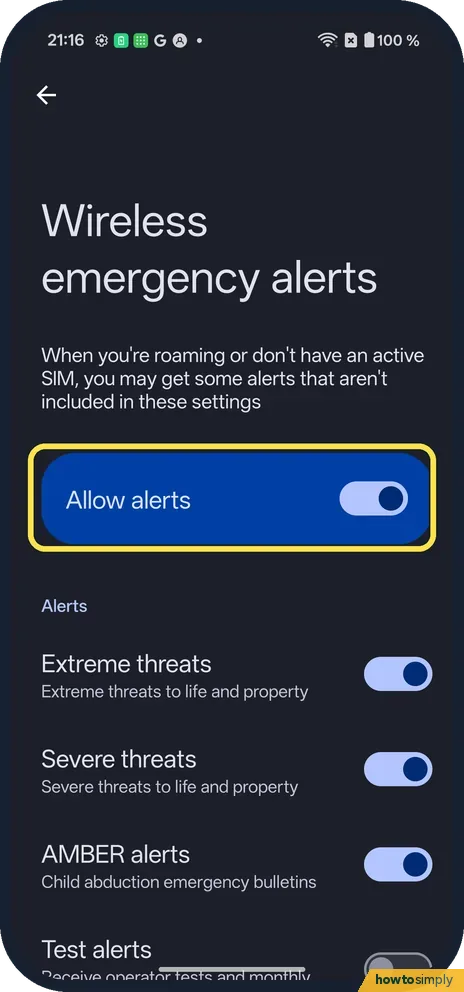
- 3
Or all of them
Allow alerts switches them all.
If you do not see this option
- Roaming or no SIM? The page warns you may get alerts not covered by these settings.
- Crisis or earthquake alerts? Separate rows on Safety & emergency; Earthquake alerts was On on ours.
- No Safety & emergency page? Google's general Android Help lists Wireless emergency alerts under Settings, Notifications. For Earthquake alerts, it says to use Location, Advanced if you do not see Safety & emergency. Searching Settings for emergency alerts reaches the same switches. Source: Get help during an emergency with your Android phone
If this does not work
- Still get one? Some national alerts cannot be switched off.
- Missed an alert? Check Allow alerts is on.
- A switch will not turn off? If a row is greyed out or springs back on, that alert type is set by your network or by national rules, so the phone does not let you refuse it. This matches the note on the page that some government alerts cannot be switched off.
- No earthquake alerts at all? Google says earthquake alerts need Wi-Fi or mobile data, use your approximate location, cover quakes of magnitude 4.5 and above, and are not available in every area. Check that location and a connection are on.
Good to know
Set up Emergency SOS on a OnePlus.
Types you switch off simply stop appearing; nothing else on the phone changes and you can turn them back on from the same page. The alerts you keep still behave the same way: Google says wireless emergency alerts always show on top of any other screen, ahead of earthquake alerts and normal app notifications. That means an alert can interrupt a call, a game or a video, which is by design. Earthquake alert accuracy has limits too: Google warns that not every quake is detected, estimates can be wrong, and an alert may arrive before, during or after the shaking.
About this guide
- Device
- Android
- Shown on
- OnePlus Nord 5 (CPH2709), OxygenOS 16.0.5.1201, Android 16
- App
- Settings
- Path
- Settings › Safety & emergency › Wireless emergency alerts
- Real screenshots
- 3 of 3 steps
- Checked
- October 2026
- Sources
- 1 official, linked below
Sources
Links checked October 2026. Menus and features can change with updates.Spotted a mistake? Menus change with updates, and we want every step to match your screen. Email us about this page or use the contact form. We read every report, and fixes are listed on What changed.
Liked this guide?
Follow us for new guides and short how-to videos.
Did this guide work for you?
Sorry about that. What happened?