ONEPLUS
How to change the notification sound on a OnePlus (OxygenOS 16)

In short
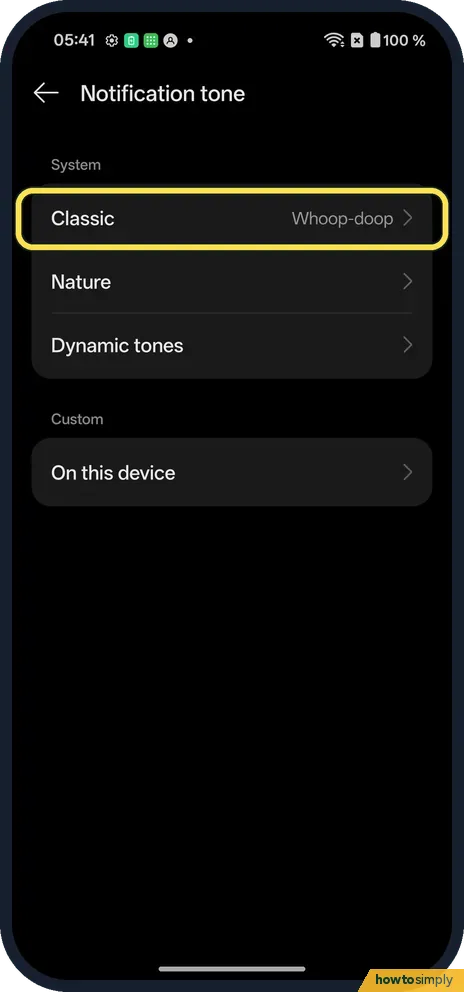
Open Settings, Sound & vibration, Notification tone. Pick a category such as Classic and tap a sound; it plays and its circle fills in.
3 of 3 steps show a real screenshot from our Nord 5. Each step was checked against the maker's own instructions, linked at the end.
Steps
- 1
Pick a category
Open Settings, Sound & vibration, Notification tone. Ours was in Classic.
- 2
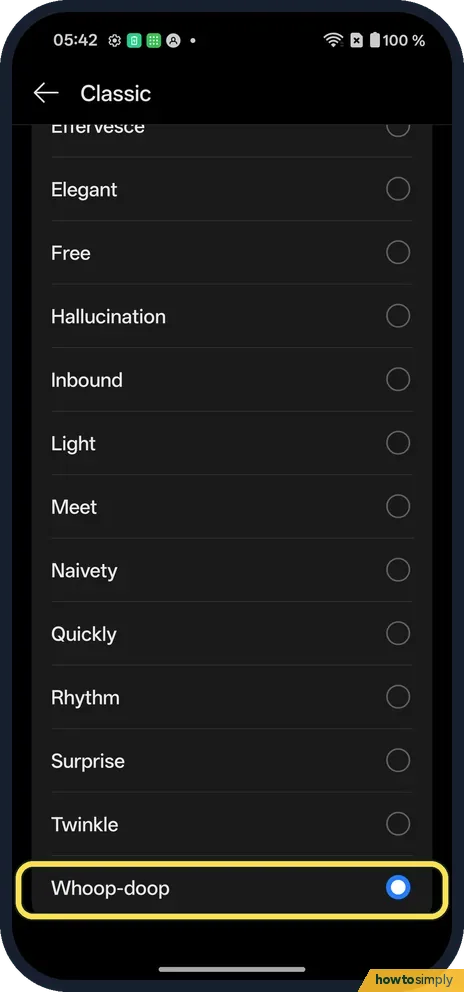
Tap a sound
The current one has a filled circle: Whoop-doop on ours.
- 3
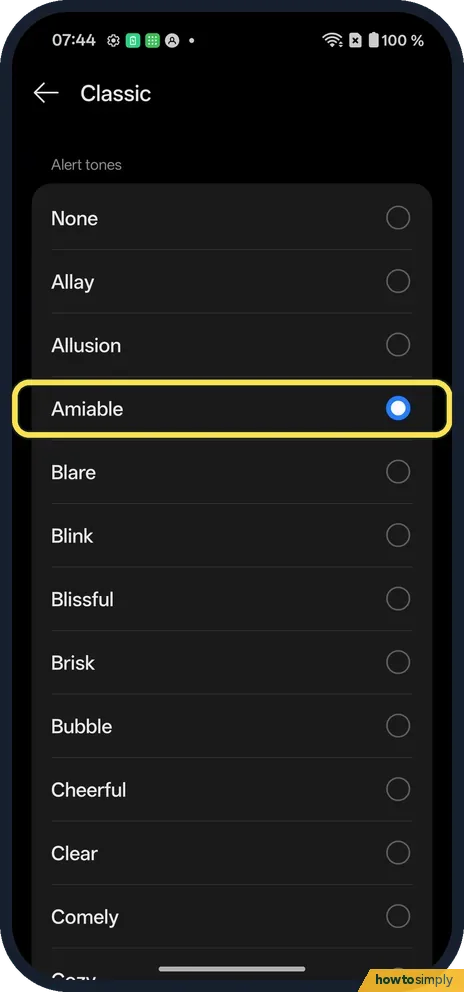
Try another
Tap any sound to hear it and pick it. We tried Amiable, then went back to Whoop-doop.
If you do not see this option
- On OxygenOS 14? The OnePlus manual calls the page Sounds & vibration, with Ringtone, Message tone and Notification tone. Source: OxygenOS 14.0 User Manual
- Your own sound? The manual says you can use music stored on the phone. Ours listed On this device next to Classic. Source: OxygenOS 14.0 User Manual
- Want more sounds to choose from? OnePlus's manual says notification tones can come from system ringtones, music stored on the phone, or the Theme Store. It also mentions Aquamorphic themes with natural-sounding tones on some system versions. Source: OxygenOS 14.0 User Manual
If this does not work
- No sound? Check the Notification volume. More: change the volume on a OnePlus.
- Phone on silent? Check the ring mode.
- One app sounds different? Many apps set their own sound in their notification settings.
- One app is always silent? Its notifications may be set to Silent rather than Alerting. Google explains that Silent notifications make no sound or vibration, while Alerting ones play a sound. Change it in that app's notification settings, or see turn off notifications for one app for where those settings live.
- Sound plays quietly after many alerts? Android can lower sound and pop-ups when lots of notifications arrive at once, for example after leaving aeroplane mode. Google calls this Notification cooldown; calls, alarms, priority conversations and emergency alerts are exceptions.
- Custom tone gone after a while? If you picked a music file and later deleted or moved it, the phone can no longer play it. Choose the tone again, or keep the file in the same folder.
Good to know
Change the ringtone and vibration on a OnePlus.
The new tone applies straight away to apps that use the phone's default notification sound, and it does not change your ringtone, alarms or the volume. Nothing is deleted when you switch, so you can go back to the old tone by tapping it again in the same category. Your choice is kept after a restart. If you want a sound but no buzz, or the other way round, the vibration settings are separate: change the ringtone and vibration.
About this guide
- Device
- Android
- Shown on
- OnePlus Nord 5 (CPH2709), OxygenOS 16.0.5.1201, Android 16
- App
- Settings
- Path
- Settings › Sound & vibration › Notification tone
- Real screenshots
- 3 of 3 steps
- Checked
- October 2026
- Sources
- 2 official, linked below
Sources
Links checked October 2026. Menus and features can change with updates.Spotted a mistake? Menus change with updates, and we want every step to match your screen. Email us about this page or use the contact form. We read every report, and fixes are listed on What changed.
Liked this guide?
Follow us for new guides and short how-to videos.
Did this guide work for you?
Sorry about that. What happened?