
howtosimply.com/guides/how-to-switch-between-gestures-and-three-keys-on-an-honor-phone/ · Checked October 2026 · BRP-NX1M, EEA), MagicOS 10.0, Android 16 (build 10.0.0.169(C430E7R2P1) · HONOR Magic7 Lite
In this guide
Open Settings, System & updates, System navigation and tap Gestures or Three keys. With gestures, swipe up from the bottom to go home and in from either edge to go back.
3 of 3 steps with real screenshots · 2 official sources below
- Device
- Android
- Shown on
- HONOR Magic7 Lite (BRP-NX1M, EEA), MagicOS 10.0, Android 16 (build 10.0.0.169(C430E7R2P1))
- App
- Settings
- Path
- Settings › System & updates
- Real screenshots
- 3 of 3 steps
- Checked
- October 2026
- Sources
- 2 official, linked below
Step by step
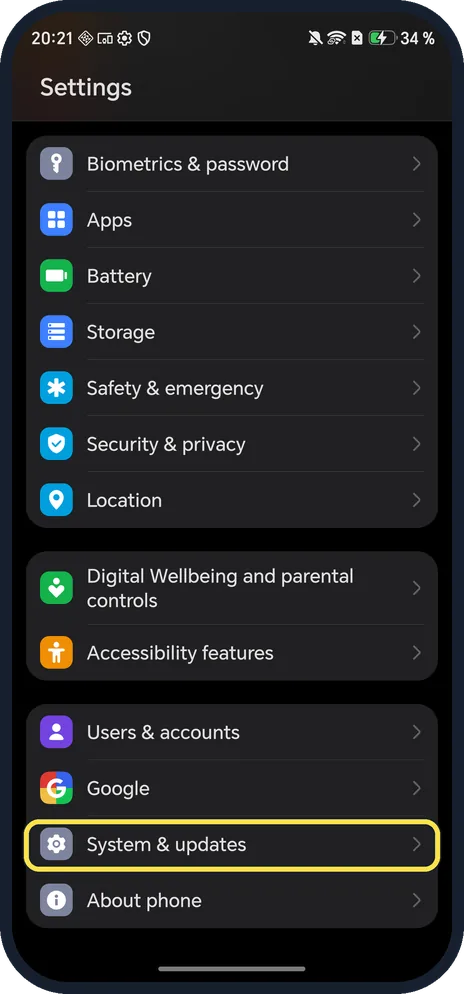
Open System & updates
Open Settings and scroll near the bottom.
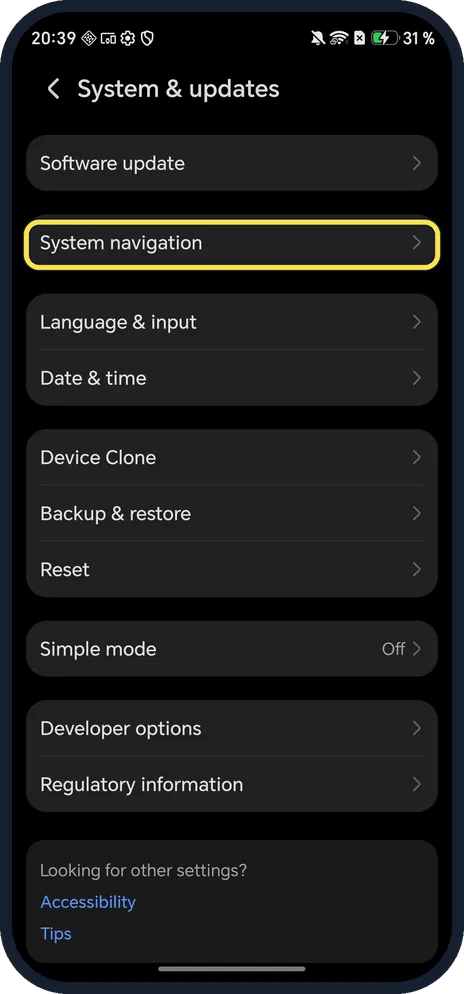
Tap System navigation
It is the second row, under Software update.
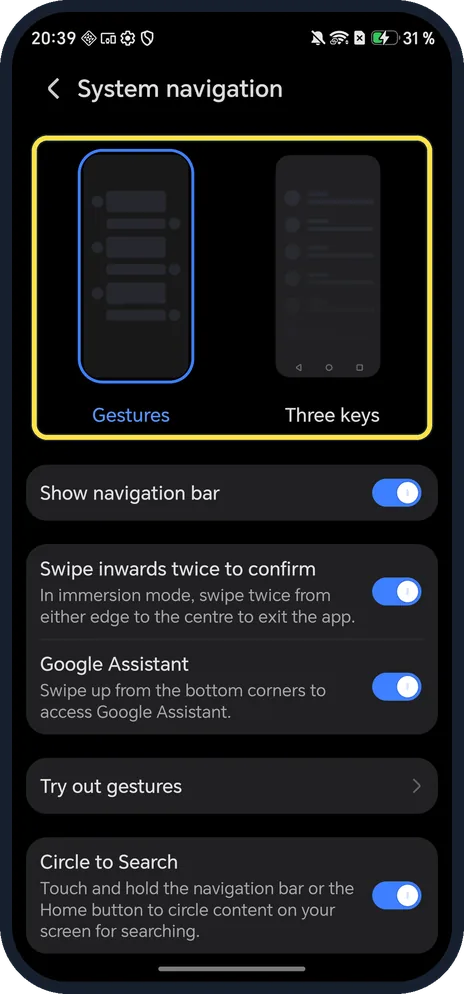
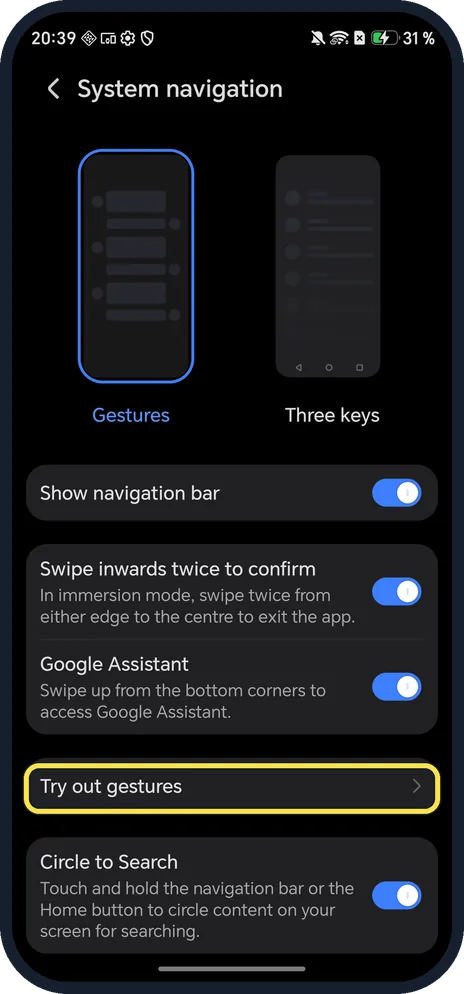
Tap Gestures or Three keys
The picture you tap gets a blue outline.
If you do not see this option
- Looking for the Navigation dock? HONOR's guide for other models puts it under Settings, System & updates, System navigation, More: a floating button for back, home and recent tasks. Our page had no More entry. Source: Use the Navigation Dock to Operate the Phone
- Can't find System navigation? HONOR says to search Settings for System navigation. On ours it was under System & updates, and the Accessibility features page also listed it under Looking for other settings? Source: The notification panel does not open when I swipe down from the status bar
- Want to hide the line at the bottom? Turn off Show navigation bar under the pictures.
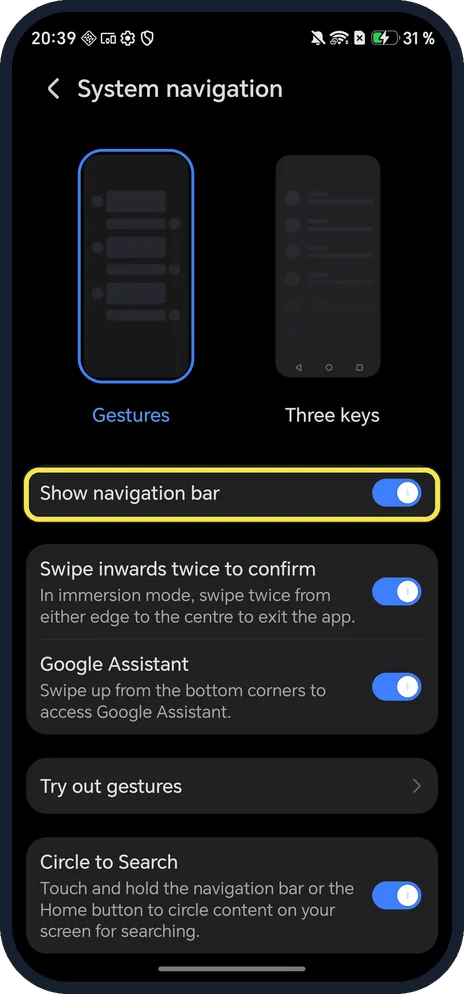
- Learning gestures? Try out gestures, lower on the page, walks you through them.
If this does not work
- Games close when you swipe from the edge? Swipe inwards twice to confirm was on in ours: in full-screen apps you swipe twice from the edge to leave.
- Circle to Search keeps opening? It triggers when you touch and hold the navigation bar or Home button. Turn off Circle to Search on the same page.
- Notification panel won't open with a swipe? HONOR suggests Three keys with a down-arrow key layout as a test: if the arrow opens the panel but swiping does not, the screen may be at fault. Source: The notification panel does not open when I swipe down from the status bar
About this guide
MagicOS 10 on our Magic7 Lite offered two choices, Gestures and Three keys.
The screenshots are from our HONOR Magic7 Lite, the European model BRP-NX1M, with MagicOS 10.0 and Android 16 (build 10.0.0.169(C430E7R2P1)), in Dark mode. Ours was on Gestures.
Good to know
To use two apps at once, open a floating window on an HONOR phone.
To change what holding Power does, change the power button shortcuts.
In short: Settings, System & updates, System navigation: Gestures or Three keys.
- HONOR Support (UK): Use the Navigation Dock to Operate the Phone
- HONOR Support: The notification panel does not open when I swipe down from the status bar
Links checked in October 2026. Menus and features can change after software updates. These steps match the version named at the top.
Did this guide work for you?
Sorry about that. What happened?