GOOGLE PIXEL
How to stop Wi-Fi turning on automatically on a Google Pixel (Android 17)

In short
Open Settings, Network and Internet, Internet, scroll to the bottom and tap Network preferences, then turn off Turn on Wi-Fi automatically. It was on on ours: Wi-Fi will turn back on near high-quality saved networks, like your home network.
4 of 4 steps show a real screenshot from our Pixel 10a. Each step was checked against the maker's own instructions, linked at the end.
Steps
- 1
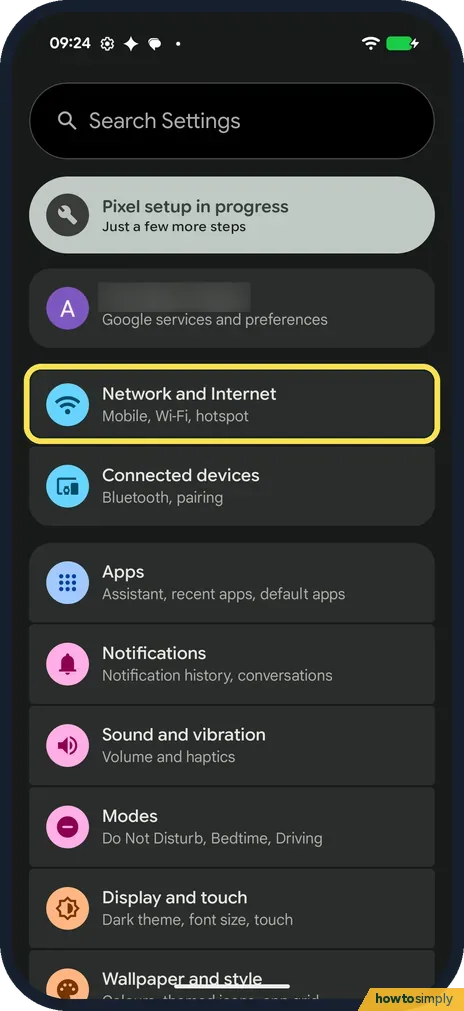
Open Network and Internet
Open Settings and tap Network and Internet: Mobile, Wi-Fi, hotspot.
- 2
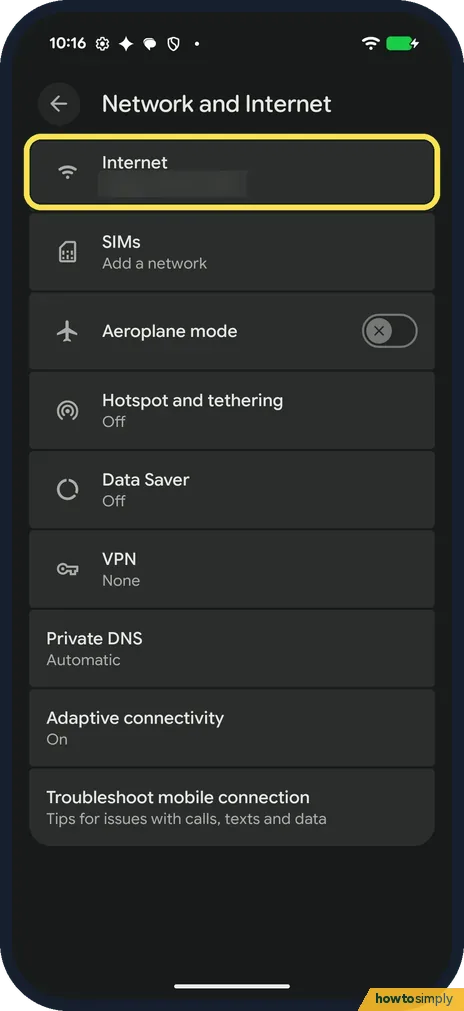
Tap Internet
Internet is the first row. Tap it.
- 3
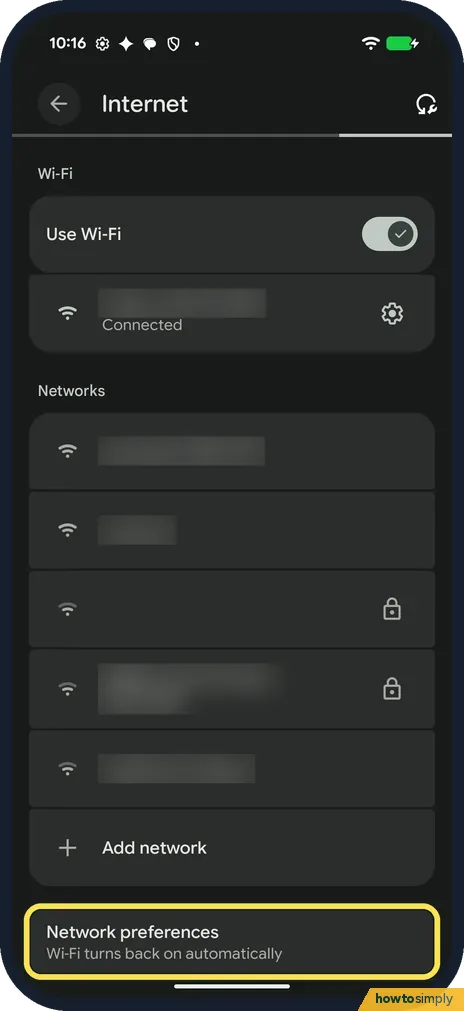
Tap Network preferences
Scroll past the networks and Add network. Network preferences is the last row: Wi-Fi turns back on automatically. Tap it.
- 4
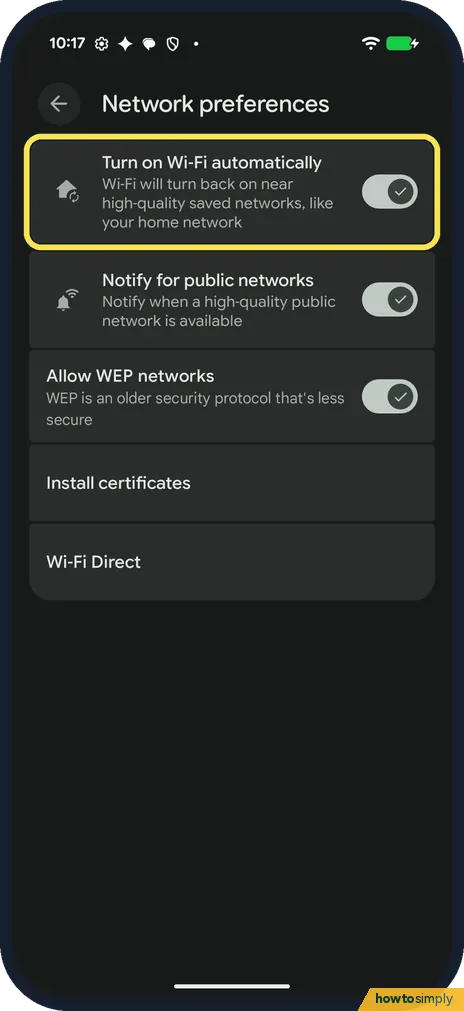
Turn off Turn on Wi-Fi automatically
The first switch is Turn on Wi-Fi automatically: Wi-Fi will turn back on near high-quality saved networks, like your home network. It was on on ours. Tap the switch to turn it off. Below it, Notify for public networks was on too: Notify when a high-quality public network is available. Turn it off as well if you don't want those notifications. Allow WEP networks (on on ours), Install certificates and Wi-Fi Direct are further down.
If you do not see this option
- Called Open network notification? Google's list names it Open network notification. Ours said Notify for public networks. Google says the options vary by phone and Android version. Source: Manage advanced network settings on your Android phone
- No Network preferences row? On ours it was the last row on the Internet page, below Add network. Scroll right to the bottom. Source: Manage advanced network settings on your Android phone
If this does not work
- Wi-Fi came back after using the hotspot? Google says that on phones that can't run hotspot and Wi-Fi at the same time, Wi-Fi turns back on when the hotspot switches itself off. See how to turn on the Wi-Fi hotspot.
- Wi-Fi keeps dropping instead? See Pixel Wi-Fi keeps disconnecting. As a last step: how to reset network settings.
- Wi-Fi is off but the phone still finds networks? That is usually Wi-Fi scanning, a location setting. Google says it lets the phone scan for nearby Wi-Fi access points to help apps get better location info. On Android 12 and later it is under Settings, Location, Location Services.
- Phone joins a network you no longer want? Turning off automatic Wi-Fi stops the radio switching itself on, but once Wi-Fi is on, the phone still joins any saved network. Forget the old network so it stops connecting: Pixel Wi-Fi keeps disconnecting shows where Forget is.
- Data use on Wi-Fi with a limit? If your home or travel Wi-Fi has a data cap, Google says Treat as metered, under the network's Network usage setting, gives you more control over data use on that network.
Good to know
Google says Install certificates lets digital certificates identify your phone, and Wi-Fi Direct connects to other devices without a network.
Moving to mobile data on weak Wi-Fi is a different switch: how to stop a Pixel switching to mobile data on weak Wi-Fi.
After you turn it off, Wi-Fi stays as you leave it until you turn it on from Quick Settings. Nothing else changes: your saved networks and passwords remain, and you can still join them by hand. Turning off Notify for public networks only stops the suggestions; you can still see and join public networks in the Wi-Fi list. To undo, go back to Network preferences and turn the switch on again.
About this guide
- Device
- Android
- Shown on
- Google Pixel 10a, Android 17 (build CP3A.261005.005)
- App
- Settings
- Path
- Settings › Network and Internet › Internet
- Real screenshots
- 4 of 4 steps
- What we did
- Observed: looked at each screen, changed nothing
- Checked
- October 2026
- Sources
- 4 official, linked below
Sources
Links checked October 2026. Menus and features can change with updates.Spotted a mistake? Menus change with updates, and we want every step to match your screen. Email us about this page or use the contact form. We read every report, and fixes are listed on What changed.
Liked this guide?
Follow us for new guides and short how-to videos.
Did this guide work for you?
Sorry about that. What happened?