
howtosimply.com/guides/samsung-galaxy-wi-fi-turning-on-by-itself-what-to-check/ · Checked October 2026 · Samsung Galaxy A57 5G (SM-A576B), One UI 8.5, Android 16
In this guide
Open Settings, Connections, Wi-Fi, tap the three dots, Intelligent Wi-Fi and switch off Turn Wi-Fi on automatically. Also check Wi-Fi scanning under Location, Location services, which lets apps scan for Wi-Fi even when Wi-Fi is off.
5 of 5 steps with real screenshots · 2 official sources below
- Device
- Android
- Shown on
- Samsung Galaxy A57 5G (SM-A576B), One UI 8.5, Android 16
- App
- Settings
- Real screenshots
- 5 of 5 steps
- What we did
- Observed: looked at each screen, changed nothing
- Our phone
- Shown on Galaxy A57, One UI 8.5
- Checked
- October 2026
- Sources
- 2 official, linked below
Step by step
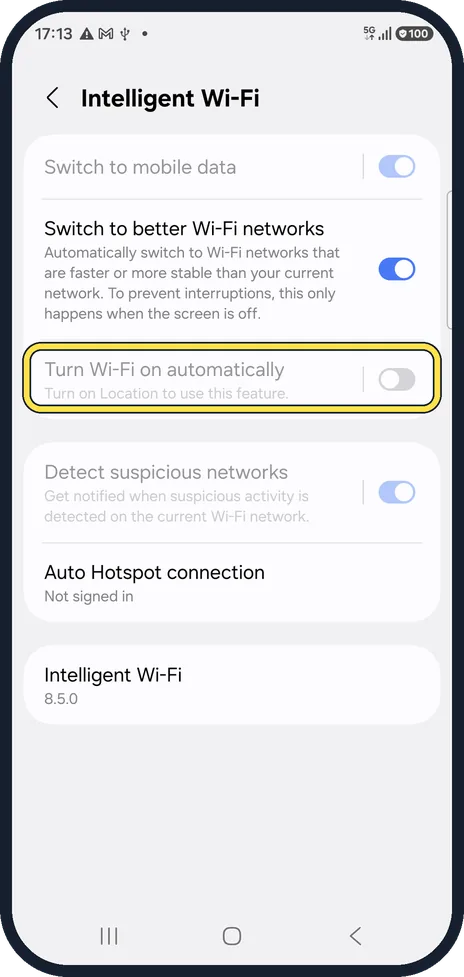
Switch off Turn Wi-Fi on automatically
Open Settings, Connections, Wi-Fi, tap the three dots at the top right and tap Intelligent Wi-Fi; it opens even while Wi-Fi is off. This is the switch that turns Wi-Fi back on by itself. On ours it was greyed out with the note Turn on Location to use this feature, so it only works while Location is on.
Watch these steps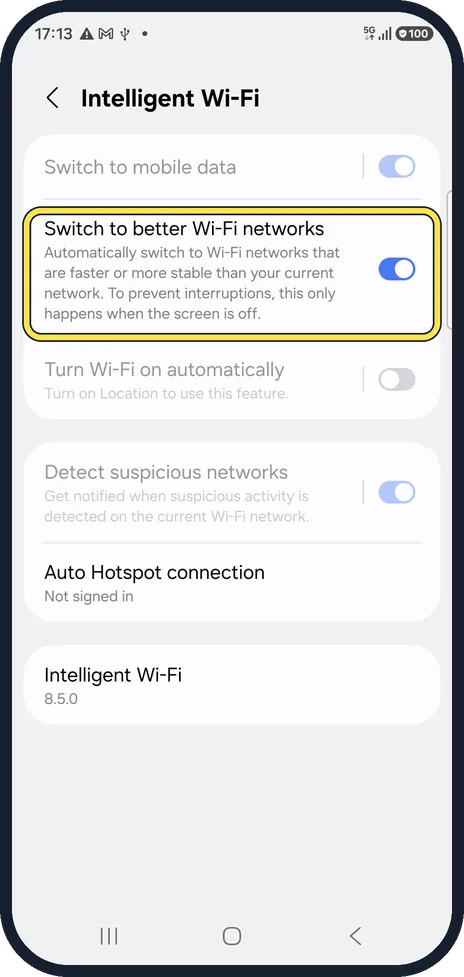
Check Switch to better Wi-Fi networks
This moves you between saved networks when another is faster or more stable. It explains Wi-Fi changing network by itself. It was on on ours.
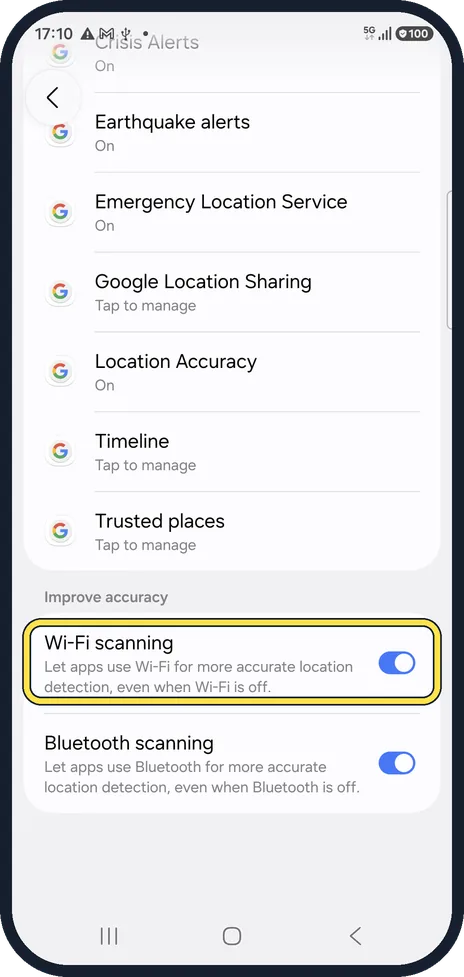
Check Wi-Fi scanning
Settings, Location, Location services. Wi-Fi scanning lets apps use Wi-Fi for location even when Wi-Fi is off. It does not switch Wi-Fi on, but the phone keeps looking for networks. It was on on ours.
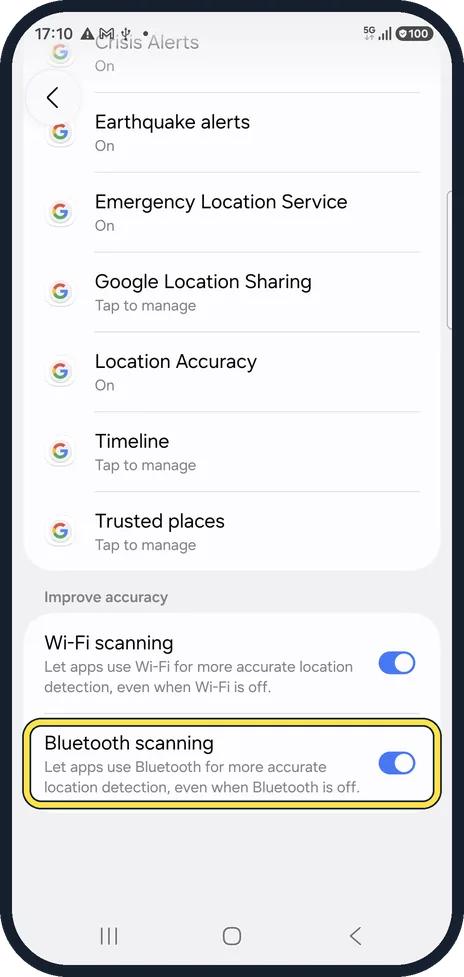
And Bluetooth scanning
The same for Bluetooth, just below. Switch both off if you want the radios fully quiet; location may then be less accurate.
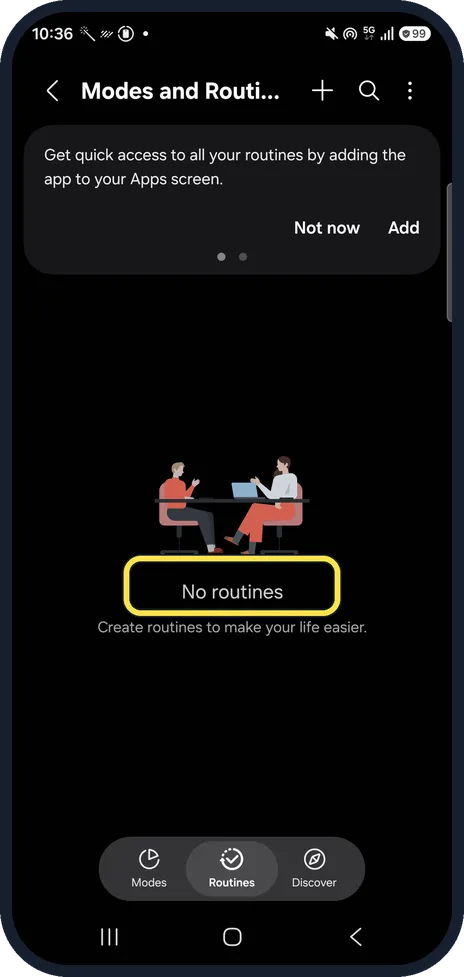
Check your routines
A routine in Modes and Routines can also turn Wi-Fi on, for example at home or at a set time. Open Settings, Modes and Routines and tap the Routines tab at the bottom.
Watch these steps
If you do not see this option
- Turn Wi-Fi on automatically is greyed out or missing Samsung says this option needs a SIM card. On our phone it was greyed out until Location was on. Source: How to optimize network connectivity?
- Some Intelligent Wi-Fi switches are missing Samsung notes that some Intelligent Wi-Fi options depend on the phone model and the carrier. Source: How to optimize network connectivity?
If this does not work
- Wi-Fi moves to another network by itself Samsung says Switch to better Wi-Fi networks moves to a faster or more stable saved network, and only while the screen is off. Source: How to optimize network connectivity?
- The phone switches to mobile data Samsung says Switch to mobile data moves to mobile data while Wi-Fi is unstable and back when the signal is strong. Turn it off in Intelligent Wi-Fi. Source: How to optimize network connectivity?
About this guide
Wi-Fi that comes back on after you switched it off is usually a Galaxy feature doing its job, not a fault. Two pages decide it.
Good to know
Wi-Fi dropping out instead? Samsung Galaxy Wi-Fi keeps disconnecting? 6 things to check.
Location off makes Turn Wi-Fi on automatically stop too; see Samsung Galaxy location not accurate? 5 settings to check for what Location affects.
In short: Wi-Fi, ⋮, Intelligent Wi-Fi: Turn Wi-Fi on automatically off. Location services: Wi-Fi scanning off if you like. Check routines.
- Samsung Members: Intelligent Wi-Fi (Galaxy tips)
- Samsung Latin: How to optimize network connectivity?
Links checked in October 2026. Menus and features can change after software updates. These steps match the version named at the top.
📷 See real photos from the Galaxy A57 in our Camera Lab, next to 10 other phones.
Did this guide work for you?
Sorry about that. What happened?