GOOGLE PIXEL
How to stop an app using background data on a Google Pixel (Android 17)

In short
Open Settings, Apps, See all apps and tap the app. Tap its data row (Wi-Fi data usage on ours) and turn off Background data. The switch says it covers mobile data used in the background. Ours had no switch to block an app's Wi-Fi or all its mobile data.
4 of 4 steps show a real screenshot from our Pixel 10a. Each step was checked against the maker's own instructions, linked at the end.
Steps
- 1
Open See all apps
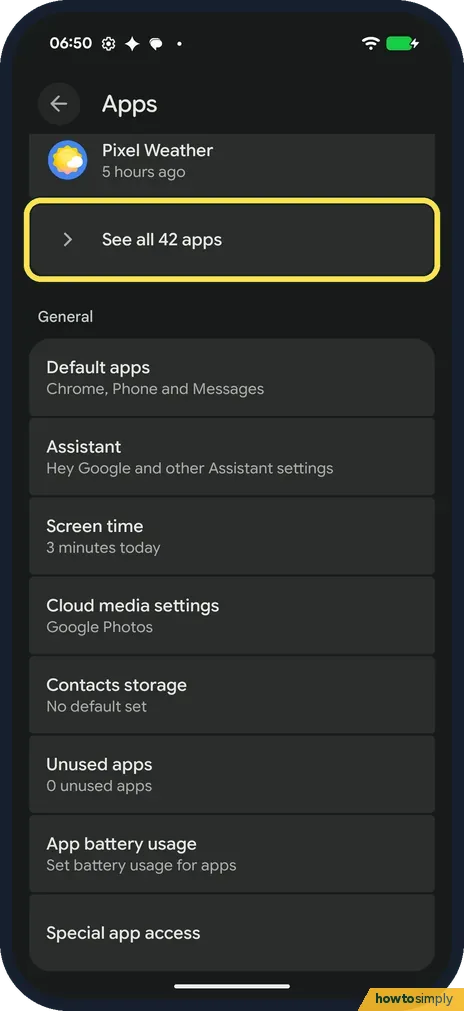
Open Settings and tap Apps. Tap See all apps; ours said See all 42 apps.
- 2
Tap the app
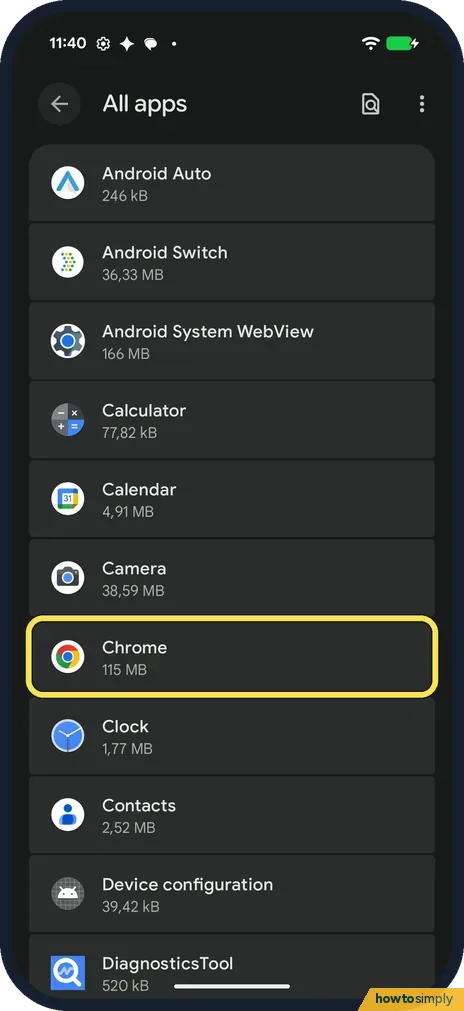
All apps lists the apps from A to Z with their size. Tap the one you want to limit. We tapped Chrome (115 MB).
- 3
Tap Wi-Fi data usage
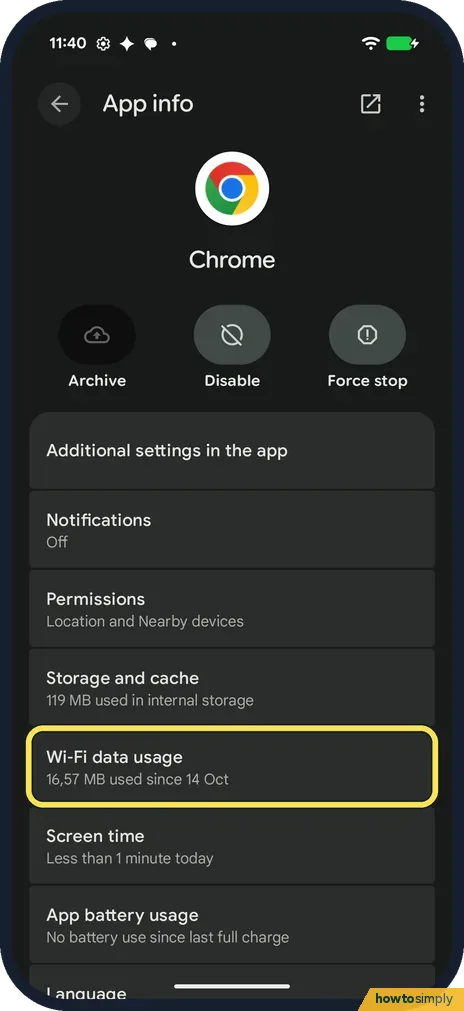
App info opens. Below Storage and cache, tap the data row. On our Pixel, which has no SIM, it was called Wi-Fi data usage: 16.57 MB used since 14 Oct.
- 4
Turn off Background data
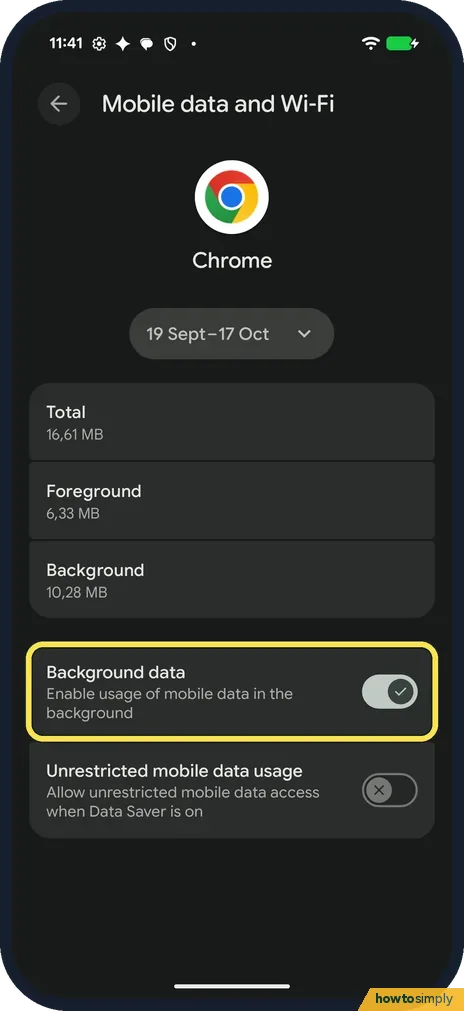
The Mobile data and Wi-Fi page shows Total, Foreground and Background for the dates at the top: 19 Sept to 17 Oct on ours, Total 16.61 MB, Background 10.28 MB. Turn off Background data: Enable usage of mobile data in the background. It was on on ours.
If you do not see this option
- No Wi-Fi data usage row? That was its name on our Pixel, which has no SIM. The page it opens is called Mobile data and Wi-Fi. Google's help shows each app's mobile data under Network and Internet, Internet, your operator's Settings, App data usage. Source: Reduce and manage mobile data usage
- Looking for a switch to block Wi-Fi? There was none on ours. The app's page had only two switches, Background data and Unrestricted mobile data usage, and nothing to turn off its Wi-Fi or all of its mobile data.
- Google says Unrestricted data? Google's Data Saver help calls it Unrestricted data. On the app's own page on our Pixel the row is called Unrestricted mobile data usage. Source: Use less mobile data with Data Saver
If this does not work
- App stopped updating? The switch's text says it allows mobile data in the background, so with it off the app may not refresh until you open it. Turn Background data back on for apps that must stay up to date, such as messaging.
- Data Saver is on? Google says Data Saver lets most apps get background data only via Wi-Fi. Unrestricted mobile data usage, on the same app page, lets that app keep using mobile data while Data Saver is on. It was off on ours. More: how to use Data Saver.
- Still using a lot of data? See which apps use the most and set a warning: data warning and limit. Google notes some operators measure usage differently from the phone.
- Want to cut data from every app? Google suggests turning off auto-sync to use less data, then syncing apps by hand when you need to. For the whole phone at once, Data Saver is quicker than going app by app.
Good to know
The switch's text mentions only mobile data. Our Pixel, with no SIM, still counted 10.28 MB of background use for Chrome, all of it over Wi-Fi.
The date range at the top of the page has a drop-down arrow for other periods. No mobile data at all? Pixel mobile data not working. To stop an app running right now: force stop it.
To undo it, open the same app page and turn Background data back on. To see which apps use the most, Google says the amount each app uses is listed below the graph on App data usage.
About this guide
- Device
- Android
- Shown on
- Google Pixel 10a, Android 17 (build CP3A.261005.005)
- App
- Settings
- Path
- Settings › Apps › See all apps › Wi-Fi data usage
- Real screenshots
- 4 of 4 steps
- What we did
- Observed: looked at each screen, changed nothing
- Checked
- October 2026
- Sources
- 2 official, linked below
Sources
Links checked October 2026. Menus and features can change with updates.Spotted a mistake? Menus change with updates, and we want every step to match your screen. Email us about this page or use the contact form. We read every report, and fixes are listed on What changed.
Liked this guide?
Follow us for new guides and short how-to videos.
Did this guide work for you?
Sorry about that. What happened?