XIAOMI REDMI
How to reset network settings on a Xiaomi phone (HyperOS 3)

In short
Go to Settings, More connectivity options, Reset Wi-Fi, mobile networks, and Bluetooth, and tap Reset settings at the bottom. It resets Wi-Fi, Mobile data and Bluetooth settings, so you have to join Wi-Fi networks and pair Bluetooth devices again. Your apps, photos and files stay.
4 of 4 steps show a real screenshot from our Redmi Note 15 Pro 5G. Each step was checked against the maker's own instructions, linked at the end.
Steps
- 1
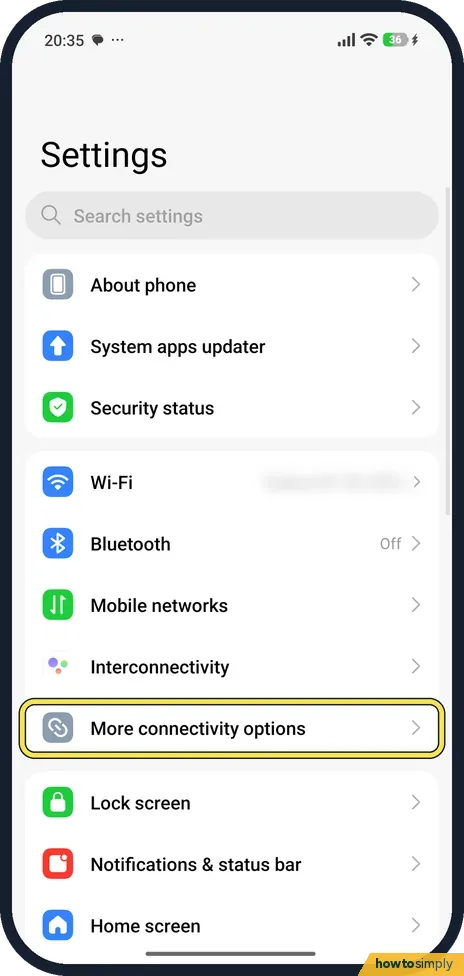
Open More connectivity options
Open Settings and tap More connectivity options, below Interconnectivity.
- 2
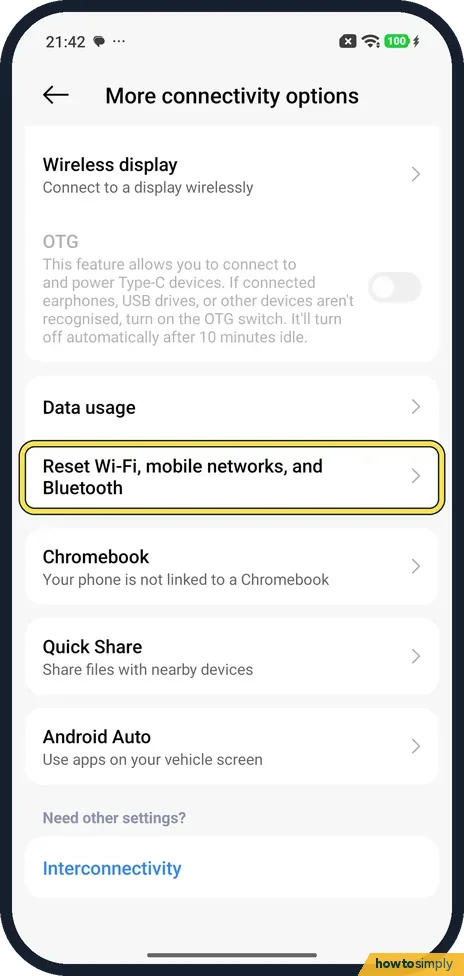
Tap the reset row
Tap Reset Wi-Fi, mobile networks, and Bluetooth, under Data usage.
- 3
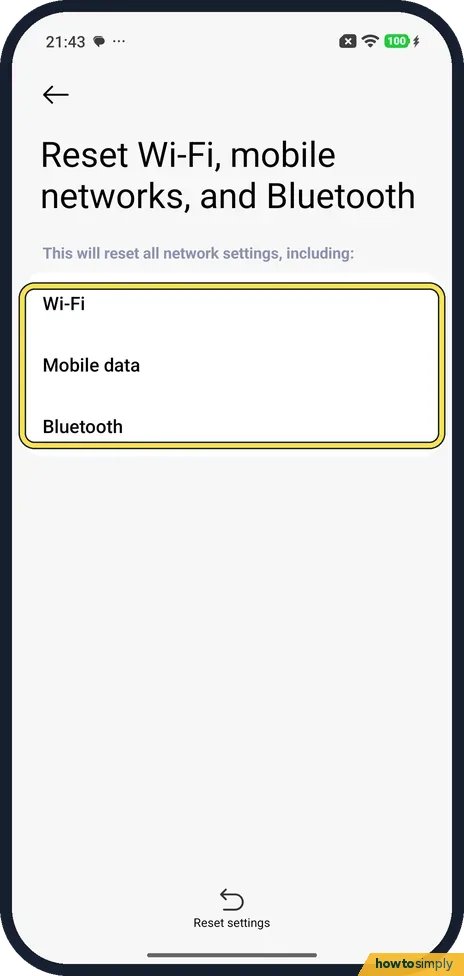
Check what it resets
The page says it will reset all network settings, including Wi-Fi, Mobile data and Bluetooth.
- 4
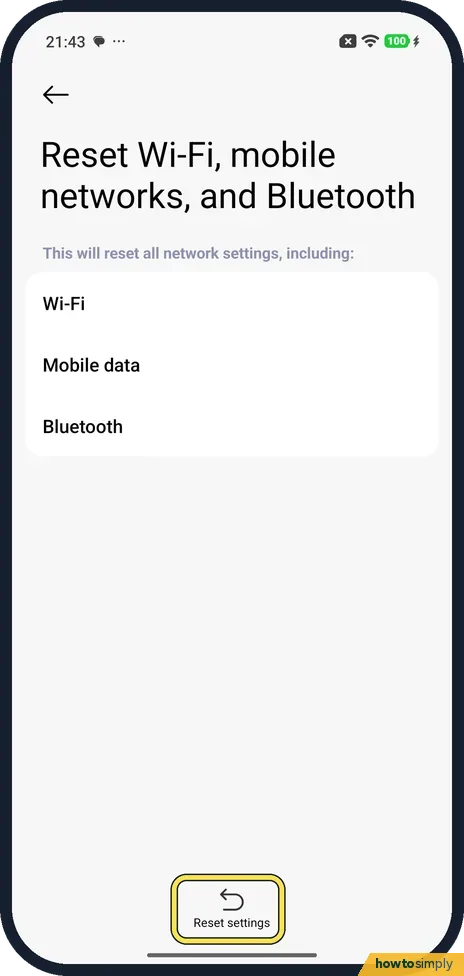
Tap Reset settings
Tap Reset settings at the bottom. We stopped here. Afterwards, join your Wi-Fi again and re-pair your Bluetooth devices.
If you do not see this option
- No Connection and sharing? Older Xiaomi software used Connection and sharing. On our HyperOS 3 phone the reset is under More connectivity options. Search Settings for reset if yours differs.
If this does not work
- Problem still there after the reset? Check the specific fixes: Wi-Fi keeps disconnecting or mobile data not working.
- Bluetooth devices gone? That is expected. Pair them again: how to pair a Bluetooth device.
- Car will not reconnect afterwards? The car still remembers the old pairing, but the phone no longer does. Remove your phone from the car's own Bluetooth list, following the car's manual, then pair again from scratch. Keep the phone's Bluetooth screen open while the car searches.
- Mobile data does not come back? Turn Aeroplane mode on, wait 10 seconds and turn it off again. If there is still no data indicator next to the signal bars, check that mobile data is turned on, and contact your mobile service provider if it stays off.
- VPN or Private DNS stopped working? Open each setting again and check it is still as you left it. Xiaomi's user guide notes that a screen lock is needed to save VPN settings, so set one first if the VPN will not save.
Good to know
This is not a factory reset. That erases everything: how to factory reset a Xiaomi phone.
The reset cannot be undone, but nothing personal is lost: apps, photos, messages and accounts stay. You rebuild your connections one by one. Join your Wi-Fi networks again, pair headphones, watches and the car again, and check any connection settings you had changed, such as a VPN or Private DNS. Apps that rely on a paired watch or tracker may need their companion app to pair again. Battery and data use go back to normal once everything is reconnected.
About this guide
- Device
- Android
- Shown on
- Xiaomi Redmi Note 15 Pro 5G (25080RABDG), HyperOS 3.0.308.0, Android 16
- App
- Settings
- Path
- Settings › More connectivity options › Reset Wi-Fi
- Real screenshots
- 4 of 4 steps
- Checked
- October 2026
- Sources
- 3 official, linked below
Sources
Links checked October 2026. Menus and features can change with updates.Spotted a mistake? Menus change with updates, and we want every step to match your screen. Email us about this page or use the contact form. We read every report, and fixes are listed on What changed.
Liked this guide?
Follow us for new guides and short how-to videos.
Did this guide work for you?
Sorry about that. What happened?