ONEPLUS
How to stop a OnePlus closing apps in the background

In short
Go to Settings, Battery, Power saving settings, App battery management, tap the app and choose Allow background activity. Smart mode (Recommended), which was picked on ours, may hold the app back when its power use is high.
6 of 6 steps show a real screenshot from our Nord 5. Each step was checked against the maker's own instructions, linked at the end.
Steps
- 1
Search for it
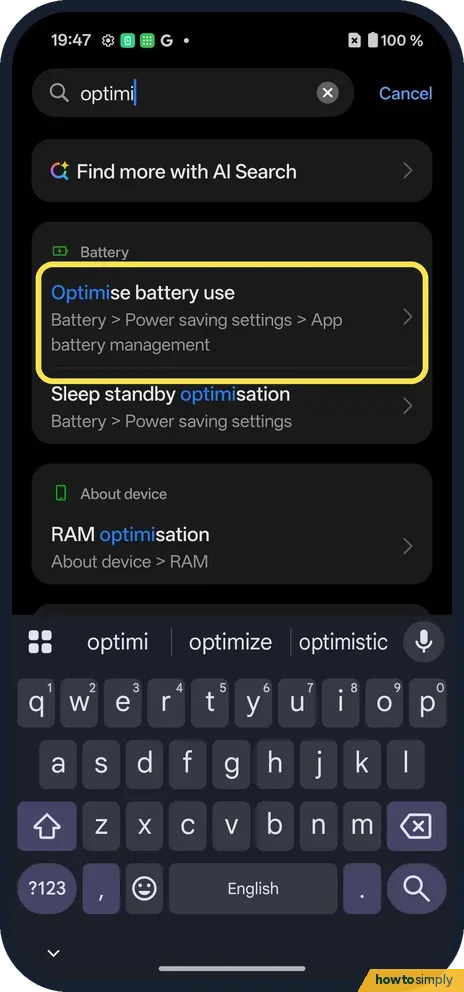
Open Settings and search for optimi. Optimise battery use opens the right page: Battery, Power saving settings, App battery management.
- 2
Or go through Battery
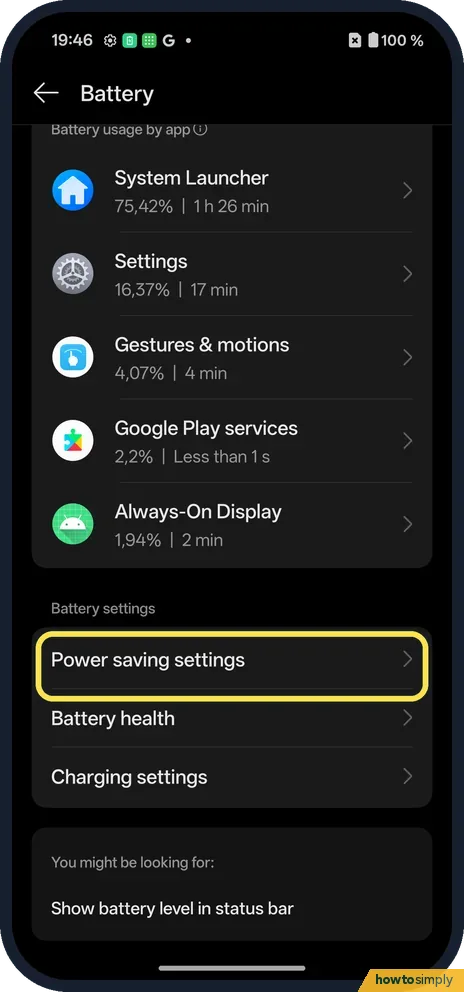
Open Battery and tap Power saving settings, under Battery settings.
- 3
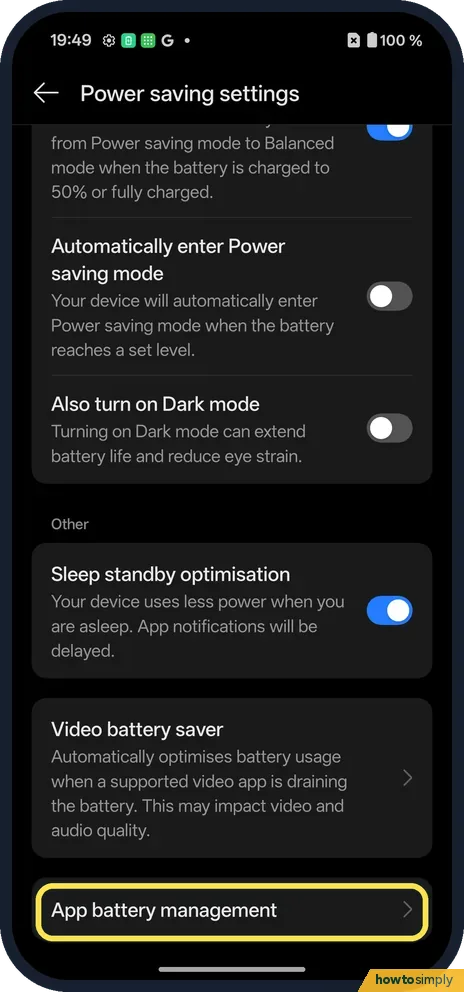
Tap App battery management
It is at the bottom of Power saving settings.
- 4
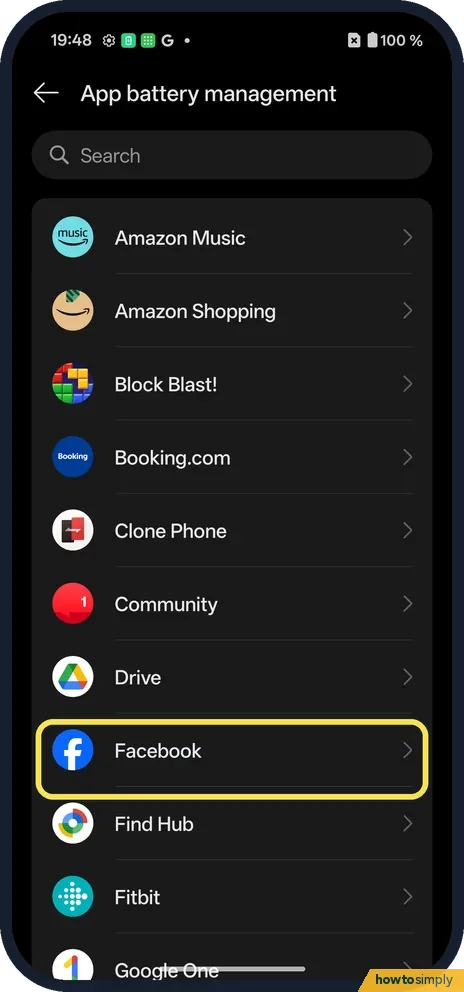
Tap the app
Find it in the list, or use Search at the top.
- 5
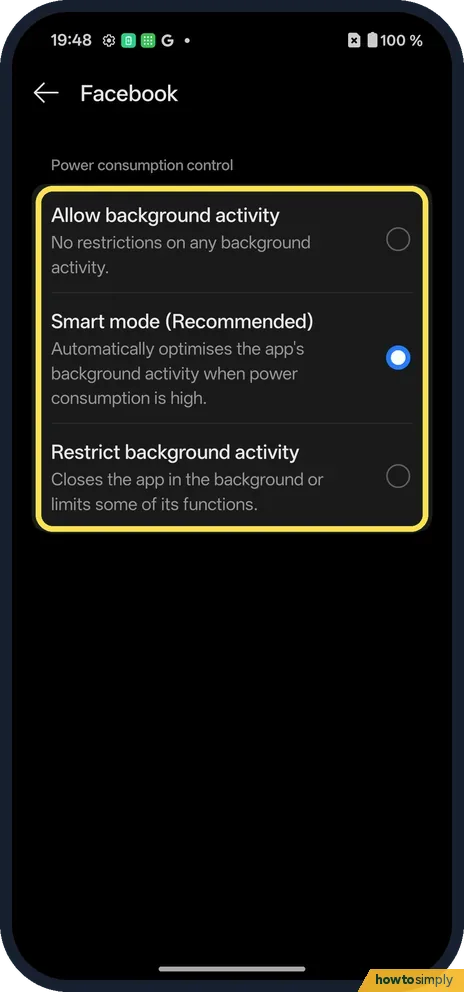
Choose Allow background activity
There are three choices. Allow background activity: no restrictions. Smart mode (Recommended), which was picked: it optimises background activity when power use is high. Restrict background activity: closes the app in the background or limits some functions.
- 6
Late notifications while asleep
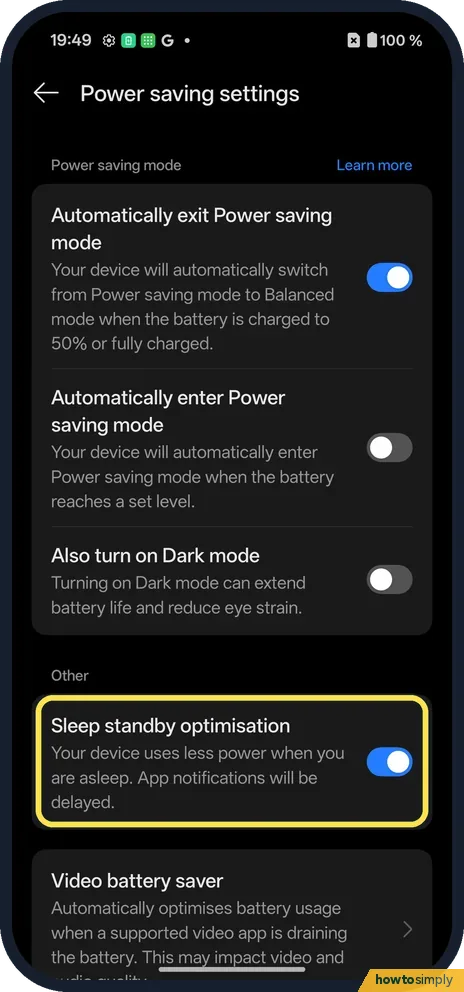
Back in Power saving settings, Sleep standby optimisation says your device uses less power when you are asleep and app notifications will be delayed. It was on on ours; switch it off if that matters.
If you do not see this option
- App not in the list? Chrome was not in ours. Only some apps are listed.
- Looking on App info? Chrome's App info on our phone had no Battery row; the setting is only in App battery management.
- Older OxygenOS? OnePlus's OxygenOS 14 manual puts it at Settings, Battery, More settings, App battery management. On our OxygenOS 16 phone it is under Power saving settings. Source: OxygenOS 14.0 User Manual
If this does not work
- Notifications late at night? Turn off Sleep standby optimisation, step 6.
- Want to restart the app instead? Force stop it and open it again.
- App still closes after allowing background activity? Check whether Power saving mode is on. Google says Battery Saver limits or turns off background activity, so it can override what you set for one app. Then check the app's own settings, as some apps have their own sync or battery options.
- Clearing recent apps closes it? Close all in recent tasks clears background apps. The OxygenOS 14 manual says an app shown with a lock icon in recent tasks must be unlocked before it can be cleared, so a locked app is kept when you clear the rest.
Good to know
See what uses battery: battery percentage on a OnePlus.
Clear an app's cache: on a OnePlus.
With Allow background activity chosen, the app is no longer held back when its power use is high, so it can keep syncing, tracking or playing in the background. The cost is battery: an app that does a lot in the background will now be free to do so. After a day or two, check its share of use: see which apps use the most battery. If it is draining too much, go back to App battery management and pick Smart mode (Recommended) again.
The OxygenOS 14 manual warns about the opposite trade-off too: limiting an app to save power can mean it does not run properly and its notifications are delayed.
About this guide
- Device
- Android
- Shown on
- OnePlus Nord 5 (CPH2709), OxygenOS 16.0.5.1201, Android 16
- App
- Settings
- Path
- Settings › Battery › Power saving settings › App battery management
- Real screenshots
- 6 of 6 steps
- Checked
- October 2026
- Sources
- 1 official, linked below
Sources
Links checked October 2026. Menus and features can change with updates.Spotted a mistake? Menus change with updates, and we want every step to match your screen. Email us about this page or use the contact form. We read every report, and fixes are listed on What changed.
Liked this guide?
Follow us for new guides and short how-to videos.
Did this guide work for you?
Sorry about that. What happened?